
Education
Post-Doctor Visit Summary
Adaptive Education is an AI-powered adaptive learning platform that transforms user-provided material into tailored explanations, visuals, and quizzes across multiple subjects and levels. Evolved from the founder's background in medical education, it offers distinct learner and teacher workflows, create-your-own custom lessons, and adaptive content that meets each learner where they are. Built B2B2C for schools, universities, tutoring centers, and training providers — with a B2C channel for individual students, parents, and homeschool families — it targets the fast-growing AI-in-education market (projected to reach ~$32B by 2030).
The problem
Learners and teachers spend hours adapting generic material to the right level. A concept has to be found across textbooks, videos, notes, AI chat, and worksheets, then reshaped by hand into explanations, examples, and practice — and repeated whenever a student is confused or a new subject or grade comes up. The highest-severity pain points are consistent: generic resources are not matched to the learner's level or prior knowledge, teachers lose time differentiating lessons, learners don't know which explanation to trust, and general-purpose AI outputs can be inaccurate, too advanced, or not pedagogically sound.
The solution
Adaptive Education is a Custom Adaptive Lesson Generator for both learners and educators. A student or teacher enters a topic — or uploads their own lesson material — and selects subject, grade or learning level, goal, and output type, then receives a structured, level-appropriate lesson with explanations, examples, checks for understanding, and next steps. Rather than generic chat, the design is pedagogy-first: separate learner and teacher workflows, level-appropriate scaffolding, teacher-editable outputs, and transparent source grounding when material is uploaded. It works across math, science, humanities, languages, health sciences, exam prep, and professional skills.
How it works
A master prompt casts the model as an instructional designer and adaptive tutor. It first infers the learner's level, subject, objective, time available, and user mode, asking clarifying questions when essential inputs are missing. The output is structured into a learning objective, prerequisite check, concise lesson, examples and analogies, practice questions with feedback, common misconceptions, next steps, and teacher notes for educator modes. The approach pairs a frontier multimodal LLM with retrieval-augmented generation (RAG) over uploaded or approved materials — chunked by concept, embedded, retrieved per generation, and shown as source references. The build uses GPT-4.1-mini for initial testing to control token cost, with Image-gen-2 for visuals, plus safety filters, logging, and educator feedback loops. Guardrails cover accuracy, age appropriateness, and high-risk domains.
Who it's for
The primary personas are a student who needs a topic explained at the right level and pace, and a teacher or tutor who needs to quickly create differentiated lessons, activities, and checks for understanding. Secondary users include parents, homeschool educators, adult learners, instructional designers, and school administrators. The customer base is B2B2C — schools, districts, universities, tutoring centers, and training organizations sponsoring access — alongside a B2C channel for individual learners and independent teachers. Revenue is planned as freemium for individuals with paid subscriptions, institutional licensing, and team plans.
Why it matters
The market is large and growing. Grand View Research estimates the global AI-in-education market at USD 5.88B in 2024, projected to reach USD 32.27B by 2030 at a 31.2% CAGR, within a broader EdTech market valued at USD 187.01B in 2025. Currently a 0-to-1 concept at early MVP stage, the plan is a closed pilot of 20–50 learners and 5–10 educators across several subjects and levels before wider beta. MVP quality targets include 90%+ on required structure, 85%+ on level alignment, 90%+ on safety and privacy checks, and zero critical safety failures — reflecting that in education, accuracy and safety are non-negotiable.
The workflow
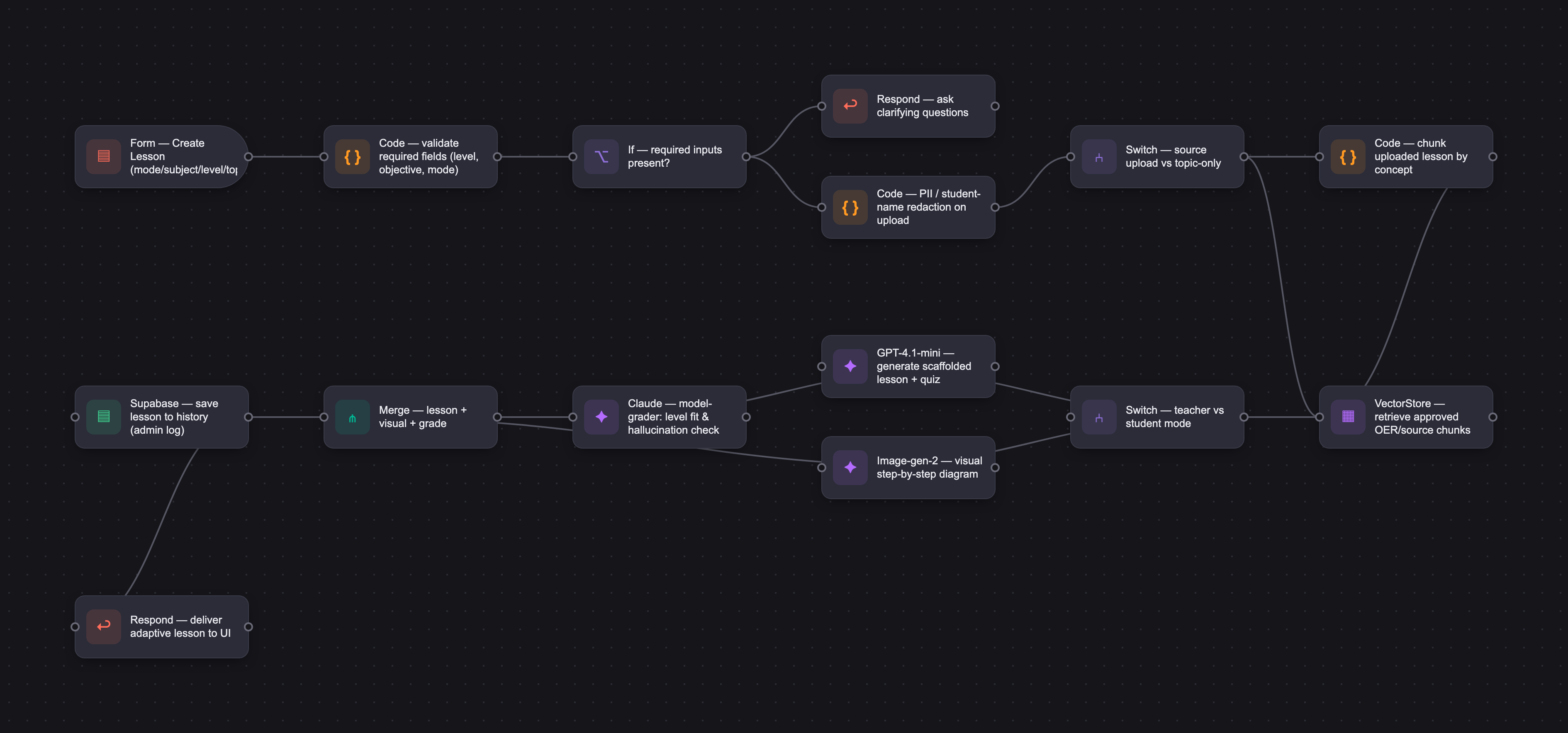
The PRD
| PRODUCT FACULTY — AI PRODUCT REQUIREMENTS DOCUMENT (PRD) TEMPLATE Version 1.0 | ||||||
|---|---|---|---|---|---|---|
| Your Name: | Iqbal Jaffer | |||||
| Your Product: | Adaptive Education | |||||
| Your Industry: | Education | |||||
| Date: | April 29, 2026 | |||||
| 4D Method | AI PRD | Instructor Feedback | ||||
| Phase | Activity | Theme | Topic | Key Question(s) | Your Response Include external links to visuals/prototypes as required. | |
| DISCOVERY | Understand your market, business, product & user context | Business Value Map | Market Attractiveness | What industry is your business in? (ie Financial services, Healthcare, Education, etc)? | Education / EdTech. The product has evolved from my background in primarily medical-education. | Please leave this area blank. This space is for the Instructor to provide you with feedback. |
| What are the key challenges (headwinds) and opportunities (tailwinds) impacting growth in your industry? Who are the key competitors? | Tailwinds: strong demand for personalized learning, teacher productivity tools, hybrid/online learning, skills retraining, AI tutoring, and adaptive content. The market is broader because the same workflow can support math, science, humanities, languages, health sciences, exam prep, and professional skills. Headwinds: trust and accuracy concerns, privacy/child-safety obligations, school procurement cycles, equity/access issues, educator skepticism, AI policy uncertainty, and crowded competition. Competitors/alternatives include broad AI tutors and teaching assistants such as Khanmigo, MagicSchool AI, Quizlet, Duolingo Max, Coursera/Chegg tools, LMS platforms, Google/Microsoft education tools, and subject-specific tutoring products. | |||||
| What is the projected growth rate of your target market segment over the next 3-5 years? | The broader market is attractive. Grand View Research estimates the global AI in education market at USD 5.88B in 2024, projected to reach USD 32.27B by 2030 at a 31.2% CAGR. It also estimates the broader EdTech market at USD 187.01B in 2025, projected to reach USD 437.54B by 2033 at a 10.8% CAGR. | |||||
| Business Model | What growth stage is your business currently in (e.g., startup, scale-up, mature)? | 0-to-1 concept / early MVP stage. | ||||
| How does your business make money? What do they sell? What is your primary revenue model (e.g., subscription, freemium, licensing, marketplace, transactional, etc?) | Planned revenue model: freemium or free trial for individual learners; paid subscriptions for students, parents, tutors, and teachers; school/district/university licensing; team licenses for tutoring centers and training programs; and possible premium content/template packs. B2B/B2B2C institutional plans can include analytics, administrative controls, privacy features, and onboarding/training. | |||||
| Who is your primary customer base (B2B, B2C, B2B2C)? | Primary customer base is B2B2C, with institutions, schools, universities, tutoring centers, and training organizations sponsoring access for learners and educators. There is also a B2C channel for individual students, parents, homeschool families, adult learners, and independent teachers/tutors. | |||||
| Differentiators | What are the key differentiators for your company? | Key differentiators: create-your-own custom lesson support; multi-subject and multi-level adaptability; separate learner and teacher workflows; ability to transform user-provided material into explanations, visuals, quizzes, and practice paths; pedagogy-first design rather than generic chat; level-appropriate scaffolding; teacher-editable outputs; transparent source grounding when source material is uploaded; | ||||
| Feature Value Map (IMPORTANT NOTE: This section is only relevant if you are working on enhancing an existing product. It does not apply if you are developing a new product from 0 to 1.) | Customers | Who are the customers (ie buyers) of your product? | N/A for an existing product because this is a 0-to-1 product. Expected buyers include schools, districts, universities, tutoring organizations, training providers, homeschool families, parents, individual students, teachers, tutors, and potentially enterprise learning teams. | |||
| End Users | Who are the end-users of your product? Which users are the most revenue-generating / revenue-impacting for your company? What are their goals, roles, and context? | End users are both learners and educators. Learners include elementary, middle-school, high-school, college, graduate/professional, adult, and lifelong learners. Educators include classroom teachers, professors, tutors, instructional designers, teaching assistants, and trainers. Revenue-impacting users are teachers/institutions for scaled adoption and individual learners/parents for direct subscriptions. | ||||
| Current Products / Services | If you are a Product-led business: What are the core features of your product, and how do they address user needs? If you are a Service-led business: What are the key services you offer to customers? | 0-to-1 product. MVP features: user type selection (student/teacher/tutor); subject and learning-level selection; custom lesson upload or topic entry; adaptive lesson generation; explanations at the right level; examples and analogies; visual/step-by-step breakdowns; formative quiz generation; feedback on misconceptions; teacher-editable lesson plan; and saved lesson history. Future features: classroom assignments, LMS integration, standards alignment, collaborative teacher libraries, and analytics dashboards. | ||||
| User Value Map | Target Persona | Who is your AI product / feature for? (Internal users, external users, an influencer, a buyer, etc) | Primary personas: (1) a student who needs a topic explained at the right level and pace, using either a chosen topic or custom material; and (2) a teacher/tutor who needs to quickly create differentiated lessons, activities, and checks for understanding across subjects. Secondary personas include parents, homeschool educators, adult learners, instructional designers, and school administrators evaluating outcomes. | |||
| Journey Map (current-state) | What is the typical journey for your target persona when they are using your product / service, focusing on their ideal experience (happy path) as they interact with your product? | Current happy-path journey without the product: learner or teacher identifies a concept or lesson objective → searches across textbooks, videos, notes, AI chat, and worksheets → tries to adapt the material to the learner’s level → manually creates explanations, examples, practice questions, and activities → checks understanding with limited feedback → repeats the process when the learner is confused or when another level/subject is needed. | ||||
| Pain-points | Where does the user experience friction, obstacles, or unmet needs throughout the journey? Identify which pain-points are most frequent and severe? | Highest-severity pain points: (1) generic resources are not matched to the learner’s level, prior knowledge, or goals; (2) teachers spend too much time adapting lessons for different students; (3) learners have fragmented resources and do not know which explanation to trust; (4) custom lessons are hard to turn into interactive practice; (5) feedback is often delayed or too shallow; (6) subject coverage is inconsistent; and (7) AI outputs can be inaccurate, too advanced, or not pedagogically sound. | ||||
| AI Opportunities | From your list of pain points, identify those that can effectively be addressed using Generative AI. Remember, this project focuses on leveraging LLM-powered AI to solve your target persona's pain points. Rank these pain points starting with the most severe and frequently occurring first. | AI-solvable opportunities ranked by severity/frequency: 1) Convert any topic or uploaded custom lesson into a structured, level-appropriate lesson; 2) generate differentiated versions for different learning levels; 3) create quick formative checks, quizzes, and practice activities; 4) identify misconceptions and recommend next steps; 5) generate teacher-ready lesson plans and classroom activities; 6) provide multilingual/accessibility-friendly explanations; 7) summarize and scaffold complex source material; 8) maintain guardrails for accuracy, age appropriateness, and high-risk domains. | ||||
| Develop an AI Solution Hypothesis | AI Solution Hypothesis | Diverge | Ideate potential solutions to address your AI-solvable pain points. Focus on generating a high quantity of ideas rather than evaluating their quality at this stage. | Ideated solutions: adaptive custom lesson generator; AI tutor that asks guiding questions instead of only giving answers; teacher lesson-plan builder; differentiated worksheet/quiz generator; visual explainer and analogy builder; misconception detector; standards/objective alignment assistant; study-path planner; classroom activity generator; and parent/homework support mode. | ||
| Converge | Rank your ideated solutions based on impact and feasibility. Identify your top three AI solutions, and clearly select the one you'll focus on for your project. | Top 3 by impact/feasibility: (1) Custom Adaptive Lesson Generator for learners and teachers; (2) Teacher Differentiation Toolkit that creates lesson plans, activities, and quizzes at multiple levels; (3) AI Study Coach that diagnoses confusion and recommends next practice. Focus for this project: the Custom Adaptive Lesson Generator, because it directly supports the broadened market, works across subjects/levels, and can serve both student and teacher use cases. | ||||
| DESIGN | Define Target State Workflow | UX Flows & Wireframes Suggested Tool: Excalidraw | Workflow (future) | Assuming your product or feature works as desired, what is the target state workflow? | Target-state workflow: user selects mode (student, teacher, tutor, parent, trainer) → selects subject, grade/learning level, goal, and available time → enters a topic or uploads custom lesson/source material → chooses output type (mini-lesson, full lesson plan, study guide, quiz, activity, practice set, visual explanation) → AI generates the lesson with scaffolding, examples, and checks for understanding → user edits or asks follow-up questions → system adapts based on performance/feedback → lesson is saved, shared, assigned, or exported. | Please leave this area blank. This space is for the Instructor to provide you with feedback. |
| Build Wireframes | Wireframes | How will users navigate through your AI solution? What are the key steps and decision points? What information will be displayed at each stage? What specific UI elements are needed on each screen? How will the layout accommodate AI features? | Key screens: 1) Onboarding/profile: role, learning level, subject interests, goals, accessibility/preferences. 2) Create Lesson: topic/source upload, objective, level, time, format, tone, output type. 3) AI Lesson Output: learning objective, prerequisite recap, explanation, examples, visuals/steps, practice questions, misconceptions, next steps. 4) Teacher Edit Mode: adjust reading level, standards/objectives, class activity, rubric, quiz, export/share. 5) Learner Practice Mode: guided questions, feedback, confidence rating, adaptive next step. 6) History/Library: saved custom lessons and reusable templates. | |||
| Develop Prototype to showcase AI interactions | Prototype Screens Suggested Tool: lovable.dev | What aspects of the AI solution will you demonstrate in your prototype? How will the AI inputs, processing, and outputs be presented visually to users? Which features are essential for launch? What can be left for later releases? | Prototype should demonstrate the broadened core interaction: a student or teacher enters a custom topic/source such as “fractions for Grade 5,” “photosynthesis for high school biology,” “supply and demand for college economics,” or “patient safety for professional training,” then receives an adaptive lesson, practice questions, and level adjustments. Essential launch features: topic/source input, learner/teacher mode, subject/level selector, lesson generation, quiz/check-for-understanding, feedback loop, save/export, and basic safety/privacy guardrails. Later releases: LMS integration, standards mapping, class analytics, collaborative lesson library, and marketplace/template packs. | |||
| Initial Prompt Design | Master Prompt [Initial Design] | Create an initial master prompt. Consider the following: What tone or personality should the AI use? How should user input and system instructions be structured for maximum clarity? What system instruction will govern the AI's behavior? What examples might improve performance? How will you format outputs for consistency? | Initial master prompt: “You are Adaptive Education, an expert instructional designer, inclusive tutor, and subject-aware learning coach. Transform the user’s topic or uploaded lesson material into a clear, accurate, age/level-appropriate learning experience. First infer the learner’s level, subject, objective, time available, and user mode. If essential information is missing, ask concise clarifying questions. Ground the lesson in provided source material when available; do not fabricate sources. Use a supportive tone, scaffold from simple to complex, include examples, checks for understanding, misconceptions, and next steps. For teachers, create editable lesson plans and activities. For learners, guide thinking rather than simply giving answers when practice is requested. Flag uncertainty and high-risk topics.” | |||
| Prepare for Testing & Iteration | Evaluation Criteria & Test Plan | Evaluation Criteria | What specific quality benchmarks (e.g., clarity, relevance, tone, accuracy, SEO, hallucination avoidance) will define “good” output? | Good output benchmarks: subject accuracy; alignment to selected learning level and objective; clear structure; appropriate reading level and tone; useful examples/analogies; interactive checks for understanding; teacher editability; learner engagement; accessibility; source-grounding when material is uploaded; appropriate handling of uncertainty; no hallucinated facts or citations; and safe behavior for minors or high-risk domains. | ||
| Example Cases | What specific example use cases, edge cases, and negative cases should be covered by test prompts and outputs? | Example cases: elementary student asks for a visual lesson on fractions; high-school teacher creates a differentiated lesson on photosynthesis; college learner requests a study guide for supply and demand; adult learner uploads workplace training material and asks for a quiz; tutor creates three difficulty levels for algebra practice. Edge/negative cases: vague topic, conflicting uploaded content, out-of-domain/high-risk topic, learner asks for homework answers only, copyrighted material misuse, inappropriate content, and missing grade/level. | ||||
| DEVELOP | AI Model Selection & Justification | AI Model Selection & Justification | Which AI model is best suited for your solution and why? What capabilities and limitations does it have? How will it integrate with your product? | Best-suited approach: a frontier multimodal LLM with strong reasoning, instruction-following, summarization, and content-generation ability, paired with retrieval-augmented generation (RAG) for uploaded or approved learning materials. The model should handle text, diagrams/screenshots when available, structured lesson outputs, and multi-turn adaptation. Limitations include hallucination risk, uneven subject depth, potential bias, privacy concerns, and the need for human/educator review in high-stakes contexts. Integration: API-based generation, RAG retrieval, safety filters, logging, and teacher/student feedback loops. For this project, due to my familiarity with it, I will be using the Codex and Open AI platform and as an initial test case, I will be using GPT-4.1-mini to minimize my token cost. I will be using Image-gen-2 for more advanced imaging capabilities. If necessary, I have abiility to increase model complexity to more advanced models of GPT, but that will result in creased costs. | Please leave this area blank. This space is for the Instructor to provide you with feedback. | |
| Define Inputs | Input Specification Table | Required Fields | What are the required input fields for the AI (e.g., title, description, keywords, tone)? Indicate format, source, requirement. | Required fields: user mode (student/teacher/tutor/parent/trainer); subject; learner level/grade/experience; topic or uploaded custom lesson/source material; learning objective; desired output type; time available or lesson length; language; and whether the output should be for self-study, classroom use, homework support, or assessment preparation. | ||
| Optional Fields | Are there any optional or user-customizable fields? How do they impact the AI’s output? | Optional fields: preferred teaching style (visual, analogy, Socratic, case-based, project-based, step-by-step); curriculum standard or exam; reading level; accommodations/accessibility needs; tone; number and difficulty of practice questions; media preference; prior knowledge; misconceptions to address; class size; export format; teacher-only notes; and whether answers should be hidden until attempted. | ||||
| Define Good Output | Output Evaluation Checklist | Objective Criteria | What criteria will you use to judge output as “good”? (e.g., structure, use of keywords, tone, factuality, relevance) | Objective criteria: correct subject matter; no unsupported factual claims; matches chosen grade/level; includes clear objective; covers prerequisites; structured lesson flow; includes examples and practice; appropriate difficulty; source-grounded when source material is provided; passes safety/privacy checks; avoids direct answer-giving when the mode calls for guided learning; and output is in the requested format. | ||
| Subjective Criteria | Are there any criteria that require human judgment or qualitative assessment? | Subjective criteria: learner feels the explanation is understandable and motivating; teacher finds the lesson usable with minimal editing; examples feel relevant to the learner’s context; tone is supportive rather than condescending; pacing feels appropriate; activities are engaging; and the output builds confidence while preserving productive struggle. | ||||
| Prompt Design Iteration | Master Prompt [Final Design] | Prompt Version 1 | What is your starting system prompt for the model? What variations will you test? What techniques will you use to optimize performance? List initial instructions, persona, inputs, and constraints. | Prompt Version 1: “You are Adaptive Education, an expert instructional designer and adaptive tutor for many subjects and learning levels. Inputs: user_mode, subject, learner_level, topic_or_source, objective, time_available, output_type, preferences, and safety_context. Produce: 1) learning objective; 2) prerequisite check; 3) concise lesson; 4) examples/analogies; 5) practice questions with feedback; 6) common misconceptions; 7) next steps; 8) teacher notes when user_mode is teacher/tutor. Constraints: be level-appropriate, accurate, inclusive, safe, and source-grounded; ask questions if required data is missing; disclose uncertainty; do not fabricate citations; avoid doing assessed work for the learner without teaching.” Variations to test: teacher-first vs learner-first outputs, Socratic vs explanatory style, shorter vs deeper lessons, and source-only vs general-knowledge mode. | ||
| Prompt Iterations | If revised, what changes did you make and why? How do you track and record prompt evolution? | Prompt iteration plan: track each version in a prompt log with date, change, reason, test cases, pass/fail notes, and reviewer comments. The major revision from the initial narrow concept is to replace “expert medical educator” with “expert instructional designer and adaptive tutor,” add role/mode switching, support broad subjects and learning levels, and explicitly include custom lesson/source uploads. | ||||
| Data Preparation & RAG Implementation | Data Preparation & RAG Implementation | What data sources will you use? How will you prepare data for model training or evaluation? (e.g., cleaning, structuring). For RAG: How will you chunk, embed, retrieve relevant information? | Data/RAG plan: use user-provided custom lesson materials, teacher-uploaded slides/notes, approved curriculum resources, open educational resources, and internal templates. Store metadata for subject, level, source, standards/objectives, file type, and permissions. Chunk by concept or lesson section, embed chunks, retrieve the most relevant material for each generation, and show source references when applicable. | |||
| Create Evaluation Set | Example Input/Output Data for Testing | Typical Examples | What are the most common inputs and expected outputs? Use real data if possible. | Typical examples: Input: “Create a 7-minute grade 6 level explanation of aortic stenosis” → Output: objective, simple explanation, visual steps, 3 examples, activity, 5-question quiz, answer key, misconceptions. Input: “Explain photosynthesis to a high-school student who struggles with chemistry” → Output: level-appropriate explanation, analogy, diagram description, practice. Input: teacher uploads a lesson on supply and demand → Output: differentiated versions for beginner/intermediate/advanced learners plus exit ticket. | ||
| Edge Cases & Negative Cases | What examples test the AI’s limits? (e.g., missing data, ambiguous input, out-of-domain) | Edge/negative cases: missing learner level; topic too broad; user asks for a direct answer to graded homework; source material conflicts with general knowledge; uploaded content contains private student data; content is inappropriate for age; subject involves medical/legal/financial advice; generated lesson overstates certainty; copyrighted material is requested for redistribution; and model cannot verify a fact. Expected behavior: model cannot proceed without specified inputs. | ||||
| Test Example Data & Review Results | Manual Review | Run your input data with the prompt. How did your output perform in manual review? Which examples failed which criteria, and why? | Manual review plan: test 20 representative prompts across subjects, user roles, and levels: elementary math, high-school science, college-level medical and biological sciences, and custom uploads on topics that I'm already expert in. Created as a "curated lesson". Reviewers score each output on accuracy, level fit, pedagogy, engagement, safety, and usefulness. Failures are tagged by type and used to revise prompt, retrieval, input requirements, or guardrails. | |||
| Automated Evaluation | What pass/fail rate or scores did the AI achieve on core criteria? | Target MVP thresholds: ≥90% pass on structure/required sections; ≥85% pass on level alignment; ≥90% pass on safety/privacy checks; ≥80% educator-rated usefulness in pilot; <5% serious factuality issues in reviewed outputs; and 0 critical safety failures. Automated checks can verify required fields, reading level, banned content patterns, source-reference presence, and rubric-based model grading. Graders and logs have been built in for admin access only. | ||||
| Handle Edge Cases & Iterate | Edge Case Identification | What edge cases did you identify in testing or real usage? | Likely edge cases identified: very broad prompts; missing age/grade/level; teacher materials that contain student names; learners trying to bypass homework; high-risk medical/legal/financial topics; controversial or sensitive subjects; conflicting or poor-quality uploaded content; AI producing too much text; AI giving answers instead of guiding; subject areas where the model is less reliable; and outputs that are pedagogically correct but too boring or generic. Images have been difficult to render accurately to greater than 90%. | |||
| Updates & Adjustments | What prompt or system adjustments have you made based on failures, feedback, or edge case observations? | Planned adjustments based on failures: require level/objective before generation; add source-grounding and uncertainty rules; add teacher-vs-student mode logic; add “teach, do not simply answer” constraint for homework-like prompts; add privacy/PII detection; add high-risk-topic disclaimers and escalation; add output length controls; add reading-level calibration; add citation/source display when using uploaded content; and maintain a prompt/version changelog tied to evaluation results. | ||||
| Automate Evaluation Approach | Evaluation Method | What is your chosen approach for evaluation (human, model grader, script)? How will you scale testing to diverse/large test sets? | Evaluation method: hybrid. Human educators review accuracy, pedagogy, classroom usability, and learner fit. A model grader checks structure, tone, level alignment, and hallucination risk. Scripts check required fields, reading level, toxicity/safety, source references, and formatting. Scale testing by building a benchmark set across subjects, levels, user modes, and custom-upload scenarios. | |||
| Evaluation Frequency | How often will you re-run evaluations for new data, new prompts, or post-launch monitoring? | During development: re-run evaluation after each major prompt, model, RAG, or safety change and weekly during active iteration. During pilot: review new feedback daily and run a formal evaluation biweekly. Post-launch: run regression tests before every release, monthly quality reviews by subject area, and immediate evaluations after any serious user-reported accuracy or safety incident. | ||||
| DEPLOY | Finalize Launch & Rollout Plan | Operational Readiness Checklist | Technical Readiness | Is infra (APIs, databases, rate limits, monitoring, rollback) tested and documented? | Technical readiness checklist: API integration tested; lesson-generation latency/cost monitored; RAG retrieval tested for custom uploads; file upload, parsing, chunking, and permissions working; model and prompt versions logged; safety filters in place; rate limits and abuse prevention configured; analytics dashboard available; export/share functions tested; | Please leave this area blank. This space is for the Instructor to provide you with feedback. |
| Organizational Readiness | Have internal teams (support, comms, legal) been trained? Is documentation complete? | This is currently a prototype with a single developer and tester (me); No additional personnel have been recruited | ||||
| Launch & Rollout Strategy | Launch Approach | What is your launch approach? Pilot, AB test, or all users—who gets access and when? | Launch approach: closed pilot first with a diverse group of students and teachers across several subjects and levels. Example pilot: 20-50 learners and 5-10 educators across elementary math, high-school science, college study support, language learning, and one professional-training use case. Compare generated lessons with current workflows, gather qualitative feedback, then expand to a larger beta with institutions/tutors and self-serve individual users. | |||
| Scale Readiness | How will you ensure readiness for scale? How will you monitor initial volume and scale up? | Scale readiness: monitor usage volume, file uploads, lesson-generation latency, token/API cost, retrieval quality, support tickets, and subject/level demand. Start with common subjects and templates, then expand coverage based on evidence. Build reusable prompt templates, subject taxonomies, moderation rules, and educator-reviewed exemplars. Scale infrastructure with rate limits, caching, batching where appropriate, and graceful degradation during spikes. | ||||
| Go-to-Market Plan | Marketing / Training Assets | What assets (FAQ, demo, guides) will you prepare for external communication/marketing? | Marketing/training assets: updated one-page problem/solution overview emphasizing custom lessons and multi-subject support; demo video showing student modes; sample lessons for different subjects/levels; learner quick-start guide; FAQ on accuracy, privacy, and appropriate use; pilot onboarding deck; before/after examples showing time saved and improved differentiation; and case studies from early users. | |||
| Stakeholder / Internal Comms | How will you communicate launch plans, progress, and outcomes internally? | Internal comms: weekly pilot status update with metrics, feedback themes, bugs, and decisions. Maintain a shared launch tracker with owners, dates, risks, and dependencies. Provide stakeholders with milestone demos, evaluation results, privacy/safety updates, and go/no-go criteria. After launch, send a retrospective summarizing adoption, lesson quality, educator feedback, learner outcomes, incidents, and next priorities. | ||||
| Confirm Legal, Privacy & Risk Protocols | Data & Privacy | How do you handle and protect user data, including storage, privacy, and compliance? | Data/privacy approach: collect only necessary profile and lesson data on what is input; no specific user tracking at this stage apart from user type (student v teacher); allow deletion/export; avoid storing sensitive data unnecessarily; de-identify student information in logs; protect uploaded materials with access controls; encrypt data in transit and at rest; | |||
| Policy & Compliance | Are content moderation, legal, and audit processes in place? Are you compliant with regulations needed for your domain? | Policy/compliance: put content moderation, acceptable-use rules, privacy review, and audit processes in place before pilot expansion. For minors, require age-appropriate safeguards and consent/workflow controls where applicable. For high-risk domains such as medical, legal, financial, or mental-health topics, provide educational-use disclaimers and avoid personalized professional advice. Maintain audit logs for prompt/model versions, user feedback, and safety incidents. | ||||
| Define Success Metrics | Success Metrics | User/Business Metrics | What user metrics will indicate success? What business metrics will demonstrate value? | User metrics: lesson creation completion rate, first lesson success, repeat usage, saved/shared lessons, quiz completion, learner confidence change, teacher time saved, teacher edit rate, assignment/export usage, feedback ratings, retention, and support tickets. Business metrics: paid conversion, institutional pilots, seats activated, cost per generated lesson, churn, expansion revenue, and number of subjects/levels used successfully. | ||
| AI Metrics | How will you measure AI performance and accuracy? | AI metrics: factual accuracy score; source-grounding precision/recall; level-alignment score; required-section completion; hallucination rate; safety violation rate; inappropriate answer-to-homework rate; reading-level match; teacher edit distance; user-rated usefulness; misconception-detection quality; retrieval relevance; latency; and cost per output. | ||||
| Monitor, Iterate & Improve | User Support & Feedback Plan | Support Channels | Where can users get support? Is escalation and ownership clear? | Support channels: in-app feedback on every lesson; report issue button for inaccurate/unsafe content; help center and FAQs; pilot Slack or email channel; office hours during pilot; support ticketing for institutions; and escalation path for privacy, safety, or high-risk content issues. Ownership should be clear across product, educator review, engineering, and privacy/legal. | ||
| Feedback Workflow | How do you gather, triage, and act on feedback and bugs? How are critical issues prioritized and communicated? | Feedback workflow: capture feedback at lesson level → tag by type (accuracy, level fit, pedagogy, safety, privacy, UX, performance, subject gap) → triage by severity and frequency → assign owner → update prompt/RAG/product → re-test affected examples → communicate fixes to pilot users. Critical safety/privacy issues are escalated immediately and can trigger temporary feature restrictions or rollback. | ||||
| Monitoring & Continuous Improvement | Monitoring Approach | What monitoring/logging is in place to spot operational/AI issues post-launch? | Monitoring approach: log prompt version, model, retrieval sources, user mode, subject, level, latency, cost, feedback rating, safety flags, and error states. Use dashboards for adoption, quality, and operational health. Sample outputs for educator review, especially new subjects/levels. Set alerts for spikes in failed generations, unsafe content flags, privacy reports, latency/cost anomalies, or low-rated lessons. | |||
| Ongoing Improvement | How will you collect learnings, review performance, and update your system continuously post-launch? | Ongoing improvement: review pilot analytics and user feedback regularly; add educator-reviewed exemplars by subject/level; update prompts and templates; expand subject coverage deliberately; improve RAG retrieval and source display; refine teacher/student modes; strengthen privacy and safety controls; run regression evaluations before releases; and use outcomes data to prioritize roadmap items such as standards alignment, LMS integration, and classroom analytics. Frequently requested topics will be escalated to become curated modules to avoid repeated generations and to ensure quality. | ||||




