
Enterprise Software Adoption
Adoption Brief
Adoption Brief is an AI feature for enterprise technology platforms that generates customer-ready review briefs from adoption signals, workflows, and success criteria. It helps implementation teams assess whether customers are following intended workflows, where process gaps exist, and what actions to recommend, without relying on slow and inconsistent manual reviews. The prototype produces a five-part brief and lets teams adjust tone and specificity for different customer contexts.
The problem
After enterprise software is implemented, customers often struggle to realize value. Implementation consultants must assess whether a customer is actually adopting the system, diagnose process gaps, and decide on follow-up — but the work is largely manual and depends heavily on the consultant knowing where to look. Three pain points dominate: adoption data is scattered across usage logs, workflow completion, support history, training records, and meeting notes; interpretation is manual; and recommendations depend on individual consultant experience. Turning that into a clear adoption story is slow, inconsistent, and hard to scale across many customers.
The solution
Adoption Brief is an AI feature within an industrial CMMS/EAM platform that generates customer-ready review briefs from adoption signals, workflows, and success criteria. A consultant selects a customer, site, and review period, and the system produces an evidence-backed brief. The key differentiator is that it measures true adoption, not just usage — evaluating against the customer's own playbook rather than generic benchmarks. Each brief includes an executive readout, workflow status, key gaps, positive signals, and recommended actions. Consultant-in-the-loop tone and sensitivity controls let teams reframe the brief for different contexts while preserving the underlying evidence and recommendations.
How it works
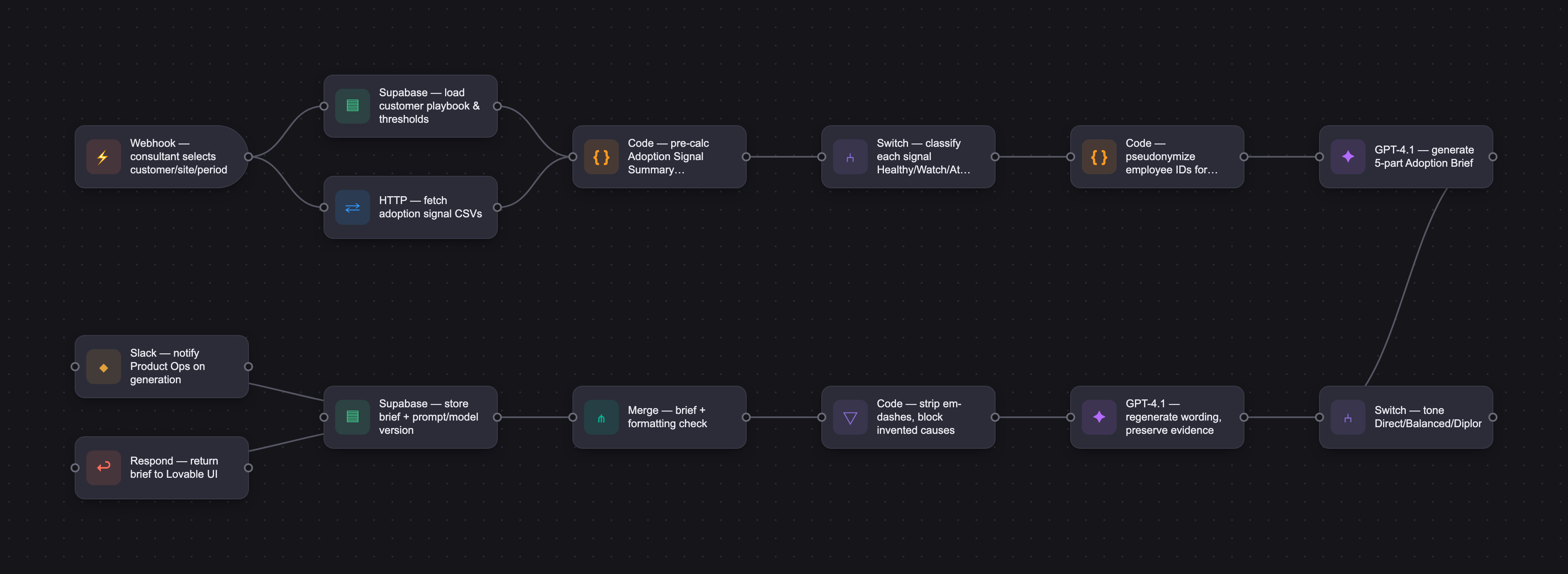
The MVP evaluates three adoption signals — work request triage timeliness, preventive maintenance completion rate, and work order completion quality — comparing each against the customer's configured threshold and classifying it as Healthy, Watch, or At Risk. The system loads a customer playbook and adoption evidence, then generates the brief. It uses GPT-4.1 (with GPT-4.1 mini as a lower-cost fallback), chosen for instruction following, structured output, and business writing. A key iteration was to stop asking the model to calculate metrics from raw CSV rows and instead feed a pre-calculated Adoption Signal Summary as the source of truth. Guardrails prevent inventing data, overstating confidence, or implying unsupported causes; tone can adapt but truth is not diluted. In manual review across five simulated scenarios (10 outputs), 6 fully passed and 4 were partial passes, with no full failures — remaining issues being minor over-inference on causes and formatting.
Who it's for
The product is B2B, sold to enterprise organizations in asset-intensive industries such as manufacturing, processing, mining, and utilities, where the buyer is a maintenance, operations, reliability, or digital transformation leader. The feature is for both internal and external users: implementation consultants and customer success teams who drive rollout and monitor for regression, and customer-side maintenance leaders, planners, and supervisors responsible for sustaining value. The most strategically important users are the implementation and customer success teams, since they drive adoption and prove value.
Why it matters
The CMMS market is projected to grow from about $1.29B in 2024 to $2.41B by 2030 (~11% CAGR), with the broader EAM market around 9% and the digital adoption market growing far faster at roughly 23% — signaling strong demand both for maintenance software and for tools that help customers actually realize value from it. Currently a demo-ready proof of concept wired to the OpenAI API using simulated data, the intended launch is a controlled beta with a small group of trusted internal consultants on real projects. Because real customer and employee-level data would be involved, the plan builds in consent, PII minimization via pseudonymous identifiers, auditability, and PIPEDA and Quebec Law 25 review before any customer data is used.
The workflow
The PRD
| PRODUCT FACULTY — AI PRODUCT REQUIREMENTS DOCUMENT (PRD) TEMPLATE Version 1.0 | ||||||
|---|---|---|---|---|---|---|
| Your Name: | Michael Kainola | |||||
| Your Product: | Adoption Brief | |||||
| Your Industry: | Industrial enterprise software for asset-intensive operations | |||||
| Date: | May 3rd, 2026 | |||||
| 4D Method | AI PRD | Instructor Feedback | ||||
| Phase | Activity | Theme | Topic | Key Question(s) | Your Response Include external links to visuals/prototypes as required. | |
| DISCOVERY | Understand your market, business, product & user context | Business Value Map | Market Attractiveness | What industry is your business in? (ie Financial services, Healthcare, Education, etc)? | Industrial enterprise software, focused on maintenance operations in asset-intensive industries such as manufacturing, processing, mining, and utilities. | Michael, this PRD holds together end to end in a way that most capstone projects do not. The pivot you made during development, moving away from asking the model to calculate metrics from raw CSV rows and instead feeding it a pre-calculated signal summary, is the kind of real iteration that separates a credible product document from a theoretical one. You identified a failure, traced it to the root cause, changed the architecture, and re-ran the evals. That discipline carries through the whole Develop section, where ten test outputs across five scenarios are reported with honest partial passes instead of inflated results. The three-screen MVP scope is tight, the tone and sensitivity controls give the consultant meaningful agency without bloating the interface, and the Deploy section shows mature enterprise thinking around consent, pseudonymous identifiers, and a controlled beta. Two areas to sharpen before the video. First, the success metrics in your launch plan name what you would track but never name what good looks like. A regeneration rate target, a minimum classification accuracy threshold, a self-reported time-saved benchmark, a minimum number of briefs before expanding access: pick concrete numbers for at least three of those so a judge can see you know what success versus failure looks like for this beta. Second, your model selection evaluates two models from the same family. One sentence on why you ruled out a meaningful alternative, Claude for instruction following, an open-source model for cost, or Gemini for long context, would show you evaluated the broader landscape rather than defaulting to the first viable option. Neither of these is a major rewrite. Both would sharpen how the PRD reads on Demo Day. On how to structure the four-minute video, treat it like an executive briefing not a walkthrough. Open with the problem in the first thirty seconds. A consultant preparing for an adoption review today pulls data from multiple scattered sources, interprets it manually, and the quality of the recommendation depends entirely on who happens to be doing the work. That pain is vivid and your journey map already captures it well. Then show the solution in action. Walk through one scenario in the prototype: select a customer, generate the brief, point to the classification logic, show a tone change. That is your proof that the AI is doing real work. Close with one slide on what the beta looks like and what success means. Aim for roughly 30 seconds on problem, 90 seconds on the live demo, 60 seconds on the eval evidence and what you learned from testing, and 30 seconds on launch plan and success targets. That leaves a small buffer under four minutes. The single biggest mistake to avoid is spending too long on market context and Discovery before the audience ever sees the product. Lead with the pain, get to the AI moment fast, and let the evidence speak. |
| What are the key challenges (headwinds) and opportunities (tailwinds) impacting growth in your industry? Who are the key competitors? | Tailwinds: Asset-intensive industries are under pressure to reduce downtime, improve maintenance productivity, and move away from paper, spreadsheets, and tribal knowledge. This creates demand for CMMS/EAM and related industrial software. Headwinds: Many customers struggle to realize value after implementation. Frontline adoption, process adherence, data quality, integrations, and change management can all slow down growth and reduce ROI. Key competitors / adjacent products: CMMS/EAM platforms such as IBM Maximo, SAP EAM, Fiix, MaintainX, UpKeep, Limble, and eMaint are adjacent because they own the maintenance workflow and may include adoption or analytics features. More direct adjacent competitors include digital adoption, product analytics, and customer success platforms such as WalkMe, Whatfix, Pendo, Userlane, Gainsight, and ChurnZero. | |||||
| What is the projected growth rate of your target market segment over the next 3-5 years? | The CMMS/EAM market is expected to grow steadily over the next few years. One estimate has the CMMS market growing from about $1.29B in 2024 to $2.41B by 2030, or about 11% average annual growth. The broader EAM market is expected to grow around 9% per year, and the digital adoption market is growing faster, with estimates around 23% per year. This suggests strong demand for maintenance software, and for tools that help companies actually adopt the software and get value from it. Sources: Grand View Research: CMMS market, 11.1% CAGR MarketsandMarkets: EAM market, 9.0% CAGR MarketsandMarkets: Digital Adoption Platform market, 23.1% CAGR | |||||
| Business Model | What growth stage is your business currently in (e.g., startup, scale-up, mature)? | This product concept is in the Discovery / MVP stage. The broader CMMS/EAM category is mature, but this capstone is exploring a newer opportunity: helping customers move beyond basic software usage, adopt the intended maintenance operating process, and sustain that adoption over time so they continue realizing value. | ||||
| How does your business make money? What do they sell? What is your primary revenue model (e.g., subscription, freemium, licensing, marketplace, transactional, etc?) | The business sells CMMS/EAM software to asset-intensive companies. The AI Adoption Coach is an AI capability within the product that helps customers and implementation teams measure adoption, detect process-adherence gaps, track value realization, and recommend the next adoption intervention. Once a customer reaches adoption, it also monitors for regression so teams do not backslide into old habits. | |||||
| Who is your primary customer base (B2B, B2C, B2B2C)? | B2B. The product is sold to enterprise organizations in asset-intensive industries, such as manufacturing, processing, mining, and utilities. The buyer is typically a maintenance, operations, reliability, or digital transformation leader. | |||||
| Differentiators | What are the key differentiators for your company? | The key differentiator is that the AI Adoption Coach measures true adoption, not just usage. Because it is built into the CMMS/EAM workflow, it can connect user activity, process adherence, and maintenance outcomes. It then recommends targeted interventions using a mix of industry best practices and the customer’s own playbooks, so the guidance is specific to how the customer actually works. Once adoption is achieved, it also monitors for regression so teams do not slide back into old habits. | ||||
| Feature Value Map (IMPORTANT NOTE: This section is only relevant if you are working on enhancing an existing product. It does not apply if you are developing a new product from 0 to 1.) | Customers | Who are the customers (ie buyers) of your product? | The buyer is the enterprise customer purchasing the CMMS/EAM software, typically a maintenance, operations, reliability, or digital transformation leader. The main users are implementation consultants, customer success teams, and customer-side maintenance leaders responsible for adoption and value realization. | |||
| End Users | Who are the end-users of your product? Which users are the most revenue-generating / revenue-impacting for your company? What are their goals, roles, and context? | The end-users are implementation consultants, customer success teams, maintenance managers, reliability leaders, planners, and supervisors. The most strategically important users are the implementation/customer success teams and maintenance leaders because they are responsible for driving adoption, reinforcing the process, and proving value from the system. | ||||
| Current Products / Services | If you are a Product-led business: What are the core features of your product, and how do they address user needs? If you are a Service-led business: What are the key services you offer to customers? | The core product is a CMMS/EAM platform used to manage maintenance work, assets, preventive maintenance, work orders, inspections, and maintenance reporting. The company may also provide implementation, training, and customer success support to help customers configure the system and adopt the related maintenance processes. | ||||
| User Value Map | Target Persona | Who is your AI product / feature for? (Internal users, external users, an influencer, a buyer, etc) | The AI Adoption Coach is for both internal and external users. Internally, it supports implementation consultants and customer success teams during rollout, and it continues supporting them after go-live by helping them monitor adoption, detect regression, and ensure continued use of the system over time. Externally, it supports customer-side maintenance leaders, reliability leaders, planners, and supervisors who are responsible for adopting the maintenance process and sustaining value. | |||
| Journey Map (current-state) | What is the typical journey for your target persona when they are using your product / service, focusing on their ideal experience (happy path) as they interact with your product? | Today, the implementation consultant starts with a rollout or value review, gathers data from different sources, assesses whether the customer is adopting the system, diagnoses process gaps, decides what follow-up is needed, and monitors whether adoption is sustained over time. The process is largely manual and depends heavily on the consultant knowing where to look and how to interpret the signals. Current State User Journey Map: click link | ||||
| Pain-points | Where does the user experience friction, obstacles, or unmet needs throughout the journey? Identify which pain-points are most frequent and severe? | The current process has three major pain points: the data is scattered, the interpretation is manual, and the recommended follow-up depends heavily on the consultant’s experience. A consultant may need to pull usage data, workflow completion, support history, training records, meeting notes, and outcome metrics before they can even start the real work. Then they still need to interpret the signals against best practices and the customer’s own playbook. This is slow, inconsistent, and hard to scale. | ||||
| AI Opportunities | From your list of pain points, identify those that can effectively be addressed using Generative AI. Remember, this project focuses on leveraging LLM-powered AI to solve your target persona's pain points. Rank these pain points starting with the most severe and frequently occurring first. | AI can help with the pain points where the consultant needs to turn scattered inputs into a clear adoption story and next-step recommendation. There is a strong translation need because data, notes, metrics, and playbooks need to become a usable adoption brief. There is also a scaling need because the same review process has to happen across many customers, a consistency need because adoption should be assessed the same way across consultants, and an expertise need because recommendations should reflect both CMMS/EAM best practices and the customer’s own playbook. These are good AI candidates because they are repeatable, context-heavy tasks that currently take a lot of manual effort. | ||||
| Develop an AI Solution Hypothesis | AI Solution Hypothesis | Diverge | Ideate potential solutions to address your AI-solvable pain points. Focus on generating a high quantity of ideas rather than evaluating their quality at this stage. | Potential Solutions Ideation: click here | ||
| Converge | Rank your ideated solutions based on impact and feasibility. Identify your top three AI solutions, and clearly select the one you'll focus on for your project. | Solution Ranking Worksheet: click here For my project, I will focus on #1, the AI Adoption Brief Generator, with light versions of #2, the Adoption Gap Detector, and #3, the Next-Best-Intervention Recommender included. This is the best MVP because it addresses the highest-friction part of the current workflow: helping the consultant turn scattered adoption signals into a clear adoption story, risks, and recommended next steps before a customer check-in. | ||||
| DESIGN | Define Target State Workflow | UX Flows & Wireframes Suggested Tool: Excalidraw | Workflow (future) | Assuming your product or feature works as desired, what is the target state workflow? | The MVP workflow starts with the implementation consultant selecting the customer name, site, and review period. The system loads a simple customer playbook containing the workflows to evaluate, success thresholds, desired outcomes, and communication preferences. The system then uses three adoption signals: work request triage timeliness, preventive maintenance completion rate, and work order completion quality. Each signal is compared against the customer’s threshold and classified as Healthy, Watch, or At Risk. The AI generates an internal Adoption Brief with an executive readout, key evidence, adoption gaps, any positive signals, and recommended actions. The consultant reviews the draft, adjusts the tone if needed, regenerates the brief, and uses it to guide the customer adoption review. Workflow Diagram + Wireframe: click here | Please leave this area blank. This space is for the Instructor to provide you with feedback. |
| Build Wireframes | Wireframes | How will users navigate through your AI solution? What are the key steps and decision points? What information will be displayed at each stage? What specific UI elements are needed on each screen? How will the layout accommodate AI features? | The MVP prototype uses three screens. First, the consultant selects the customer context by choosing the customer, operating site, and review period. After the consultant clicks Generate, the system loads the existing customer playbook and adoption evidence in the background. The second screen is a progress screen showing the system moving through the brief-generation steps: loading customer context, gathering adoption evidence, evaluating evidence against the playbook, and generating the Adoption Brief. The third screen displays the generated Adoption Brief. It includes the executive readout, workflow status, key gaps, positive signals, and recommended actions. A side panel lets the consultant adjust tone and sensitivity, then regenerate the brief while preserving the underlying evidence and recommendations. The key decision point is the consultant review step, where the consultant decides whether the brief’s tone and framing are appropriate before using it in the customer adoption review. Workflow Diagram + Wireframe: click here | |||
| Develop Prototype to showcase AI interactions | Prototype Screens Suggested Tool: lovable.dev | What aspects of the AI solution will you demonstrate in your prototype? How will the AI inputs, processing, and outputs be presented visually to users? Which features are essential for launch? What can be left for later releases? | The prototype demonstrates the core MVP flow for generating an internal CMMS adoption brief. The consultant selects a customer, operating site, and reporting period. The system then loads the matching customer playbook, gathers the relevant adoption evidence, compares the signals against customer thresholds, and generates an evidence-backed brief. The essential MVP features are customer/site/period selection, background playbook and evidence loading, threshold-based adoption assessment, and a generated Adoption Brief with executive readout, workflow status, key gaps, positive signals, and recommended actions. The prototype also demonstrates consultant-in-the-loop review through tone and sensitivity controls, allowing the consultant to regenerate the brief while preserving the underlying evidence and recommendations. Later releases can add live integrations, richer playbook editing, user- or crew-level patterns, support-ticket and meeting-note analysis, customer-ready exports, follow-up tracking, and outcome measurement. Lovable Prototype: click here Password: cohort9 | |||
| Initial Prompt Design | Master Prompt [Initial Design] | Create an initial master prompt. Consider the following: What tone or personality should the AI use? How should user input and system instructions be structured for maximum clarity? What system instruction will govern the AI's behavior? What examples might improve performance? How will you format outputs for consistency? | You are an AI Adoption Brief Generator for CMMS/EAM implementation consultants. Your job is to help consultants prepare for customer adoption reviews by turning a simple customer playbook and a small set of adoption signals into a concise, evidence-backed internal briefing note. Core responsibilities: - Evaluate adoption against the customer’s own playbook, not generic software usage benchmarks. - Compare each adoption signal against the customer’s configured threshold. - Classify each workflow as Healthy, Watch, or At Risk. - Separate true adoption from simple system usage. - Identify the most important adoption gaps, one positive signal, and practical recommended actions. - Write for an implementation consultant preparing for a customer conversation. Tone options: - Direct: clear, firm, and action-oriented. - Balanced: professional, neutral, and collaborative. - Diplomatic: softer, careful, and relationship-conscious. Sensitivity options: - Specific: reference specific roles, teams, shifts, or user groups when relevant. - Aggregate: keep findings at the workflow or site level and avoid calling out individuals or small groups. Default behavior: - If no tone is provided, use Balanced. - If no sensitivity level is provided, use Aggregate. - The initial brief should be safe for internal consultant review, not customer-ready distribution. Rules: - Do not invent data. - Do not mention metrics that were not provided. - Do not overstate confidence. - If data is missing or ambiguous, say what should be validated. - Preserve the underlying evidence and recommendations regardless of tone. - Tone can adapt, but truth should not be diluted. - Do not write as if the brief is ready to send directly to the customer. - No emojis. - Keep the brief concise, practical, and evidence-backed. | |||
| Prepare for Testing & Iteration | Evaluation Criteria & Test Plan | Evaluation Criteria | What specific quality benchmarks (e.g., clarity, relevance, tone, accuracy, SEO, hallucination avoidance) will define “good” output? | I will evaluate the Adoption Brief across seven dimensions: structure, relevance, factuality, terminology, tone, strategy, and efficiency. Structure: Follows the expected brief format: executive readout, workflow status, key gaps, positive signals, and recommended actions. Relevance: Stays focused on the consultant’s customer adoption review. Factuality: Uses only the provided customer context, thresholds, and adoption signals. Does not invent data. Terminology: Uses clear CMMS/EAM language, including work request triage, PM completion, completion quality, and adoption thresholds. Tone: Matches the selected tone while remaining internal-facing and consultant-oriented. Strategy: Identifies meaningful gaps, positive signals, and evidence-backed recommended actions. Efficiency: Produces a concise brief that does not require consultant editing. | ||
| Example Cases | What specific example use cases, edge cases, and negative cases should be covered by test prompts and outputs? | Classification accuracy: Test whether the AI correctly labels each adoption signal as Healthy, Watch, or At Risk based on the customer’s thresholds. Grounding / no hallucination: Provide only the three MVP metrics and confirm the AI does not invent user names, crews, tickets, training issues, or root causes. Tone regeneration: Generate a brief, change the tone, and confirm the wording changes while the evidence, classifications, and recommendations stay consistent. | ||||
| DEVELOP | AI Model Selection & Justification | AI Model Selection & Justification | Which AI model is best suited for your solution and why? What capabilities and limitations does it have? How will it integrate with your product? | I would use GPT-4.1 for the MVP, with GPT-4.1 mini as a lower-cost fallback if testing shows acceptable quality. GPT-4.1 is well suited because it is strong at instruction following, structured output, long-context comprehension, and business writing. Those capabilities fit this product because the model needs to follow a fixed brief format, compare adoption signals against thresholds, and rewrite the same brief in different tones without changing the underlying facts. Its main limitations are that it is not a dedicated reasoning model, it can hallucinate if inputs are vague, and it may misinterpret unclear instructions. To manage this, the MVP uses structured inputs, explicit thresholds, fixed classification rules, and lightweight evaluation checks. In the product, GPT-4.1 sits behind the brief-generation workflow. The app passes customer context, the existing playbook, adoption signal values, thresholds, and tone/sensitivity settings into the prompt. The model returns the Adoption Brief, which the consultant reviews and can regenerate with a different tone before using in the customer review. | Please leave this area blank. This space is for the Instructor to provide you with feedback. | |
| Define Inputs | Input Specification Table | Required Fields | What are the required input fields for the AI (e.g., title, description, keywords, tone)? Indicate format, source, requirement. | Required Input fields: click here | ||
| Optional Fields | Are there any optional or user-customizable fields? How do they impact the AI’s output? | The main optional fields are tone and sensitivity. Tone can be set to Direct, Balanced, or Diplomatic, and controls how strongly the brief communicates adoption gaps and recommended actions. Sensitivity can be set to Specific or Aggregate, and controls how specifically the brief refers to patterns, teams, or user groups. If these fields are not provided, the default values are Balanced tone and Aggregate sensitivity. These defaults create a safe first draft for internal consultant review. Changing tone or sensitivity should affect wording and framing only. It should not change the underlying evidence, workflow status, conclusions, or recommendations. | ||||
| Define Good Output | Output Evaluation Checklist | Objective Criteria | What criteria will you use to judge output as “good”? (e.g., structure, use of keywords, tone, factuality, relevance) | I will evaluate the prompt manually using a small set of repeatable test scenarios. Each scenario will include customer context, thresholds, and the three MVP adoption signals. Before running the prompt, I will define the expected classifications for each signal. After generating the brief, I will score the output using a simple pass/fail checklist for classification accuracy, grounding, evidence-backed recommendations, tone match, and internal consultant usefulness. Pass / Fail Rubric: click here | ||
| Subjective Criteria | Are there any criteria that require human judgment or qualitative assessment? | Yes. Some criteria require human judgment because the brief is meant to support a consultant-led customer conversation, not just produce a technically correct summary. Human review is needed to assess whether the executive readout is clear and useful, whether the recommended actions are practical, whether the tone would land appropriately with the customer, and whether the brief reflects good consultant judgment. A human reviewer should also check that the AI does not overstate conclusions, imply unsupported root causes, or frame adoption gaps in a way that could create defensiveness. These criteria will be evaluated through manual review using the pass/fail rubric, with notes captured for prompt improvements. | ||||
| Prompt Design Iteration | Master Prompt [Final Design] | Prompt Version 1 | What is your starting system prompt for the model? What variations will you test? What techniques will you use to optimize performance? List initial instructions, persona, inputs, and constraints. | The starting prompts include one system prompt, one initial brief-generation user prompt, and one tone-regeneration prompt. The system prompt defines the AI as an Adoption Brief Generator for CMMS/EAM implementation consultants and includes the core constraints: use only provided data, evaluate against customer-specific thresholds, keep the brief internal-facing, and preserve evidence when tone changes. I will not run extensive prompt experimentation for the MVP. I will test the current prompts against a small set of representative examples and only make targeted revisions if the output fails the rubric. The main variations I may test are minor changes to the tone instructions, recommendation guidance, or classification instructions. Performance will be optimized through lightweight manual evals. If the AI misclassifies a signal, invents data, produces generic recommendations, or changes the meaning during tone regeneration, I will revise the relevant prompt instruction and retest that case. | ||
| Prompt Iterations | If revised, what changes did you make and why? How do you track and record prompt evolution? | I revised the prompts after early testing showed the model was not consistently handling specificity, employee-level patterns, and CSV-based signal calculation. The updates clarified that tone and sensitivity are runtime settings, removed tone/sensitivity from customer context files to avoid conflicting instructions, aligned the prompt with the actual CSV schema, and added clearer rules for employee-level pattern detection. I also added stronger guardrails around unsupported conclusions, tone changes, and punctuation. For example, the prompt now instructs the model not to invent causes, not to dilute material risks when tone changes, and not to use em dashes or en dashes. I will keep prompt tracking lightweight. If I make further changes, I will note the reason for the change and whether it improved the specific test case that exposed the issue. Update prompts have been added to the sheets: System Prompt v2; User Prompt 1 v2; User Prompt 2 v2. | ||||
| Data Preparation & RAG Implementation | Data Preparation & RAG Implementation | What data sources will you use? How will you prepare data for model training or evaluation? (e.g., cleaning, structuring). For RAG: How will you chunk, embed, retrieve relevant information? | For the MVP, I will use simulated customer context files and granular adoption signal CSVs. The context files include customer/site details, implemented workflows, desired outcomes, and success thresholds. The CSVs provide simulated row-level data used to calculate triage timeliness, PM completion, and work order completion quality. I am not training or fine-tuning a model, and I am not building production-grade RAG infrastructure. Instead, I am simulating retrieval by providing the relevant customer context and adoption data directly to the model at inference time. To test the value of retrieval, I will compare outputs with and without the customer context file. The context-aware version should produce a more grounded brief because it can use customer-specific workflows, thresholds, and desired outcomes. In production, structured playbook data and adoption metrics would come from product databases or reporting tables. Unstructured sources like implementation notes, support tickets, training notes, meeting notes, company best practices, examples of “what good looks like,” and standard intervention playbooks could be retrieved using RAG. | |||
| Create Evaluation Set | Example Input/Output Data for Testing | Typical Examples | What are the most common inputs and expected outputs? Use real data if possible. | For testing, I’m using simulated customer context files and simulated adoption signal CSVs. The context file includes the customer/site details, implemented workflows, desired outcomes, and success thresholds. The CSV includes row-level records for triage timeliness, PM completion, and work order completion quality. It also includes employee identifiers so I can test the Specific sensitivity setting. The expected output is an internal Adoption Brief that calculates the actual results, compares them to the customer thresholds, classifies each workflow as Healthy, Watch, or At Risk, and summarizes the findings for consultant review. I’m testing a few basic scenarios: healthy adoption, mixed adoption, borderline adoption, poor adoption, and missing or erroneous data. Each output should include an executive readout, workflow status, key gaps, positive signals where applicable, and evidence-based recommended actions. | ||
| Edge Cases & Negative Cases | What examples test the AI’s limits? (e.g., missing data, ambiguous input, out-of-domain) | I’m testing a few cases that could cause the AI to fail. The main edge case is missing or erroneous data, where PM completion records are unavailable and some signal records contain blank or unknown values. In that case, the AI should mark the signal as Unable to Evaluate and avoid making unsupported claims. I’m also testing borderline results, where a signal is slightly below the threshold and should be classified as Watch rather than At Risk. For negative cases, I’m checking that the AI does not invent root causes, use generic benchmarks instead of customer thresholds, or name employees when the data does not support it. I’m also checking that Diplomatic tone does not hide material risks, and that Specific sensitivity only names employees when the CSV supports the pattern. | ||||
| Test Example Data & Review Results | Manual Review | Run your input data with the prompt. How did your output perform in manual review? Which examples failed which criteria, and why? | I tested the prompt against five simulated scenarios, using both default settings and Direct + Specific settings. This gave me 10 total test outputs covering healthy adoption, mixed adoption, borderline adoption, poor adoption, and missing or erroneous data. The prompt performed much better after I stopped asking the model to calculate metrics directly from raw CSV rows. Instead, I used a pre-calculated Adoption Signal Summary as the source of truth. With that change, the outputs correctly used the provided classifications and generally stayed grounded in the customer context, thresholds, and signal summaries. The main issues were minor over-inference in a few cases, especially around possible causes, and occasional formatting issues like em dashes or markdown dash lines. I added guardrails to avoid unsupported causal claims and to remove em dashes, en dashes, and markdown horizontal rules. Detailed pass/fail results are tracked in a separate evaluation results table: click here | |||
| Automated Evaluation | What pass/fail rate or scores did the AI achieve on core criteria? | I tested 10 outputs across five simulated scenarios. Overall, 6 fully passed and 4 were partial passes. None fully failed. The strongest areas were classification accuracy, evidence use, tone, sensitivity, and internal-facing language. These passed across all 10 outputs. Grounding was mostly good, but 4 outputs had minor over-inference around possible causes. Formatting passed in 8 of 10 outputs, with 2 issues caused by em dashes or markdown dash lines. Overall, the model performed well once I switched to a pre-calculated Adoption Signal Summary. The main remaining improvements are tightening causal language and adding a final formatting check. Detailed results are tracked in the separate evaluation results table. | ||||
| Handle Edge Cases & Iterate | Edge Case Identification | What edge cases did you identify in testing or real usage? | I identified a few edge cases during testing. The first was missing or unreliable data. If a signal is missing or has blank/unknown values, the AI should mark it as Unable to Evaluate and avoid unsupported conclusions. The second was healthy adoption. Even healthy workflows can have some failed records, but the AI should not turn those into major gaps. If all workflows are Healthy, the brief should focus on sustainment. The third was Specific sensitivity. The AI should only name employees when the data clearly supports it. It should not name people in healthy scenarios or when data quality is weak. The final edge case was unsupported causal language. The AI sometimes implied causes like training gaps or process breakdowns without evidence, so I added guardrails requiring validation language when the cause is unknown. | |||
| Updates & Adjustments | What prompt or system adjustments have you made based on failures, feedback, or edge case observations? | I made a few targeted adjustments based on testing. First, I stopped asking the model to calculate metrics directly from raw CSV rows. Early tests showed that the model could miscount records, so I changed the workflow to use a pre-calculated Adoption Signal Summary as the source of truth. I also tightened the prompt rules around healthy workflows, employee-level findings, and unsupported causes. If all workflows are Healthy, the brief should not force major gaps. Employee names should only be used when Specific sensitivity is selected and the summary clearly supports a pattern. The model also should not infer causes like training gaps, staffing issues, or process breakdowns unless the input explicitly supports them. Finally, I added formatting guardrails to avoid em dashes, en dashes, and markdown horizontal rules. | ||||
| Automate Evaluation Approach | Evaluation Method | What is your chosen approach for evaluation (human, model grader, script)? How will you scale testing to diverse/large test sets? | I’m using a lightweight manual review approach. I run each test scenario through the prompt, then compare the output against a predefined answer key and pass/fail rubric. The rubric covers classification accuracy, grounding, evidence use, tone, sensitivity, internal-facing language, and formatting. I used ChatGPT to help apply the rubric and summarize the results, but the criteria were defined in advance and the final review remains manual. For this phase, I’m not using a model grader or automated eval harness because the test set is small and qualitative review is more useful. To scale this later, I would automate the easier checks first, such as correct statuses, missing data handling, employee-name usage, and forbidden punctuation. Human review would still be needed for subjective criteria like usefulness, tone, and quality of recommendations. | |||
| Evaluation Frequency | How often will you re-run evaluations for new data, new prompts, or post-launch monitoring? | I would re-run the evals whenever I make a meaningful prompt change, change the input format, or add a new type of data. For the capstone, I re-ran the evals after switching from raw CSV input to the pre-calculated Adoption Signal Summary, since that changed how the model used evidence. In a production version, I would run a small set of regression tests before releasing prompt or model changes. I would also do periodic spot checks after launch, especially for cases involving missing data, employee-level findings, tone changes, or unsupported causal claims. The main behaviours I would continue checking are correct classifications, grounded recommendations, appropriate tone and sensitivity, and no invented or unsupported details. | ||||
| DEPLOY | Finalize Launch & Rollout Plan | Operational Readiness Checklist | Technical Readiness | Is infra (APIs, databases, rate limits, monitoring, rollback) tested and documented? | The current build is a proof of concept for an AI feature that could be added to a broader enterprise CMMS/EAM product. For the capstone, the Lovable prototype is demo-ready. It is wired to the OpenAI API and can generate Adoption Briefs using the developer message, user prompt, simulated customer context, and pre-calculated Adoption Signal Summary inputs. Tone and sensitivity controls are also connected. This is not production-ready infrastructure. In a real product, this feature would need to be integrated into the application, data model, reporting layer, authentication, permissions, and customer-specific configuration. It would also require secure API setup, real customer data integrations, deterministic metric calculation, error handling, rate-limit and cost monitoring, prompt/model versioning, output-quality monitoring, and rollback options. A production version would also require updated data collection and AI usage language in the enterprise license agreement, so customers understand what data is used, how it is processed, and how AI-generated outputs are governed. The prototype is ready to demonstrate the AI concept and validate the workflow, but production infrastructure and launch readiness are not fully tested or documented yet. | Please leave this area blank. This space is for the Instructor to provide you with feedback. |
| Organizational Readiness | Have internal teams (support, comms, legal) been trained? Is documentation complete? | For the capstone proof of concept, full internal training is not required. For a production version, this would be an important part of launch readiness. Since this would be an AI feature inside a broader enterprise CMMS/EAM product, implementation consultants, support, product, legal, and customer-facing teams would all need clear guidance before launch. Internal documentation would need to explain how the Adoption Brief is generated, what data it uses, how tone and sensitivity settings work, when employee-level findings can appear, and how consultants should review the output before using it in a customer conversation. Consultants would also need usage guidance that makes it clear the brief is a decision-support tool, not an automatic customer-facing report. Support would need a basic playbook for common issues such as missing data, stale thresholds, incorrect customer playbooks, poor outputs, or API failures. Product and implementation teams would need clear ownership of customer playbooks, thresholds, and change management preferences. Legal and commercial teams would need to review data usage, AI output governance, and employee-level insight handling before launch, including any required updates to customer agreement language. For the current capstone, the prototype, prompts, eval results, and workflow documentation are sufficient to demonstrate the concept. Full internal training and production documentation would be future launch-readiness work. | ||||
| Launch & Rollout Strategy | Launch Approach | What is your launch approach? Pilot, AB test, or all users—who gets access and when? | The launch approach would be a controlled beta, not an all-user release or A/B test. The first users would be a small number of trusted internal implementation consultants using the feature on real customer projects after the core concept has already been validated through simulated testing. Customers would not get direct access during the beta. However, because real customer data would be used and transmitted to an external LLM, customer consent would be required through a beta testing agreement or similar addendum. During the beta, consultants would treat the Adoption Brief as a decision-support tool, not something to rely on blindly. If they intend to use any findings in a customer conversation, they would be expected to validate the evidence and recommendations first. A feedback process would also be added, ideally directly in the tool, so consultants can flag inaccurate, useful, unclear, or risky outputs. If the beta shows the feature is accurate, useful, and safe, access could gradually expand to a larger internal consultant group before any customer-facing release. | |||
| Scale Readiness | How will you ensure readiness for scale? How will you monitor initial volume and scale up? | The expected initial volume would be relatively low because this is a periodic consultant workflow, likely used weekly or bi-weekly per active customer project. For beta, scale would be limited to a small number of internal consultants and consenting customer projects. The capstone prototype is built in Lovable, but a beta or production version would move into the native product stack: React, C#, SQL Server, and a server-side OpenAI API integration. Monitoring would therefore be handled through the product backend and database, not Lovable. I would track briefs generated, regenerations, customer/site usage, tone and sensitivity settings, API errors, response times, model/prompt version, and estimated cost. OpenAI’s platform would still be useful for overall API usage and cost, but product-level monitoring would be needed to understand how the feature is actually being used. I would also add an in-product feedback mechanism so consultants can flag outputs as useful, inaccurate, too generic, wrong tone, risky, or unsupported. Even though near-term demand should be manageable, tracking usage, cost, quality, and failure modes is important because the longer-term product vision includes additional LLM-powered analytical capabilities. Scaling would be gradual, with broader access only after the beta shows the feature is reliable, useful, and safe. | ||||
| Go-to-Market Plan | Marketing / Training Assets | What assets (FAQ, demo, guides) will you prepare for external communication/marketing? | Initially, during the targeted-beta period, I would not market this broadly as a standalone AI product. I would position it as an AI-assisted adoption review capability used by our consultants with a small number of hand-picked enterprise customers. The external assets would focus on controlled beta communication: a short customer overview, a demo or walkthrough, an FAQ, and an IT/security/legal packet explaining data usage, AI involvement, human review, employee-level insights, limitations, and consent requirements. A beta agreement or addendum would also be needed because customer data would be transmitted to an external LLM. Internally, we would need consultant training materials, an output review checklist, examples of good and bad briefs, and a feedback process. If the beta is successful, we could later create broader sales and customer-facing assets for existing customers as an upsell. Over time, this could become a customer-facing module, but I would first validate it as part of our internal consulting “secret sauce.” | |||
| Stakeholder / Internal Comms | How will you communicate launch plans, progress, and outcomes internally? | Internal communication would start with a clear beta plan shared with product, implementation, support, legal, and leadership. The plan would explain the purpose of the beta, who has access, which customers are involved, what data is being used, what safeguards are in place, and how consultant feedback will be collected. During the beta, I would provide lightweight progress updates covering usage, consultant feedback, output quality, issues found, and any prompt or workflow changes. Since this is an AI feature inside a broader enterprise product, I would also keep legal, support, and customer-facing teams informed of any risks related to data usage, employee-level insights, or customer communication. At the end of the beta, I would summarize the results, including whether the briefs were useful, accurate, safe, and worth expanding. That summary would inform the decision to continue testing, expand to more consultants, or move toward a broader customer-facing release. | ||||
| Confirm Legal, Privacy & Risk Protocols | Data & Privacy | How do you handle and protect user data, including storage, privacy, and compliance? | For the capstone proof of concept, I am only using simulated customer data. No real customer data is being used in the Lovable prototype or evaluation set. For a real beta or production version, data protection would be a key requirement. Because the feature could use customer operational data and employee-level adoption signals, customers would need to explicitly consent before any data is sent to an external LLM. This would need to be covered through a beta agreement, addendum, or updated enterprise license language. In production, the feature would be integrated into the native enterprise product rather than Lovable. Customer data would be handled through the existing application, database, authentication, permissions, and security model. Sensitive data would need to be encrypted in transit and at rest, and only the minimum required context should be sent to the LLM. Where possible, personally identifiable information should not be sent to the LLM. For employee-level insights, the product could send a hashed or pseudonymous employee identifier, while keeping the mapping to real employee names inside the customer’s network. This would let the AI detect employee-level patterns without exposing actual employee identities to the external model. Employee-level insights would still need clear rules around when identifiers can appear, how findings are framed, and how consultants validate them before using them in a customer conversation. | |||
| Policy & Compliance | Are content moderation, legal, and audit processes in place? Are you compliant with regulations needed for your domain? | For the capstone proof of concept, I am only using simulated customer data, so formal legal, compliance, moderation, and audit processes are not required. For a real beta or production version, these processes would need to be in place before using customer data. In Canada, this would include review against PIPEDA, applicable provincial privacy laws, and Quebec Law 25 where relevant. Customers would need to consent before their data is sent to an external LLM. Content moderation is mainly about business risk. The system should avoid unsupported causal claims, blame-oriented employee findings, customer-ready wording, and conclusions based on missing or unreliable data. Consultants would still review and validate the brief before using it in a customer conversation. The production design should minimize personal information sent to the LLM. Where possible, employee names should be replaced with hashed or pseudonymous identifiers, with the mapping kept inside the customer’s network. Sensitive data should be encrypted in transit and at rest. Auditability would also be required. The system should retain enough information to review what data was used, what output was generated, and which prompt/model version produced it. | ||||
| Define Success Metrics | Success Metrics | User/Business Metrics | What user metrics will indicate success? What business metrics will demonstrate value? | For the beta, I would focus on leading indicators that are realistic to measure. User metrics would include number of briefs generated, number of active consultants, regeneration rate, tone/sensitivity usage, consultant feedback ratings, and self-reported time saved. I would also track whether consultants used the brief in a real customer review and whether it helped surface useful insights or actions. Output quality would be measured through a lightweight review checklist covering classification accuracy, grounding, recommendation quality, tone, sensitivity, and safe handling of employee-level findings. Business impact would be harder to prove during beta, so I would treat it as directional. Possible indicators would include more consistent adoption reviews, faster identification of adoption risks, better prepared consultants, and customer feedback that the review was useful. Longer term, this could be linked to adoption improvement, retention, or upsell, but those would require more data and would be harder to attribute directly to the AI feature. | ||
| AI Metrics | How will you measure AI performance and accuracy? | This is different from the broader user/business metrics question. This one is specifically about whether the AI output itself is good. A starting answer would be: I would measure AI performance using the evaluation rubric developed during the Develop phase. The main checks are classification accuracy, grounding, evidence use, tone, sensitivity, internal-facing language, and formatting. For the beta, I would continue using a small regression set of test scenarios to check that prompt or model changes do not break core behaviour. I would also review a sample of real generated briefs against the source data and customer context. The highest-priority accuracy checks would be whether the brief uses the correct adoption statuses, avoids unsupported causal claims, handles missing data correctly, and only includes employee-level findings when the data supports them. Consultant feedback would also be used to flag outputs that are inaccurate, too generic, unclear, risky, or not useful. | ||||
| Monitor, Iterate & Improve | User Support & Feedback Plan | Support Channels | Where can users get support? Is escalation and ownership clear? | For the targeted beta, support would be handled through the existing Product Ops/Support channel. Since this is an internal consultant tool and an extension of an existing enterprise application, I would not create a separate support process at this stage. Internal consultants would report issues the same way they report other product issues, including inaccurate outputs, missing data, poor recommendations, API errors, or concerns about employee-level findings. Product Ops/Support would triage issues and escalate to Product, Engineering, or Legal/Commercial as needed. Before broader rollout, I would document the common issue types, escalation path, and required information for support tickets. | ||
| Feedback Workflow | How do you gather, triage, and act on feedback and bugs? How are critical issues prioritized and communicated? | For the targeted beta, feedback would be collected in two ways. Quality feedback on the generated brief would be captured directly in the tool, while functional issues would go through the existing Product Ops/Support channel. In-tool feedback would let consultants flag inaccurate data, stale data, generic recommendations, wrong tone or specificity, unsupported conclusions, and accuracy concerns, especially around employee-level findings. Stale data would be treated as a defect because it could lead to misleading recommendations. Since this would be a small beta, feedback would be reviewed actively and used to make targeted improvements. Small formatting or wording fixes could be deployed quickly. Larger changes to prompts, data handling, or workflow behaviour would require review and communication to the beta consultants. Critical issues, such as privacy concerns, incorrect employee-level findings, stale data, or misleading outputs, would be escalated through Product Ops/Support to Product, Engineering, or Legal/Commercial as needed. | ||||
| Monitoring & Continuous Improvement | Monitoring Approach | What monitoring/logging is in place to spot operational/AI issues post-launch? | For production, monitoring would be built into the native React, C#, and SQL application rather than Lovable. The OpenAI portal would be useful for high-level API usage and cost monitoring, but product-level monitoring should be captured in our own telemetry layer, such as Grafana. The C# backend would log API errors, timeouts, latency, model version, prompt version, token usage, estimated cost, customer/site context, and failed brief generations. Product usage would be tracked in SQL, including briefs generated, regenerations, active consultants, tone/sensitivity usage, and consultant feedback. Quality monitoring would come from in-tool feedback and periodic review of generated briefs against the source data. Over time, automated evals could be added for objective checks such as classification accuracy, missing-data handling, employee-level naming rules, unsupported causal language, and formatting rules. This would let us monitor reliability, cost, usage, and output quality as we add more LLM-powered analytical capabilities to the product. | |||
| Ongoing Improvement | How will you collect learnings, review performance, and update your system continuously post-launch? | During the targeted beta, learnings would be reviewed weekly, ideally after each customer review cycle where the tool was used. The product team would gather feedback from implementation consultants, who are the primary users, and use leadership input to guide broader product direction. The review would look at whether the brief saved preparation time, surfaced useful insights, improved the quality of customer conversations, and produced recommendations the consultant could actually use. It would also capture issues such as inaccurate outputs, generic recommendations, wrong tone or specificity, risky employee-level findings, stale data, or unsupported conclusions. During beta, feedback would be reviewed actively and used to make targeted improvements to prompts, data inputs, workflow design, and documentation. After beta, this would move into the regular product feedback cadence, likely monthly or as needed for urgent issues. Over time, learnings from usage, consultant feedback, output reviews, telemetry, and automated evals would be used to improve the system and inform whether the feature should expand to more consultants, more customers, or additional LLM-powered analytical workflows. | ||||




