
Fintech
AI Invoice Auditor
AI Invoice Auditor is a batch auditing tool for controllers and CFO workflows during month-end close. Users upload ERP transaction CSVs and invoice PDFs, and the system runs one AI call per invoice to return structured verdicts, quoted evidence, and status mappings across checks like numeric matching, category compliance, and legitimacy. The output preserves an audit trail, supports comments and reruns, and exports audit-ready CSVs for external auditors.
The problem
During month-end close, a Controller exports the month's AP transactions from the ERP, pulls the matching PDF invoices, and walks through a risk-based sample side by side — checking that amounts, vendors, and expense categories match policy and that receipts look legitimate. A single Controller processes around 1,500 invoices a month. The core pains: it's too slow to review the full population, so Controllers sample — but auditors increasingly want full coverage, not samples. Manual PDF-versus-transaction comparison eats hours, wrong expense categories are hard to catch at scale, suspicious receipts go undetected, and the audit trail is built by hand, slow and error-prone.
The solution
AI Invoice Auditor is a batch auditing tool built for the Controller's monthly review — not the AP clerk approving one invoice at a time. Users upload ERP transaction CSVs and a folder of invoice PDFs, and the system runs one AI call per invoice to return structured verdicts, quoted evidence, and status mappings. Unlike a vendor's black-box score, it's built to fit a non-standard chart of accounts and expense policy, and to give the auditor reasoning they can quote. The output preserves an audit trail, supports per-item comments and re-runs, and exports audit-ready CSVs. It's framed as decision-support (Sheridan autonomy level 3-4): the AI narrows the population to flagged items and shows extracted values, and the Controller signs off and can edit any field.
How it works
For each transaction-PDF pair, GPT-4o-mini reads the PDF as a vision input and runs checks — amount_match, currency_match, vendor_match, category_fit, and legitimacy — each returning result (pass/fail/unclear), a 0-1 confidence, quoted evidence, and a short explanation, as strict JSON. The application, not the model, assigns statuses (matched, mismatched, category-flagged, suspicious, needs human review) using per-check confidence thresholds tuned by the cost of a false positive. If any item fails, the batch keeps running and the item gets an "AI error" status with the exact reason. The expense policy is pasted into the system prompt for the capstone (RAG over the full policy is planned for later). Prompt iteration split out currency, added a pdf_data extraction block, made amounts separator-tolerant, moved vendor matching to brand level, and strengthened legitimacy with layout and arithmetic sub-checks plus few-shot examples. On a 30-item gold set (re-labeled independently by a finance Controller with 28/30 agreement), the v7 re-run reached 150/150 per-check agreement and 30/30 status correctness, closing every legitimacy miss from v6.
Who it's for
This is an internal product for one company — Controllers and senior AP Managers who own the monthly AP review and prepare evidence for SOX and external audits. The economic buyer is finance leadership: the CFO who funds the build and the VP Finance. It deliberately targets the Controller's monthly batch review, a workflow off-the-shelf tools like Stampli, AppZen, and SAP Concur don't serve because they're built for the clerk approving one invoice at a time. Off-the-shelf alternatives also can't fit the company's non-standard chart of accounts and expense policy without heavy, brittle customization.
Why it matters
This isn't a commercial market play — it addresses internal AP workload growth and rising audit expectations. Volume should grow 10-15% a year, and auditors increasingly want full-population testing rather than samples, making manual review unsustainable within a year or two. Two CFO-level KPIs anchor the case: a cleaner external audit report (reduce audit findings by ~150 per cycle) and a shorter close (save ~8 working hours on AP review). Vision and reasoning models are finally good enough for finance work, but the real bar is trust — controllers don't yet trust AI for work that has to hold up in an audit, which is exactly why quotable evidence, calibrated confidence, and a full history timeline are the product's backbone.
The workflow
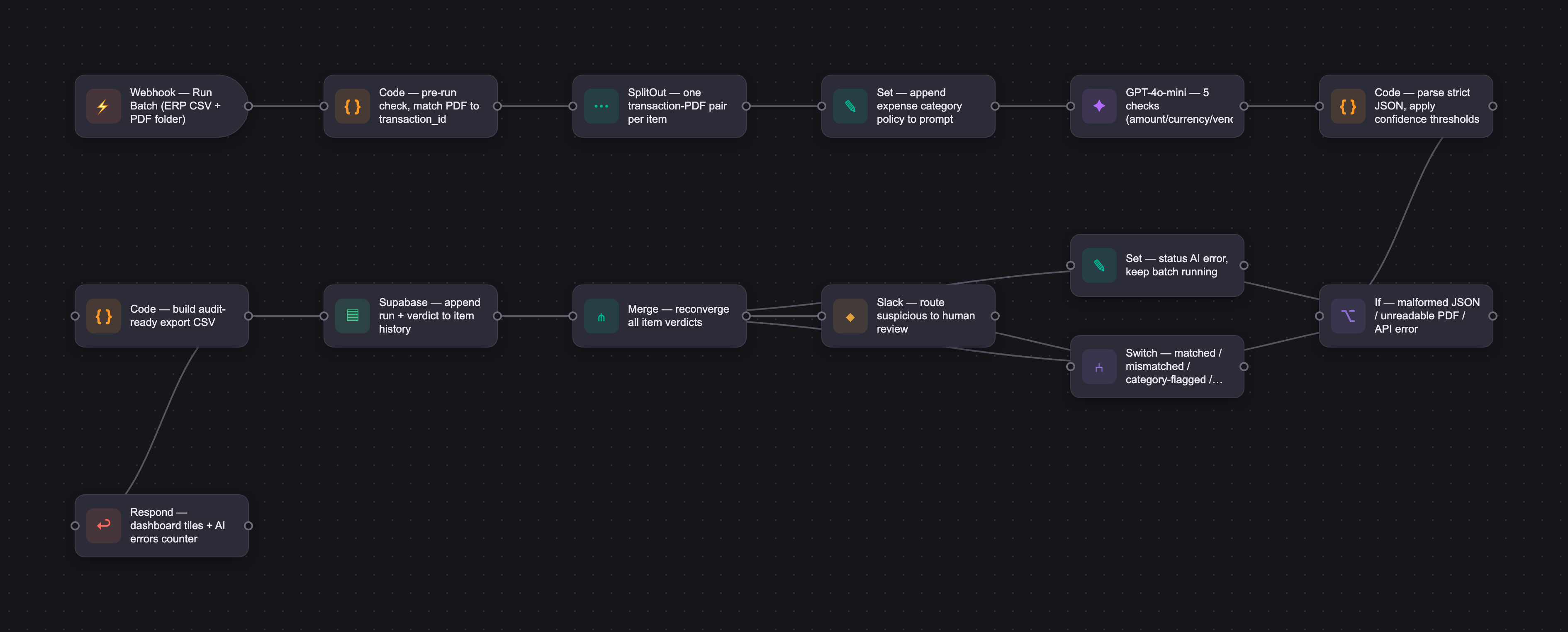
The PRD
| PRODUCT FACULTY — AI PRODUCT REQUIREMENTS DOCUMENT (PRD) TEMPLATE Version 1.0 | ||||||
|---|---|---|---|---|---|---|
| Your Name: | Serhii Ovdiienko | |||||
| Your Product: | AI Invoice Auditor | |||||
| Your Industry: | FinTech | |||||
| Date: | May 5, 2026 | |||||
| 4D Method | AI PRD | Instructor Feedback | ||||
| Phase | Activity | Theme | Topic | Key Question(s) | Your Response Include external links to visuals/prototypes as required. | |
| DISCOVERY | Understand your market, business, product & user context | Business Value Map | Market Attractiveness | What industry is your business in? (ie Financial services, Healthcare, Education, etc)? | The company is a SaaS business in M&A. The product is internal and sits in Finance, on the AP side. It supports monthly close and audit work. | Serhii, the build versus buy reasoning in this PRD is doing something most internal tool proposals never do. It names the exact vendors (Stampli, AppZen, ZIP HQ, Payhawk) and then explains precisely why none of them fit the Controller's batch workflow. That is not a generic "we want to own it" argument. That is a defensible position. The pain points are ranked with real operational weight behind them. "Cannot review the full population" is the right number one because it connects audit pressure to headcount constraints in a single sentence. The headwinds are honest, especially the trust gap ("Controllers do not trust AI yet for work that has to hold up in an audit"). That headwind should shape every design decision you make. Two gaps worth closing. First, the CFO and VP Finance fund this build, but you never say what success looks like to them. Hours saved per close? Reduced audit findings? A number they would quote in a board deck would anchor the whole PRD. Second, "10 to 15 percent AP volume growth" floats without a baseline. The 1,500 invoices per month figure shows up later in Develop. Pull it forward so the growth claim has a denominator. |
| What are the key challenges (headwinds) and opportunities (tailwinds) impacting growth in your industry? Who are the key competitors? | Tailwinds: - Audit and SOX expectations on the company keep growing. - Vision and reasoning models are finally good enough for finance work. A year ago I would not have proposed this. - AP volume inside the company is growing. So is fraud and expense abuse risk. - Finance team is asked to do more with the same headcount. - Pressure to close the month faster. Headwinds: - Controllers do not trust AI yet for work that has to hold up in an audit. - Our chart of accounts and our expense policy are non-standard. Any tool needs deep configuration. - Internal data privacy and security expectations are high. - Build vs buy is a real debate. Finance leadership may push for an off-the-shelf tool. Build vs buy alternatives we would consider buying instead of building: - AP audit and approval: Stampli, AppZen, SAP Concur Intelligent Audit. - Procurement and spend: ZIP HQ. - Card and expense: Payhawk, Clara, Volopay, Rydoo. Why we still want to build internally: none of these tools are configurable enough for our chart of accounts and our expense policy without heavy customization. None of them target the Controller's monthly batch review specifically. They are built for the AP clerk who approves one invoice at a time. | |||||
| What is the projected growth rate of your target market segment over the next 3-5 years? | Not a commercial market. This is an internal product for one company, so external market growth is not the right lens. What matters is internal AP volume and audit pressure. - A Controller in our company processes around 1,500 invoices per month today. That is the baseline. - AP transaction volume should grow around 10 to 15 percent per year as the business scales. On the current baseline that means ~1,650 to 1,725 invoices a month within a year, ~1,800 to 1,985 within two. - SOX and external audit scrutiny gets heavier every year. Auditors want more evidence and want to see full-population testing, not just samples. - Manual review hours per month are already painful for the finance team. Without automation, in a year or two this becomes unsustainable. The "growth" this product addresses is internal workload growth and rising audit expectations, not external market expansion. | |||||
| Business Model | What growth stage is your business currently in (e.g., startup, scale-up, mature)? | Internal product inside a mature SaaS company. The company itself is established. The product is brand new, 0 to 1, no prior version. We are at prototype / MVP stage. | ||||
| How does your business make money? What do they sell? What is your primary revenue model (e.g., subscription, freemium, licensing, marketplace, transactional, etc?) | Not a revenue-generating product. It is an internal tool, so the "value model" replaces the revenue model: - Save Controller and AP Manager hours during monthly close. - Reduce risk of missed errors and undetected fraud. - Strengthen audit-defensibility for SOX and external audits. - Increase population coverage from sample-based review to full-batch review. What success looks like to the funder. The CFO funds this build. Two CFO-level KPIs anchor the case: - Cleaner external audit report. Reduce audit findings by ~150 per cycle. - Shorter month-end close. Save ~8 working hours (one full working day) on AP review during close. Both numbers are framed at a level a CFO would quote in a board deck. They are the success conditions for the build, not nice-to-haves. Funded as an internal finance-tech investment, not as a product sold to customers. | |||||
| Who is your primary customer base (B2B, B2C, B2B2C)? | Internal users only. No external customers. Primary users are the company's own Controllers and senior AP Managers. The "buyer" is internal finance leadership: CFO who funds the build. | |||||
| Differentiators | What are the key differentiators for your company? | Three reasons we build instead of buying off the shelf. 1. The product is built for the Controller's workflow. Off-the-shelf tools target the AP clerk who approves one invoice at a time. The Controller works in monthly batches, and that workflow is not in any vendor's product. 2. Our expense policy and chart of accounts are non-standard. Configuring a vendor tool to fit them takes months and stays brittle. 3. The auditor needs reasoning they can quote. A vendor's black-box score does not pass that bar. | ||||
| Feature Value Map (IMPORTANT NOTE: This section is only relevant if you are working on enhancing an existing product. It does not apply if you are developing a new product from 0 to 1.) | Customers | Who are the customers (ie buyers) of your product? | N/A. This is a new 0-to-1 product, not an enhancement of an existing one. | |||
| End Users | Who are the end-users of your product? Which users are the most revenue-generating / revenue-impacting for your company? What are their goals, roles, and context? | N/A. This is a new 0-to-1 product, not an enhancement of an existing one. | ||||
| Current Products / Services | If you are a Product-led business: What are the core features of your product, and how do they address user needs? If you are a Service-led business: What are the key services you offer to customers? | N/A. This is a new 0-to-1 product, not an enhancement of an existing one. | ||||
| User Value Map | Target Persona | Who is your AI product / feature for? (Internal users, external users, an influencer, a buyer, etc) | Internal users only. Controllers and senior AP Managers in the company. They own the monthly AP review and they prepare evidence for SOX and external audits. The economic buyer is finance leadership, mainly the CFO and VP Finance. | |||
| Journey Map (current-state) | What is the typical journey for your target persona when they are using your product / service, focusing on their ideal experience (happy path) as they interact with your product? | Current monthly AP review, happy path: 1. Month-end close window opens. 2. Controller exports the month's AP transactions from the ERP into Excel. 3. They pull the related PDF invoices and receipts from email, shared drives, and the expense tools. 4. They put Excel and the PDFs side by side. 5. They pick a sample, often risk-based, and walk through each one. They check that the amount matches, the vendor matches, the expense category fits company policy, and the receipt looks legitimate. 6. They flag exceptions, create correction tickets, follow up with the requestors. 7. They sign off the batch and prepare the audit trail for SOX and external auditors. | ||||
| Pain-points | Where does the user experience friction, obstacles, or unmet needs throughout the journey? Identify which pain-points are most frequent and severe? | Most frequent and severe, in order: 1. Cannot review the full population. Too slow to check every PDF, so Controllers sample. Auditors increasingly want full coverage, not samples. 2. Manual PDF vs transaction comparison eats hours every month. 3. Wrong expense category picked by the submitter. Hard to catch at scale. 4. Suspicious or fake receipts go undetected. 5. The audit trail is built by hand. Slow and error-prone. Out of scope for this capstone but worth listing: intercompany corrections, vendor master duplicates. | ||||
| AI Opportunities | From your list of pain points, identify those that can effectively be addressed using Generative AI. Remember, this project focuses on leveraging LLM-powered AI to solve your target persona's pain points. Rank these pain points starting with the most severe and frequently occurring first. | Pains a generative model can address, ranked: 1. Reading invoices and receipts. Vision models can pull amount, vendor, date, line items. 2. Comparing what the model extracted with the ERP transaction and flagging mismatches. 3. Checking whether the chosen expense category fits the invoice content. The expense policy is fed in as context with RAG. 4. Spotting suspicious or fake receipts using both visual and text signals. 5. Writing an explanation per flag that the Controller can paste into the audit trail. | ||||
| Develop an AI Solution Hypothesis | AI Solution Hypothesis | Diverge | Ideate potential solutions to address your AI-solvable pain points. Focus on generating a high quantity of ideas rather than evaluating their quality at this stage. | Ideated solutions, broad list before filtering: 1. AI batch auditor for monthly AP review. 2. Real-time AI assistant inside the AP clerk's invoice approval workflow. 3. AI categorization coach that gives AP submitters real-time feedback at the moment they enter an expense. 4. AI fraud detective focused only on receipt authenticity. 5. AI policy compliance scanner that audits internal policies against the actual transactions. | ||
| Converge | Rank your ideated solutions based on impact and feasibility. Identify your top three AI solutions, and clearly select the one you'll focus on for your project. | Top 3 by impact and feasibility: 1. AI batch auditor for monthly AP review. Chosen. 2. Real-time AI assistant inside the AP clerk's invoice approval workflow. 3. AI categorization coach for AP submitters. Selected solution: AI Invoice and Receipt Auditor. The batch auditor for monthly AP review. Phase 1, capstone scope: The Controller uploads ERP transactions and the matching PDFs. The system runs: - Amount and vendor matching against the ERP transaction. - Expense category check against the company expense policy. - Receipt legitimacy scan using visual and text signals. Returns a dashboard with statuses (matched, mismatched, suspicious, category-flagged) and a per-item explanation the Controller can review and sign off. Phase 2, after the capstone: - Auto-ingest from ERP and email. No manual upload. - ERP connectors to NetSuite and Payhawk. - Learning from the Controller's prior decisions to reduce false positives. - Fraud pattern detection across batches. - One-click audit pack export for SOX and external auditors. | ||||
| DESIGN | Define Target State Workflow | UX Flows & Wireframes Suggested Tool: Excalidraw | Workflow (future) | Assuming your product or feature works as desired, what is the target state workflow? | Step 0 — Settings. One-time or occasional setup. Reachable from the Dashboard via the Settings button. A Back button returns to the Dashboard. - OpenAI API key (kept in browser memory only). - System prompt, editable so I can iterate on it. - Expense category policy. A text area with the full policy. Step 1. Upload Data. Reachable from the Dashboard via the Upload data button. Back button returns to the Dashboard. - One CSV with the month's ERP transactions. Columns: transaction_id, transaction_date, vendor_name, amount, currency, expense_category, submitter_name, description. - A folder of PDFs. Each filename matches a transaction_id (for example INV-12345.pdf). - Pre-run check before kicking off. - After upload, the batch state on the Dashboard becomes New. Step 2. Run batch, all at once. For each transaction-PDF pair, GPT-4o reads the PDF and runs four checks: amount_match, vendor_match, category_fit, legitimacy. Each check returns: result (pass, fail, or unclear), confidence on a 0 to 1 scale, evidence, and a short explanation. Status assignment is done by the application, not the model: - matched: all four checks pass with confidence at or above 0.85. - mismatched: amount_match or vendor_match fails with confidence at or above 0.80. - category-flagged: category_fit fails with confidence at or above 0.75. - suspicious: legitimacy fails with confidence at or above 0.70. - needs human review: any check is unclear, or pass/fail confidence sits below the threshold, or the PDF is unreadable, or a special policy rule fires. The thresholds are tuned by the cost of a false positive at each status. Approval verdicts need high precision. Flagging verdicts can prioritise recall, because the Controller reviews every flagged item anyway: | Status | Verdict type | Cost of a false positive | Threshold | | matched | approval | A bad invoice gets approved. High cost. | 0.85 | | mismatched | flag | A clean transaction goes to human review. Low. | 0.80 | | category-flagged | flag | Same. Categories are fuzzy by nature. | 0.75 | | suspicious | flag | Missing fraud is worse than a false alarm. | 0.70 | These are starting values. Final numbers will come from the Phase 1 eval, by computing precision and recall per check at each threshold. An item can have multiple statuses. After the run, batch state on the Dashboard becomes AI Reasoned. Step 3. Dashboard, the home page. - Batch status banner showing the current state: New, AI Reasoned, or Signed Off. - Summary tiles per status. - Filter, sort, drill in. - Top-right nav: Settings, Upload data, Sign Off. Step 4. Item Detail in edit mode. Reached by drilling into an item from the Dashboard. Back button returns to the Dashboard. - The page opens directly in edit mode. There is no separate Approve or Override button. - ERP fields are shown side by side with the values the AI extracted, pair by pair (Amount, Vendor, Category, Legitimacy). Each pair shows its check status (PASS, FAIL, UNCLEAR) and the confidence below. - ERP-side fields are editable. AI-side fields are read-only. - A multi-select badge area for Statuses sits at the top and is editable. - Comment field is optional and gets captured into history. - Save button persists edits only. It does not re-run the AI. - Re-run AI button re-triggers the AI checks for this item only. - History timeline at the bottom shows every AI run and every Controller action with timestamps. Step 5. Sign-off and Export. Reached from the Dashboard via the Sign Off button. Back button returns to the Dashboard. - Batch summary. - Export CSV button. Generates a CSV with the original ERP columns plus extra columns: ai_statuses, controller_comment, last_updated_at. - Sign Off Batch button sets the batch state to Signed Off and returns to the Dashboard. Error handling and failure UX. The Controller is preparing audit evidence. A silent failure mid-batch is worse than no run at all. Rules: - No batch ever breaks. If an item fails the AI call (timeout, malformed JSON, network error, invalid API key, rate limit), the batch keeps running. The failed item gets status "AI error" with the exact reason. The Controller can press Re-run AI later. - Every error is logged and displayed. Each failure appends to the item's history with timestamp and the raw error message. The Dashboard shows an "AI errors" counter. The Batch Progress screen shows live error counts. The Item Detail page shows the full error trace. The Stop button on the Batch Progress screen stays available, but it is the Controller's choice - it is not the system's response to an error. Batch state machine: New (after Upload), then AI Reasoned (after the batch run), then Signed Off (after sign-off). Excalidraw includes all 6 screens, the target-state workflow diagram plus Input data example. | The threshold table is the strongest single element in this PRD. Tying each confidence cutoff to the cost of a false positive at that status level (0.85 for approvals because a bad invoice slipping through is expensive, 0.70 for suspicious because a false alarm just means one more human review) shows real audit thinking, not just prompt engineering. One thing missing: what happens when the system breaks mid-batch. If the API times out on item 47 of 200, or returns malformed JSON, does the batch stop? Does the item get marked "needs human review" and the batch continues? The batch progress screen lists a Stop button but no error state. For a tool that has to hold up in an audit, the failure UX matters as much as the happy path. Spell out the error states for the batch progress screen and the item detail page. |
| Build Wireframes | Wireframes | How will users navigate through your AI solution? What are the key steps and decision points? What information will be displayed at each stage? What specific UI elements are needed on each screen? How will the layout accommodate AI features? | Drawn in Excalidraw first, then rebuilt in Lovable. Six screens. 1. Dashboard. The home page. Batch status banner, summary tiles, filterable table. Top-right nav has Settings, Upload data, Sign Off. Drilling into any row opens Item Detail. 2. Settings. Back button. OpenAI API key, system prompt text area, expense category policy text area, Save button. 3. Upload Data. Back button. CSV dropzone, PDF folder dropzone, pre-run check, Run Batch button. 4. Batch Progress. Progress bar, current item, live status counts, Stop button. 5. Item Detail in edit mode. Back button. Re-run AI button in the top right. PDF preview. Multi-select Statuses badge area, editable. Field by field comparison: each pair shows the ERP value (editable) on the left and the AI-extracted value (read-only) on the right, with the check confidence and PASS or FAIL below. The pairs cover Amount, Vendor, Category, Legitimacy. Comment field. History timeline. Save button persists edits only. 6. Sign-off. Back button. Batch summary, Export CSV button, Sign Off button. After sign-off, batch state becomes Signed Off and the user lands back on the Dashboard. Navigation rule: Back always returns to the Dashboard. 3P framework applied: - Prioritization. The AI verdict and its reasoning are the most prominent thing on the Item Detail screen. - Placement. AI-extracted values sit right next to the ERP values, so the Controller can compare without scrolling. - Prominence. Save and Re-run AI are the highest-contrast buttons on the Item Detail page. | |||
| Develop Prototype to showcase AI interactions | Prototype Screens Suggested Tool: lovable.dev | What aspects of the AI solution will you demonstrate in your prototype? How will the AI inputs, processing, and outputs be presented visually to users? Which features are essential for launch? What can be left for later releases? | Phase 1 prototype scope. Built in Lovable, calling GPT-4o. Must-have for the demo: - Dashboard home page with the batch status banner, summary tiles, filterable table, and top-right nav (Settings, Upload data, Sign Off). - Settings: OpenAI API key, system prompt, expense category policy. Back to Dashboard. - Upload Data: CSV dropzone, PDF folder dropzone, pre-run check, Run Batch. Back to Dashboard. - Batch Progress: progress bar with live status counts. - Real GPT-4o calls per transaction-PDF pair using the master prompt. - The four checks come back as structured JSON with result, confidence, and explanation. - Status assignment rules applied client-side based on the confidence thresholds. - Item Detail in edit mode: PDF preview, editable multi-select statuses, field-by-field ERP versus AI comparison with PASS or FAIL plus confidence per pair, Comment, History, Save (persists edits only), Re-run AI (re-triggers checks for this item). Back to Dashboard. - Sign-off: batch summary, Export CSV, Sign Off Batch. After sign-off the state becomes Signed Off and the user lands back on the Dashboard. Back to Dashboard. - Batch state machine: New, then AI Reasoned, then Signed Off. Rendered on the Dashboard banner. - Export CSV with extra columns: ai_statuses, controller_statuses, controller_comment, last_updated_at. - History per item: every AI run and every Controller action with timestamps. Out of scope for Phase 1: - Multi-user accounts or login. Single-user prototype. - ERP connector or live data pull. - PDF export of the audit trail. - RAG over the policy file. We paste the policy text into the system prompt instead. - Per-item Approve and Override flow. Replaced by Save plus Re-run AI. - Fraud pattern detection across batches. - Auto-ingest from email or shared drives. Design patterns from the deck, all four applied: - Pattern 1, Input Prompt. The Upload Data screen. - Pattern 2, Special Instructions. The Settings screen lets the Controller adjust the system prompt and expense policy before each run. - Pattern 3, LLM Output. Per-check AI extracted value plus reasoning plus confidence shown next to the ERP value on the Item Detail page. - Pattern 4, User Feedback. Field edits, status edits, the Comment field, and the Re-run AI action are all captured into history. Sheridan autonomy level: 3 to 4. The AI narrows the population to flagged items and shows the extracted values. The Controller signs off and can edit any field. | |||
| Initial Prompt Design | Master Prompt [Initial Design] | Create an initial master prompt. Consider the following: What tone or personality should the AI use? How should user input and system instructions be structured for maximum clarity? What system instruction will govern the AI's behavior? What examples might improve performance? How will you format outputs for consistency? | Below is the v1 master prompt. After the first round of evals (30 hand-labelled items), tehre is a plan to add 3 to 5 few-shot examples per status type (matched, mismatched, suspicious, ambiguous) and re-test. --- ## SYSTEM PROMPT ``` You are an experienced accounts payable auditor working under SOX and external-audit standards. INPUTS YOU WILL RECEIVE - The company expense category list is included at the END of this system message, under the header "EXPENSE CATEGORY LIST:". Each category has Covers, Excludes, and Notes. - The user message contains TWO parts: 1. One ERP transaction as JSON, prefixed with "ERP transaction:" — fields: transaction_id, transaction_date, vendor_name, amount, currency, expense_category, submitter_name, description. 2. One invoice or receipt PDF, attached as a file. YOUR JOB Return a structured verdict for this single transaction–PDF pair. Run five checks. Use only evidence visible in the PDF and the ERP transaction. Do not invent details. If the PDF is unreadable or missing required fields, that is itself a finding. CHECKS 1. amount_match — does the PDF total match the ERP transaction amount? - Compare the numeric total only. Currency is handled separately by currency_match. - If amounts differ only by tax (e.g. net vs. gross), mark "unclear" and explain. - Quote PDF total amout without currecny code / symbol. 2. currency_match — does the currency on the PDF match the currency on the ERP transaction? - Look for a currency symbol (e.g. $, €, £, ¥), a three-letter currency code (USD, EUR, GBP, CHF, JPY), or both on the PDF. - If the PDF currency clearly differs from the ERP currency, mark "fail". - If no currency is visible on the PDF or it is ambiguous (e.g. "$" could be USD, CAD, AUD), mark "unclear" and explain. - "pass" only when the PDF and ERP currencies are clearly the same. - quote PDF currency code / symbol without amount. 3. vendor_match — does the vendor on the PDF match the vendor on the ERP transaction? 4. category_fit — does the submitter's chosen expense category match the invoice content, using the expense category list? - In "matched_category", return the category name EXACTLY as written in the list, verbatim. 5. legitimacy — does the receipt look authentic? Check: - vendor pattern (real-looking business identity, address, tax ID where expected) - edited amounts (font mismatch, suspicious decimals, alignment artifacts) - future date or date far off from transaction_date - missing required fields (date, total, vendor) - invoice number missing or obviously placeholder/reused (e.g. "INV-0001", "00000") Note: you only see ONE PDF per call, so do not claim cross-batch duplicates. OUTPUT FOR EACH CHECK - result: "pass" | "fail" | "unclear" - confidence: number between 0.0 and 1.0 - evidence: the EXACT text or number you saw in the PDF - explanation: a short, audit-defensible reason CONFIDENCE RULES - 0.90 – 1.00 — clear, unambiguous evidence. - 0.70 – 0.89 — strong evidence with minor noise. - 0.50 – 0.69 — partial or ambiguous evidence — prefer "unclear". - below 0.50 — do not assert pass or fail. Use "unclear". OUTPUT FORMAT (strict JSON, no prose around it) { "transaction_id": "...", "checks": { "amount_match": {"result": "pass|fail|unclear", "confidence": 0.0, "evidence": "...", "explanation": "..."}, "currency_match": {"result": "pass|fail|unclear", "confidence": 0.0, "evidence": "...", "explanation": "..."}, "vendor_match": {"result": "pass|fail|unclear", "confidence": 0.0, "evidence": "...", "explanation": "..."}, "category_fit": {"result": "pass|fail|unclear", "confidence": 0.0, "evidence": "...", "matched_category": "...", "explanation": "..."}, "legitimacy": {"result": "pass|fail|unclear", "confidence": 0.0, "evidence": "...", "explanation": "..."} }, "summary": "One short sentence the Controller can show to an auditor." } HARD RULES - Quote the exact text or number you saw as evidence. Never invent a vendor, amount, currency or date. - If two values look close but not identical (e.g. amount differs by tax), mark "unclear" and explain why. - Do not assign overall statuses yourself. The application derives statuses from your check results and confidence scores. ``` | |||
| Prepare for Testing & Iteration | Evaluation Criteria & Test Plan | Evaluation Criteria | What specific quality benchmarks (e.g., clarity, relevance, tone, accuracy, SEO, hallucination avoidance) will define “good” output? | Quality bar in two stages. Stage 1 Reading the AI output for the first batch of 30 invoices and marking pass or fail by hand. Stage two, once the prompt is stable, is a scripted eval with an LLM grader. What makes a good output: 1. Faithfulness - Every piece of evidence the model cites is actually on the PDF or in the ERP transaction. No invention. 2. Correct check result - The pass/fail/unclear call matches what a senior Controller would assign. 3. Calibrated confidence - The confidence number actually reflects how certain the model is. When it says 0.85 it should be right roughly 85 percent of the time. 4. Reasoning quality - The explanation cites the concrete number or vendor name. The Controller can paste it into the audit trail. 5. Right use of 'unclear' - Unclear' is used when the evidence is genuinely ambiguous, not as a safe default. 6. Output format - The output is strict JSON. It parses cleanly every time. Per-check accuracy targets I am aiming for: - amount_match: 90%+. - currency_match: 95%+ (numeric/symbol detection is usually clean) - vendor_match: 85%+ - category_fit: 85%+ (needs policy reasoning). - legitimacy: 80%+ precision (low false-fraud rate is more important than recall) Calibration target: when the model says confidence >= 0.85 , The answer should actually be right at least 85 percent of the time on the test set. Evaluation method, Phase 1: - 30 hand-labelled items, mixing clean, mismatched, suspicious, and ambiguous cases. - Controller (me, for now) reviews each AI verdict and marks pass or fail per check. - Pass rate per check tracked in a simple sheet. Evaluation method, Phase 2: - LLM-as-judge. - Run automatically on every prompt change. | ||
| Example Cases | What specific example use cases, edge cases, and negative cases should be covered by test prompts and outputs? | Happy path: 1. Stripe SaaS invoice $99, vendor 'Stripe Inc', category 'Software: SaaS'. Expected: all checks pass, status = matched. 2. Marriott hotel $420, category 'Business Trips: Accommodation'. Expected: all checks pass, status = matched. 3. Restaurant receipt $85, vendor 'Joe's Bistro', category 'Client Meetings: Meals'. Expected: all checks pass, status = matched. Edge cases: 4. Amount differs by tax. PDF shows $108 (incl. tax), ERP shows $100 (net). Expected: amount_match = unclear, status = needs human review. 5. Wrong category. Submitter chose 'Software: SaaS' but the invoice is for a one-time hardware purchase. Expected: category_fit = fail with high confidence, status = category-flagged. 6. Restaurant receipt with no food line items, category 'Client Meetings: Meals'. Expected: category_fit = fail, status = category-flagged. 7. L&D request without a PDP reference. Expected: category_fit = unclear, status = needs human review. 8. Currency mismatch. PDF shows EUR 99.00, ERP shows USD 99.00. Expected: amount_match = pass, currency_match = fail, status = mismatched. 9. Currency ambiguous - PDF shows '$99.00' (could be USD/CAD/AUD), ERP shows USD. Expected: currency_match = unclear, status = needs human review. Negative cases: 8. Edited receipt where the total looks pasted over (font mismatch). Expected: legitimacy = fail with high confidence, status = suspicious plus needs human review. 9. Future-dated invoice, three months ahead. Expected: legitimacy = fail, status = suspicious. 10. Duplicate invoice number appears twice in the same batch. Expected: legitimacy = fail, status = suspicious. 11. Unreadable PDF, too blurry to extract amount or vendor. Expected: amount_match = unclear, vendor_match = unclear, status = needs human review. 12. Mismatched amount and edited receipt at the same time. Expected: amount_match = fail, legitimacy = fail, status = mismatched plus suspicious plus needs human review. 13. PDF filename does not match any transaction_id. Expected: out-of-batch. The application catches this before any LLM call. | ||||
| DEVELOP | AI Model Selection & Justification | AI Model Selection & Justification | Which AI model is best suited for your solution and why? What capabilities and limitations does it have? How will it integrate with your product? | Chosen model: GPT-4o-mini. Three OpenAI options were considered. GPT-4o-mini won on cost and speed, and the reasoning is enough for what the model is actually asked to do. What the product needs the model to do: Read a PDF (vision). Reason about field matches and about whether the chosen category fits, using a short 7-item policy. Return strict JSON. Volume context: around 1,500 invoices per Controller per month, plus re-runs triggered from the Item Detail page. Both speed and cost matter. Options considered: GPT-4o. Strong reasoning, moderate speed. List price $2.50 / $10.00 per 1M tokens. Accurate but overkill for a 7-item policy, and about 16-17x more expensive than mini. GPT-4o-mini. Reasoning is good enough for this policy, very fast, $0.15 / $0.60 per 1M tokens. Strong JSON output. Vision works on the test PDFs. Selected for v1. o4-mini. Reasoning model with deeper thinking, slower (reasoning tokens), and more expensive than mini. Kept as a Phase 2 option if mini falls short on category_fit or legitimacy. Why mini wins for v1: Cost. About 16-17x cheaper than GPT-4o on per-token rates. Speed. Fastest of the three. Re-runs feel instant. Reasoning is enough. The policy has 7 entries with explicit Covers / Excludes rules — exactly the shape mini handles well. The model is not reasoning over a long legal document. Strict JSON output works. Vision works on the test PDFs so far. Per-invoice cost (estimate, not measured yet): Input runs around 3K to 30K tokens depending on PDF density. Output is around 500 tokens. Worst case on mini lands near $0.0035 per invoice, or about $5 per month for 1,500 invoices before re-runs. These numbers will be replaced with measured values after the first eval run. Known limits accepted for v1: Lower reasoning depth than GPT-4o or o4-mini. Failure modes seen in dashboard testing (see R42): category ambiguity, currency symbol ambiguity, subtle paste-over edits on legitimacy. Phase 2 upgrade paths if mini is not good enough: Route only category_fit and legitimacy to o4-mini, keep mini for everything else. Switch the whole verdict to GPT-4o. Use the Batch API (50% discount) for the monthly run, keep realtime for the Re-run button. Data security: The product handles sensitive AP data. The plan relies on a major LLM provider with a documented operator track record (OpenAI). Anthropic stays on a backup shortlist for the same reason. A real internal deployment needs Security and Legal sign-off, an Enterprise tier, and confirmation that PDFs are not retained for training. No retention claims are made here — those get confirmed at deploy time. Integration: The app calls the OpenAI Chat Completions endpoint, one call per invoice. The user provides the API key in Settings. The system prompt and the expense policy are stitched together at call time. The PDF goes as a base64 attachment in the user message. response_format is set to json_object so output is structured. | The prompt iteration log from v1 through the final version is one of the most honest i have seen. Each change traces to a specific failure: currency confusion spawned v2, locale separators spawned v4, "Marriott Hotel" versus "Marriott Hotels Marriott Marquis SF" spawned v5. That is test-driven prompting, not guesswork. The open question is legitimacy. You report 9 of 12 check-level misses and all 6 status-level misses tracing back to legitimacy. You describe the fix (layout consistency sub-check, arithmetic sub-check, INV-9003 as a few-shot example). But there are no re-run results showing whether the fix worked. That gap is the single most important thing to close before this PRD is complete. Run the updated prompt against the same 30 items and report the delta. Without that, the eval story is "we found the problem" but not "we moved the number." One smaller point. The 30-item gold set was labelled by one person (you). A second reviewer on even 10 of those items would tell you whether the labels themselves are reliable, especially on category_fit where you acknowledge ambiguity between two policy categories. Deploy is empty. The internal nature of this product makes Deploy especially important because your "customer" is finance leadership sitting 50 feet away, and your risk surface (sensitive AP data hitting the OpenAI API) needs a concrete data handling answer, not a deferred one. What does the CFO need to see before this runs on real invoices? | |
| Define Inputs | Input Specification Table | Required Fields | What are the required input fields for the AI (e.g., title, description, keywords, tone)? Indicate format, source, requirement. | Required inputs per call to the model: Source: ERP CSV row. - transaction_id Format: string. Used to match the PDF by filename. - transaction_date Format: ISO date. Used by legitimacy check. - vendor_name Format: string. Used by vendor_match. - amount Format: number. Used by amount_match. - currency Format: 3-letter ISO code (USD, EUR, ...). Used by currency_match. - expense_category Format: string. Used by category_fit. - submitter_name Format: string. Used for the audit trail. - description Format: string. Holds the submitter's comment and the purpose of the invoice. Also holds policy hints like PDP reference and HubSpot meeting link. ---- Source: uploaded PDF - invoice / receipt PDF Format: base64-encoded PDF. Sent in the user message as image_url with the data:application/pdf;base64 prefix. Matched by filename = transaction_id ---- Source: Settings - expense category list Format: markdown text. Appended to the system message. - system prompt Format: markdown text. The master prompt. - OpenAI API key Format: string. Source: Stored in browser memory only. Not committed anywhere. | ||
| Optional Fields | Are there any optional or user-customizable fields? How do they impact the AI’s output? | None for Phase 1. Phase 2 candidates: - Skip legitimacy check. Per-batch toggle for low-risk runs to make them faster and cheaper. - Adjustable confidence thresholds. Per-batch overrides so the Controller can tune the cutoffs (e.g. raise legitimacy from 0.70 to 0.85 after too many false positives) based on prior runs. Out of scope for v1 because they make every run different and harder to evaluate. | ||||
| Define Good Output | Output Evaluation Checklist | Objective Criteria | What criteria will you use to judge output as “good”? (e.g., structure, use of keywords, tone, factuality, relevance) | A script can decide pass or fail on these. No human judgment needed. Each rule is tagged with its source so the eval stays in sync with the system prompt. Sources: [Schema] — required by the JSON output format in the system prompt. [Prompt] — required by a specific instruction inside the system prompt. [App] — required by the application code, not by the model. Structure & format: 1. [Schema] Output parses as valid JSON. No prose around the JSON, no markdown fences. 2. [Schema] The response has 'pdf_data', 'transaction_id', 'checks', and 'summary'. 3. [Schema] 'pdf_data' has all six keys: vendor, receipt_number, date, amount, currency, content. 4. [Schema] 'checks' has all five keys: amount_match, currency_match, vendor_match, category_fit, legitimacy. 5. [Schema] Each check object has 'result', 'confidence', 'evidence', 'explanation'. 6. [Schema] 'result' is one of 'pass', 'fail', 'unclear'. 7. [Schema] 'confidence' is a number between 0.0 and 1.0 inclusive. 8. [Prompt] 'summary' is one short sentence, no newlines, under ~200 characters. 9. [Prompt] Fields not visible in the PDF are returned as an empty string. No invented values. Per-check rules (all derived from the system prompt — keep in sync if the prompt changes): 10. [Prompt] amount_match.evidence quotes a number that actually appears in the PDF. The quoted PDF total has no currency symbol or code. 11. [Prompt] amount_match comparison is separator-tolerant. "350.00", "350,00", "350", "1,234.56", and "1.234,56" all count as equal numeric values to the matching ERP amount. 12. [Prompt] currency_match.evidence quotes a currency symbol or 3-letter code visible in the PDF, without the amount. 13. [Prompt] pdf_data.currency is the ISO 4217 3-letter code, mapped from the PDF's symbol or code per the prompt's mapping table. 14. [Prompt] vendor_match.evidence quotes the vendor exactly as printed in the PDF. Comparison is brand-level (legal suffixes, chain descriptors, location names stripped). A 'pass' requires the same brand or parent on both sides. 15. [Prompt] category_fit always returns 'matched_category'. Value is either a category name copied verbatim from the policy file OR an empty string when no policy category fits. 16. [Prompt] category_fit returns 'fail' with matched_category="" when the submitter's category does not fit AND no other policy category fits. 17. [Prompt] category_fit returns 'fail' with matched_category=<other category, verbatim> when the submitter's category does not fit but a different policy category does. 18. [Prompt] category_fit returns 'unclear' with matched_category="" when the receipt content is ambiguous and no category clearly fits. 19. [Prompt] legitimacy.evidence quotes a specific PDF artifact (invoice number string, date string, tax ID string, or a description of a visual anomaly). No vague references. 20. [Prompt] legitimacy returns 'fail' only when the explanation cites at least one concrete signal from the documented list (placeholder invoice number, missing required field, date inconsistency, edited amount artifact, weak vendor identity). 21. [Prompt] legitimacy never claims cross-batch duplicates (the model sees only one PDF per call). 22. [Prompt] pdf_data values and the matching evidence fields in 'checks' must be consistent. If pdf_data.vendor is "X", vendor_match.evidence must reference "X" exactly. | ||
| Subjective Criteria | Are there any criteria that require human judgment or qualitative assessment? | These need a human or an LLM-as-judge to score. A script cannot tell on its own. 1. Faithfulness. Every claim in 'explanation' traces back to the PDF or the ERP row. No invented details. 2. Calibrated confidence. 0.95 should almost always be right. A 0.6 should read uncertain. Confidence should vary case by case. If every item ends up at 0.9, something is off. 3. Audit-defensible tone. The explanation reads like a senior AP auditor wrote it. Specific, short, cites numbers and vendor strings. No "looks odd". 4. Honest use of 'unclear'. Used when evidence is genuinely ambiguous. Not used as a safe default. 5. Vendor brand judgment. "Marriott Hotel" vs "Marriott Hotels Marriott Marquis SF" reads as the same brand. Clearly different brands fail. The judgment needs a reviewer. 6. Category pick is reasonable. When the submitter is wrong, the model either picks the best-fitting policy category or leaves it empty. A reviewer judges whether the pick is the most defensible reading, not just plausible. 7. Legitimacy fires proportionally. 'fail' is reserved for concrete, audit-grade signals. Weak signals belong in 'unclear'. The bar is "would this hold up in an audit". 8. Final statuses match a Controller's call. After the app applies thresholds, the assigned statuses agree with the human-labelled gold standard. | ||||
| Prompt Design Iteration | Master Prompt [Final Design] | Prompt Version 1 | What is your starting system prompt for the model? What variations will you test? What techniques will you use to optimize performance? List initial instructions, persona, inputs, and constraints. | Find The Version #1 and Final veriosn of System prompts on Excalidraw. Version #1 follows the four prompting strategies from the Prompt Engineering deck. Each one has a clear use in this product. Clear instructions. v1 sets a persona (AP auditor working under SOX and external audit standards). It uses delimiters to separate the ERP transaction JSON from the PDF attachment. It tells the model the exact output shape — strict JSON, one object per check, plus a one-sentence summary. The persona helps the model adopt the right tone in 'explanation'. The structured output makes the result parsable in the app. Reference text. The expense category list is appended at the end of the system message under a labelled header. Without that the model would have to guess what categories exist. With it, the model can quote category names verbatim and check the receipt content against the Covers and Excludes rules. Split tasks into subtasks. The verdict is broken into named checks - amount_match, currency_match, vendor_match, category_fit, legitimacy. Each check returns its own result, evidence, confidence, and explanation. Splitting the task this way isolates failure modes: when category_fit is wrong, the rest of the verdict stays useful, and the eval can grade each check separately. Time to think. The output schema requires 'evidence' to be filled in before 'explanation'. The model must commit to a quoted piece of evidence first, then justify the verdict. This is a structured form of chain-of-thought that works inside strict JSON, without adding free-text reasoning that would break the parser. Two of the three prompting techniques from the deck are in play. Two of the three prompting techniques from the deck are in play. v1 is zero-shot. Few-shot is the planned upgrade for v2 or v3, with worked examples added for the two hardest checks (category_fit and legitimacy). Chain-of-thought is already used in its structured form through the evidence-then-explanation order. Constraints set in v1: - Output is strict JSON. No prose around it. - Evidence quotes text or numbers actually visible. No invention. - 'unclear' is preferred when evidence is ambiguous. Pass or fail below 0.5 confidence is not allowed. - Overall statuses are not the model's job. They are assigned by the application. | ||
| Prompt Iterations | If revised, what changes did you make and why? How do you track and record prompt evolution? | Prompt versions live in the OpenAI dashboard (Prompts feature). Each version is pinned by id. The current production version is also pasted into the app's Settings textarea so the prototype always runs the same prompt the dashboard shows. Tracked per version: label (v1, v2, ...), date, one-line reason for the change, and eval results before and after when available. Changes so far: - v1. Initial prompt. Four checks: amount_match, vendor_match, category_fit, legitimacy. Zero-shot. - v2. Split currency_match out of amount_match into its own check. Reason: currency confusion in the dashboard tests ($ vs USD, € vs EUR, ambiguous symbols). - v3. Added a pdf_data extraction block. The model now extracts vendor, receipt number, date, amount, currency, and content fields before reasoning about any check. Reason: forces the model to commit to what it actually read on the PDF before producing a verdict. Makes the evidence quotable and consistent. - v4. Tightened amount_match to be separator-tolerant. "350.00", "350,00", "1,234.56", and "1.234,56" are all treated as the same numeric value. Reason: real receipts use different locale conventions, and the v3 model was failing equal amounts that were written with different separators. - v5. Rewrote vendor_match to compare at brand level, not literal string. Legal suffixes (Inc, LLC, GmbH), chain descriptors (Hotels, Resorts), and location suffixes (city, property names) are stripped before comparing. Reason: "Marriott Hotel" and "Marriott Hotels Marriott Marquis SF" were being flagged as different vendors. - v6. Tightened category_fit. The model now returns matched_category as either a verbatim category name from the policy OR an empty string when no category in the list fits. Reason: the v5 model was inventing near-matches when nothing in the policy fit the receipt. - v7. Strengthened the legitimacy check. Added two sub-checks the model must run before deciding: layout consistency (total uses the same font and color as the rest of the document) and arithmetic consistency (line items plus tax must equal the printed total). Result rule: pass requires evidence that all sub-checks were performed. Added INV-9003 as a fourth few-shot example so the model sees a correct "fail with concrete cited signals" verdict for an edited total. Final Version. Three few-shot examples added at the end of the prompt covering clean match, category mismatch, and suspicious receipt. Examples use real cases from the sample data. Reason: category_fit and legitimacy are the two hardest checks, and few-shot is the biggest accuracy lever for judgment-heavy tasks. | ||||
| Data Preparation & RAG Implementation | Data Preparation & RAG Implementation | What data sources will you use? How will you prepare data for model training or evaluation? (e.g., cleaning, structuring). For RAG: How will you chunk, embed, retrieve relevant information? | Data sources: - ERP transactions CSV. One row per transaction. Columns: transaction_id, transaction_date, vendor_name, amount, currency, expense_category, submitter_name, description. - Invoice and receipt PDFs. One PDF per transaction. Matched to the ERP row by filename (e.g. INV-1001.pdf maps to transaction_id INV-1001). - Expense category policy in markdown (expense_categories.md). Currently 7 categories, each with Covers, Excludes, and Notes. Preparation: - CSV is parsed in the app (built in Lovable). No cleaning step. The app's pre-run check flags rows with missing required fields and skips them before the batch runs. - PDFs are read as base64 and sent inline to the model as a vision input. No OCR step on the app side. GPT-4o-mini handles the vision part. - The expense policy is pasted into the system message on every call. No chunking, no embedding, no retrieval. Data security: - Phase 1 runs in the browser. PDFs and ERP rows are sent to the OpenAI API per call. The data is sensitive AP information. - A real internal deployment needs Security and Legal sign-off, an Enterprise tier, and confirmation that PDFs are not retained for training. RAG: out of scope for the capstone, planned for after. For the capstone, only a handful of categories were included in the markdown policy file, and many of the real-world nuances (sub-rules, edge cases, exception handling, examples per category) were left out to keep the prompt readable. The full company expense policy is much larger and contains language that does not fit cleanly in a system message. After the capstone, RAG becomes necessary. The natural next step is to chunk the full policy by category, embed each chunk, and retrieve the 2 or 3 most relevant categories per invoice before sending the model message. That moves the policy out of the prompt and lets the company maintain the policy as a real document instead of a trimmed markdown file. | |||
| Create Evaluation Set | Example Input/Output Data for Testing | Typical Examples | What are the most common inputs and expected outputs? Use real data if possible. | Two real examples. Both expected to mark every check "pass" and end up with status "matched". Example 1: INV-2001 (client meeting tip, USD). ERP: Founding Farmers, 12.37 USD, Client Meetings: Meals, description includes HubSpot link. Expected: amount/currency/vendor/category/legitimacy all pass. Status = matched. Example 2: INV-20172 (sport equipment, UAH). ERP: Паньківський ФОП, 3700 UAH, Wellness Package, description "Barbell bench". Expected: amount/currency/vendor/category/legitimacy all pass. Status = matched. Together they exercise the recent prompt upgrades: brand-level vendor matching (strip "ФОП"), separator-tolerant amounts ("3 700,00"), currency mapping without English context (UAH), and policy-grounded category_fit on a translated receipt (quote the Wellness Package "sport equipment" bullet). | ||
| Edge Cases & Negative Cases | What examples test the AI’s limits? (e.g., missing data, ambiguous input, out-of-domain) | Three edge cases. Each one probes a different limit. Example 3: INV-18692 - bank slip, no line items. ERP: Itaŭ Unibanco, 350 BRL, L&D, PDP reference and "Spanish Classes for April (12/12)" in the description. PDF is a debit confirmation with no items. Expected: amount, currency, vendor, legitimacy all pass. category_fit fails with matched_category empty — there are no line items to ground against the policy. Status = category-flagged. Example 4: INV-0991 - medical bill, amount mismatch. ERP: HK Sanatorium & Hospital, 8,330 HKD, Wellness Package. PDF total is 11,256 HKD and the content is a hospital bill. Expected: amount_match fails (11256 vs 8330). Currency, vendor pass. category_fit fails — Wellness Package excludes medical bills not covered by policy. Status = mismatched + category-flagged. Example 5: INV-9003 - edited total. ERP: Blue Bottle Coffee, 487 USD, Client Meetings: Meals. PDF total is rendered in a different font and color from the rest, and the line items add to a different number. Expected: amount, currency, vendor, category all pass. Legitimacy fails on concrete signals (font mismatch, color mismatch, arithmetic discrepancy). Status = suspicious + needs human review. | ||||
| Test Example Data & Review Results | Manual Review | Run your input data with the prompt. How did your output perform in manual review? Which examples failed which criteria, and why? | 4 of 5 items met expectations. 1 failed. INV-9003 — Failed. The model marked legitimacy = pass with a confident : "Real vendor identity with address, appropriate invoice number, date matches transaction_date." It looked at the parts of the receipt that were clean (vendor, address, invoice number, date) and missed the parts that were edited: the total is in a different font and color from the rest, and the line items add up to a different number than the printed total. The prompt mentions font and color mismatches but does not force the model to look for them. It also does not ask the model to sum the line items and compare against the printed total. So the model treated the edited total as ground truth. Planned fixes: force a layout check (same font and color as the rest), force an arithmetic check (line items sum vs printed total). Label reliability check. The 30-item gold set was originally labelled by the PM. Before the v7 re-run, a Controller from the finance team relabelled the same 30 items independently, focused on category_fit where ambiguity is most likely. Result: agreement on 28 of 30 items. The two disagreements were category_fit calls where the receipt could fit two policy categories. Both were relabelled as "unclear" in the gold set. | |||
| Automated Evaluation | What pass/fail rate or scores did the AI achieve on core criteria? | Two scripted runs on the 30-item labelled set: a baseline on v6, and a re-run on v7 after the legitimacy fix. - JSON validity: 30/30. Every response parsed. - Schema validity: 30/30. All required fields present, confidence within 0.0–1.0. - Semantic similarity per check (5 checks × 30 items = 150 individual checks): 138 of 150 agreed with the human label. Most disagreements clustered on legitimacy (9 of 12 misses) - confidently passing receipts that had visible edit artifacts the model did not pick up. The remaining three misses sat on category_fit, where the receipt content was ambiguous between two policy categories. - Faithfulness: high. Every claim in 'explanation' traced back to the PDF or the ERP row. No invented details. - Status correctness: 24 of 30 items. The six misses were all legitimacy-driven: the model marked "matched" on items that should have been "suspicious + needs human review". v7 fix: - Strengthened the legitimacy check. Added two sub-checks the model must run before deciding: layout consistency (total uses the same font and color as the rest of the document) and arithmetic consistency (line items plus tax must equal the printed total). Result rule: pass requires evidence that all sub-checks were performed. - Added INV-9003 as a fourth few-shot example so the model sees a correct "fail with concrete cited signals" verdict for an edited total. v7 re-run on the same 30 items: - JSON validity: 30/30. - Schema validity: 30/30. - Semantic similarity per check: 150/150 agreed with the human label. - Faithfulness: high. - Status correctness: 30/30 items. All 6 legitimacy misses from v6 are now caught. The legitimacy fix closed every miss in the set. | ||||
| Handle Edge Cases & Iterate | Edge Case Identification | What edge cases did you identify in testing or real usage? | Edge cases hit during testing: - Category ambiguity. Some receipts could plausibly fit two policy categories. The model picked one confidently instead of flagging ambiguity. - Currency symbols. "$" alone is ambiguous (USD, CAD, AUD). "€" sometimes written as "EUR". The model had to guess when there was no country or code on the page. - Decimal and thousands separators. "350,00" and "350" read as different numbers. Locale conventions differ. - Vendor brand variations. "Marriott Hotel" vs "Marriott Hotels Marriott Marquis SF" flagged as different. - Non-English receipts. Ukrainian "Лавка" (workout bench) failed category_fit because the model read "bench" literally and missed that the Wellness policy covers sport equipment. - PDFs without line items. INV-18692 (Itaŭ Unibanco bank slip) had nothing to ground category_fit against. - Policy violation hidden in the ERP description. INV-0991 (medical bill) is excluded by the Wellness policy. The model has to read Excludes, not just Covers. - Manually edited totals. INV-9003 has a clean vendor, address, invoice number, and date, but the total is in a different font and color, and the line items do not add up. The model passed it. Strongest miss in the run. - Confidence not always calibrated. The model sometimes returned high confidence on a wrong answer. | |||
| Updates & Adjustments | What prompt or system adjustments have you made based on failures, feedback, or edge case observations? | Adjustments made: - Split currency_match into its own check. Currency was a real source of error. - Added a pdf_data extraction block. The model commits to what it read on the PDF before producing a verdict. - Made amount_match separator-tolerant. "350,00" and "350" now compare as equal. - Moved vendor_match to brand-level comparison. Legal suffixes, chain descriptors, and location names are stripped before comparing. - Tightened category_fit. matched_category is now either a verbatim policy name or an empty string. The model must translate non-English receipts first and quote the exact policy bullet that supports its decision. - Rewrote expense_categories.md with bulleted Covers lists and concrete examples per category. - Strengthen legitimacy. Two new sub-checks: layout consistency (same font and color as the rest of the document) and arithmetic consistency (line items plus tax must equal the printed total). - Add INV-9003 as a fourth few-shot example so the model sees a correct "fail with concrete cited signals" verdict for an edited total. | ||||
| Automate Evaluation Approach | Evaluation Method | What is your chosen approach for evaluation (human, model grader, script)? How will you scale testing to diverse/large test sets? | A mix of two approaches. Each fits a different kind of question. Script. Used for the things a deterministic check can grade: JSON parses, schema is right, every required field is present, confidence is between 0 and 1, currency is a 3-letter code, status assignment matches the rules. Fast, free, runs on every output. Human. Used for the judgment questions a script can't grade: does the explanation actually trace back to the PDF, does the per-check result match what a senior auditor would write, are the cited signals on legitimacy strong enough. The human compares the model's verdict to the labelled set and marks each item agree or disagree with a short reason. Scaling to larger sets. Each script test is a function: in goes (item, model_output, expected_label), out comes a pass/fail and a short reason. A driver script loops the eval set and writes one row per item per test into a CSV. The same driver runs on 5 items, 30 items, or 3,000 items. Human review stays focused on the items that fail a script test plus a random sample of the rest, so the human cost stays bounded. LLM-as-judge was considered and dropped for now. It adds API cost and runtime, and the small labelled set is fast enough to review by hand. If the eval set grows past what a person can review in an hour, this gets revisited. ==== Two-set eval discipline : - 30-item gold set. Used during prompt iteration. Every prompt version runs against it before shipping into Settings. - 10-item hold-out set. Never used to tune the prompt. Scored only after the fact, on the same prompt version. Compared to the gold set score to test whether the prompt generalizes or has overfit. | |||
| Evaluation Frequency | How often will you re-run evaluations for new data, new prompts, or post-launch monitoring? | Baseline: once a month, on a sampled set of production runs. Also re-run on demand when: - The system prompt changes. Every new version in the OpenAI dashboard triggers a run on the labelled set before that version goes into Settings. - The expense category policy changes. - A specific failure pattern shows up in production and needs investigation. | ||||
| DEPLOY | Finalize Launch & Rollout Plan | Operational Readiness Checklist | Technical Readiness | Is infra (APIs, databases, rate limits, monitoring, rollback) tested and documented? | he product is a single-page web app calling OpenAI directly. The pilot deployment adds a Postgres database for the audit trail, a small monitoring dashboard, and request-pacing rules tuned to OpenAI's published limits. What is in place: - The app runs in the browser. The OpenAI API key is held in browser memory only. - The app calls the OpenAI Chat Completions endpoint per invoice, model GPT-4o-mini. response_format = json_object. - Postgres database operated by IT. It stores all ERP transactions per batch, all AI verdicts (full JSON), all Controller actions (saves, overrides, comments, re-runs), all errors (with raw error message), sign-off records, the system prompt version used per batch, and the audit logs for every Controller action. - Request pacing on the client side. Max 6 concurrent calls, ~7 seconds per request (PDF rendering is the bottleneck). Sized to stay below OpenAI's published GPT-4o-mini limits at the current tier: TPM 6 × 30,000 = 180,000 tokens/min (ceiling 200,000), RPM ~52 (ceiling 500). If a 429 response comes back, the app pauses for the rate-limit window and resumes on its own. - Volume math. 1,500 invoices per close. Roughly 30,000 tokens per invoice (input plus output). With the pacing above, a full batch finishes in around 30 minutes. An average month covers ~3 batch runs (initial run plus Re-Run AI on items the Controller wants reprocessed). At GPT-4o-mini list prices ($0.15 / 1M input, $0.60 / 1M output), the monthly cost lands near $22. - Monitoring dashboard. Reads from Postgres. Shows error rate per batch, average time per item, token usage per batch, monthly cost trend, and status mix over time. - Error handling. Every API failure caught and surfaced. Items move to 'AI error' status with a logged raw error. Batch never breaks. - Rollback plan. The product is browser-only and replaces nothing in the existing ERP. If the product needs to be turned off, the Controller falls back to the existing Excel-based manual review the same day. Documentation: - master_prompt.md (current system prompt). - expense_categories.md (policy). - lovable_playbook.md (build steps). - 30-item gold eval set in the working folder. - Postgres schema doc owned by IT. | Serhii, this PRD reads as a coherent product document end to end. The prompt iteration log is the clearest demonstration of that coherence: each version traces to a specific failure, the fix is named, and the v7 re-run shows legitimacy misses closing from six down to zero. The label reliability check with a second reviewer adds a layer of rigor most capstone projects skip. The error handling spec in Design also directly answers the trust headwind from Discovery, and that cross-phase alignment is what makes a PRD credible on Demo Day. Two moves to think through as you head into pilot. First, prove the v7 prompt generalizes by holding out 10 fresh items the prompt has never seen and reporting that score next to the 150 of 150 on the seen set. Every eval set has two halves: the one you iterate against and the one you only read after the fact. Second, carry your CFO success conditions (50 findings reduced, 8 hours saved per close) down into Deploy as the actual pilot measurements, and write the threshold into the go / no-go review as one line: if the pilot does not hit X on hours and Y on findings, it does not graduate. That single sentence turns a review into a real decision gate, and it is the muscle every AI PM needs early. |
| Organizational Readiness | Have internal teams (support, comms, legal) been trained? Is documentation complete? | The product covers the company's full AP control surface. One Controller operates it. All AP invoices flow through the product after pilot. People involved at full rollout: - Controller. Primary operator. Runs every monthly close through the product. - AP Manager. Oversight on flagged items. Reviews overrides and comments before close sign-off. - Internal Audit. Read-only access to the Postgres audit trail. - Information Security. Periodic access reviews and DPA review of OpenAI and the Anthropic backup provider. - IT / DevOps. Owns the Postgres database and the monitoring dashboard. - AI Product Owner. On standby during the first close. Triages issues. - CFO as a sponsor. Get a one-page brief before pilot and a results readout after. Training: - Controller: one-hour live training before pilot. Covers Settings, Upload, Dashboard, Item Detail review, sign-off, export. Includes one practice batch on the sample data. - CFO: 30-minute demo. Focuses on the success metrics (defined above), data handling, and the audit trail. - AP Manager, Internal Audit, InfoSec, IT: short walkthroughs aligned to their role. Documentation completed for pilot: - User guide for the Controller. - This AI PRD. - Run log template for the Controller during the pilot. - Postgres schema and dashboard guide owned by IT. | ||||
| Launch & Rollout Strategy | Launch Approach | What is your launch approach? Pilot, AB test, or all users—who gets access and when? | One pilot, one month close cycle. No A/B test. The product replaces a manual process for a single operator, so a controlled pilot is more useful than a comparative test. Pilot scope: - One Controller as the primary operator. PM stands by on the first close. - One full month-end close. - Full population: around 1,500 invoices for the month. - Real production AP data. Sent under the existing OpenAI Enterprise / Zero-Retention contract. - Audit trail written to Postgres from day one. - Go / no-go review at the end of the close against the metrics (see "Success metrics" section below) After the pilot: - Phase 2: stabilization. Tune the prompt based on the close, run the 30-item eval after each prompt change, expand the monitoring dashboard. - Phase 3: orchestration consideration. If the eval shows one check needs deeper reasoning than mini provides, split the verdict into specialist agents. Not in scope: - Public launch. Internal product. Pass / fail line for the pilot : The pilot only graduates to the next phase if both of these are true at the end of the close: - The Controller saves at least 8 working hours on AP review compared to the prior close. - External audit findings drop by at least 150 in this cycle. Both have to hit. Hitting one and missing the other is not a green light. The pilot runs for one more cycle with a tighter scope before a decision is made. | |||
| Scale Readiness | How will you ensure readiness for scale? How will you monitor initial volume and scale up? | Volume: 1,500 invoices per close, one Controller. Within a year, around 1,650 to 1,725 with growth. How the app handles the volume: - Sequential per item, but with max 6 concurrent calls and ~7 seconds per request (PDF rendering is the bottleneck). - A full batch finishes in around 30 minutes. Re-Run AI on a single item is a few seconds. - The pacing is sized below OpenAI's GPT-4o-mini limits at the current tier: 180,000 TPM (ceiling 200,000) and ~52 RPM (ceiling 500). Rate-limit hits are unlikely. If one happens, the app pauses for the rate-limit window and resumes on its own. - Per-call cost is bounded by ~30,000 tokens per invoice. A worst-case month (initial run plus Re-Run AI on items) is near $22 at current GPT-4o-mini list prices. How we monitor scaling: - Monitoring dashboard, reading from Postgres. Error rate, time per item, token usage per batch, monthly cost, status mix. - Weekly check of the OpenAI dashboard for usage and rate-limit headroom. - Per-close review of items in 'AI error' and 'needs human review'. Patterns there are the first signal. If volume ever exceeds what GPT-4o-mini can handle in a reasonable window (4 hours), the upgrade paths apply: route only category_fit and legitimacy to a reasoning model, switch the full verdict to GPT-4o, or move the monthly batch to OpenAI's Batch API for the 50% discount. | ||||
| Go-to-Market Plan | Marketing / Training Assets | What assets (FAQ, demo, guides) will you prepare for external communication/marketing? | No external marketing. Internal product, single operator. Internal assets prepared: - User guide for the Controller, with screenshots. - One-hour live training session for the Controller before pilot. - 30-minute demo for the CFO. - Recorded walkthrough video (30 minutes) for any future onboarding (Internal Audit, Information Security, IT, new AP Manager). - This AI PRD as the source of truth. Not in scope: - Public FAQs, marketing collateral, sales materials. | |||
| Stakeholder / Internal Comms | How will you communicate launch plans, progress, and outcomes internally? | Short list of stakeholders, focused communications. Before pilot: - One-page brief to the CFO. Pilot scope, success metrics (8 hours saved per close, 150 audit findings reduced), data handling posture, go / no-go criteria. - Note to Legal and Information Security confirming the existing OpenAI Enterprise / Zero-Retention contract covers this product and that the Anthropic DPA is on file for the backup provider. - Briefing to IT on the Postgres deployment and the monitoring dashboard. During pilot: - Weekly check-in between Product Owner and Controller. - Issues log shared with finance leadership on demand. - Monitoring dashboard accessible to finance leadership, Internal Audit, and Information Security. After pilot: - Results readout to CFO. Side-by-side numbers against the targets (below). - Go / no-go decision on continuing past pilot. | ||||
| Confirm Legal, Privacy & Risk Protocols | Data & Privacy | How do you handle and protect user data, including storage, privacy, and compliance? | The product handles sensitive AP data: vendor identity details, monetary amounts, and the contents of invoices and receipts. Data handling is the single most important risk surface. What is in place for the pilot: - OpenAI Enterprise contract with Zero-Retention. The company already holds this contract for other OpenAI usage. Legal confirms it covers this product before pilot start. Under Zero-Retention, OpenAI does not store the API request or response after the response is returned and the data is not used for training. - Open AI DPA, The current subprocessor list is reviewed by Legal and Information Security. - Data flow today: browser to OpenAI API per invoice. No other external destination. - Where the data is stored: Postgres database, operated by IT, behind the company's existing access controls. Stores ERP transactions per batch, AI verdicts, Controller actions, errors, sign-off records, audit logs. - API key handling: held in browser memory only during a session. Not persisted to Postgres. Phase 2 plan is to move the key to a server-side proxy so it never sits on the user's machine. - Audit trail retention: aligned with the company's existing SOX records-retention policy. Open risks tracked: - Data residency. OpenAI's standard endpoints route through US infrastructure. Legal and Information Security confirm compatibility with the company's data-residency requirements before pilot start. - Backup-provider parity. If the company ever switches to Anthropic for cost or contractual reasons, the same DPA review applies before that switch. | |||
| Policy & Compliance | Are content moderation, legal, and audit processes in place? Are you compliant with regulations needed for your domain? | The product sits inside finance. Compliance is table stakes. Before launch, Legal and InfoSec confirm in writing: - The existing OpenAI Enterprise / Zero-Retention contract covers AP data. - The Open AI DPA is acceptable. - The Postgres audit trail meets SOX evidence requirements. - No new privacy review is needed beyond the umbrella already covering OpenAI usage. SOX and external audit: - Every AI verdict carries a quotable evidence string. Every Controller action is logged to Postgres with a timestamp. The exported CSV plus the Postgres audit trail is the audit record. - Product Owner and Controller walk the external auditor through the audit trail before the next audit cycle. Other regulations to watch: - SOX is the main regime. - Data residency under GDPR. | ||||
| Define Success Metrics | Success Metrics | User/Business Metrics | What user metrics will indicate success? What business metrics will demonstrate value? | Deploy-time metrics: - JSON validity. Target: 100% per batch. - Schema validity. Target: 100% per batch. - Status correctness on the 30-item gold set. Target: 90%+ per prompt version. - 'AI error' rate per batch. Soft target: under 1%. - Time per item (latency). Tracked per batch. - Cost per batch and per invoice. Tracked monthly from the OpenAI dashboard and the Postgres monitoring view. Production feedback loop: - Controller overrides reviewed by Product Owner. Notable cases added to the gold set with correct labels. Prompt retested. The pass / fail line for the pilot (not just metrics): - 8 hours saved per close — required to move forward. - 150 audit findings reduced per cycle — required to move forward. Hit both, the product graduates to the next phase. Miss either, the pilot runs another cycle. | ||
| AI Metrics | How will you measure AI performance and accuracy? | Pre-condition (always 100% or the batch is broken): - JSON validity. - Schema validity. Accuracy: - Per-check agreement with human label on the 30-item gold set. - Status correctness: final statuses match the gold standard. Target 90%+ on every version that ships. - Confidence calibration: when the model returns 0.9, is it right ~90% of the time? Spot-checked monthly. - Production override rate: overrides per close. Live-data signal that accuracy has drifted. Performance: - Time per item. Baseline ~7 sec. - Time per batch. Baseline ~30 min for 1,500 invoices. - Tokens per invoice. Baseline ~30,000. - Cost per batch and per close. - 'AI error' rate. Soft target under 1%. When we measure: - Pre-deploy: 30-item eval re-run before every prompt change ships. - Production: continuous, off Postgres. - Post-close: Product Owner reviews three buckets: 'AI error', 'needs human review', overrides. Hold-out check: There are two test sets. The 30-item gold set was used while the prompt was being iterated. The 10-item hold-out set was kept aside on purpose and never touched during prompt work. During pilot, both are reported together: - Gold set (seen during tuning): per-check agreement and status correctness. - Hold-out set (never seen during tuning): the same numbers, side by side. If the two scores are within 10 points of each other, the prompt works on real new items, not just the ones it was tuned on. A bigger gap means the prompt is too specific to the gold set and more varied examples are needed before rolling out wider. | ||||
| Monitor, Iterate & Improve | User Support & Feedback Plan | Support Channels | Where can users get support? Is escalation and ownership clear? | Product Owner is the support channel during pilot. How it works: - Controller pings Product Owner directly (chat, email, walk over). Product Owner owns the response. - Issues log in a shared doc: date, summary, severity, resolution. - Severity 1 (broken product or wrong calls on real invoices): same-day. - Severity 2 (improvement or annoyance): triaged weekly. Escalation: - Finance leadership (policy, contract, scope): Product Owner escalates to CFO. - Postgres or dashboard issues: IT owns, Product Owner coordinates. - Prompt and app changes: PMProduct Owner owns. | ||
| Feedback Workflow | How do you gather, triage, and act on feedback and bugs? How are critical issues prioritized and communicated? | Three sources, triaged weekly. Sources: - Controller, via the issues log. - Audit trail. Overrides, 'AI error', 'needs human review' . - Post-close review session between Product Owner and Controller. Triage: - Product Owner reviews issues log every Monday. P0 / P1 / P2 label and a short next step. - P0 (wrong calls on real invoices, security or compliance): same week. - P1 (recurring annoyances, UX gaps): next iteration. - P2 (nice-to-haves): later phase. Communications: - Resolved items: one-line note back to the Controller. - Monthly summary of the issues log to finance leadership. | ||||
| Monitoring & Continuous Improvement | Monitoring Approach | What monitoring/logging is in place to spot operational/AI issues post-launch? | Three layers. In-app: - Item history shows every AI run, every Controller action, every error. - Dashboard tile counts including 'AI errors'. - Exported CSV after each close as a portable audit record. Monitoring dashboard (from Postgres DB): - Error rate per batch. - Average time per item. - Token usage per batch. - Monthly cost trend. - Status mix over time. - Per-prompt-version comparison. External: - OpenAI dashboard weekly: usage, error rate, TPM/RPM patterns, monthly spend. - After each close Product Owner reviews three buckets in Postgres: 'AI error', 'needs human review', overrides. Alerts (Phase 2): - 'AI error' rate above 1% in a batch. - Time per item drifting more than 50% from baseline. - Cost-per-batch outliers. | |||
| Ongoing Improvement | How will you collect learnings, review performance, and update your system continuously post-launch? | Two loops. Per close cycle: - Product Owner and Controller meet after each close. - Review the three Postgres DB buckets. - Decide next changes (prompt, policy, UX, monitoring). - Log decisions and the app change log. Per prompt change: - Run the 30-item eval before the new version ships into Settings. - Compare scores to the prior version. Record deltas. - If a regression appears, the previous version stays live. Watchlist: - Orchestration. Today the verdict is one LLM call. A future version could split the verdict into a category-fit specialist agent and a legitimacy specialist agent, coordinated by a planner. Only if the eval shows one check needs deeper reasoning than mini provides. - Fine-tuning data. Postgres DB already stores AI verdicts plus Controller overrides. After a year, that set can train a smaller fine-tuned model on this task - same accuracy, lower cost. - API key handling. Phase 2 moves the key to a server-side proxy so it never sits in the browser. | ||||




