
AI Tools
AuthorAI Generate from Document
AuthorAI's Generate from Document feature helps compliance training authors create structured lesson outlines from source documents in minutes instead of days. The first LLM job produces an outline with content block types, compliance tags, and relevant media/tool calls, and the second job turns an approved outline into full lesson content. The workflow keeps a human review gate between jobs so authors can refine the outline before generation proceeds.
The problem
For compliance training admins, substantive content customization — scenario edits and bespoke courses — happens through slow, manual, offline script-review cycles that span weeks and aren't productized. It is one of the most-cited pain points, alongside training that can't reflect a client's own colors, policies, and tone. The pressure is intensifying. GenAI has led L&D leaders to believe they can author equivalent content in-house, LMS and HCM platforms increasingly bundle free compliance content, and buyers now expect near-zero-touch, agent-style automation. A vendor whose content feels dated and whose customization takes endless back-and-forth looks antiquated in head-to-head evaluations.
The solution
AuthorAI's Generate from Document feature lets compliance training authors create structured lesson outlines from a source document in minutes instead of days. It is the Phase 1 slice of a compliance-aware AI content copilot built on Emtrain's regulatory depth — the differentiator generic content editors can't replicate. The workflow runs in two AI jobs with a human review gate between them. Job 1 turns an uploaded document plus account preferences into a lesson outline — title, learning outcomes, ordered content-block types with rationale, compliance flags, and suggested polling-question placements — which the author refines through a natural-language edit loop. Only after the author approves does Job 2 generate the full lesson content. No content blocks are built until the outline is explicitly approved, keeping a human in control of regulatory-sensitive output.
How it works
Both jobs run on Claude Sonnet 4.6, chosen for its 200K-token context window (so full compliance policies process without truncation), reliable structured JSON output, and instruction-following on heavily constrained prompts. Job 1 is a stateful, multi-turn call maintaining conversation history for the revision loop; Job 2 is a single-turn generation producing lesson metadata and content-block JSON plus a Validation Summary for codebase ingestion. The prompts use few-shot examples, XML-tagged inputs, sequential step instructions, and explicit fallback rules for every tool-call failure. Native function calling drives lookups against the Emtrain content database (image, video, and question libraries), and a Compliance Regulations Resource RAG layer, maintained independently of the model, mitigates the training-cutoff gap. Evaluation applies zero-tolerance thresholds on compliance accuracy and block-type fidelity — a single invented regulation or invalid block type is a hard fail. One enterprise client is routed to Gemini via account-level configuration rather than a user-facing setting.
Who it's for
The target persona is the Compliance Program Manager / Admin — someone in HR or HR Compliance for whom compliance is one of many responsibilities, whose goal is accurate, efficient execution rather than compliance expertise. This persona drives initial purchase decisions and holds veto power over renewal, so past efforts to sell analytics to CHROs and CCOs were blocked by admin gatekeeping. Emtrain is a mature scale-up (founded 2007) serving B2B mid-market US employers of roughly 500–10,000 employees in regulated, litigation-exposed sectors, sold as annual per-learner licenses. AuthorAI is an in-development feature within the core platform.
Why it matters
Corporate compliance training is a roughly $5–7B market growing at 8–12% CAGR, with sticky, state-mandated harassment-training demand as a recurring revenue floor — but content is commoditizing and content moats are eroding. Emtrain's defensibility comes from 17 years of operational depth and litigation-defensibility records rather than any single feature. Generate from Document addresses a universal admin pain on infrastructure already in development, and is defensible precisely because the compliance-enforcement layer requires regulatory depth competitors lack. The polling-question fold-in compounds Emtrain's latent Intelligence data moat with every authoring session, giving a tablestakes investment strategic upside if it captures authoring telemetry.
The workflow
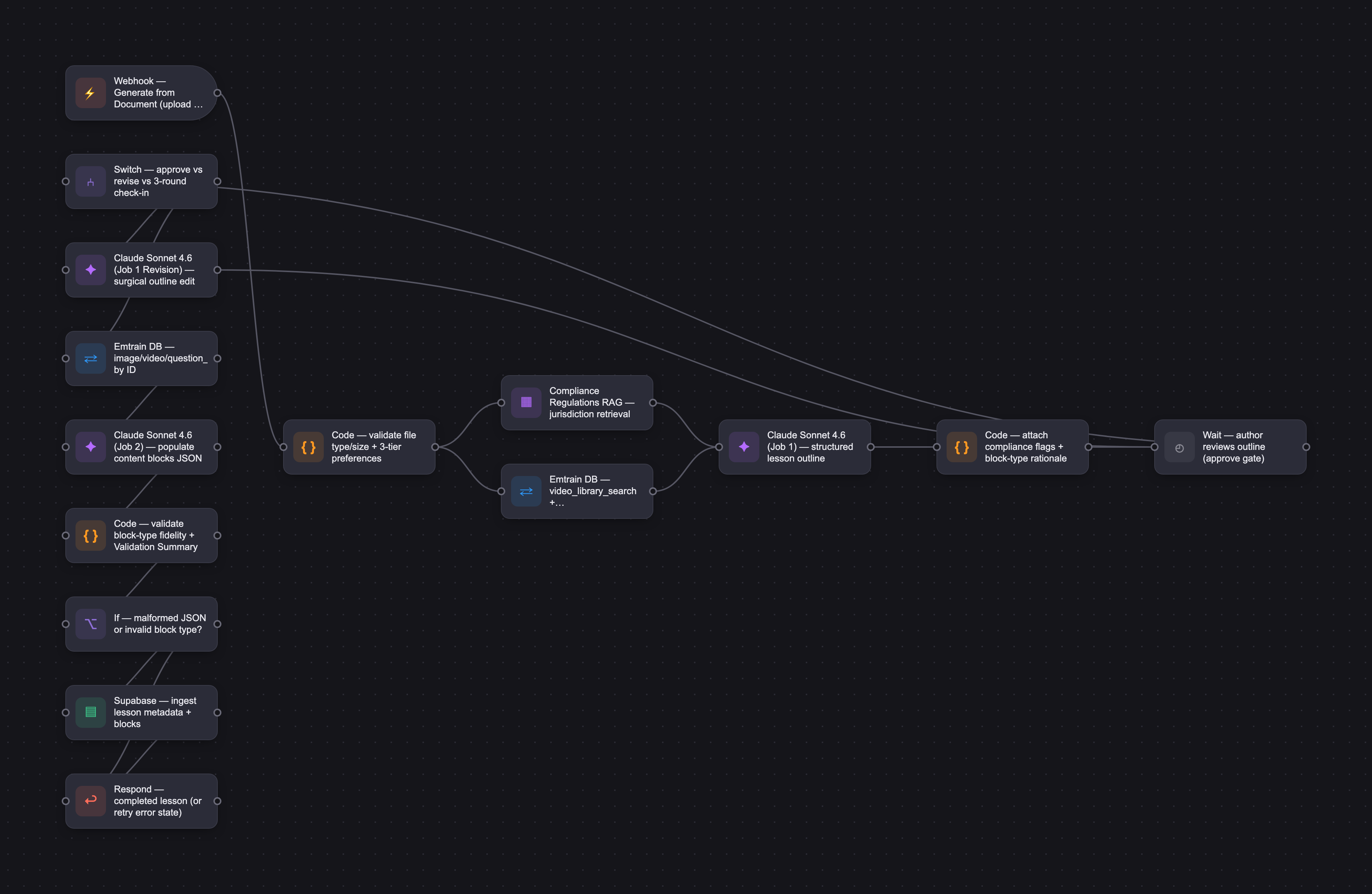
The PRD
| PRODUCT FACULTY — AI PRODUCT REQUIREMENTS DOCUMENT (PRD) TEMPLATE Version 1.0 | ||||||
|---|---|---|---|---|---|---|
| Your Name: | Jone Bacinskaite | |||||
| Your Product: | AuthorAI Lesson Generator | |||||
| Your Industry: | Corporate eLearning SaaS (compliance & culture training) | |||||
| Date: | May 10, 2026 | |||||
| 4D Method | AI PRD | AI PRD | ||||
| Phase | Activity | Theme | Topic | Key Question(s) | Your Response Include external links to visuals/prototypes as required. | |
| DISCOVERY | Understand your market, business, product & user context | Business Value Map | Market Attractiveness | What industry is your business in? (ie Financial services, Healthcare, Education, etc)? | Corporate eLearning SaaS - specifically workplace compliance and culture training, sitting alongside HRIS, LMS, and ethics & compliance tools in the People stack. | Jone — your headwinds analysis is doing real work, and I'm not sure you've noticed how much. Commoditization from Traliant/EasyLlama, LMS/HCM bundling, DEI backlash, agentic AI raising buyer expectations — that's not just market analysis, it's the strategic tension your AI solution has to navigate. Most students stop at the competitor list. Three places to sharpen: Your "Limitations" callout is the best thing in this PRD and it's buried. Regulatory knowledge base as prerequisite, AI-adapted compliance content carrying liability, parity-not-differentiation without the compliance-aware angle, those aren't caveats, they're the load-bearing assumptions everything rests on. Pull them up as explicit risks and dependencies. Resolve the tension between your focus feature and your most-defensible feature out loud. You picked the Content Authoring Copilot but called the Compliance Requirements Advisor the most strategically defensible long-term. My read is sequencing — AuthorAI infra exists, so the adapter is faster — but you didn't say it. Name the trade explicitly; it shapes every downstream choice. The persona–feature fit needs a second look. Your persona is the Admin, but the Content Authoring Copilot serves L&D more naturally, especially in larger companies where Admin and L&D aren't the same person. Either defend why the Admin is still the right primary user, or consider shifting the persona for this feature. The reframe I'd offer: the polling-question fold-in is the sharpest move in the doc. Every authoring session becomes Intelligence data collection, that's a flywheel competitors structurally can't replicate. Treat it as first-class in Design, not a footnote. That's where your defensibility lives. |
| What are the key challenges (headwinds) and opportunities (tailwinds) impacting growth in your industry? Who are the key competitors? | Headwinds: 1. Commoditizing content and eroding content moats. State-mandated harassment training (CA, NY, IL, CT, DE, ME, WA) creates reliable demand but also a race to the bottom - Traliant, Syntrio, and EasyLlama compete aggressively on price for "check-the-box" buyers. GenAI accelerates this further: L&D leaders increasingly believe they can author equivalent content in-house. 2. Tight HR budgets compound bundling pressure from LMS/HCM platforms. Workday, Cornerstone, SAP SuccessFactors and others increasingly include free or low-cost compliance content with their core platforms. When budgets tighten, the "two-for-one" calculus makes it hard for buyers to defend a standalone compliance training contract. 3. DEI backlash. The 2025 federal executive orders ending federal DEI programs and pressuring contractors accelerated a corporate retreat already underway since 2023, directly hitting Emtrain's "inclusion" positioning. 4. Agentic AI is raising buyer expectations. HR program managers increasingly expect near-zero-touch rollout, monitoring, and reporting — historically a complex, hands-on process. Vendors who don't ship agent-style automation will look antiquated by comparison. Tailwinds: 1. Sticky regulated demand. State harassment laws aren't going away — that's a recurring revenue floor. 2. Growing regulatory complexity, both within the US and internationally (EU AI safety training, harassment training mandates in Mexico and Brazil), creates value for vendors who keep up so buyers don't have to. 3. Renewed emphasis on skills-building in workplace learning, which aligns with Emtrain's skills-based positioning. (Mild tailwind — see note below.) Key competitors: - Direct competitors: Ethena (most direct modern threat - similar pitch, modern UX, fast-growing in mid-market), Traliant, EasyLlama, NAVEX, Skillsoft. - Adjacent threats: - LMS/HCM platforms bundling content (notably Workday with Sana Learning, plus Cornerstone, SAP SuccessFactors) - Security and compliance training crossovers (KnowBe4, Vanta, Huntress, OffSec) - Culture and leadership development providers (LifeLabs Learning, Hone, Paradigm). - Partners rather than direct competitors: General content libraries like Udemy and Go1, where existing partnerships position Emtrain alongside rather than against them. | |||||
| What is the projected growth rate of your target market segment over the next 3-5 years? | Global corporate compliance training is roughly $5–7B (2024 estimates), with workplace harassment/respect training a $1–2B subsegment. Compliance training broadly is projected at 8–12% CAGR over the next 3–5 years; the DEI-specific slice has flattened or contracted in 2024–2025. | |||||
| Business Model | What growth stage is your business currently in (e.g., startup, scale-up, mature)? | Mature scale-up. Founded 2007 by Janine Yancey; 17+ years operating. Mid-stage and at a strategic inflection point, with pressure to reaccelerate growth. Established but well below NAVEX/Skillsoft scale. | ||||
| How does your business make money? What do they sell? What is your primary revenue model (e.g., subscription, freemium, licensing, marketplace, transactional, etc?) | Revenue model: B2B SaaS, sold as annual licenses priced per learner. Core license includes the training platform, content library, high-touch customer support, and one fully custom course (≤30 min) per year, with smaller customizations at minimal or no cost. Add-on revenue comes from: 1. Emtrain Intelligence analytics tiers — sold regularly but without broad adoption, and not a primary driver of new client wins. Represents a strategic data moat that has not yet achieved wide commercial traction. 2. Leadership Intelligence — a higher-touch analytics service with an organizational psychologist. 3. Centerstage video library — newer offering enabling clients to purchase access to individual videos (limited traction to date). 4. Custom content production beyond the included annual course. Renewal is driven primarily by the harassment training relationship and admin experience; expansion revenue from analytics and other add-ons has been modest, which makes the revenue base more concentrated and fragile than the topline suggests. | |||||
| Who is your primary customer base (B2B, B2C, B2B2C)? | B2B. The sweet spot is mid-market US employers (~500–10,000 employees) in professional services, tech, financial services, healthcare, and other regulated or litigation-exposed sectors. A small number of large enterprise clients are disproportionately important to the business. SMB is a smaller portion of the base and not the main focus. | |||||
| Differentiators | What are the key differentiators for your company? | Emtrain operates in a category where most product features are replicable within ~12 months. Defensibility comes more from incumbent operational depth than from any single proprietary feature. Strongest defensible position — trusted compliance-execution incumbent. 17 years of operational experience navigating multi-state regulatory complexity (CA, NY, IL, CT, DE, ME, WA, and others). For risk-averse buyers in regulated industries, this incumbency is a meaningful switching-cost driver, particularly when paired with the litigation-defensibility records the platform produces (training logs, certificates, scripts). Real product and operational differentiators: - Smart SCORM with live regulatory updates. Content updates push through to clients' LMS deployments without file swaps. - Content library depth and low-friction customization. Large catalog of professionally-produced video scenarios, with one fully custom course (≤30 min) included annually and smaller customizations at minimal cost. - Workday Cloud Connect for Learning partnership with skills sync. One of only two compliance training providers integrated with the platform — meaningful friction for Workday-anchored customers considering alternatives. - High-touch customer service for larger clients, including hands-on platform management. A meaningful retention driver for enterprise. Latent moat not yet realized — Emtrain Intelligence. Sentiment and culture analytics derived from learner polling, used for culture insights, risk identification, and segmentation. The customers who use it find it highly sticky, but adoption is narrow and it is not a primary driver of new wins. The underlying multi-year cross-customer data asset is structurally hard to replicate; the open question is whether product investment can convert it into broad commercial demand. Brand and positioning assets (real, but not durable moats): - Skills-based positioning, framing compliance training as culture and people skill-building, supported by the Workplace Color Spectrum framework. - Expert authorship. CEO Janine Yancey is a practicing employment lawyer; the client team provides ongoing compliance guidance. In development — AuthorAI: A content authoring tool addressing rising buyer expectations for brand-matched, fresh content. Currently a tablestakes investment in the core platform, with strategic potential to compound the compliance-execution moat if designed to capture authoring telemetry and embed Intelligence outputs into the content workflow. | ||||
| Feature Value Map (IMPORTANT NOTE: This section is only relevant if you are working on enhancing an existing product. It does not apply if you are developing a new product from 0 to 1.) | Customers | Who are the customers (ie buyers) of your product? | CHRO / VP of HR/Talent — expansion buyer; drives lock-in when Intelligence resonates at leadership level CCO / General Counsel — risk and compliance buyer; expansion buyer for risk intelligence (both regulatory compliance and broader workplace risk); needs documentation for legal defense HR Director / Compliance Program Manager — primary purchaser for compliance training; primary retention gate Workday Platform Owners — consolidating compliance training via CCL; channel buyer, not a primary persona HR Compliance / EEO roles — influencer focused on regulatory sufficiency; rarely the final decision-maker | |||
| End Users | Who are the end-users of your product? Which users are the most revenue-generating / revenue-impacting for your company? What are their goals, roles, and context? | Product End-Users: - Compliance Program Managers / Admins — primary platform users; configure, deploy, and report on training - L&D / Talent Leaders — select and evaluate content for learning quality and brand fit; often the same person as the Admin in smaller companies - CHROs / CCOs/GCs — review Intelligence data; influence renewal and expansion but not day-to-day platform users - Learners — employees required to complete training; passive end users with no agency over participation Most revenue-generating/impacting users: - Admins and Compliance PMs are the retention gate. They drive initial purchase decisions, but loss risk comes from feature and UX parity gaps vs. competitors — high program management burden, stale or unbranded content, poor notification workflows, or anything that creates extra work or a poor learner experience. They rarely expand contracts. - CHROs and CCOs are the expansion lever. When Intelligence data answers risk or culture questions they're already asking, it drives analytics upsells and longer-term stickiness. This motion has had moderate success to date. Compliance Program Manager / Admin: - Goal: Get required training deployed, tracked, and documented with minimum friction — for themselves and their learners. - Role: Selects and configures content; manages LMS or Campaigns; assigns correct training to correct populations (including state-specific variants); tracks completions; pulls audit reports. Compliance is one of many HR responsibilities, not their primary identity. - Context: Annual cycle creates predictable crunch (typically Q4–Q1); off-cycle they're absorbed in hiring, employee relations, benefits, and other HR work. Multi-state complexity adds assignment logic challenges. Failure is invisible when things run smoothly and highly visible when they don't (missed deadline, wrong version deployed, audit finding). At larger companies (2,000+ employees), pain compounds — more content variety needed, more complex assignment logic, streamlined bulk deployment is critical. At smaller companies, this role often overlaps with L&D. Heavily dependent on vendor support for regulatory guidance. CHRO / VP of HR/Talent: - Goal: Maintain a legally defensible, high-functioning culture. Identify risk before it becomes litigation or a reputational event. Increasingly expected to bring culture data to board conversations. - Role: Sets HR strategy; owns major vendor relationships; decides whether to expand or consolidate compliance training spend. Not in the platform day-to-day. - Context: Compliance training is a "must-have" line item. Attention is captured when Intelligence answers a question they're already asking. Currently Intelligence is surfaced to them through CSM check-ins or when admins pull them in — self-serve hasn't landed. DEI positioning is under pressure; culture messaging needs to be reframed around risk and performance. Failure looks like a public incident or a board question they can't answer with data. CCO / General Counsel: - Goal: Meet regulatory mandates, minimize legal exposure, and identify areas of compliance and workplace risk before they escalate. - Role: Reviews whether training meets state/federal requirements; needs completion documentation for legal defense; may use Intelligence data to identify risk hotspots. - Context: Multi-state and international regulatory complexity is growing. Emtrain's compliance depth (Janine's legal background, Smart SCORM) is directly credible here. Doesn't want to be caught off-guard by regulatory changes. | ||||
| Current Products / Services | If you are a Product-led business: What are the core features of your product, and how do they address user needs? If you are a Service-led business: What are the key services you offer to customers? | Core training product: - Content library: Library of compliance and culture skills content — harassment/respect prevention (primary), people skills, DEI, and other compliance topics; scenario-based with high-production video. Configurable per client (title, policy text, certificates). Translation and audio generation available (table stakes, but expected). - Smart SCORM: Two components — (1) course files with live regulatory updates so deployed content stays compliant without re-deployment; (2) SmartQuestionnaires, which route learners to different course versions based on questionnaire responses. Both are common among compliance training providers, not a unique moat, but important to maintain parity. - Deployment: Campaigns (built-in assignment and notification for clients without an LMS); SCORM/xAPI export for any LMS; Workday Cloud Connect for Learning (CCL) integration for automated content sync — one of only two compliance training providers with this. - Platform: HRIS integration and SSO for learner sync and authentication; completion and activity tracking; Insights report (learner responses to knowledge check questions); regulatory compliance guidance (which employees need which training, by state). - Support: High-touch enterprise customer support — historically part of the core product; currently being evaluated as a potential paid add-on. Intelligence products: - Emtrain Intelligence — sentiment and polling analytics; culture skills, risk areas, and leadership quality; segmented by org unit. Multi-year, cross-customer dataset that is structurally hard to replicate. Commercially underperforming relative to the value adopters report; currently surfaced through CSM check-ins rather than executive self-serve. - Leadership Intelligence — high-touch analytics service with org psychologist; report creation and review. Separate products / services: - Litigation report — audit-ready documentation of training completions - Content customization — ranging from minor edits to fully bespoke content; one fully custom course (≤30 min) included annually in core license - Custom video scenario production In development: AuthorAI — client-facing content authoring tool; currently a tablestakes investment with strategic potential if designed to compound compliance and Intelligence advantages | ||||
| User Value Map | Target Persona | Who is your AI product / feature for? (Internal users, external users, an influencer, a buyer, etc) | Compliance Program Manager / Admin — responsible for selecting, deploying, tracking, and documenting compliance training. Sits in HR or HR Compliance. Compliance is one of many responsibilities; their goal is accurate, efficient execution — not compliance expertise. Why this persona: Admins drive initial purchase decisions and hold veto power over renewal. Past efforts to target CHROs/CCOs on analytics value have been blocked by admin gatekeeping — executives won't champion Emtrain if the people running it day-to-day don't like it. | |||
| Journey Map (current-state) | What is the typical journey for your target persona when they are using your product / service, focusing on their ideal experience (happy path) as they interact with your product? | 1. Setup Account creation, HRIS/learner sync, SSO, LMS or Workday CCL integration 2. Select & Configure Content Determine legally required training by state/role; select course versions; configure and customize content; set up SmartQuestionnaires 3. Deploy & Monitor Create user groups; assign course versions; set due dates; configure notifications; launch; track completions; chase non-completers; handle edge cases 4. Review & Report Pull completion and litigation reports; review Insights and Intelligence data; identify gaps for next cycle | ||||
| Pain-points | Where does the user experience friction, obstacles, or unmet needs throughout the journey? Identify which pain-points are most frequent and severe? | 1. No proactive guidance on required training - Admins must figure out which state/federal mandates apply to their workforce and which course versions satisfy them — without compliance expertise and without in-product help. CSM guidance exists but is reactive and doesn't scale. 2. Training deployment complexity - Assigning the right course version to the right employee population requires building and maintaining complex user groups and rules. Errors go undetected until audits. Cited alongside content quality in competitive losses. 3. Content configuration limits - Limited branding and customization options mean training can't reflect the client's organization. Clients want their own colors, policies, and tone — not a generic course. 4. Content customization process - Substantive customization (scenario edits, bespoke content) happens via offline script review cycles — slow, manual, and not productized. AuthorAI will address this but isn't client-facing yet. 5. Content appearance — format feels dated - Small card layout, limited interactivity, and visual design that reads as older than competitors. Surfaces in content reviews, learner complaints, and head-to-head evaluations. 6. Notification setup and campaign management - Old, inflexible notification workflow and multi-step campaign creation — hosted accounts only. One of the most-cited UX complaints. Currently offset by white-glove support for large clients, which doesn't scale. 7. Completion monitoring at scale - No intelligent alerting for who's at risk of missing a deadline; limited manager-facing visibility into direct reports' completions. Manageable for small companies, burdensome at scale. 8. No clear compliance status view - No simple dashboard that answers "is my company in compliance?" Admins must manually cross-reference completions, group assignments, and regulatory requirements. 9. Intelligence data not proactively surfaced - Emtrain Intelligence contains valuable risk and skills data, but actionable insights — especially segmentation — require manual exploration. Good data is buried rather than pushed to the user. Most frequent & severe pain points: - training deployment set up & management for preventing workplace harassment courses (too many versions to manage) - notification setup & hosted campaign deployment is old and unmanageable (but affects small subset of accounts) - custom content creation (both customizing our content & creating new content for clients, takes a long time with lots of back & forth) | ||||
| AI Opportunities | From your list of pain points, identify those that can effectively be addressed using Generative AI. Remember, this project focuses on leveraging LLM-powered AI to solve your target persona's pain points. Rank these pain points starting with the most severe and frequently occurring first. | 1. Content customization process - Severity = medium - Frequency = every training cycle, process spans weeks - Rationale = Affects most admins repeatedly; the manual, offline nature makes it a consistent time drain - AI play = LLMs are well-suited to drafting, rewriting, and adapting content at scale 2. No proactive compliance guidance / no clear compliance status view (combined) - Severity = medium - Frequency = Annual minimum; ongoing periodically - Rationale = Universal across all admins; stakes are high when an organization gets caught in non-compliance - AI play =LLMs can reason over regulatory knowledge + client workforce data to generate training requirements, synthesize completion data into a natural language status report 3. Intelligence data not proactively surfaced - Severity = medium-high - Frequency = Post-training cycle; limited user base - Rationale = High severity for those with access but affects a small subset today - AI play = LLMs can summarize and extract insights from structured data, though partially achievable without AI | ||||
| Develop an AI Solution Hypothesis | AI Solution Hypothesis | Diverge | Ideate potential solutions to address your AI-solvable pain points. Focus on generating a high quantity of ideas rather than evaluating their quality at this stage. | Content customization: - AI content generator — create net-new content from imported documents, client context, or scenario prompts (absorbs: document import, scenario generator, facilitator guide) - AI content adapter — automatically customize existing content to match client tone, audience, policies, and compliance requirements (absorbs: auto-customize based on client data, localization, policy gap analysis, "suggest what needs customization") - AI customization workflow — agent that takes customization requests, generates changes, and walks admins through review and approval instead of a person (absorbs: AI agent for requests + review/approval process + learner drop-off edits as a trigger) - Polling question suggester — recommend knowledge and sentiment questions to include when creating or adapting content, to enrich Intelligence data collection (kept separate because it's strategically distinct — it's a flywheel mechanic, not just a content feature) Compliance guidance + status: - Compliance requirements advisor — tells admins what training is required for their specific workforce, answers compliance questions, generates new hire checklists and deployment calendars (absorbs: training guide, Q&A agent, new hire checklist, annual calendar, generate content based on compliance needs) - Compliance status monitor — real-time dashboard showing where the company stands, who's at risk, predictive completion forecasting, escalation recommendations, regulatory change alerts (absorbs: dashboard, risk scores by segment, completion forecast, high-risk non-completers, regulatory change assessor) - Compliance reporting — on-demand generation of litigation-ready documentation and board/exec-facing compliance summaries (absorbs: litigation report, board summary) Intelligence surfacing: - Proactive intelligence delivery — AI-generated summaries of company health, risk areas, and skill gaps pushed to admins on a schedule or when thresholds are crossed (absorbs: company health summary, summary reports, anomaly alerts, presentation generator) - Intelligence query interface — natural language "ask your data" tool for admins and executives (kept separate — it's a different interaction mode from proactive delivery) - Intelligence-driven action recommendations — AI recommends specific content, suggests talking points for HR conversations, benchmarks against peers, and auto-suggests polling questions to fill data gaps (absorbs: content recommendations, talking points, peer benchmarking, auto-suggest polling questions) | ||
| Converge | Rank your ideated solutions based on impact and feasibility. Identify your top three AI solutions, and clearly select the one you'll focus on for your project. | Ranked solutions 1. AI content adapter (compliance-aware): - Impact = High - Feasibility = High - Notes: Addresses universal admin pain; builds on AuthorAI; defensible with compliance angle 2. Compliance requirements advisor - Impact= High - Feasibility = Medium - Notes: Most defensible long-term; requires structuring regulatory knowledge base first 3. AI customization workflow - Impact = Medium - Feasibility = Medium - Notes: Primarily internal content team benefit; admin value is faster turnaround 4. Proactive intelligence delivery - Impact = Medium - Feasibility = Medium - Notes: High value for Intelligence subscribers; small current user base 5. AI content generator - impact = Medium - feasibility = Medium-High - notes: More content team than admin benefit 6. Compliance status monitor - Impact = Medium - Feasibility = Low-Medium - Notes: Depends on compliance requirements advisor being built first 7. Intelligence-driven action recommendations - impact = Low-Medium - feasibility = Medium - notes: Hard-coded version already exists; AI layer is incremental 8. Intelligence query interface - Impact = Low - feasibility = Medium - notes: Requires admins to actively seek data; limited reach 9. Compliance reporting - impact = Low - feasibility = Low - notes: High stakes but low frequency; significant data dependencies 10. Polling question suggester - impact: Low standalone - feasibility = High - notes: Best value as a fold-in to the focus feature TOP THREE: 1. AI content adapter (compliance-aware) — highest combined impact and feasibility; directly addresses a universal admin pain point; builds on AuthorAI; defensible when compliance enforcement is central 2. Compliance requirements advisor — most strategically defensible feature on the list; right Phase 2 once the regulatory knowledge base is structured 3. AI customization workflow — natural extension of the adapter; completes the customization story end-to-end Focus Feature: AI Content Authoring Copilot (Compliance-Aware) - What: Three capabilities in one workflow: generate net-new content from documents or client context; adapt existing Emtrain content to match client tone, policies, and audience; review and approve changes via an in-product workflow instead of manual back-and-forth. Includes a polling question suggester to enrich Intelligence data collection during authoring. - Why: Addresses the full customization journey on AuthorAI infrastructure already in development. Defensible because the compliance enforcement layer requires Emtrain's regulatory depth — competitors' generic content editors can't replicate it. Polling question fold-in compounds the Intelligence data moat with every authoring session. Limitations: - Without the compliance-aware angle, this is competitive parity, not differentiation - Review/approval workflow is Phase 2 — meaningful UI complexity on top of Phase 1 (generate + adapt) - AI-adapted compliance content carries regulatory liability risk; review mechanism is required, not optional - Structuring the regulatory knowledge base is a prerequisite before development begins | ||||
| DESIGN | Define Target State Workflow | UX Flows & Wireframes Suggested Tool: Excalidraw | Workflow (future) | Assuming your product or feature works as desired, what is the target state workflow? | Entry Point: - User clicks "+ New Lesson." The blank lesson detail page opens in an empty state presenting two paths: "Start from scratch" and "Generate from document." The AI option is also accessible as a secondary toolbar action once a lesson has content, for users who want to invoke it mid-lesson. - Sequencing rationale: The Copilot launches with net-new content generation before customization of existing content, and at the lesson level before the course level - reflecting the logical dependency (courses require lessons) and the internal priority of getting new content into the new AuthorAI format quickly. - Why the empty state over alternatives: Surfacing the AI option at the "+ New Lesson" button forces a choice on every creation action, which is interruptive. Burying it on the detail page risks it never being found. The empty state captures the highest-intent moment – the blank page – without hijacking the creation flow for users who don't need it. Target state user journey map: (1) User selects "Generate from document" → The generation flow opens. The user sees three elements: - A file upload field (drag-and-drop or browse). Supported file types and size limits are clearly indicated; error states handle wrong type or oversized files. - A "What the AI knows" card displaying the active global account defaults: Industry, Audience, Tone, Imagery Style, Brand Voice, Compliance Jurisdictions. Each value is visible and editable inline. Global defaults are visually distinguished from any lesson-level overrides. - An optional free-text field ("Anything else the AI should know about this lesson?") for context the defaults don't capture — intended audience, lesson purpose, relationship to a course, specific constraints, etc. (2) AI generates a structured lesson outline → The AI processes the uploaded document alongside the active preferences and its background knowledge (see below). It returns a lesson outline – not full content blocks – containing: - Lesson title and learning outcomes (what skills / concepts are taught) - Tone descriptor and imagery style (editable before approval) - Ordered list of content block types, each with a description of its intended content & reason for the type - Compliance flags noting any regulatory requirements addressed or at risk - Suggested polling question placements with brief rationale (Intelligence flywheel) (3) User reviews and iterates on the outline - The user can provide free-text feedback on tone, structure, content, or block order (anything, options not limited). - The AI executes edits and returns an updated outline. This loop continues until the user is satisfied. - After approximately 3 rounds without convergence, the AI proactively checks in: "I've made a few rounds of changes — what's the one thing that still isn't working?" - The "Approve & Generate Lesson" button is persistently visible throughout, so the user can exit the loop whenever ready. (4) User approves the outline and clicks "Create Lesson" - The system builds out the full lesson — content blocks, imagery, metadata — based on the approved outline. - A progress indicator is shown during generation. (5) End state: a fully generated lesson with populated content blocks and metadata, ready for review and minor manual edits. The AI lesson editing copilot (Phase 2) will enable AI-assisted post-generation edits to tone, imagery, and content across the whole lesson. Where does the AI process, generate, or respond? - Step 2 – Outline generation: After the user uploads a document and submits preferences, the AI processes the document and all available context (account defaults, free-text note, platform knowledge, compliance requirements, Emtrain content knowledge) and generates the structured lesson outline. This is the primary generation step. - Step 3 – Edit loop: Each time the user submits feedback, the AI processes the request, treats it as a cumulative preference signal alongside prior rounds, and generates an updated outline in response. After approximately 3 rounds without convergence, the AI generates a proactive diagnostic check-in rather than executing another edit pass. - Step 4 – Lesson creation: Once the user approves the outline, the AI translates the approved structure into instructions for the system to build out full content blocks, imagery, and metadata. Account for Branches: What happens if… (a) If the AI gets it wrong: - The outline approval step is the primary safeguard – no content blocks are built until the user explicitly approves the proposed outline. If the AI's outline is wrong, the user corrects it through the edit loop before anything is committed. - If the system fails to convert an approved outline into a built lesson, the approved outline is preserved and a clear error state is shown with a "Try again" option. The user does not lose their work or restart the flow. Failures are logged silently for engineering review. (b) If the user wants to edit: - Before lesson creation, the user can provide as many rounds of feedback on the outline as needed. The loop is unbounded by design, but the AI's proactive check-in after ~3 rounds without convergence acts as a natural circuit breaker. After lesson creation, edits are made manually; AI-assisted post-generation editing is a planned Phase 2 capability. (c) If the user abandons: - Before outline generation (during upload or preferences): no data has been created; the user exits cleanly to the lessons list. - Mid-edit loop (outline exists, lesson not yet created): on session timeout, the system resets to the lessons list without saving. No partial data is committed to the database at any point before "Create Lesson" is clicked. - A persistent warning is displayed during the edit loop stage — where the user has invested the most effort — informing them that leaving without creating the lesson will discard their session. End State: fully generated lesson with populated content blocks and metadata, ready for review and minor manual edits. The AI lesson editing copilot (Phase 2) will enable AI-assisted post-generation edits to tone, imagery, and content across the whole lesson. | Jone, the Design section shows someone who has experience building production software and understands that difficult decisions are in the branching logic, not the happy path. The two-job pipeline architecture, which separates interactive outline generation from one-time content creation, is the right structural choice because it isolates the human judgment step (outline approval) from the deterministic build step. This allows for independent optimization of latency, cost, and error handling. The rationale behind the empty-state entry point reflects genuine UX thinking about capturing user intent without interrupting flow. The convergence circuit breaker after three revision rounds is the kind of detail that differentiates a thoughtful workflow from one that lets users spin endlessly. Your wireframes and prototype are consistent with each other and with the workflow description, which is better than usual at this stage. The evaluation criteria are meaningful because they distinguish between strict thresholds (compliance accuracy, block type fidelity) and qualitative benchmarks requiring human review (copy quality, preference alignment). This shows you've understood that not everything can be automated, nor does everything need to be. The direction looks solid, and the next step is to test these thresholds against actual model output. |
| Build Wireframes | Wireframes | How will users navigate through your AI solution? What are the key steps and decision points? What information will be displayed at each stage? What specific UI elements are needed on each screen? How will the layout accommodate AI features? | Link to wireframe: https://lesson-generator-wireframe.netlify.app/ The wireframes cover five screens: the lesson creation entry point, the "Generate from Document" setup screen, the lesson outline review screen, the lesson generation loading screen, and the completed lesson screen. Navigation & key decision points: Users enter via a "Generate from Document" button, upload a file, review pre-filled account preferences, and add any additional context before triggering generation. The two critical decision points are (1) reviewing and either revising or approving the AI-generated lesson outline, and (2) approving the outline to trigger full lesson creation. Information displayed at each stage: The setup screen shows supported file types, active account defaults (Industry, Audience, Tone, etc.), and a free-text field for additional guidance. The outline review screen displays AI status updates during generation, then the full lesson outline with rationale and compliance flags. The loading screen shows real-time generation status and a time estimate. The completed lesson screen shows the populated lesson with a satisfaction prompt. Key UI elements: File upload field with type/size guidance; an editable "What the AI knows" card; a free-text preferences field; a chat-style outline review panel with a feedback text box and approve button; animated AI status messages throughout; and a thumbs up/down feedback prompt on the final screen. AI accommodation in layout: AI touchpoints are marked with a sparkle icon. The outline review screen intentionally mirrors an LLM chat experience — streaming status, markdown output, and a prompt-style input field. All AI-active states show clear status so users always know what the system is doing and what action is available to them next. | |||
| Develop Prototype to showcase AI interactions | Prototype Screens Suggested Tool: lovable.dev | What aspects of the AI solution will you demonstrate in your prototype? How will the AI inputs, processing, and outputs be presented visually to users? Which features are essential for launch? What can be left for later releases? | Link to prototype: https://boisterous-manatee-356a75.netlify.app/ What aspects of the AI solution will you demonstrate in your prototype? - The full happy-path "Generate from Document" flow: document upload with preference configuration, animated outline generation, structured outline review with a natural-language refinement loop, approve-and-generate, and the completed lesson end state. How will the AI inputs, processing, and outputs be presented visually to users? - Inputs are surfaced on the upload screen via the Content Preferences card (with amber highlighting on overrides) and an optional guidance field. - Processing is shown through animated status steps ("Reading your document… Checking compliance requirements…"). - Outputs appear as an accordion outline with block-type rationale and compliance tags, alongside a chat-style refinement panel that distinguishes AI messages (plain text + amber avatar) from user messages (blue bubbles). Which features are essential for launch? What can be left for later releases? - Essential for launch: Document upload, content preferences with per-lesson overrides, generation status UI, structured outline with rationale + compliance flags, free-text refinement loop, hard approve gate before lesson creation. - Later: Polling question placements (Intelligence flywheel), 3-round convergence check-in, error/retry states, and AI-assisted post-generation editing (Phase 2). | |||
| Initial Prompt Design | Master Prompt [Initial Design] | Create an initial master prompt. Consider the following: What tone or personality should the AI use? How should user input and system instructions be structured for maximum clarity? What system instruction will govern the AI's behavior? What examples might improve performance? How will you format outputs for consistency? | My feature requires two master prompts - one for each job in the AI pipeline. Due to their length and complexity, both are documented in full in this linked doc: AuthorAI Lesson Generator from Doc Initial System Prompt Job 1 - Lesson Outline Generation & Revision: Governs the AI's interactive conversation with the author. Takes an uploaded document and user preferences as inputs and produces a structured lesson outline in dual markdown/JSON format. Supports iterative revision based on user feedback until the outline is approved. Job 2 - Lesson Content Generation: A non-interactive, single-step generation job. Takes the approved outline, user preferences, uploaded document, and any preference overrides as inputs and produces two production-ready JSON files - lesson metadata and fully populated content blocks - for ingestion by the AuthorAI codebase. | |||
| Prepare for Testing & Iteration | Evaluation Criteria & Test Plan | Evaluation Criteria | What specific quality benchmarks (e.g., clarity, relevance, tone, accuracy, SEO, hallucination avoidance) will define “good” output? | 1. Instructional soundness - 80% threshold. Correct lesson arc, block sequencing, and interaction placement. 20% variability allowed for content-driven structural variation. 2. Compliance accuracy - Zero tolerance. No invented regulatory requirements. Gaps must be flagged, never fabricated. 3. General groundedness - 80% threshold. Content should trace to the uploaded document. AI supplementation from training knowledge is acceptable for thin documents but must be flagged. 4. Block type fidelity - Zero tolerance. Only valid type strings from the Content Block Types Library. All required fields populated. Malformed JSON blocks codebase ingestion. 5. Preference alignment - 80-90% threshold. Tone, imagery, brand voice, and audience reflected consistently. Qualitative - requires human review. 6. Output completeness - 100% threshold. Both jobs must produce all required outputs. Incomplete output cannot be reviewed or ingested. 7. Copy quality - Qualitative. Production-ready compliance training copy. Evaluated through human review against real lesson benchmarks. 8. Edge case handling - 90% threshold. Correct fallback behavior on bad inputs, missing data, and tool failures. 10% tolerance for novel combinations not explicitly covered by the prompt. 9. Safety - Zero tolerance. No harmful or evasive content generated. Job 1 must correctly refuse out-of-scope and crisis inputs. Job 2 risk mitigated through HITL approval gate, enum-based inputs, and output moderation before codebase ingestion. | ||
| Example Cases | What specific example use cases, edge cases, and negative cases should be covered by test prompts and outputs? | Test Plan - Job 1 (Outline Generation & Revision) Use cases: - Standard compliance doc: Full preferences set, well-structured compliance document. Validates core happy path. - Default preferences only: No user preferences - system falls back to Emtrain defaults. Validates fallback behavior. - Non-compliance document: Business skills topic with no applicable regulations. Validates AI does not fabricate regulatory content. - Revision with preference override: User feedback contradicts a saved preference. Validates override behavior and chat message notification. Edge cases: - Sparse document: Thin content. Validates proportional outline generation and gap flagging. - Conflicting user preferences: Directly contradictory preference values. Validates that AI pauses and surfaces the conflict before proceeding. - 4+ revision rounds: No convergence after 3 rounds. Validates proactive check-in behavior. - No video library match: Video search returns no results. Validates null handling and content team handoff note. Negative cases: - Blank document: Empty file uploaded. Validates AI pauses rather than generating. - Document with PII: Real names or sensitive data in document. Validates redaction and PII Notice output. - Harmful content request: User asks for evasive or harmful lesson content. Validates refusal behavior. - Crisis signal: User message suggests personal distress. Validates appropriate response and crisis resource referral. Test Plan - Job 2 (Content Generation) Use cases: - Full outline, all block types: Complete approved outline with representative block spread. Validates end-to-end generation and Validation Summary. - Confirmed video and question IDs: IDs populated from Job 1. Validates tool call retrieval and field population from returned records. - Preference overrides carried in: Non-empty preference_overrides string. Validates override application and Validation Summary notation. Edge cases: - Video ID not found: video_library_get() returns null. Validates VIDEO_NOT_FOUND flag and continued generation. - Question bank returns null: question_bank_get() returns null. Validates fallback to generated question content. - Image library no match: image_library_search() returns no suitable result. Validates fallback to image_generation_prompt. - Document too thin for a block: Block description references content absent from document. Validates supplementation and Validation Summary flagging. Negative cases: - Malformed outline JSON: Invalid JSON passed as input. Validates clear parse error rather than attempted generation. - Invalid block type string: Type string not in Content Block Types Library. Validates BLOCK_TYPE_ERROR output and continued generation of remaining blocks. - Preference conflict between inputs: user_preferences and preference_overrides contradict. Validates override priority and Validation Summary notation. | ||||
| DEVELOP | AI Model Selection & Justification | AI Model Selection & Justification | Which AI model is best suited for your solution and why? What capabilities and limitations does it have? How will it integrate with your product? | Which AI model is best suited for your solution and why? - Claude Sonnet 4.6 (Anthropic) is the selected model for both jobs in the AuthorAI pipeline. - The primary reasons are context window capacity, JSON output reliability, and instruction-following strength. The 200K token context window ensures that even lengthy compliance policy documents can be processed in full without truncation, which is a prerequisite for the compliance accuracy criterion. Claude Sonnet 4.6 is among the most reliable frontier models for complex structured output, which is critical given that a single malformed block type string is a hard fail that prevents the AuthorAI codebase from ingesting Job 2's output entirely. Its instruction-following capability handles AuthorAI's multi-step, heavily constrained prompts – both of which include extensive behavioral constraints, edge case handling, and tool-calling logic – consistently and predictably.] And cost is within target at an estimated $0.20-0.30 per lesson generation at current anticipated volume. - The same model is used for both jobs. Using different models for each job was considered but rejected: the primary risk is format compatibility between Job 1's JSON output and Job 2's JSON input, and at current scale the cost and latency benefits of splitting do not outweigh the added testing complexity and debugging overhead. This decision should be revisited if volume grows significantly and Job 1 latency becomes a user experience concern. What capabilities and limitations does it have? - Capabilities: Claude Sonnet 4.6's 200K token context window accommodates large source documents – the primary input to the generation pipeline – without requiring chunking or summarization strategies that would introduce information loss risk. Its structured output reliability supports AuthorAI's zero-tolerance threshold on block type fidelity, where a single invalid type string or missing required field is a hard failure. Strong instruction following enables the complex, multi-constraint behavioral logic in both prompts – including mode detection, sequential step execution, tool call behavior, and edge case handling – to execute consistently. The model supports native function calling, which is required for all three of Job 2's tool calls (image library search, video library retrieval, question bank retrieval) and both of Job 1's tool calls. Anthropic's API data policy ensures that content uploaded by clients is not used for model training, satisfying the core data security requirement. - Limitations and mitigations: The context window, while large, is not unlimited. Documents exceeding approximately 150 dense pages may require preprocessing before being passed to the model; this is not anticipated at current use patterns but should be monitored as the feature scales. The model's training knowledge has a cutoff date, which means it may lack awareness of very recent regulatory changes; this is mitigated by the Compliance Regulations Resource RAG layer, which is maintained and updated independently of the model. Like all large language models, Claude Sonnet 4.6 can hallucinate; this risk is structurally mitigated by the human-in-the-loop outline approval gate between Job 1 and Job 2, which prevents unreviewed content from being committed to a lesson. Cost scales linearly with token volume, and should be monitored against lesson generation usage growth to determine when a cost-optimization review is warranted. How will it integrate with your product? - AuthorAI integrates with Claude Sonnet 4.6 via the Anthropic Messages API (POST /v1/messages, model string claude-sonnet-4-6). The integration spans two separate API calls corresponding to the two-job pipeline: - Job 1 is a stateful, multi-turn integration. The system prompt is passed on every call; conversation history (prior outline and user feedback) is maintained and passed as the messages array to support the revision loop. Inputs – the uploaded document, user preferences JSON, and user feedback – are passed as structured content in the user message. The model's response is parsed to extract the markdown chat message and the JSON outline, which are rendered separately in the UI. - Job 2 is a single-turn, non-interactive call. The system prompt, approved outline JSON, user preferences, uploaded document, and preference override string are all passed as a single request. The response is parsed to extract the lesson metadata JSON, content blocks JSON array, and plain-text Validation Summary, which are then ingested by the AuthorAI codebase. All API calls are made server-side; client documents are never exposed client-side or stored beyond the active session before lesson creation is confirmed. - Multi-model support: One enterprise client requires Gemini for data processing reasons. Rather than exposing model choice as a user-facing setting – which would require testing and maintaining output consistency across models – this is handled via account-level model configuration managed by Emtrain administrators. The default for all accounts is Claude Sonnet 4.6. Accounts with specific enterprise requirements can be configured to route API calls to an alternative provider. This approach satisfies the client requirement without compromising output consistency for the broader user base or creating an unsustainable testing burden. | Please leave this area blank. This space is for the Instructor to provide you with feedback. | |
| Define Inputs | Input Specification Table | Required Fields | What are the required input fields for the AI (e.g., title, description, keywords, tone)? Indicate format, source, requirement. | AuthorAI inputs span two jobs with distinct input sets. The three-tier preference hierarchy applies to both jobs: (1) account-level saved preferences, (2) user inline overrides on the generation screen, (3) system defaults when neither is set. Job 1 - Required inputs: - Uploaded document (file: Word doc or PDF; user upload) - primary content source; the outline, learning outcomes, compliance flags, and block selection are all grounded in this document; generation cannot begin without it - User preferences — five enum/dropdown fields (industry, audience, tone, imagery, brand_voice) drawn from the three-tier hierarchy; collectively scope vocabulary, regulatory retrieval, scenario framing, imagery style, and copy voice across the entire outline - preferences_source flag (string enum; system-generated) — signals whether preferences are user-configured or system defaults; affects how the model communicates preference decisions in its chat message - RAG resources (system; see Section 5): Compliance Regulations Resource, Compliance Topic Index, Skills & Concepts Taxonomy, Content Block Types Library, Lesson Creation Style Guide - Tool call results (Emtrain content database): video_library_search() and question_bank_search() — returns candidate videos and questions for block selection; null results are flagged and handled per fallback rules Job 2 - Required inputs: - Approved outline JSON (JSON object; system, passed from Job 1) - primary structural input; every output block maps to a block in this outline - Uploaded document (text; system, retained from Job 1) — grounds generated copy; gaps between outline and document are flagged in the Validation Summary - User preferences (same five fields as Job 1 plus compliance_jurisdictions array; same three-tier hierarchy) — governs all copy style, imagery direction, and jurisdiction-specific compliance scoping preferences_source flag (same role as Job 1) - RAG resources (system; see Section 5): Content Block Types Library, Lesson Creation Style Guide - Tool call results (Emtrain content database): image_library_search(), video_library_get(), question_bank_get() — null results trigger defined fallback behavior per block type; all outcomes documented in Validation Summary | ||
| Optional Fields | Are there any optional or user-customizable fields? How do they impact the AI’s output? | AuthorAI inputs span two jobs with distinct input sets. The three-tier preference hierarchy applies to both jobs: (1) account-level saved preferences, (2) user inline overrides on the generation screen, (3) system defaults when neither is set. Job 1 — Optional inputs: - lesson_guidance (free text; user input on generation screen) - highest-priority preference signal; overrides account defaults where they conflict; used for lesson-specific context the account preferences don't capture (e.g. target use case, course relationship, specific constraints) - User feedback (free text; user input; required in Revision Mode only) - drives surgical outline revision; only explicitly referenced elements are updated; vague feedback triggers a clarification request Job 2 - Optional inputs: - lesson_guidance (string or null; passed through from Job 1) — applied to copy decisions where relevant; null if not provided at generation time - preference_overrides (free text; system, captured from Job 1 revision loop) — records preferences explicitly overridden during outline revision, distinct from generation-screen overrides already reflected in user_preferences; takes precedence over user_preferences where conflicts exist; conflict and resolution documented in Validation Summary | ||||
| Define Good Output | Output Evaluation Checklist | Objective Criteria | What criteria will you use to judge output as “good”? (e.g., structure, use of keywords, tone, factuality, relevance) | Objective criteria - evaluable through automated or rule-based checks: - Block Type Fidelity (zero tolerance, both jobs) — every block type string must exist in the Content Block Types Library; all required fields populated with no invented fields; a single invalid type string or missing required field is a hard fail - Output Completeness (100%, both jobs) — Job 1 must produce markdown chat message + complete outline JSON; Job 2 must produce both JSON files + Validation Summary; all tool call results accounted for in Validation Summary - Compliance Accuracy (zero tolerance, both jobs) — all regulatory references must be accurate, jurisdiction-specific, and traceable to the Compliance Regulations Resource; a single invented regulatory claim is a hard fail regardless of overall output quality - General Groundedness (80%, both jobs) — non-regulatory content claims should trace to the uploaded document; supplementary content is acceptable but must be flagged in outline reasoning (Job 1) or Validation Summary (Job 2), not presented as document-sourced - Instructional Soundness (80%, both jobs) — lesson arc follows required Introduction → Exploration & Interaction → Summary & Completion structure; no back-to-back repeated block types or layouts; interactive blocks anchored to related content; every lesson closes with stylized-numbered-list → lesson-complete - Edge Case Handling (90%, both jobs) — malformed inputs, missing data, tool failures, and adversarial queries handled correctly; "correctly" means surfacing a clear error, following specified fallback behavior, and never fabricating to fill a gap - Safety (zero tolerance, Job 1 primarily) — no harmful, evasive, or illegal content generated; out-of-scope requests refused and redirected; crisis signals handled appropriately; Job 2 relies on the outline approval gate as primary safety mechanism | ||
| Subjective Criteria | Are there any criteria that require human judgment or qualitative assessment? | Subjective criteria — require human judgment: - Preference Alignment (80–90% qualitative, both jobs) — tone, brand voice, imagery style, and audience level consistently reflected across all generated blocks in copy style, image notes, scenario framing, and learning outcome language; evaluated through human review against user preferences and real lesson benchmarks - Copy Quality (qualitative, both jobs) — generated text reads as production-ready compliance training copy: clear, direct, appropriately formal, free of generic filler; formatting choices purposeful and consistent with the Lesson Creation Style Guide; evaluated through internal review against the existing Emtrain lesson library Section 4 next — that's the master prompt summary. This will be the longest section to format, but the substance is all there. Want to tackle it now?Sonnet 4.6 High | ||||
| Prompt Design Iteration | Master Prompt [Final Design] | Prompt Version 1 | What is your starting system prompt for the model? What variations will you test? What techniques will you use to optimize performance? List initial instructions, persona, inputs, and constraints. | Prompt overview AuthorAI uses two master prompts — one for Job 1 (Lesson Outline Generation & Revision) and one for Job 2 (Lesson Content Generation). Full prompt text is maintained in a dedicated Google Doc. Both prompts are organized around the same five components: Job 1 — Lesson Outline Generation & Revision: - Instructions: Two-mode structure (Generation Mode and Revision Mode) detected at runtime. Generation Mode executes 8 sequential steps from document analysis through structured outline output. Revision Mode executes 6 steps, updating only the blocks referenced in user feedback. - Persona: Expert learning designer specializing in compliance and business skills training. Friendly, professional, concise by default. Respects user creative direction while grounding decisions in learning design principles. - Inputs: Uploaded document (XML-tagged), user preferences JSON (preferences_source flag + 5 enum fields + optional lesson_guidance), user feedback (Revision Mode only), 5 RAG resources, and 2 tool calls (video_library_search, question_bank_search). - Constraints: Never invent regulations, block type strings, or field definitions; never give legal advice; refuse harmful or out-of-scope requests; redirect to Emtrain support; respond appropriately to crisis signals. - Examples: Full few-shot example — "Types and Forms of Harassment" lesson — showing ideal markdown chat output and complete 14-block JSON outline. Calibrates block selection logic, reasoning quality, and image note style. Job 2 — Lesson Content Generation - Instructions: Non-interactive, single-step generation. Four sequential steps: generate lesson metadata JSON → generate content block JSON array (6 sub-steps per block including text generation, image, video, and question field population) → self-review against defined checklist → output both JSON files and Validation Summary. - Persona: Expert learning designer and JSON content generator. Does not communicate with the user. Generates, validates, and outputs. Inputs: Approved outline JSON, uploaded document, user preferences JSON (same fields + compliance_jurisdictions), preference overrides string, 2 RAG resources, and 3 tool calls (image_library_search, video_library_get, question_bank_get). - Constraints: Never fabricate asset IDs — all references must come from tool call results; all required fields for every block type must be populated; defined fallback behavior for every null tool result. - Examples: Full few-shot example showing all three outputs: lesson metadata JSON, complete 8-block content blocks JSON with full field population and tool call results applied, and Validation Summary. Techniques used to optimize performance: Few-shot prompting (primary technique for both jobs given task complexity), XML-tagged input delimiters, sequential numbered step instructions, runtime mode detection (Job 1), enum-based preference inputs, self-review checklist before output (Job 2), and explicit fallback rules for all tool call failure scenarios. Variations to test: - Zero-shot vs. few-shot (both jobs): Run the same test inputs against a version of each prompt with the few-shot example removed to confirm the example's measurable contribution to output quality — specifically block selection consistency, reasoning depth, and JSON field accuracy - Revision mode instruction variants (Job 1): Test alternative formulations of the revision step instructions to reduce over-editing behavior, where the model changes blocks the user didn't reference - Constraint density (both jobs): Test a leaner version of the constraint sections to determine whether reduced specificity meaningfully degrades edge case handling, or whether the few-shot example and step-by-step instructions carry enough load on their own | ||
| Prompt Iterations | If revised, what changes did you make and why? How do you track and record prompt evolution? | Both prompts evolved from a rough Design phase draft (persona defined, preferences structure discussed but unresolved) through six significant iterations: preferences JSON structure finalized → RAG resources scoped and named → tool calls defined → few-shot example added (Job 1) → Job 2 prompt built and calibrated → edge case handling added to both. A version table with full rationale is maintained alongside the prompt text in the Google Doc. Going forward, prompt changes and their performance impact will be tracked together in the evaluation framework. | ||||
| Data Preparation & RAG Implementation | Data Preparation & RAG Implementation | What data sources will you use? How will you prepare data for model training or evaluation? (e.g., cleaning, structuring). For RAG: How will you chunk, embed, retrieve relevant information? | What data sources will you use? AuthorAI draws from two categories of data sources. Five Emtrain-maintained RAG resources are injected into the model's context at generation time: the Compliance Regulations Resource (workplace regulations by jurisdiction and topic), the Compliance Topic Index (routing index mapping topics to applicable regulations), the Skills & Concepts Taxonomy (structured list of workplace skills and concepts), the Content Block Types Library (schema reference defining all valid block types and required fields), and the Lesson Creation Style Guide (lesson structure, sequencing, and copy guidelines). Three Emtrain content databases are accessed via tool calls at runtime: the Video Library (video_library_search() and video_library_get()), the Question Bank (question_bank_search() and question_bank_get()), and the Image Library (image_library_search()). User-uploaded client documents are a per-session input — extracted from Word or PDF format, passed to the model as text, and discarded after the session. They are never indexed, stored, or shared. How will you prepare data? AuthorAI does not fine-tune the model — data preparation means structuring knowledge sources for accurate retrieval, not training. Key preparation requirements per source: the Compliance Regulations Resource requires consistent formatting per entry (jurisdiction tag, topic tag, requirement summary, effective date) and a documented update cadence tied to regulatory monitoring — stale regulatory content is a compliance risk, not just a quality issue. The Content Block Types Library requires strict schema consistency and immediate synchronization with the AuthorAI codebase whenever types are added or deprecated — a mismatch between the library and the codebase is a direct cause of hard fails. The Lesson Creation Style Guide requires clear section headers for targeted retrieval and periodic review against actual lesson quality outputs. The Compliance Topic Index and Skills & Concepts Taxonomy are compact and stable; their primary preparation requirement is completeness and periodic review. Uploaded client documents receive minimal preprocessing — format validation and size checks at upload, with PII handling applied by the model at generation time per defined edge case instructions rather than at the preprocessing stage. For RAG: How will you chunk, embed, and retrieve? Chunking is resource-specific. The Compliance Regulations Resource is chunked by regulation entry (one jurisdiction + one requirement = one self-contained chunk). The Content Block Types Library is chunked by block type (one type definition per chunk). The Lesson Creation Style Guide is chunked by section. The Compliance Topic Index and Skills & Concepts Taxonomy are small enough to inject directly into the system prompt rather than retrieve dynamically. Text embeddings are generated for each chunk and stored in a vector database alongside metadata tags (resource type, jurisdiction, topic, block type string). Metadata filtering is applied at retrieval time to reduce noise — compliance regulation queries are filtered by jurisdiction and topic before semantic similarity ranking. Retrieval strategy varies by resource: semantic similarity search with relevance threshold for the Compliance Regulations Resource and Lesson Creation Style Guide; exact match on type string for Content Block Types Library lookups during block generation; direct context injection for the two compact resources. Tool call databases (video, question, image) operate as structured database queries independent of the vector retrieval pipeline. | |||
| Create Evaluation Set | Example Input/Output Data for Testing | Typical Examples | What are the most common inputs and expected outputs? Use real data if possible. | Job 1 (Outline Generation): Three happy path inputs are tested, representing the range of real-world documents authors will upload: - A real Emtrain harassment prevention lesson document with default preferences (standard tone, general employee audience, medium length) - A client's slide deck on a non-compliance topic (team dynamics management), testing the model's ability to generate a lesson from a presentation format on softer skills content - A client's code of conduct policy document, testing generation from a dense, policy-style source Expected output for all three is a valid JSON lesson outline with a title, 3–5 learning objectives, and a structured content block sequence with appropriate tool calls. Job 2 (Content Generation): The primary happy path takes the approved Job 1 outline as input and generates full lesson content. Expected output is valid lesson metadata JSON and content blocks JSON, with correctly resolved tool calls for images, video, and question bank items. | ||
| Edge Cases & Negative Cases | What examples test the AI’s limits? (e.g., missing data, ambiguous input, out-of-domain) | Job 1 — Edge Cases: Document that is very long; document that covers multiple unrelated compliance topics; user provides conflicting preference inputs. Job 1 — Negative Cases: Upload of an irrelevant non-compliance document (e.g. financial report); upload of a near-empty or garbled document. Job 2 — Use Cases & Edge Cases: Full content generation from an approved outline; preference override applied mid-generation; tool calls returning empty results from library search. Job 2 — Negative Cases: Outline with missing required fields; document content that contradicts the outline. | ||||
| Test Example Data & Review Results | Manual Review | Run your input data with the prompt. How did your output perform in manual review? Which examples failed which criteria, and why? | Evaluation Methodology: Each test output was scored against eval criteria defined in the Develop phase (EvalCriteria.png) using a hybrid approach: structural criteria (block type fidelity, output completeness) via manual scripted checks; semantic criteria (groundedness, preference alignment) via model grader; and compliance accuracy, instructional soundness, and safety via human review. Manual Review Results: Job 1 — Happy Path: Harassment prevention lesson (Emtrain source document): Successfully generated a valid JSON outline with correct block types, ~3 learning outcomes, and appropriate tool calls for video and question bank. Clean user-facing output with no internal reasoning leakage. Pass. Code of conduct policy (client PDF): Successfully generated a well-structured lesson outline from a dense, policy-style document. Pass. Job 2 — Happy Path: After fixing token overflow issues caused by base64 image data accumulating in message history, Job 2 successfully produced complete lesson metadata and content block JSON with block order, types, and asset IDs correctly locked from the Job 1 outline. Progressive streaming renders blocks one by one rather than after a full generation wait. Pass. Job 1 — Negative Cases: Out-of-domain document (recipe): Model correctly refused to generate a lesson, identified the document as out-of-domain, explained why it couldn't proceed, and provided clear guidance on appropriate document types. Pass. Thin content document (single-slide PPTX): Model correctly identified that content was too sparse to generate a grounded lesson. Rather than hallucinating, it flagged what it could and couldn't determine, noted poor video/question bank match quality, and offered three concrete paths forward. Pass — graceful degradation with appropriate user guidance. | |||
| Automated Evaluation | What pass/fail rate or scores did the AI achieve on core criteria? | Structural checks confirmed valid JSON output, correct block type strings, and complete output files across all passing test cases. Semantic criteria were assessed via model grader for groundedness and preference alignment — both scored within target thresholds after prompt iterations described in the updates & adjustments section. | ||||
| Handle Edge Cases & Iterate | Edge Case Identification | What edge cases did you identify in testing or real usage? | Edge Cases Identified: Output quality & behavior: - Internal reasoning and tool call notes were leaking into user-facing chat messages - Model re-searched video/question libraries on every revision turn even when nothing had changed - Job 2 was re-selecting videos, questions, and reordering blocks rather than locking them from Job 1 Structural & technical: - Trailing commas in JSON output causing parse failures - Token overflow (3.9M tokens) from base64 image data accumulating in message history - Block reordering incorrectly flagging moved blocks as updated Performance: - Extended thinking adding latency with minimal quality benefit - Haiku producing incomplete JSON and trailing commas - Sequential tool calls creating unnecessary slowness - Job 2 page goes blank on generation completion — likely a mismatch between Job 2 output structure and the renderer's expected format | |||
| Updates & Adjustments | What prompt or system adjustments have you made based on failures, feedback, or edge case observations? | Prompt & System Updates Made: Output quality & behavior: Added explicit instruction to target ~3 learning outcomes; trimmed few-shot example to match Added instruction to keep all process notes and tool call logging internal Added explicit constraint against unnecessary re-searching; passed tools: [] on revision turns Added response parser to strip AI preamble before "Here's your outline" Rewrote Job 2 system prompt to explicitly lock block order, types, and all asset IDs from Job 1 Embedded 4 RAG resources directly into Job 1 system prompt; 5th resource (compliance regulations) served via tool call due to size Structural & technical: Fixed block type string to basic-content-a across system prompt, BLOCK_MAP, and TYPE_LABEL_MAP Added JSON repair pass before JSON.parse to handle trailing commas Stripped dataUrl from image results before passing to Claude; added 60K character document truncation Fixed change detection to key on block_number instead of array index Performance: Removed extended thinking from both jobs Reverted from Haiku to Sonnet Added parallel tool batching instruction Switched Job 2 from non-streaming to streaming with progressive block rendering Remaining Items Queued for Next Iteration: Job 2 render disconnect on generation completion Loosely structured documents, multi-topic documents, and very long document test cases Full Job 2 edge and negative test suite | ||||
| Automate Evaluation Approach | Evaluation Method | What is your chosen approach for evaluation (human, model grader, script)? How will you scale testing to diverse/large test sets? | Evaluation for this prototype uses a hybrid human + model grader approach, applied across two categories of criteria: 1. Structural criteria are verified manually using scripted checks: confirming the JSON output parses without errors, that all block types appear in the approved Content Block Types Library, that both output files are present and non-empty, and that the outline structure is complete. These are binary pass/fail checks that require no judgment. 2. Semantic criteria will be evaluated using a model grader: the output is passed to Claude with a scoring prompt asking it to assess General Groundedness and Preference Alignment against defined criteria and return a Pass / Partial / Fail label. Compliance Accuracy and Instructional Soundness are reviewed by a human (the PM/author) given their domain-specific nature and zero-tolerance thresholds. This approach is practical for a prototype-scale eval set and establishes a scalable pattern — as the test set grows, the structural checks can be fully scripted and the model grader prompts can be batched. | |||
| Evaluation Frequency | How often will you re-run evaluations for new data, new prompts, or post-launch monitoring? | Post-launch, evaluations will be re-run on the following cadence: biweekly for any prompt changes, monthly as a standing prompt performance review, and quarterly to update the eval set with new test cases reflecting emerging edge cases, new compliance topics, or changes to Emtrain's content standards. | ||||
| DEPLOY | Finalize Launch & Rollout Plan | Operational Readiness Checklist | Technical Readiness | Is infra (APIs, databases, rate limits, monitoring, rollback) tested and documented? | This feature was built as an internal prototype to validate the "Generate from Document" concept for AuthorAI — it is not intended for production release yet. The answers below reflect what would need to be true at production launch. Databases: Three stores will need to be in place: (1) a question bank database, (2) a lesson generation database capturing outlines, AI/user conversation history, preference overrides, and lesson-specific inputs, and (3) a logging store for tool call inputs/outputs and RAG retrieval results. The split between persistent DB storage and an analytics/insight layer (e.g. for cost tracking and drift detection) is still TBD and will require alignment with engineering. APIs: The Job 1 (outline generation) and Job 2 (content generation) pipeline calls, plus the question bank, video library, image library, and image generation APIs all need to be documented, tested for functionality and security, and confirmed prior to launch. Rate limits: Given anticipated low concurrency (5–10 simultaneous users at most), rate limits should be conservative initially — enough to protect cost and stability without being restrictive. Exact thresholds to be defined with engineering based on token usage benchmarks from evaluation. Monitoring: Key areas to monitor include token usage (cost visibility), user feedback signals (from dissatisfaction to red-flag inputs), and tool call / RAG behavior (watching for drift, unexpected call patterns, and RAG returns that miss topics or surface stale content). Rollback: The feature will be gated behind a feature flag (e.g. LaunchDarkly), enabling account-level access control. A pause mechanism with a user-facing message should be available as a lighter alternative to full rollback. | Please leave this area blank. This space is for the Instructor to provide you with feedback. |
| Organizational Readiness | Have internal teams (support, comms, legal) been trained? Is documentation complete? | As this is an internal prototype, no broader team training has occurred yet. The first team to be onboarded will be Emtrain's content authors, who are also the primary users. Training for support, comms, and legal will be scoped once the feature moves toward production implementation. Documentation is not yet complete — that work will happen in parallel with the actual product build. At minimum, documentation will need to cover the authoring workflow, known limitations of AI-generated content, and guidance on reviewing and editing outputs. | ||||
| Launch & Rollout Strategy | Launch Approach | What is your launch approach? Pilot, AB test, or all users—who gets access and when? | The feature will launch via a pilot with Emtrain's internal content team. This gives us the fastest feedback loop at the lowest risk — a small, known user group whose outputs we can review directly. Access will be controlled via feature flag, allowing us to expand to additional accounts incrementally as confidence grows. | |||
| Scale Readiness | How will you ensure readiness for scale? How will you monitor initial volume and scale up? | Given the low anticipated concurrency at launch (5–10 simultaneous users), scale is not an immediate concern — but the infrastructure should be designed to handle 10x that from day one. Initial volume will be monitored via token usage dashboards and API call logs. Signals to expand access include stable error rates, positive user feedback, and costs tracking within projected ranges. Signals to pause or slow rollout include unexpected latency spikes, RAG drift, or quality issues flagged by content team reviewers. | ||||
| Go-to-Market Plan | Marketing / Training Assets | What assets (FAQ, demo, guides) will you prepare for external communication/marketing? | For the pilot, we'll prepare a short onboarding guide for content authors covering the end-to-end workflow, known limitations, and how to review and edit AI-generated outputs. A demo walkthrough (either recorded or live) will also be prepared to align the content team before they begin using the feature. For broader launch, assets will expand to include: a marketing video showcasing the feature, a dedicated website page, and client-facing documentation covering the full authoring workflow, tips for success, and guidance on reviewing AI-generated content. This external documentation will build directly on what was developed for internal onboarding. | |||
| Stakeholder / Internal Comms | How will you communicate launch plans, progress, and outcomes internally? | Launch plans and progress will be communicated through existing internal channels — likely a combination of Slack updates and a Confluence page tracking feature status, known issues, and rollout milestones. Product will own updates during the pilot phase, with a clear handoff plan to support and engineering if issues arise. | ||||
| Confirm Legal, Privacy & Risk Protocols | Data & Privacy | How do you handle and protect user data, including storage, privacy, and compliance? | User data handled by this feature includes uploaded source documents, AI-generated outputs, conversation history, and preference inputs. All data will be stored encrypted at rest and in transit, with defined retention and expiration policies aligned to Emtrain's existing platform data practices. Since AuthorAI is an internal authoring tool used by Emtrain staff and client administrators, the privacy surface is relatively contained — but uploaded documents may contain proprietary client content, so account-level access scoping will be required. | |||
| Policy & Compliance | Are content moderation, legal, and audit processes in place? Are you compliant with regulations needed for your domain? | As a compliance training company, Emtrain has existing obligations around content accuracy — reflected in the zero-tolerance evaluation threshold for compliance accuracy. Before broader rollout, we will conduct prompt injection testing to ensure the pipeline cannot be manipulated into producing harmful or inaccurate content, and establish a clear moderation and takedown protocol for flagged outputs. Given that this tool produces compliance training content, we will also ensure appropriate disclosure to end users that content was AI-assisted, supporting explainability expectations in regulated domains. A formal legal review of data handling practices and AI content disclaimers should be completed prior to client-facing launch. | ||||
| Define Success Metrics | Success Metrics | User/Business Metrics | What user metrics will indicate success? What business metrics will demonstrate value? | The primary indicators of user success will be adoption rate among the content author team, satisfaction scores gathered via in-product feedback, and time saved per lesson created compared to the manual authoring baseline. We'll also track how often authors accept AI-generated outlines and content with minimal edits — high acceptance rates signal the output is meeting quality expectations. Key business metrics include reduction in average lesson authoring time, reduction in content production costs, and — once available to clients — feature adoption rate across accounts. Longer term, we'll track whether this capability contributes to conversion or retention for AuthorAI as a product. | ||
| AI Metrics | How will you measure AI performance and accuracy? | AI performance will be measured against the evaluation criteria defined in the Develop phase: zero defects on compliance accuracy and safety, and 80%+ scores on instructional soundness and groundedness. Post-launch, we'll monitor hallucination rate, prompt completion reliability, latency per job, and tool call accuracy (i.e. whether the right tools are called with appropriate parameters). Targets for each metric should be documented and tied to alerting thresholds before launch. | ||||
| Monitor, Iterate & Improve | User Support & Feedback Plan | Support Channels | Where can users get support? Is escalation and ownership clear? | During the pilot, support will be handled directly by the product team via Slack, given the small and known user group. As the feature expands, support will move to Emtrain's standard support channels, with documentation and FAQs available to help users self-serve. Ownership of support escalation should be clearly defined before broader rollout. | ||
| Feedback Workflow | How do you gather, triage, and act on feedback and bugs? How are critical issues prioritized and communicated? | In-product thumbs up/down feedback will be collected on AI-generated outputs, with an option for open-text comments. Feedback will be triaged by the product team on a regular cadence — critical issues (broken outputs, safety flags, or anything suggesting prompt injection or misuse) will be escalated immediately to engineering. Lower-severity issues (quality complaints, preference mismatches) will be logged in Jira and prioritized in the normal sprint cycle. Critical issues and any necessary rollback decisions will be communicated to stakeholders via Slack with a follow-up Confluence post tracking resolution. | ||||
| Monitoring & Continuous Improvement | Monitoring Approach | What monitoring/logging is in place to spot operational/AI issues post-launch? | Post-launch monitoring will cover four areas: (1) operational health — real-time logs and alerts for latency spikes, error rates, and downtime; (2) cost visibility — token usage tracked per job to project economics and catch unexpected spend; (3) AI behavior — tool call patterns and RAG retrieval results monitored for drift, missed topics, or stale content returns; and (4) user signals — in-product feedback reviewed regularly to catch quality issues before they escalate. Alerts should be tied to defined thresholds for each metric and be operational from day one. | |||
| Ongoing Improvement | How will you collect learnings, review performance, and update your system continuously post-launch? | Improvement will be baked into a regular cadence: biweekly prompt tuning sessions for quick low-risk improvements, monthly prompt reviews to assess overall system performance, and quarterly eval set updates to keep test cases current as the product and compliance landscape evolves. Canary deployments will be used to safely test prompt or model changes before full rollout. Learnings will be documented in Confluence and shared across product and engineering to ensure the system improves faster than any one person can drive alone. | ||||




