
Small Business CRM
Inbo
Inbo is an AI client cheat sheet for small business owners who lose critical client context across calls, emails, and follow-ups. After a call, the owner saves a quick note, and Inbo connects that note with existing email history to generate a traceable brief showing status, risks, deadlines, and next steps. The system uses lightweight RAG over call notes and email records so owners can quickly recover context before the next customer interaction.
The problem
Small business owners run client relationships across email, phone calls, texts, and memory. Call details never get captured, context scatters, follow-ups get forgotten, and deadlines turn fuzzy. Before the next reply or call, the owner wastes time reconstructing the client story — searching email or relying on memory. As the narrative puts it, owners already use memory as their CRM, but memory has terrible search and no backup. Most AI email tools only summarize the inbox and miss the context that gets lost when work moves to a phone call.
The solution
INBO is an AI client cheat sheet. After a call, the owner selects the client and saves a quick note; INBO connects that note with existing email history to generate a source-backed client brief showing current status, what changed, risks, deadlines, and a recommended next step. The key differentiator is capturing the missing call-note context and turning all of it into a client cheat sheet. It's designed mobile-first for owners moving between meetings and job sites, and the brief is always traceable back to its sources so a busy owner can trust it quickly.
How it works
INBO uses lightweight RAG over call notes and email records. The MVP stores both emails and call notes in a single unified context_items table in Supabase, with seeded Gmail-like records and user-added notes. Brief generation runs through an OpenAI gpt-4o-mini edge function — chosen for being fast, cost-effective, and strong enough for structured summarization, extraction, and RAG-style generation over small retrieved context sets. The system prompt instructs the model to use only retrieved context_items, avoid inventing facts, prefer recent source dates and call notes, and show sources. Iteration moved it from generic brief generation to lost-context recovery, and removed unreliable blank sections. Human-reviewed scenario testing achieved 6/6 usable results, meeting the 80% MVP threshold.
Who it's for
INBO is for external, B2B/prosumer users — small business owners, consultants, contractors, freelancers, and small service teams who manage client relationships directly and own the follow-ups and deadlines. The primary persona is the mobile small business owner managing clients from calls, email, and memory while moving between meetings, job sites, and appointments. The persona is a composite informed by interviews with a former sales VP, a contractor and mobile Gmail user, and a new business owner.
Why it matters
INBO targets the large and growing segment of small service businesses, independent consultants, and solo operators who need to remember client context but don't want a heavy CRM — a demand fed by AI assistants, mobile-first work habits, and comfort with lightweight automation. The potential model is freemium or subscription SaaS, with paid tiers for more clients, higher brief limits, and stronger Gmail and Zapier capture. At prototype/MVP stage, the goal is to validate the core loop — Add Call Note, Retrieve, Brief — before scaling. Success is measured by call notes saved, briefs generated, repeat usage, time saved preparing for follow-ups, and owners' reported confidence before replies and calls.
The workflow
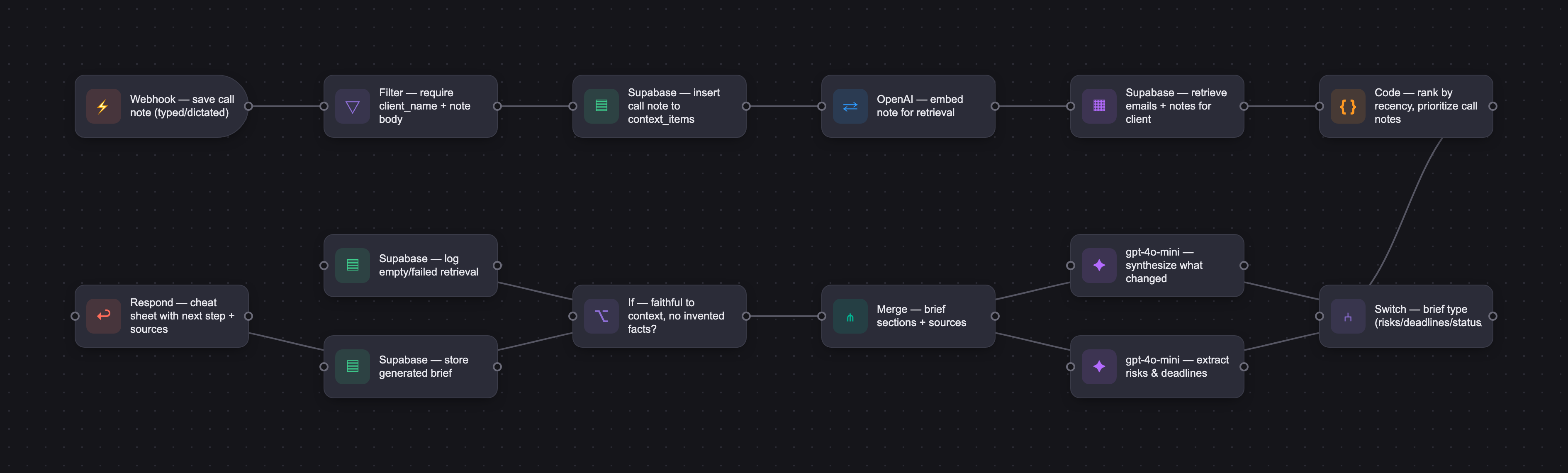
The PRD
| PRODUCT FACULTY — AI PRODUCT REQUIREMENTS DOCUMENT (PRD) TEMPLATE Version 1.0 | ||||||
|---|---|---|---|---|---|---|
| Your Name: | Cristina Salajan | |||||
| Your Product: | INBO - Your Client Cheat Sheet | |||||
| Your Industry: | Small business productivity, client communications, and AI workflow automation | |||||
| Date: | 6.15.26 | |||||
| 4D Method | AI PRD | Instructor Feedback | ||||
| Phase | Activity | Theme | Topic | Key Question(s) | Your Response Include external links to visuals/prototypes as required. | |
| DISCOVERY | Understand your market, business, product & user context | Business Value Map | Market Attractiveness | What industry is your business in? (ie Financial services, Healthcare, Education, etc)? | INBO is in the small business productivity and client communications space. It supports service-based small businesses that manage client work across email, phone calls, quick notes, and memory. | Please leave this area blank. This space is for the Instructor to provide you with feedback. |
| What are the key challenges (headwinds) and opportunities (tailwinds) impacting growth in your industry? Who are the key competitors? | Headwinds: small business owners have scattered client information, limited time, and low tolerance for complex CRM tools. Tailwinds: AI assistants, mobile-first work habits, and increasing comfort with lightweight automation create demand for tools that summarize and reconnect business context. | |||||
| What is the projected growth rate of your target market segment over the next 3-5 years? | The target market is the large and growing segment of small service businesses, independent consultants, contractors, and solo operators. For this MVP, market sizing is directional rather than quantitative; the product targets users who manage recurring client work but do not want a heavy CRM. | |||||
| Business Model | What growth stage is your business currently in (e.g., startup, scale-up, mature)? | INBO is at prototype / MVP stage. The goal is to validate the core workflow before scaling: capture a call note, combine it with email context, and generate a source-backed client cheat sheet. | ||||
| How does your business make money? What do they sell? What is your primary revenue model (e.g., subscription, freemium, licensing, marketplace, transactional, etc?) | Potential business model: freemium or subscription SaaS for solo operators and small teams. Future paid tiers could include more clients and client history, higher brief limits, stronger Gmail + Zapier email capture, in-app voice recording and transcription, translation, and team access. | |||||
| Who is your primary customer base (B2B, B2C, B2B2C)? | Primary customer base is B2B / prosumer: small business owners, consultants, contractors, freelancers, and small service teams who manage client relationships directly. | |||||
| Differentiators | What are the key differentiators for your company? | Key differentiator: INBO captures the context that gets lost when work moves from email to phone calls. Most AI email tools summarize the inbox; INBO also lets users add the missing call-note context and later turns all of it into a client cheat sheet. | ||||
| Feature Value Map (IMPORTANT NOTE: This section is only relevant if you are working on enhancing an existing product. It does not apply if you are developing a new product from 0 to 1.) | Customers | Who are the customers (ie buyers) of your product? | Buyers are small business owners or solo operators who are responsible for client relationships, follow-ups, and deadlines. | |||
| End Users | Who are the end-users of your product? Which users are the most revenue-generating / revenue-impacting for your company? What are their goals, roles, and context? | End users are mobile small business owners and client-facing operators. Primary persona: the mobile small business owner who manages clients from calls, email, and memory while moving between meetings, job sites, and appointments. | ||||
| Current Products / Services | If you are a Product-led business: What are the core features of your product, and how do they address user needs? If you are a Service-led business: What are the key services you offer to customers? | Core MVP services: Add Call Note, Generate Client Brief, source-backed client context, client/deadline/risk sections, and a lightweight dashboard showing what needs attention. | ||||
| User Value Map | Target Persona | Who is your AI product / feature for? (Internal users, external users, an influencer, a buyer, etc) | INBO is for external small business users, especially solo/small-team owners who need to remember client context after calls. The persona is a composite informed by interviews with: Interviewee 1: former VP / sales professional; Interviewee 2: contractor and mobile Gmail user; Interviewee 3: new business owner / software developer. | |||
| Journey Map (current-state) | What is the typical journey for your target persona when they are using your product / service, focusing on their ideal experience (happy path) as they interact with your product? | Current journey: client communication begins in email, then moves to phone calls, texts, meetings, or quick conversations. The owner later searches email or relies on memory to remember what changed, what was promised, and what deadline matters. | ||||
| Pain-points | Where does the user experience friction, obstacles, or unmet needs throughout the journey? Identify which pain-points are most frequent and severe? | Pain points: call details are not captured, context is scattered across email and memory, follow-ups are forgotten, deadlines become unclear, and the user wastes time reconstructing the client story before replying or calling again. | ||||
| AI Opportunities | From your list of pain points, identify those that can effectively be addressed using Generative AI. Remember, this project focuses on leveraging LLM-powered AI to solve your target persona's pain points. Rank these pain points starting with the most severe and frequently occurring first. | AI opportunity: use AI to retrieve stored email-like context and call notes, synthesize what changed, identify risks/deadlines, and produce a concise client cheat sheet with sources. | ||||
| Develop an AI Solution Hypothesis | AI Solution Hypothesis | Diverge | Ideate potential solutions to address your AI-solvable pain points. Focus on generating a high quantity of ideas rather than evaluating their quality at this stage. | Possible solutions included an AI inbox summary, a CRM-lite client tracker, a call-note capture tool, a deadline extractor, and a client brief generator. The strongest idea combines call-note capture with AI-generated client cheat sheets. | ||
| Converge | Rank your ideated solutions based on impact and feasibility. Identify your top three AI solutions, and clearly select the one you'll focus on for your project. | Selected solution: INBO. Impact is high because it solves the missing-memory problem after calls. Feasibility is high because the MVP can use one Supabase context table, seeded Gmail-like records, typed/dictated call notes, and OpenAI-generated briefs. | ||||
| DESIGN | Define Target State Workflow | UX Flows & Wireframes Suggested Tool: Excalidraw | Workflow (future) | Assuming your product or feature works as desired, what is the target state workflow? | Target workflow: user finishes a client call on mobile, opens INBO, selects the client, adds (writes or records) a call note, and saves it. Later, the user asks a question such as “What changed after my latest call?” INBO retrieves relevant context and generates a source-backed client cheat sheet. | Please leave this area blank. This space is for the Instructor to provide you with feedback. |
| Build Wireframes | Wireframes | How will users navigate through your AI solution? What are the key steps and decision points? What information will be displayed at each stage? What specific UI elements are needed on each screen? How will the layout accommodate AI features? | Key screens: mobile-first Add Call Note, Generate Client Brief form, Client Brief output, Sources, Risks, Deadlines, and dashboard cards. The prototype should start by saving a call note because that is the main differentiator. | |||
| Develop Prototype to showcase AI interactions | Prototype Screens Suggested Tool: lovable.dev | What aspects of the AI solution will you demonstrate in your prototype? How will the AI inputs, processing, and outputs be presented visually to users? Which features are essential for launch? What can be left for later releases? | Prototype demonstrates: adding a call note, saving it to INBO memory, generating a client brief from email + call-note context, showing sources, and answering brief types such as risks, deadlines, current status, and next action. | |||
| Initial Prompt Design | Master Prompt [Initial Design] | Create an initial master prompt. Consider the following: What tone or personality should the AI use? How should user input and system instructions be structured for maximum clarity? What system instruction will govern the AI's behavior? What examples might improve performance? How will you format outputs for consistency? | Initial prompt instructed the AI to act as a client-context assistant, use only retrieved context_items, avoid inventing facts/dates/decisions, prioritize recent call notes, and generate practical sections such as Current Status, What Changed, Risks, Deadlines, Recommended Next Step, and Sources. | |||
| Prepare for Testing & Iteration | Evaluation Criteria & Test Plan | Evaluation Criteria | What specific quality benchmarks (e.g., clarity, relevance, tone, accuracy, SEO, hallucination avoidance) will define “good” output? | Benchmarks: faithful to retrieved context, includes latest call note when relevant, identifies deadlines/risks, gives a useful next step, shows sources, avoids hallucinations, and keeps output concise enough for a busy owner. | ||
| Example Cases | What specific example use cases, edge cases, and negative cases should be covered by test prompts and outputs? | Example cases include: Add Call Note retrieval, Blue Oak latest call changes, Blue Oak risk brief, Northside deadline extraction, Rivera current status, and Northside next action. Edge cases include missing data, wrong client selection, and ambiguous questions. | ||||
| DEVELOP | AI Model Selection & Justification | AI Model Selection & Justification | Which AI model is best suited for your solution and why? What capabilities and limitations does it have? How will it integrate with your product? | Model selected: OpenAI gpt-4o-mini for MVP. It is fast, cost-effective, and strong enough for structured summarization, extraction, and RAG-style brief generation over small retrieved context sets. | Please leave this area blank. This space is for the Instructor to provide you with feedback. | |
| Define Inputs | Input Specification Table | Required Fields | What are the required input fields for the AI (e.g., title, description, keywords, tone)? Indicate format, source, requirement. | Required inputs: client_name, user question, brief type, retrieved context_items with source_type, source_title, source_date, raw_content, summary, action_items, deadlines, risks, waiting_on_me, and waiting_on_client. | ||
| Optional Fields | Are there any optional or user-customizable fields? How do they impact the AI’s output? | Optional inputs: brief type override (Auto-detect, Full brief, Risks, Deadlines, etc.), manually typed or mobile-dictated call note, and future Gmail import metadata. Optional fields help tailor the output but are not required for the core loop. | ||||
| Define Good Output | Output Evaluation Checklist | Objective Criteria | What criteria will you use to judge output as “good”? (e.g., structure, use of keywords, tone, factuality, relevance) | Good output is structured, specific to the selected client, source-backed, current, faithful, and action-oriented. It should answer the user question directly and avoid generic unsupported claims. | ||
| Subjective Criteria | Are there any criteria that require human judgment or qualitative assessment? | Subjective criteria: Does the brief feel useful to a small business owner? Does it reduce the mental work of remembering the client story? Is the next step clear enough to act on? | ||||
| Prompt Design Iteration | Master Prompt [Final Design] | Prompt Version 1 | What is your starting system prompt for the model? What variations will you test? What techniques will you use to optimize performance? List initial instructions, persona, inputs, and constraints. | Final system prompt strategy: INBO is an AI client-context assistant for small business owners. Use only retrieved context_items. Do not invent facts. Prefer recent source_date and call notes. Generate sections appropriate to the user question and show sources. | ||
| Prompt Iterations | If revised, what changes did you make and why? How do you track and record prompt evolution? | Prompt iterations focused on moving from generic “brief generation” to lost-context recovery, prioritizing call notes, reducing blank sections, simplifying brief-type layouts, and improving deadline/risk extraction. | ||||
| Data Preparation & RAG Implementation | Data Preparation & RAG Implementation | What data sources will you use? How will you prepare data for model training or evaluation? (e.g., cleaning, structuring). For RAG: How will you chunk, embed, retrieve relevant information? | Data sources: seeded Gmail-like email records and user-added call notes stored in Supabase. MVP uses a single unified context_items table for both emails and call notes. Gmail import is in MVP scope as a prototype ingestion path; production sync is future work. | |||
| Create Evaluation Set | Example Input/Output Data for Testing | Typical Examples | What are the most common inputs and expected outputs? Use real data if possible. | Typical example: save a Blue Oak call note about the June 28 soft launch, then ask “What changed after my latest call?” Expected output should mention the new note, current status, risks/deadlines, next step, and sources. | ||
| Edge Cases & Negative Cases | What examples test the AI’s limits? (e.g., missing data, ambiguous input, out-of-domain) | Edge cases: a risk question with Auto-detect, a deadline question where ownership is unclear, wrong client/question mismatch, missing data, and repeated/generic next steps. Negative case: the model should not invent facts not present in retrieved rows. | ||||
| Test Example Data & Review Results | Manual Review | Run your input data with the prompt. How did your output perform in manual review? Which examples failed which criteria, and why? | Manual review showed the core loop passed: a newly saved call note was retrieved and used in a later brief. Other scenarios also passed or passed with minor issues, especially around recommended next-step specificity. | |||
| Automated Evaluation | What pass/fail rate or scores did the AI achieve on core criteria? | Evaluation achieved 6/6 usable results: core Add Call Note retrieval passed; latest call context passed; current status passed; risks/deadlines/next action passed with minor issues. Target MVP threshold of 80% was met. | ||||
| Handle Edge Cases & Iterate | Edge Case Identification | What edge cases did you identify in testing or real usage? | Identified edge cases: risk mode originally showed a blank “Why It Matters” section, deadline mode initially left sections blank, and Recommended Next Step was sometimes accurate but generic. | |||
| Updates & Adjustments | What prompt or system adjustments have you made based on failures, feedback, or edge case observations? | Adjustments: removed unreliable blank sections from risk mode, simplified deadline layout, improved prompt instructions for source-backed outputs, and documented next-step specificity as a future refinement. | ||||
| Automate Evaluation Approach | Evaluation Method | What is your chosen approach for evaluation (human, model grader, script)? How will you scale testing to diverse/large test sets? | Evaluation method: human-reviewed scenario testing using realistic client data. Each case was checked for expected fact coverage, faithfulness, call-note usage, source visibility, and usefulness of next step. | |||
| Evaluation Frequency | How often will you re-run evaluations for new data, new prompts, or post-launch monitoring? | Frequency: rerun evals after prompt changes, new ingestion paths, model changes, and before demo/release. Future versions should include a larger automated eval set and model-graded faithfulness checks. | ||||
| DEPLOY | Finalize Launch & Rollout Plan | Operational Readiness Checklist | Technical Readiness | Is infra (APIs, databases, rate limits, monitoring, rollback) tested and documented? | Technical readiness for capstone demo: Lovable frontend, Supabase context_items table, OpenAI client-brief edge function, and Add Call Note workflow are working. Known limitation: Gmail import is prototype scope, not production-grade sync. | Please leave this area blank. This space is for the Instructor to provide you with feedback. |
| Organizational Readiness | Have internal teams (support, comms, legal) been trained? Is documentation complete? | For MVP/capstone, documentation includes PRD, demo script, eval set, architecture notes, and known limitations. For production, add support/legal/privacy review, onboarding docs, and support workflows. | ||||
| Launch & Rollout Strategy | Launch Approach | What is your launch approach? Pilot, AB test, or all users—who gets access and when? | Launch approach: capstone demo / pilot prototype. Demonstrate the end-to-end loop with seeded clients and saved call notes. Target initial users are service-based small business owners who rely on Gmail and phone calls. | |||
| Scale Readiness | How will you ensure readiness for scale? How will you monitor initial volume and scale up? | Scale readiness: future work includes authentication, tenant isolation, production Gmail OAuth, monitoring, logging, rate-limit handling, and a more normalized data model if client/task volume grows. | ||||
| Go-to-Market Plan | Marketing / Training Assets | What assets (FAQ, demo, guides) will you prepare for external communication/marketing? | Assets: 4-minute video, app walkthrough, final PRD, evaluation table, architecture diagram, and demo script. Messaging centers on “INBO: your client cheat sheet.” | |||
| Stakeholder / Internal Comms | How will you communicate launch plans, progress, and outcomes internally? | Communicate the core narrative: small business owners already use memory as their CRM, but memory has terrible search and no backup. INBO saves the missing call context and turns it into a client cheat sheet. | ||||
| Confirm Legal, Privacy & Risk Protocols | Data & Privacy | How do you handle and protect user data, including storage, privacy, and compliance? | Data is stored in Supabase. MVP uses public/demo policies for capstone; production must implement authentication, row-level security by user/account, least-privilege keys, and privacy-safe handling of email/call-note content. | |||
| Policy & Compliance | Are content moderation, legal, and audit processes in place? Are you compliant with regulations needed for your domain? | Production version should review Gmail API/OAuth compliance, user consent, data retention, deletion, and privacy disclosures. Model outputs should remain source-backed and avoid unsupported claims. | ||||
| Define Success Metrics | Success Metrics | User/Business Metrics | What user metrics will indicate success? What business metrics will demonstrate value? | User/business metrics: number of call notes saved, briefs generated, repeat usage, time saved preparing for follow-ups, and user-reported confidence before replies/calls. | ||
| AI Metrics | How will you measure AI performance and accuracy? | AI metrics: eval pass rate, faithfulness, source coverage, latest call-note inclusion, deadline/risk extraction accuracy, and next-step usefulness. | ||||
| Monitor, Iterate & Improve | User Support & Feedback Plan | Support Channels | Where can users get support? Is escalation and ownership clear? | Support for prototype: collect user feedback during demo/interviews and maintain a short issue log. Future production support would include help docs, email support, and escalation for data/import issues. | ||
| Feedback Workflow | How do you gather, triage, and act on feedback and bugs? How are critical issues prioritized and communicated? | Feedback workflow: tag issues as UI, retrieval, prompt/output, data quality, or integration. Prioritize blockers to the core loop: Add Call Note → Retrieve → Brief. | ||||
| Monitoring & Continuous Improvement | Monitoring Approach | What monitoring/logging is in place to spot operational/AI issues post-launch? | Monitoring approach: log edge function errors, failed saves, failed brief generations, and empty retrieval results. Future versions should monitor latency, token usage, import failures, and model output quality. | |||
| Ongoing Improvement | How will you collect learnings, review performance, and update your system continuously post-launch? | Ongoing improvement: expand the evaluation set, improve Recommended Next Step specificity, strengthen Gmail + Zapier email capture so client emails reliably combine with saved call notes, add in-app voice recording and transcription, support language translation for multilingual client conversations, and continue improving the mobile-first capture experience. | ||||




