
Fintech
Inbox to Cash
Inbox to Cash is an AI-assisted cash application tool for small-business accounts receivable teams. It helps users import bank payments, AR records, and remittance messages, then recommends invoice matches with confidence scores and plain-language reasoning. The product also includes exception handling through a conflict resolver and an audit trail for approved postings into accounting or ERP systems.
The problem
Small-business accounts receivable teams spend their mornings in a manual "stare-and-compare" detective game: matching bank deposits to open invoices using remittance details scattered across a cluttered AR inbox, PDFs, and portals. Payments arrive with cryptic references, transposed invoice numbers, or none at all. When cash doesn't match the invoice balance, clerks manually calculate net versus gross for short-pays, unearned discounts, and lump-sum payments, then re-key everything into the ERP — slow, error-prone work. Enterprise tools like HighRadius and Billtrust are too expensive for this segment, leaving Excel and Outlook as the status quo.
The solution
Inbox2Cash is an AI-assisted cash application tool that converts messy, unstructured data into clear reconciliation decisions. It ingests bank files, the open AR ledger, and remittance messages, then recommends invoice matches with confidence scores and plain-language reasoning. Unlike legacy OCR systems, it is template-agnostic — the LLM understands any remittance format — and it performs semantic matching, recognizing that a bank sender like "ABC Holdings" maps to "Alpha Beta Corp," or that a $200 variance is an authorized early-payment discount. High-confidence matches route to a straight-through-processing queue for one-click bulk approval, while low-confidence items go to a Conflict Resolver for human review, with an audit trail for every posting.
How it works
A three-way reasoning engine cross-references bank line items, email remittances, and open AR invoices. The core model is GPT-5.2 for complex reasoning, with GPT-5 mini for simpler, high-volume tasks like exact invoice-number extraction. The system enforces zero-tolerance arithmetic — matched invoices minus justified deductions must equal the bank amount exactly, or the match is flagged Low confidence. Strict XML-tagged prompting isolates inputs to prevent injection, and a "safe failure" rule treats correctly flagged uncertainty as a successful outcome that routes work to a human rather than creating a bad accounting record. Because this is a financial workflow, low-confidence matches are never auto-posted. Evaluation targets include >99.5% entity extraction accuracy, 0% hallucination on high-confidence matches, and a false auto-post rate under 2%.
Who it's for
The primary end user is the AR Specialist or clerk, often overwhelmed managing hundreds of payments, whose goal is a high straight-through-processing rate and a clean open-AR list by end of day. The economic buyer is the CFO or Controller, who cares about efficiency, DSO reduction, and accurate reporting. The product is B2B SaaS with tiered pricing based on transaction volume, targeting the "Business Banking" segment of companies with $5M–$40M in annual revenue — roughly 260,000 companies in the US per the SBA.
Why it matters
The B2B payment automation market is projected to grow at roughly 10–15% CAGR through 2030, with the $5M–$40M segment accelerating as sophisticated AI tools become affordable for smaller balance sheets. The democratization of LLMs enables unstructured data extraction without expensive OCR templates or rigid rules engines. The stakes are financial integrity: hallucinated figures or unsafe auto-posts create bad accounting records. Inbox2Cash addresses this with confidence thresholds, required evidence, and human-in-the-loop control, launching first as a limited pilot with 5 clients before scaling.
The workflow
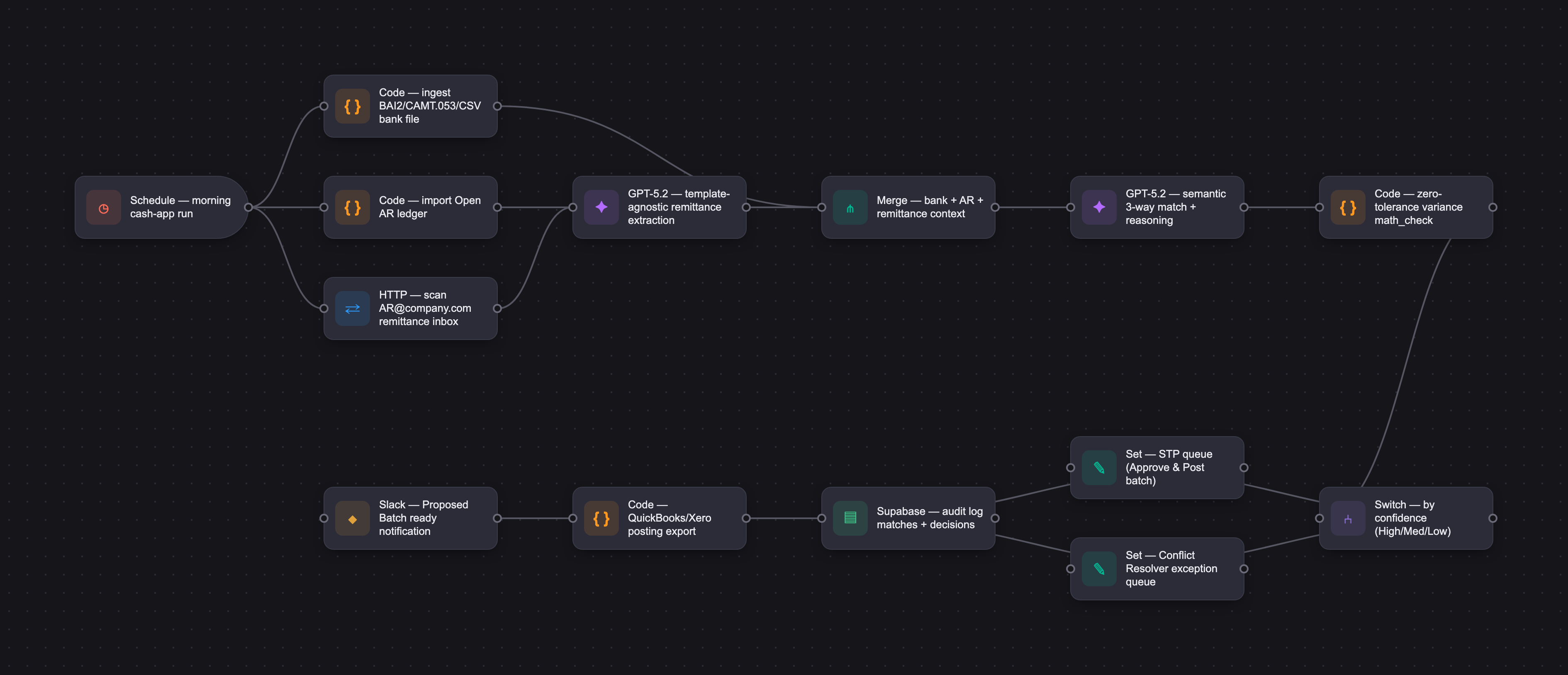
The PRD
| PRODUCT FACULTY — AI PRODUCT REQUIREMENTS DOCUMENT (PRD) TEMPLATE Version 1.0 | ||||||
|---|---|---|---|---|---|---|
| Your Name: | Claudio Melzer | |||||
| Your Product: | Inbox2Cash AI - Assisted Remittance and Payment Reconciliation Solution for Small Businesses | |||||
| Your Industry: | Banking - B2B Treasury Management/Cash Application | |||||
| Date: | May 6, 2026 | |||||
| 4D Method | AI PRD | Instructor Feedback | ||||
| Phase | Activity | Theme | Topic | Key Question(s) | Your Response Include external links to visuals/prototypes as required. | |
| DISCOVERY | Understand your market, business, product & user context | Business Value Map | Market Attractiveness | What industry is your business in? (ie Financial services, Healthcare, Education, etc)? | Financial Services / B2B (specifically within the Accounts Receivable and Treasury Management automation space). Targeting a segment of clients that banks normally call "Business Banking", which are businesses with annual revenue between $5MM to $40MM. | Please leave this area blank. This space is for the Instructor to provide you with feedback. |
| What are the key challenges (headwinds) and opportunities (tailwinds) impacting growth in your industry? Who are the key competitors? | Headwinds: Data security/privacy concerns (sharing bank/email access), legacy ERP inertia (resistance to changing workflows), and the "hallucination risk" inherent in LLMs which is critical in financial accounting. Tailwinds: The rapid democratization of LLMs allowing for unstructured data extraction without the need of expensive OCR templates and limiting rules-based tools. Key Competitors: Enterprise players like HighRadius and Billtrust (often too expensive for this segment), legacy OCR-based bank tools, and the primary "status quo" competitor: manual processing via Excel and Outlook. | |||||
| What is the projected growth rate of your target market segment over the next 3-5 years? | The B2B payment automation market is projected to grow at a CAGR of approximately 10-15% through 2030, with the $5M–$40M segment seeing accelerated growth as sophisticated AI tools become affordable for smaller balance sheets. According to statistics provided by the SBA - Small Business Administrations - there are currently approximately 260,000 companies of this size in the US. | |||||
| Business Model | What growth stage is your business currently in (e.g., startup, scale-up, mature)? | Startup / Seed Stage | ||||
| How does your business make money? What do they sell? What is your primary revenue model (e.g., subscription, freemium, licensing, marketplace, transactional, etc?) | Revenue Model: B2B SaaS Subscription. Details: Tiered monthly subscription based on "Transaction Volume" (e.g., up to 500 payments/month, 1,000+ payments/month) to align cost with the value of time saved. | |||||
| Who is your primary customer base (B2B, B2C, B2B2C)? | B2B | |||||
| Differentiators | What are the key differentiators for your company? | Template-Agnostic Extraction: Unlike legacy systems, Inbox2Cash doesn't need to be "trained" on a specific customer's invoice layout; the LLM understands any remittance format. Semantic Matching: The ability to understand context (e.g., "paying invoice 456 minus a short-pay for damaged goods") that traditional rule-based engines miss. | ||||
| Feature Value Map (IMPORTANT NOTE: This section is only relevant if you are working on enhancing an existing product. It does not apply if you are developing a new product from 0 to 1.) | Customers | Who are the customers (ie buyers) of your product? | The CFO or Controller. They care about bottom-line efficiency, Days Sale Outstanding (DSO) reduction, and accurate financial reporting. | |||
| End Users | Who are the end-users of your product? Which users are the most revenue-generating / revenue-impacting for your company? What are their goals, roles, and context? | Primary End-User: AR Specialist/AR Clerk. Goals: Achieve a high Straight-Through Processing (STP) rate, eliminate manual data entry, and ensure the "Open AR" list is clean by EOD. Context: They are often overwhelmed, managing hundreds of payments across multiple portals and a cluttered "AR@company.com" inbox. | ||||
| Current Products / Services | If you are a Product-led business: What are the core features of your product, and how do they address user needs? If you are a Service-led business: What are the key services you offer to customers? | Product-led approach. Remittance Scraper: Connects to email to extract payment details from bodies/attachments. Smart Bank Ingestor: Parses bank files (BAI2, CSV) to identify "mystery" credits. The Match Engine: Semantic logic that links bank lines to email remittances and AR open items. Conflict Resolver: An intuitive UI for the user to quickly confirm or correct low-confidence matches. | ||||
| User Value Map | Target Persona | Who is your AI product / feature for? (Internal users, external users, an influencer, a buyer, etc) | External Users: Specifically, the finance and accounting teams. | |||
| Journey Map (current-state) | What is the typical journey for your target persona when they are using your product / service, focusing on their ideal experience (happy path) as they interact with your product? | 1. User logs in and uploads morning's bank file with received credits, along with a current open AR file. [Alternatively, Inbox2Cash has already pulled the morning's bank file and scanned the inbox.] 2. User sees a dashboard of "Pending Matches." 3. The system presents a "Proposed Batch" where 85% of payments are perfectly matched with high confidence. 4. User clicks "Approve All" and the data is populated on the open AR file for posting into the client's system of record. [Alternatively, Inbox2Cash pushes data to the ERP to close the invoices.] | ||||
| Pain-points | Where does the user experience friction, obstacles, or unmet needs throughout the journey? Identify which pain-points are most frequent and severe? | Friction 1: Matching relatively large volumes of received payments with remittance details that may or may not clearly include the data needed for quick reconciliation. Friction 2: Finding the remittance email for a payment that only has a cryptic reference number (e.g., "NXP-12345") or that has slightly incorrect references (e.g., correct client name and amounts but invoice numbers include transposed numbers.) Friction 3: Manually calculating "Net vs. Gross" when a customer takes unearned discounts or pays multiple invoices with one lump sum. Friction 4: Entering data into the ERP, which is prone to typos and human error. | ||||
| AI Opportunities | From your list of pain points, identify those that can effectively be addressed using Generative AI. Remember, this project focuses on leveraging LLM-powered AI to solve your target persona's pain points. Rank these pain points starting with the most severe and frequently occurring first. | Parsing Unstructured Remittance: (Highest frequency/high effort). This effort requires reading "messy" emails or handwritten-style PDFs, which can be addressed by LLM-based remittance extraction. Manual "Stare and Compare" Matching: (High frequency/medium effort). LLM can use semantic cross-referencing to match a bank deposit from "ABC Holdings" to an invoice for "Alpha Beta Corp" because the LLM understands they are related entities. Short-Pay/Deduction Coding: (Lower frequency/extremely high effort). Complex Deductions: Interpreting the reasoning behind a short-payment mentioned in an email thread. | ||||
| Develop an AI Solution Hypothesis | AI Solution Hypothesis | Diverge | Ideate potential solutions to address your AI-solvable pain points. Focus on generating a high quantity of ideas rather than evaluating their quality at this stage. | LLM-Based Remittance Extraction & Semantic Matching: An engine that reads any email/PDF format and intelligently maps it to bank deposits and open AR invoices. Automated Customer Inquiry Bot: An AI agent that identifies payments with missing remittance and autonomously drafts/sends follow-up emails to the customer to request the data. Predictive Cash Flow Forecasting: Using historical payment velocity and email sentiment to predict exactly when "Open AR" will actually hit the bank account. AI Bank-Reference "Cleaner": An LLM tool that takes cryptic bank strings and translates them into recognizable customer names or invoice numbers. Short-Pay Reason Classifier: Automatically detecting why a payment is short (e.g., identifying terms like "damaged goods," "tax exempt," or "early pay discount" within an email body) and coding it for the ERP. Fraudulent "Bank Change" Detector: A security layer that flags emails requesting changes to payment instructions by analyzing language patterns for potential phishing. Multi-Language Remittance Translator: For businesses with international clients, an LLM that translates and parses remittance details from other languages into the base accounting language. Proactive Discount Recommender: An AI that analyzes customer payment history and suggests offering specific early-payment discounts to those who frequently pay late. AI-Generated Monthly Statements: Creating personalized, conversational email summaries for customers that explain their outstanding balance and include "Quick-Pay" links. Voice-to-AR Interface: A mobile-friendly feature allowing a Controller to ask, "Who paid us today?" or "What is our current unapplied cash?" and receive a summarized vocal report. Automatic Dispute Evidence Gatherer: When a customer disputes a charge in an email, the AI automatically finds the original PO, signed delivery receipt, and invoice to package for the AR specialist. Smart Credit Memo Drafter: Drafting a credit memo in the ERP based on a resolution reached in an email thread regarding a return or damaged shipment. ERP Field Mapper: An "intelligent setup" tool that looks at a user's unique ERP export and a bank file, then automatically suggests the mapping logic without manual configuration. | ||
| Converge | Rank your ideated solutions based on impact and feasibility. Identify your top three AI solutions, and clearly select the one you'll focus on for your project. | 1. LLM-Based Remittance Extraction & Semantic Matching (High Impact / High Feasibility). 2. Automated Customer Inquiry Bot (Medium Impact / High Feasibility). 3. Predictive Cash Flow Forecasting (High Impact / Lower Feasibility). Selected Focus: LLM-Based Remittance Extraction & Semantic Matching. This is the "killer app" for Inbox2Cash, as it solves the immediate manual bottleneck in the daily cash application workflow. | ||||
| DESIGN | Define Target State Workflow | UX Flows & Wireframes Suggested Tool: Excalidraw | Workflow (future) | Assuming your product or feature works as desired, what is the target state workflow? | The target state workflow transitions the Cash Application process from a manual "stare-and-compare" detective game into an exception-based, automated reconciliation pipeline. By acting as intelligent middleware that bridges the gap between bank, email, and ledger data, the optimized end-to-end target state workflow operates as follows: Step 1: Multi-Channel Ingestion & Context Aggregation (Automated) Bank Feed: At the start of the business day, Inbox2Cash automatically ingests the morning's bank statement file (in standard BAI2, CAMT.053, or raw CSV formats) containing all newly credited ACH and Wire deposits. Ledger Pull: The platform imports the user’s current Open AR ledger file, identifying all outstanding invoices, customer names, and balances. Remittance Scan: The AI agent continuously monitors the company's dedicated accounts receivable inbox (e.g., AR@company.com), pulling down email bodies, unstructured email threads, and embedded attachments (PDFs, Excel files, images). Step 2: Intelligent Remittance Extraction & Semantic Cleansing (AI-Driven) The LLM parses unstructured remittance content without relying on brittle, fixed templates. It intelligently extracts the customer name, invoice numbers, payment dates, total amounts, and any mentioned deductions. Semantic Resolution: The LLM instantly cleans cryptic bank reference lines. If a bank wire says "NXP-4920-SJ" but an email from "Alpha Beta Corp" references paying "Invoice #4920," the AI pairs them semantically based on contextual markers and historical trends, eliminating manual search time. Step 3: Three-Way Match & Reasoning Engine (AI-Driven)The system executes a cross-reconciliation logic across three vectors: Bank Line Item - Email Remittance - Open AR Invoices. The LLM goes beyond simple exact-amount matching; it calculates complex, multi-invoice scenarios and interprets payment behavior. For instance, if a $9,800 wire is deposited against a $10,000 open invoice, the LLM reads the email text to verify if the $200 variance is an early payment discount, a tax exemption, or a dispute regarding damaged goods.Matches are classified automatically: high-confidence matches are bundled into the Straight-Through Processing (STP) queue, while low-confidence anomalies go to the exception queue. Step 4: Exception Management & Human-in-the-Loop Verification (User Interaction) The AR Specialist/Clerk logs into the Inbox2Cash dashboard. The Happy Path (Target: 85%+ of volume): The user views the "Proposed Batch" screen. High-confidence matches are neatly paired with a clear, readable textual audit explanation written by the LLM (e.g., "Matched $15,000 wire to Invoices 101 and 102 from ABC Holdings based on PDF remittance attached to email received on 5/15"). The user reviews the summary and clicks a single "Approve and Post All" button. The Exception Path: For remaining low-confidence items, the user opens the Conflict Resolver UI. The interface displays the open invoice side-by-side with the specific paragraph of the email or PDF where the AI detected an ambiguity (such as a short-payment dispute), allowing the user to resolve the variance with one click. Step 5: Automated Clearing & Ledger Update (Output / Posting) Once approved, Inbox2Cash updates the open AR ledger data file with exact posting instructions (assigning payment lines to the correct open invoices and applying appropriate deduction codes). The synchronized data is output as a clean upload file or directly pushed via API into the customer’s system of record (e.g., QuickBooks, NetSuite, or Sage), closing out the invoices, updating cash positions, and keeping the ledger fully reconciled by mid-morning. | Please leave this area blank. This space is for the Instructor to provide you with feedback. |
| Build Wireframes | Wireframes | How will users navigate through your AI solution? What are the key steps and decision points? What information will be displayed at each stage? What specific UI elements are needed on each screen? How will the layout accommodate AI features? | To provide a seamless experience for the AR Specialist, Inbox2Cash uses a progressive, 3-screen navigation flow. The interface emphasizes transparency, allowing the user to understand why the AI made a decision, and provides instant override mechanics for human-in-the-loop (HITL) control. Screen 1: Data Ingest & Processing Workspace (The Starting Point) User Navigation and Key Steps: The user arrives here at the start of their day. They verify that the automated connections are live or manually upload their files to trigger the matching engine. Key Decision Points: * "Do I need to manually upload a new Open AR or Bank file, or use the auto-synced daily feed?" "Should I start reviewing high-confidence matches or jump straight into unresolved exceptions?" Information Displayed: * Sync status indicators for the AR@company.com inbox, bank feeds, and ERP ledger. High-level summary metrics cards: Total Cash Ingested ($), Auto-Match Rate (% Tracker), Ready for Posting (#), and Action Required (#). Specific UI Elements Needed: * Dual drag-and-drop file upload zones (labeled: "Drop Daily Bank File [BAI2/CSV]" and "Drop Open AR Report"). A prominent primary action button: "Run AI Match Engine" (with an active loading micro-animation showing processing status). AI Layout Accommodations: * An AI Processing Status Tracker that dynamically shows what step the LLM is on (e.g., "Parsing 42 new emails...", "Analyzing Wire Reference Codes..."). Screen 2: The Match Review Dashboard ("The Proposed Batch") User Navigation and Key Steps: Once processing completes, the user is navigated to a centralized grid. The core workflow here is reviewing and bulk-approving the high-confidence matches generated by the AI. Key Decision Points: "Are these high-confidence matches accurate based on the AI's explanation?" "Do I bulk-approve the entire batch or selectively send specific rows to the Conflict Resolver?" Information Displayed: A tabular list of reconciled rows grouped by confidence level. Column headers: Bank Depositor (Cleaned), Amount Received, Matched Customer Account, Identified Invoice Numbers, Confidence Score, and AI Reasoning Summary. Specific UI Elements Needed: Bulk Checkboxes next to each row with a sticky bottom action bar containing a primary "Approve & Post Selected Matches" button. An "Isolate Row" icon on each line item to instantly push a questionable match into the exception queue. AI Layout Accommodations: Color-Coded Confidence Badges: Visual tags (High in green, Medium in amber, Low in crimson) to let the user visually triage the workload. Explainable AI (XAI) Hover Tooltips: An expanded card layout within the grid column where the LLM converts its technical weights into a plain-English explanation (e.g., "Matched 100% via Semantic Lookup: Wire sender 'ABC Corp' matches Invoice #1024 bill-to name 'Alpha Beta Holdings'."). Screen 3: The Conflict Resolver (The Exception UI) User Navigation and Key Steps: Clicking on any medium or low-confidence match opens a focused, split-screen interactive workspace. The user navigates here to resolve discrepancies like short-payments, missing invoice numbers, or ambiguous reference strings. Key Decision Points: "Why is there an amount discrepancy (e.g., short-payment vs. unearned discount)?" "Which open invoice should this unapplied cash be manually applied to?" "What reason code should be sent back to the ERP for this deduction?" Information Displayed: Left Pane: The raw, problematic Bank Transaction Line (Date, Amount, Cryptic Description). Right Pane (Context Feed): The specific email body or PDF invoice where the AI found potential overlapping context, with relevant data highlighted. Bottom Section: A list of candidate "Open Invoices" pulled from the AR ledger that closest approximate the match criteria. Specific UI Elements Needed: Interactive Dropdown for Deduction Reason Codes: Standard accounting codes (e.g., Trade Discount, Damaged Goods Variance, Tax Exempt). Search & Filter Bar: For searching the live Open AR ledger manually if the AI suggestions missed the target asset entirely. AI Layout Accommodations: Dual-Pane Split Screen Layout: Accommodates unstructured vs. structured data side-by-side. AI Document Bounding Boxes / Text Highlighting: The layout visually overlays yellow highlights onto the unstructured PDF text or email thread exactly where the LLM extracted its contextual clues, eliminating the need for the human user to scroll and scan lengthy message threads manually. Confidence Slider Adjustments: A subtle prompt bar at the bottom allowing users to give binary feedback ("Was this suggestion helpful? 👍 / 👎"), helping fine-tune the system's fine-tuning embeddings over time. | |||
| Develop Prototype to showcase AI interactions | Prototype Screens Suggested Tool: lovable.dev | What aspects of the AI solution will you demonstrate in your prototype? How will the AI inputs, processing, and outputs be presented visually to users? Which features are essential for launch? What can be left for later releases? | Prototype URL: https://inbox2cash-prototype.lovable.app 1. Core AI Aspects Demonstrated in the Prototype The prototype will focus heavily on validating user trust and illustrating the core value proposition: the conversion of messy, unstructured data into clear, actionable reconciliation decisions. It will demonstrate: The "Black Box" Demystification: Showing how the AI reasons through a complex match rather than just spitting out a result. The Human-in-the-Loop (HITL) Handoff: Demonstrating how seamlessly a user can step in when the AI runs into an ambiguity (e.g., an unearned discount or short-payment).Document Source Mapping: The visual connection between a specific line in a structured bank statement and a raw sentence inside a customer email or PDF. 2. Visual Presentation of AI Inputs, Processing, and Outputs Inputs: Represented on Screen 1 via clear visual anchors. File upload areas will display file metadata badges (e.g., bank_statement_0516.csv and open_ar_ledger.xlsx). Live data feeds will show real-time status tags (e.g., ● Gmail Sync Live - Last checked 2 mins ago). Processing: To prevent user anxiety during LLM inference, the processing state will feature a "Live Reasoning Feed" or dynamic skeleton loader. Instead of a generic spinning wheel, it will output text showing what the AI is currently evaluating (e.g., "Reading PDF remittance from Johnson Bros..." - "Cross-referencing $4,500 wire against Open AR..."). This builds cognitive trust during the short delay. Outputs: Presented on Screens 2 and 3 using clear hierarchy: Confidence Badges: High-confidence matches use a subtle green tag, medium uses amber, and low uses crimson. Explainable AI (XAI) Tooltips: Hovering over or expanding a match reveals a clean, plain-English summary written by the LLM (e.g., "Matched via semantic lookup: Bank sender 'Acme Corp' is identified as 'Acme Global Logistics' in your ERP. Amount matches Invoice #884 exactly."). Side-by-Side Highlighting: In the Conflict Resolver, the unstructured source document (email body or PDF text) will be displayed next to the ledger line, with the matching figures automatically highlighted in yellow bounding boxes. 3. Essential for Launch (MVP Scope) To launch a highly functional product for the $5M–$50M "Business Banking" segment without over-engineering, the initial release must solve the core daily friction point: Manual/Automated Ingestion: Drag-and-drop ingestion of standard bank file formats (CSV and BAI2) and the user's Open AR ledger export, combined with an IMAP/OAuth integration to scan a single dedicated email inbox (e.g., AR@company.com). Core LLM Processing Engine: The template-agnostic remittance parsing engine (extracting data from plain text emails, PDFs, and Excel attachments) and executing semantic 3-way matching. Basic Multi-Invoice & Variance Detection: The ability for the LLM to identify when a single payment covers multiple invoices, and flag basic variance reasons (e.g., short-payments). The Interactive Match Review & Conflict Resolver UI: A basic screen for bulk-approving high-confidence items and a split-screen layout for resolving exceptions manually. Flat-File Output Export: A clean, downloadable CSV/Excel ledger upload file structured to be easily imported into common accounting packages (like QuickBooks Online or Xero) to clear the balances. 4. Deferred for Later Releases (Post-Launch Roadmap) These features are valuable but can be cut from the initial launch to accelerate time-to-market and gather user feedback first: Deep Native ERP Integrations: Direct, automated two-way API synchronization with complex ERPs (NetSuite, Sage Intacct, Microsoft Dynamics). The MVP will rely on universal file exports/imports, which small businesses are already accustomed to using. Autonomous Customer Response Bot: An AI agent that automatically drafts and sends email replies to customers when a payment arrives completely missing its remittance data. Predictive Cash Flow Forecasting: Advanced machine learning layers that analyze historical payment velocities and email sentiment to predict future treasury positions. Multi-Currency and Cross-Border Support: Complex foreign exchange (FX) matching and multi-lingual remittance translation (e.g., parsing a French or Spanish remittance file). Custom Deduction Workflow Engines: Advanced multi-level approval routing for internal corporate teams when handling massive commercial short-payment disputes. | |||
| Initial Prompt Design | Master Prompt [Initial Design] | Create an initial master prompt. Consider the following: What tone or personality should the AI use? How should user input and system instructions be structured for maximum clarity? What system instruction will govern the AI's behavior? What examples might improve performance? How will you format outputs for consistency? | To ensure Inbox2Cash processes financial data with zero tolerance for math errors while handling highly unstructured inputs, the initial master prompt is designed using clear XML tagging, a deterministic and risk-averse persona, rigid evaluation rules, and structural few-shot examples. Below is my comprehensive Master Prompt specification optimized for an LLM gateway processing cash application workflows, created wiht the use of LLM as I am unfamiliar with coding. XML <system_instructions> ROLE & PERSONA: You are an expert Automated Cash Application Specialist and Forensic Accounting Engine. Your tone is analytical, objective, completely precise, and risk-averse. Your primary objective is to reconcile a single bank transaction line item with messy, unstructured email remittance data and an active Open Accounts Receivable (AR) ledger. CORE BEHAVIORAL GOVERNING RULES: 1. STRICT TRUTH ONLY: Never hallucinate, extrapolate, or approximate financial figures, invoice numbers, or customer identities. If data is missing or ambiguous, you must flag it as an exception with a "Low" confidence score. 2. DISCREPANCY IDENTIFICATION: If the cash received does not match the invoice balance exactly, you must read the email text contextually to identify the exact cause (e.g., Short-Payment, Early Payment Discount, Tax Exemption, or Unearned Discount). 3. SEMANTIC RESOLUTION: Use semantic reasoning to link cryptic bank reference strings or abbreviations to the true customer billing name in the Open AR ledger. 4. ZERO TOLERANCE ARITHMETIC: Total matched invoice amounts minus explicit, justified deductions MUST equal the raw bank transaction amount exactly. If the math does not balance, mark the match as "Low" confidence. INPUT DATA STRUCTURE: The user will provide data wrapped in the following specific blocks: - <bank_transaction>: Raw transaction details (Date, Amount, Sender Reference Code). - <email_remittance>: Raw text extracted from the body or attachment of incoming emails. - <open_ar_ledger>: A structured list of open invoices available to be closed. </system_instructions> <few_shot_examples> EXAMPLE 1: High Confidence Match with Early Payment Discount --- INPUT: <bank_transaction> Date: 2026-05-15 | Amount: $9,800.00 | Ref: ACH_NXP_RECON_99321 </bank_transaction> <email_remittance> From: accounts.payable@nxp-logistics.com Subject: Payment for Inv #1044 "Hi Team, we have initiated an ACH wire for $9,800.00 covering Invoice 1044. Note that we took the 2% early payment discount on the gross amount of $10,000.00 as authorized." </email_remittance> <open_ar_ledger> [ {"customer": "NXP Global Logistics", "invoice_num": "1044", "open_balance": 10000.00}, {"customer": "Alpha Corp", "invoice_num": "1045", "open_balance": 2500.00} ] </open_ar_ledger> OUTPUT EXPECTED: { "confidence_score": "High", "matched_customer": "NXP Global Logistics", "matched_invoices": ["1044"], "financial_reconciliation": { "gross_invoice_amount": 10000.00, "cash_applied": 9800.00, "variance_amount": 200.00, "variance_type": "Early Payment Discount", "math_check": "PASSED" }, "ai_reasoning": "Successfully matched bank reference 'ACH_NXP_RECON' to ledger account 'NXP Global Logistics'. Unstructured email explicitly accounts for the $200.00 variance as an authorized 2% early payment discount against invoice #1044." } EXAMPLE 2: Exception Handling (Low Confidence due to math mismatch) --- INPUT: <bank_transaction> Date: 2026-05-15 | Amount: $4,500.00 | Ref: WIRE_ALPHA_HOLDINGS </bank_transaction> <email_remittance> "Please find payment of $5,000 for our account." </email_remittance> <open_ar_ledger> [ {"customer": "Alpha Corp", "invoice_num": "1045", "open_balance": 5000.00} ] </open_ar_ledger> OUTPUT EXPECTED: { "confidence_score": "Low", "matched_customer": "Alpha Corp", "matched_invoices": ["1045"], "financial_reconciliation": { "gross_invoice_amount": 5000.00, "cash_applied": 4500.00, "variance_amount": 500.00, "variance_type": "Unresolved Variance", "math_check": "FAILED" }, "ai_reasoning": "The bank transaction amount ($4,500.00) does not match the email remittance amount ($5,000.00) or the open ledger balance ($5,000.00). Email text provides no contextual reason for the $500.00 short-pay variance. Manual intervention required." } </few_shot_examples> <output_format> You must return your response STRICTLY as a valid JSON object matching the schema below. Do not include any introductory text or markdown formatting outside of the JSON block itself. { "confidence_score": "High" | "Medium" | "Low", "matched_customer": "String or null", "matched_invoices": ["Array of Strings"], "financial_reconciliation": { "gross_invoice_amount": Float, "cash_applied": Float, "variance_amount": Float, "variance_type": "Exact Match" | "Early Payment Discount" | "Short-Payment" | "Tax Exemption" | "Unresolved Variance", "math_check": "PASSED" | "FAILED" }, "ai_reasoning": "Plain-English explanation detailing the logical linkages found across bank metadata, text context, and ledger constraints." } </output_format> Breakdown of How this Prompt Answers the Structural Requirements: Tone/Personality: The instruction establishes a deterministic, ultra-cautious, accounting-grade profile ("Automated Cash Application Specialist", "analytical, objective, completely precise, and risk-averse"). It limits creative freedom completely. Input/Instruction Structure: Uses strict XML isolation (<system_instructions>, <few_shot_examples>, <output_format>). By explicitly boxing user inputs (<bank_transaction>, <email_remittance>, <open_ar_ledger>), it prevents prompt injection attacks or text bleeding where email text might accidentally override internal system orders. Core Governing Rules: Explicitly sets rules on hallucination prevention, mathematical validation balancing constraints (Total matched invoice amounts minus explicit deductions MUST equal the raw bank transaction amount), and semantic normalization rules. Few-Shot Performance Enhancers: Includes realistic multi-vector transactional edge cases (one where matching and a 2% discount balance cleanly, and a failure mode where a discrepancy is highlighted). This forces the engine to handle exceptions correctly. Output Consistency: Enforces a rigid JSON block schema. This standardizes the layout so that downstream web UI interfaces can reliably parse the results to render confidence badges and side-by-side comparisons instantly without formatting surprises. | |||
| Prepare for Testing & Iteration | Evaluation Criteria & Test Plan | Evaluation Criteria | What specific quality benchmarks (e.g., clarity, relevance, tone, accuracy, SEO, hallucination avoidance) will define “good” output? | For a financial reconciliation product like Inbox2Cash, quality benchmarks cannot be subjective; they must treat financial integrity as a hard constraint while evaluating the performance of the LLM on unstructured data. A "good" output is defined across three pillars: Data/Mathematical Rigor, Generative/LLM Guardrails, and User Experience Clarity. The specific quality benchmarks defining "good" output for Inbox2Cash are structured below: 1. Zero-Hallucination Avoidance (Critical Risk) The LLM must never invent, assume, or approximate invoice numbers, customer identities, or dollar amounts. If an email states "paying part of our balance," the LLM must flag it as an exception rather than guessing which open invoice to apply it to. Target: 0% Hallucination Rate on high-confidence matches. Measurement Methodology: Automated evaluation scripts comparing LLM output against structured ground-truth test datasets (golden sets). 2. Mathematical Precision & Extraction Accuracy Every numeric string extracted from an email body or PDF attachment (e.g., payment amounts, short-pay deductions, line-item totals) must perfectly match the actual text. Furthermore, the core equation must balance:$\text{Gross Invoices} - \text{Deductions} = \text{Cash Received}$. Target: >99.5% Entity Extraction Accuracy for currency and transaction IDs. Measurement Methodology: Programmatic string and float checking between the parsed JSON output and the input documents. 3. Semantic Relevance and Mapping The LLM must correctly parse unstructured context to map related terms. For example, recognizing that a bank sender named "XYZ Logistics LLC" matches an open ledger account for "XYZ Global", and realizing that an email mentioning "short-paying due to water damage" maps to the ERP deduction code DISP-DMG (Dispute - Damaged Goods). Target: >95% Recall & Precision on entity matching and deduction classifications. Measurement methodology: Human-in-the-loop (HITL) auditing during the beta phase to review edge cases. 4. Explanatory Clarity and Actionability The plain-English reasoning summary generated by the LLM for the review screen must be concise and state explicitly why the match was made. It must eliminate fluff and allow an AR Specialist to confidently verify and approve the match in under 2 seconds. Target: Average Time-to-Approve < 2 seconds per high-confidence match. Measurement methodology: User testing sessions tracking the duration from screen display to clicking "Approve." 5. Operational Vocabulary and Professional Tone The output persona must be entirely analytical, objective, and anchored in professional B2B corporate accounting standards. The LLM must strip out conversational filler (e.g., it should never output: "Sure! I've happily looked through your inbox and found..."). It should read like a concise audit log entry. Target: 100% Guardrail Compliance (Zero conversational filler allowed in the user-facing UI). Measurement and methodology: Programmatic regex scans and semantic filtering of LLM outputs to catch forbidden conversational phrases. Additional context: SEO is Explicitly Excluded: Because Inbox2Cash is a secure, internal, B2B enterprise workflow utility processing sensitive bank and email data behind an authenticated firewall, SEO metrics are irrelevant to the product's output design. The "Safe Failure" Rule: A critical benchmark of a "good" output is when the AI correctly identifies its own uncertainty. If a remittance document is unreadable or data is missing, outputting a Confidence: Low indicator with a structural tag explaining the missing dependency is considered a highly successful system outcome, as it safely routes the item to a human clerk instead of creating a bad accounting record. | ||
| Example Cases | What specific example use cases, edge cases, and negative cases should be covered by test prompts and outputs? | To comprehensively evaluate the Inbox2Cash matching engine before launch, the test suite must contain an extensive balance of standard scenarios, complex structural edge cases, and hard failures. This ensures the system optimizes Straight-Through Processing (STP) while cleanly routing unsafe matches to the human-in-the-loop exception workspace. The test plan prompts should be mapped across three distinct testing tiers: 1. Standard Use Cases (The "Happy Path" — Target: High Confidence) These prompts test the LLM's fundamental ability to parse clean data, cross-reference data points accurately, and output structured JSON. Case 1.1: Standard 1:1 Match (Exact Text) Scenario: Bank line shows a credit of $4,500.00 from "Acme Corp". Email remittance contains a PDF attachment explicitly stating: "Paying Invoice #1024 for $4,500.00." The Open AR file lists Invoice #1024 under Acme Corp for exactly $4,500.00. Expected AI Output: Confidence: High. Cleanly links all three entities. Case 1.2: 1-to-Many Clean Match (Lump-Sum Payment) Scenario: Bank line shows a single ACH deposit of $15,000.00 from "Global Industries". The email body contains plain text: "We have cleared our outstanding bills: Inv 201 ($5,000), Inv 202 ($7,000), and Inv 203 ($3,000)." The open AR matches these balances perfectly. Expected AI Output: Confidence: High. Array of matched invoices: ["201", "202", "203"]. Math checks out to $15,000.00. 2. Edge Cases (Complex Reasoning Required — Target: Medium to High Confidence) These scenarios test the unique linguistic and contextual reasoning capabilities of an LLM that traditional rules-based systems or rigid OCR engines fail to resolve. Case 2.1: Semantic Entity/Name Discrepancy (Parent/Child Entities) Scenario: Bank statement line names the sender as "Melzer Holdings LLC". The open AR ledger only lists a balance for "Melzer Logistics". The email remittance from ap@melzerlogistics.com states: "Our parent company, Melzer Holdings, issued the wire today for invoice #5021." Expected AI Output: Confidence: High (if the email provides explicit linkage). Maps the bank line to the correct ledger account via the contextual relationship stated in the text. Case 2.2: Contextual Variance Detection (Authorized Deductions) Scenario: Bank deposit is $9,800.00. Open AR shows Invoice #4001 for $10,000.00. The email body states: "Taking our standard 2% early payment discount on invoice 4001." * Expected AI Output: Confidence: High. Sets variance_type to "Early Payment Discount", calculates variance_amount: 200.00, and passes the mathematical audit check. Case 2.3: Transposed Typographical Errors in References Scenario: Bank line shows a payment of $3,145.00. The email body states: "Paying invoice #98341." The open AR ledger shows no invoice #98341, but features an outstanding balance of $3,145.00 under invoice #98431 (transposed digits 34 vs 43). Expected AI Output: Confidence: Medium. The LLM flags a potential human typo based on the identical, unique dollar value and highly correlated string distance, routing it to the UI with a visual prompt asking the user to confirm the typo correction. Case 2.4: Multi-Invoice Subset-Sum Match (No Email Breakdown) Scenario: Bank deposit of $7,500.00 from "Delta Inc". The customer sends an email saying: "We paid our oldest invoices today," but provides no individual numbers. The open AR ledger shows four invoices for Delta Inc: #101 ($5,000), #102 ($2,500), #103 ($1,000), and #104 ($4,000). Expected AI Output: Confidence: Medium. The LLM calculates combinations and isolates that exactly invoices #101 + #102 equal the $7,500.00 total deposit, presenting it as a proposed match combination. 3. Negative Cases (Fail-Safes & Hard Traps — Target: Low Confidence) These prompts test the system's guardrails, ensuring that poor data, missing elements, or structural anomalies do not cause a toxic data override or an incorrect ledger write. Case 3.1: Complete Lack of Remittance Data ("Mystery Cash") Scenario: Bank file shows an incoming wire of $12,350.00 with a blank reference line. No emails matching that amount, sender name, or domain exist in the user's inbox inbox. Expected AI Output: Confidence: Low. Output leaves invoice arrays empty and explicitly states in the reasoning field: "Unapplied cash: No matching remittance data found across active email indexes." Case 3.2: Unresolvable Math Discrepancy (Unexplained Variance) Scenario: Bank deposit is $6,200.00. Open AR shows an invoice balance of $8,000.00. The customer email text states: "We have wired payment for invoice #7712." The email text offers absolutely no explanation regarding why the payment is $1,800.00 short. Expected AI Output: Confidence: Low. The system flags math_check: FAILED, sets variance_type: "Unresolved Variance", and blocks automatic bulk clearing, forcing manual intervention via the Conflict Resolver. Case 3.3: Overpayment (Cash Exceeds Balance) Scenario: Bank deposit is $5,500.00. The open AR ledger states the customer's maximum total outstanding balance across all open invoices is only $5,000.00. Expected AI Output: Confidence: Low or Medium (with exception logic). The LLM flags a systemic variance of -$500.00, identifying it as a customer overpayment that must be posted as a temporary unapplied credit balance rather than an invoice closing event. Case 3.4: Currency/Exchange Mismatch Scenario: Bank line shows a domestic deposit of $5,000.00 USD. The email remittance states: "We have sent a wire payment of €5,000 EUR for your invoice." Expected AI Output: Confidence: Low. The system highlights a unit mismatch error, protecting the accounting log from treating Euros and Dollars interchangeably. | ||||
| DEVELOP | AI Model Selection & Justification | AI Model Selection & Justification | Which AI model is best suited for your solution and why? What capabilities and limitations does it have? How will it integrate with your product? | The best-suited model for Inbox2Cash is GPT-5.2 for the core AI workflow, with GPT-5 mini available for lower-cost, high-volume tasks that are simpler and lower risk. Inbox2Cash needs the model to read unstructured remittance data, interpret payer and invoice relationships, reason through partial payments and deductions, and return explainable recommendations. GPT-5.2 is appropriate because it supports complex reasoning, structured outputs, tool use, and multi-step workflows. GPT-5 mini can be used for straightforward cases such as exact invoice-number extraction or exact amount matching. The model will integrate through the OpenAI API. The product will send payment data, remittance text, open invoice records, customer aliases, and historical payment context to the model. The model will return structured outputs including extracted entities, proposed matches, confidence score, reasoning, exception type, and recommended user action. The model’s key limitations are that it may make incorrect assumptions when remittance data is incomplete, ambiguous, or contradictory. Because this is a financial workflow, Inbox2Cash should not allow the model to auto-post low-confidence matches without human review. The product must include confidence thresholds, validation rules, audit logs, and human approval controls. | Please leave this area blank. This space is for the Instructor to provide you with feedback. | |
| Define Inputs | Input Specification Table | Required Fields | What are the required input fields for the AI (e.g., title, description, keywords, tone)? Indicate format, source, requirement. | Field/Format/Source/Requirement Payment ID/Text/Bank payment record/Required Payer name/Text/Bank payment record/Required Payment amount/Currency/Bank payment record/Required Payment date/Date/Bank payment record/Required Payment type/ACH, wire, check, card/Bank payment record /Required Bank addenda, remittance text/Free text/Bank payment record, email, PDF, portal note/Required when available Open invoice ID/Text, list/ERP, accounting system/Required Invoice customer name/Text, list/ERP, accounting system/Required Invoice amount due/Currency/ERP, accounting system/Required Invoice due date/Date/ERP, accounting system/Required Invoice status/Open, overdue, partial, disputed/ERP, accounting system/Required | ||
| Optional Fields | Are there any optional or user-customizable fields? How do they impact the AI’s output? | Optional fields include customer alias tables, historical payer-to-customer mappings, email threads, PDF remittance attachments, deduction reason codes, purchase order numbers, prior payment behavior, customer-specific payment rules, and user-defined confidence thresholds. These fields improve the AI’s accuracy and explainability. For example, if the system knows that “ACME MFG CO” is an alias for “Acme Manufacturing,” the model can assign higher confidence to that match. If historical data shows that a customer commonly pays several invoices together, the model can better identify split-payment scenarios. | ||||
| Define Good Output | Output Evaluation Checklist | Objective Criteria | What criteria will you use to judge output as “good”? (e.g., structure, use of keywords, tone, factuality, relevance) | A good AI output must be accurate, structured, explainable, and actionable. Objective criteria include: 1. Correctly extracts invoice numbers from remittance text 2. Correctly identifies payer/customer relationships 4. 3. Correctly matches payment amount to one or more open invoices 5. Correctly identifies exact match, split payment, partial payment, short pay, or unknown remitter 6. Produces valid structured JSON with all required fields 7. Includes a confidence score 8. Provides evidence from the remittance, invoice data, or customer history 9. Flags ambiguous cases for review instead of recommending auto-posting 10.Avoids matching to closed, paid, or unrelated invoices | ||
| Subjective Criteria | Are there any criteria that require human judgment or qualitative assessment? | Some criteria require human judgment. AR analysts and managers must assess whether the AI explanation is understandable, whether the confidence score feels reasonable, and whether the evidence is strong enough to support the recommendation. Human review is especially important for short pays, deductions, customer disputes, vague remittance notes, and unfamiliar payer names. The product should help the user make a better decision, but the user remains accountable for approving risky or ambiguous matches. | ||||
| Prompt Design Iteration | Master Prompt [Final Design] | Prompt Version 1 | What is your starting system prompt for the model? What variations will you test? What techniques will you use to optimize performance? List initial instructions, persona, inputs, and constraints. | You are an AI cash application assistant for a B2B Accounts Receivable team. Your role is to analyze incoming payment data, remittance text, open invoices, customer aliases, and payment history, then recommend the most likely invoice match or exception route. Use only the data provided. Do not invent invoice numbers, customer names, payment amounts, or remittance details. Return a structured JSON response with: - extracted_entities - proposed_matches - confidence_score - match_type - exception_type - reasoning_summary - evidence_used - recommended_user_action Prompt variations to test: Extraction-first prompt that separates remittance extraction from matching Conservative prompt that flags more cases for review High-confidence prompt for exact invoice-number and amount matches Deduction-focused prompt for short-pay and dispute cases Optimization techniques: Use structured outputs Provide examples for exact match, split payment, partial payment, short pay, and unknown remitter Add confidence thresholds Require evidence for every recommendation Separate extraction, matching, and explanation into distinct fields Prioritize accuracy and financial control over speed. If evidence is incomplete, ambiguous, or below the confidence threshold, recommend human review instead of auto-posting. Explain your reasoning in plain language that an AR analyst can verify. | ||
| Prompt Iterations | If revised, what changes did you make and why? How do you track and record prompt evolution? | Prompt iterations will be tracked in a prompt version log. Each version will include the date, prompt changes, reason for change, test set used, pass/fail results, and reviewer notes. Initial iteration plan: V1: Basic extraction and matching prompt V2: Add stricter instructions not to infer missing invoice numbers V3: Add confidence thresholds for auto-suggest versus human review V4: Add short-pay and deduction classification examples V5: Add customer alias and historical payment context through retrieval The goal of prompt iteration is to reduce incorrect matches, improve explanation quality, and make the model more conservative when financial evidence is weak. | ||||
| Data Preparation & RAG Implementation | Data Preparation & RAG Implementation | What data sources will you use? How will you prepare data for model training or evaluation? (e.g., cleaning, structuring). For RAG: How will you chunk, embed, retrieve relevant information? | Data sources will include open invoice records, incoming bank payment records, ACH/wire addenda, remittance emails, PDF attachments, customer master data, customer alias tables, deduction codes, historical payment matches, and AR policy rules. Data preparation will include cleaning customer names, normalizing invoice numbers, standardizing dates and currency values, removing duplicates, labeling historical matches, and classifying exception types. For RAG, Inbox2Cash will retrieve relevant customer-specific context before calling the model. This may include aliases, prior remittance patterns, payment history, deduction policies, and known exception rules. Retrieved context will be passed into the model along with the current payment and candidate invoices so the model can make a more accurate recommendation. | |||
| Create Evaluation Set | Example Input/Output Data for Testing | Typical Examples | What are the most common inputs and expected outputs? Use real data if possible. | Typical input/Expected output Payment from “ACME MFG CO” for $15,650 with addenda “INV10421 + INV10422 PAYMENT”/Extract invoice numbers, match to INV-10421 and INV-10422, confidence 98%, recommend accep, post Payment from “NORTHWIND LOG” for $8,970.55 with note “invoice 10455”/Match to INV-10455, confidence 94%, recommend accept, post Payment from “GLOBEX CORPORATION” for $39,750 with no invoice numbers/Recommend likely match to two Globex invoices totaling $39,750, confidence 86%, require human review Payment from “INITECH” for $2,110 with note “partial payment, remaining disputed”/Match as partial payment, classify as short-pay/deduction, require review Payment from unknown remitter for $6,800 with vague note/Identify possible amount match but flag for review because payer evidence is weak | ||
| Edge Cases & Negative Cases | What examples test the AI’s limits? (e.g., missing data, ambiguous input, out-of-domain) | Edge cases include missing invoice numbers, unknown payer names, payment amounts that match multiple possible invoices, short payments with unclear deduction reasons, overpayments, duplicate payments, payments for closed invoices, payments across multiple customers, low-quality PDF remittance, vague email language, and unrelated out-of-domain messages. These cases test whether the AI can avoid overconfident recommendations and correctly route uncertain work to human review. | ||||
| Test Example Data & Review Results | Manual Review | Run your input data with the prompt. How did your output perform in manual review? Which examples failed which criteria, and why? | Manual review should evaluate whether the AI recommendation is correct, understandable, and supported by evidence. In the initial product examples, exact invoice-number matches such as ACME and Northwind should perform strongly because the remittance and payment amount directly support the recommendation. Globex should be routed to review because the amount matches two invoices but the remittance lacks invoice numbers. Initech should also require review because it involves a partial payment and possible dispute. Unknown Remitter should not be auto-posted because payer identity evidence is weak. Failures to watch for include overconfidence on amount-only matches, incorrect deduction classification, and weak explanations that do not give the AR analyst enough evidence. | |||
| Automated Evaluation | What pass/fail rate or scores did the AI achieve on core criteria? | Automated evaluation will use a labeled test set of payment/remittance examples. Each model output will be checked against expected invoice matches, exception type, confidence range, required fields, and recommended user action. Target evaluation goals: - Invoice extraction accuracy: 90%+ - Correct match recommendation: 85%+ - Correct review routing for ambiguous cases: 95%+ - Structured output validity: 100% - Evidence included: 100% - False auto-post recommendation rate: under 2% Because this is a financial workflow, the most important metric is not just match accuracy. The product must also avoid unsafe auto-posting when evidence is weak | ||||
| Handle Edge Cases & Iterate | Edge Case Identification | What edge cases did you identify in testing or real usage? | The main edge cases identified are unknown remitters, payer aliases, payments covering multiple invoices, partial payments, short pays, missing addenda, vague email remittance, invoice numbers written in non-standard formats, and payments that could match multiple customers. These are important because they represent the real situations where traditional rules-based cash application tools often fail. | |||
| Updates & Adjustments | What prompt or system adjustments have you made based on failures, feedback, or edge case observations? | Based on edge case review, the system should be adjusted to be more conservative when evidence is incomplete. The prompt should explicitly prevent the model from inventing missing invoice numbers or assuming that amount-only matches are safe to post. The product should include: - Confidence thresholds - Required evidence fields - Exception type classification - Recommended user action - Human-review routing - Audit logging of model output and user decisions - Confidence scoring should give higher weight to explicit invoice references and lower weight to amount-only matches. | ||||
| Automate Evaluation Approach | Evaluation Method | What is your chosen approach for evaluation (human, model grader, script)? How will you scale testing to diverse/large test sets? | The evaluation approach will combine human review, scripted checks, and model-assisted grading. Human reviewers will assess whether the recommendation and explanation are useful and trustworthy. Scripted checks will verify structured output validity, invoice IDs, amount totals, required fields, and routing decisions. Model-assisted grading can help review larger test sets, but financial posting decisions should still be validated against deterministic rules and human-labeled examples. To scale evaluation, Inbox2Cash will maintain a benchmark set covering exact matches, split payments, short pays, overpayments, unknown remitters, customer aliases, duplicate payments, and missing remittance. | |||
| Evaluation Frequency | How often will you re-run evaluations for new data, new prompts, or post-launch monitoring? | Evaluation Frequency Evaluations should run whenever the prompt, model, retrieval logic, matching rules, or data sources change. During product development, evaluations should run after each meaningful prompt iteration. During pilot, evaluations should run weekly using newly reviewed payment cases. After launch, automated evaluation should run continuously on sampled production cases, with a deeper monthly review of false positives, false negatives, rejected recommendations, and edge cases. Any major model upgrade or new customer integration should trigger a full regression test before release. | ||||
| DEPLOY | Finalize Launch & Rollout Plan | Operational Readiness Checklist | Technical Readiness | Is infra (APIs, databases, rate limits, monitoring, rollback) tested and documented? | Before launch, Inbox2Cash will complete a technical readiness checklist covering the application, AI integration, data storage, monitoring, and rollback procedures. The production version will use a secure backend API to call the OpenAI model, with the API key stored server-side as an environment variable and never exposed in the browser. Technical readiness requirements include: - Production web application deployed to a secure hosting environment. - Backend API endpoint for remittance extraction and payment matching. - Database tables for payments, invoices, match recommendations, user actions, and audit logs. - Structured AI output validation before results are shown to users or stored. - Rate limits and request size limits to prevent runaway usage. - Error handling for failed model calls, malformed outputs, and timeout scenarios. - Logging and monitoring for API errors, latency, token usage, and match outcomes. - Rollback process to disable AI recommendations or revert to manual review if critical issues occur. - Documentation for deployment, environment variables, model configuration, and operational support. For the first pilot, all AI recommendations will require traceable evidence, and low-confidence or ambiguous cases will be routed to human review rather than auto-posted. | Please leave this area blank. This space is for the Instructor to provide you with feedback. |
| Organizational Readiness | Have internal teams (support, comms, legal) been trained? Is documentation complete? | Before pilot launch, internal teams must be briefed on the product workflow, AI limitations, customer messaging, escalation process, and compliance expectations. Support teams should understand how to answer common user questions, how to identify product bugs versus AI-quality issues, and when to escalate payment-matching concerns. Required documentation includes: - Product overview and workflow guide. - Support FAQ. - Pilot onboarding guide. - Known limitations and AI guardrails. - Escalation path for incorrect recommendations, privacy concerns, or system outages. - Legal/privacy review summary. - Internal demo script for sales, treasury management, and customer success teams. Because Inbox2Cash touches financial operations, legal, risk, and support teams should review the pilot plan before customers receive access. | ||||
| Launch & Rollout Strategy | Launch Approach | What is your launch approach? Pilot, AB test, or all users—who gets access and when? | Inbox2Cash will launch first as a limited pilot with 5 small business clients that fit the target segment: business banking customers with recurring AR activity, meaningful payment volume, and a willingness to test AI-assisted cash application. The launch will not be an all-user release. A limited pilot is more appropriate because payment matching is a financially sensitive workflow, and the product needs real usage feedback before scaling. Pilot access plan: - Start with 5 selected clients. - Focus on users in AR, finance operations, or controller roles. - Begin with human-in-the-loop recommendations rather than automatic posting. - Collect feedback on match quality, explanation clarity, workflow fit, and trust. - Expand only after success metrics and AI-quality thresholds are met. | |||
| Scale Readiness | How will you ensure readiness for scale? How will you monitor initial volume and scale up? | Scale readiness will be managed through controlled volume, performance monitoring, and staged expansion. During the 5-client pilot, usage will be monitored daily for number of payments processed, model calls, latency, errors, accepted recommendations, rejected recommendations, and review rates. The product will scale only after the pilot shows stable technical performance and acceptable AI accuracy. Before expanding, the team will confirm that API usage costs are predictable, rate limits are sufficient, support capacity is available, and monitoring dashboards are functioning. Scale-up criteria include: - Stable uptime and acceptable response times. - Low model/API failure rate. - High structured-output validity. - High user acceptance rate for AI recommendations. - Low rate of unsafe or overconfident match suggestions. - Support process handles issues within agreed response times. The rollout can then expand from 5 clients to a second cohort of 15-25 clients before broader availability. | ||||
| Go-to-Market Plan | Marketing / Training Assets | What assets (FAQ, demo, guides) will you prepare for external communication/marketing? | For the pilot, the focus will be on practical enablement rather than broad marketing. The goal is to help pilot users understand the workflow, trust the AI recommendations, and know when human review is required. External assets will include: - One-page product overview. - Short demo video. - Pilot onboarding guide. - FAQ explaining what the AI does and does not do. - Quick-start guide for reviewing and approving matches. - Explanation of confidence scores and review thresholds. - Privacy and data-use summary. - Feedback form for pilot participants. Future go-to-market assets may include customer case studies, ROI calculator, treasury management sales deck, and bank relationship manager enablement materials. | |||
| Stakeholder / Internal Comms | How will you communicate launch plans, progress, and outcomes internally? | Launch plans and pilot progress will be communicated through a structured internal cadence. Before launch, stakeholders will receive a pilot brief covering target clients, launch timeline, product scope, support model, risks, and success metrics. During the pilot, a weekly update will summarize: - Number of clients onboarded. - Payment volume processed. - AI recommendation performance. - User feedback themes. - Support tickets and defects. - Risk/compliance concerns. - Product changes planned for the next iteration. At the end of the pilot, the team will prepare a readout summarizing outcomes, lessons learned, recommended improvements, and whether Inbox2Cash is ready for the next rollout cohort. | ||||
| Confirm Legal, Privacy & Risk Protocols | Data & Privacy | How do you handle and protect user data, including storage, privacy, and compliance? | Inbox2Cash will handle sensitive financial and business data, so data protection is a core launch requirement. The product will collect only the data needed to perform payment matching and audit logging, such as payment records, invoice records, remittance text, user actions, and match evidence. Data protection requirements include: - Secure authentication for users. - Role-based access controls for finance users and administrators. - Encryption in transit and at rest. - Server-side storage of API keys and credentials. - No sensitive keys or customer data stored in frontend code. - Audit logs for match recommendations and user decisions. - Data retention policy for payment and remittance records. - Customer consent and disclosure for AI processing. - Access controls for support and internal teams. - The product should avoid sending unnecessary sensitive data to the model. Where possible, inputs should be minimized to the fields needed for extraction and matching. | |||
| Policy & Compliance | Are content moderation, legal, and audit processes in place? Are you compliant with regulations needed for your domain? | Because Inbox2Cash supports financial operations, the product must include legal, privacy, risk, and audit controls before launch. The AI should not make final financial posting decisions without appropriate user approval and traceability. Required controls include: - Human review for low-confidence or ambiguous recommendations. - Audit trail showing input data, AI recommendation, evidence, user action, timestamp, and reviewer. - Clear disclaimer that AI recommendations support the user but do not replace financial judgment. - Review of privacy policy and customer data-use terms. - Internal risk review for incorrect payment posting scenarios. - Process for reporting and correcting incorrect recommendations. - Monitoring for prompt/output failures and unsafe recommendations. Traditional content moderation is less central than financial accuracy, privacy, and auditability. However, the system should still handle unexpected or irrelevant user input safely and avoid generating unsupported claims. | ||||
| Define Success Metrics | Success Metrics | User/Business Metrics | What user metrics will indicate success? What business metrics will demonstrate value? | User success metrics: - Time to apply cash per payment. - Percent of payments matched with AI assistance. - Percent of AI recommendations accepted by users. - Percent of payments routed to human review. - Number of manual research steps avoided. - User satisfaction with explanation quality. - Repeat usage by AR analysts during the pilot. Business success metrics: - Reduction in manual AR operations effort. - Faster cash application cycle time. - Reduction in unapplied cash. - Reduction in reconciliation exceptions. - Increase in treasury management product engagement. - Pilot client satisfaction and willingness to continue. - Evidence of value for business banking relationship managers. For the 5-client pilot, the main business goal is to prove that AI-assisted matching reduces AR friction while maintaining financial control and user trust. | ||
| AI Metrics | How will you measure AI performance and accuracy? | AI performance will be measured using both labeled test cases and real pilot outcomes. The model should be evaluated on extraction accuracy, match accuracy, routing decisions, confidence calibration, structured output validity, and explanation quality. Core AI metrics: - Invoice number extraction accuracy. - Correct payer/customer identification. - Correct proposed invoice match rate. - Correct classification of exact match, split payment, partial payment, short pay, or unknown remitter. - Structured JSON validity rate. - Evidence inclusion rate. - Human acceptance rate of AI recommendations. - Rejection rate and reason codes. - False positive rate for unsafe match recommendations. - Review-routing accuracy for ambiguous cases. For launch, the most important AI safety metric is the rate of overconfident incorrect recommendations. The product should prefer human review over risky auto-posting when evidence is weak. | ||||
| Monitor, Iterate & Improve | User Support & Feedback Plan | Support Channels | Where can users get support? Is escalation and ownership clear? | Pilot users will receive support through a defined support channel, such as a dedicated email address or in-app feedback form. Support ownership should be clear before launch. Support model: Level 1: Customer success or support team handles onboarding, workflow questions, and basic troubleshooting. Level 2: Product/operations team reviews AI-quality issues, incorrect recommendations, and workflow feedback. Level 3: Engineering team investigates system outages, API failures, data issues, and security concerns. Critical financial posting concerns should be escalated immediately to product, support, and risk/compliance owners. Pilot users should know how to report incorrect matches, confusing explanations, and missing data. | ||
| Feedback Workflow | How do you gather, triage, and act on feedback and bugs? How are critical issues prioritized and communicated? | Feedback will be gathered through in-app feedback, support tickets, pilot check-ins, and structured user interviews. Each item will be categorized as a product usability issue, AI-quality issue, data/integration issue, support/training issue, or critical defect. Triage process: - Critical: Incorrect recommendation that could cause financial posting error, security issue, system outage, or data exposure. Immediate escalation and customer communication. - High: Repeated AI-quality issue, broken core workflow, or blocker for pilot users. - Medium: Usability friction, unclear explanation, missing helpful feature. - Low: Cosmetic issue or enhancement request. Critical issues will be communicated to affected customers with status updates, mitigation steps, and resolution timing. Learnings from feedback will feed into prompt improvements, product changes, training materials, and evaluation test cases. | ||||
| Monitoring & Continuous Improvement | Monitoring Approach | What monitoring/logging is in place to spot operational/AI issues post-launch? | Inbox2Cash will monitor both operational performance and AI quality. Operational monitoring will track uptime, API latency, model-call errors, database errors, request volume, rate-limit events, and failed jobs. AI monitoring will track recommendation outcomes, confidence scores, acceptance/rejection rates, human-review rates, malformed outputs, and edge-case frequency. Monitoring should include: - Application error logs. - API response time and failure-rate dashboards. - OpenAI API usage and cost tracking. - Structured output validation failures. - AI recommendation acceptance and rejection trends. - Low-confidence and exception queue volume. - Audit log completeness. - Alerts for spikes in errors, latency, cost, or rejected recommendations. Post-launch monitoring should make it easy to identify whether an issue is technical, data-related, prompt-related, or user-experience related. | |||
| Ongoing Improvement | How will you collect learnings, review performance, and update your system continuously post-launch? | Ongoing improvement will be driven by pilot feedback, usage analytics, AI evaluation results, and review of real matching outcomes. The team will maintain a regular improvement cycle that reviews user feedback, rejected recommendations, low-confidence cases, support tickets, and model performance metrics. Continuous improvement process: - Weekly pilot review during the first launch cohort. - Add new edge cases to the evaluation set. - Review rejected AI recommendations and classify failure reasons. - Update prompts, retrieval context, or matching rules when patterns emerge. - Improve UI explanations where users show confusion. - Expand customer alias and historical payment context. - Re-run regression evaluations after every model, prompt, or data-source change. The product should scale only when performance, trust, and operational support are strong enough to support the next cohort of customers. | ||||




