
Travel
Itineraro
Itineraro turns travel video inspiration into a ready-to-go itinerary by extracting, validating, and sequencing places mentioned in social content. Its pipeline uses a transcription and vision layer plus three specialized agents: one to extract locations, one to enrich them with real-world data, and one to build a geographically coherent itinerary. The user reviews enriched locations before the itinerary is generated, creating a more grounded planning flow than a generic travel chatbot.
The problem
Short-form video has become the primary way people find travel inspiration — 75% of travelers use social media to research trips — but the gap between dozens of saved videos and an actual plan is a real pain point. The research and organization phase is where travelers hit the most overwhelm, and by the time they reach booking, planning fatigue has set in. Existing tools fall short. General planners like MindTrip and Wanderlog lean on chat or map-based planning, and video-to-location extractors like TripStash produce lists that require heavy manual entry. None deliver the "turn these travel videos into a bookable itinerary in one go" experience.
The solution
Itineraro turns saved travel videos into a ready-to-go itinerary. A user drops one or more video links, and the system extracts, validates, and sequences the places featured in the content — matching the video's own format, whether a multi-city trip or an hourly neighborhood walk. Extracted locations are enriched with real-world details — hours, address, coordinates, booking links, visit duration — and shown to the user to review and select before the itinerary is built. This human-in-the-loop gate produces a more grounded plan than a generic travel chatbot, with map pins, day-by-day routing, and callouts such as a missing lunch spot or a long-wait warning.
How it works
Itineraro runs a multi-stage pipeline built on Claude Sonnet 4.6 via the Anthropic SDK. A deterministic media processor (ffmpeg + Whisper + PaddleOCR) transcribes audio and reads on-screen text, then three specialized agents take over: a Location Extractor that reads transcript, keyframes, OCR, captions, hashtags, and top comments across channels; a Location Aggregator that dedupes and enriches via web search and geocoding; and an Itinerary Builder. Geo-clustering (DBSCAN) and an hours cross-check are handled deterministically. Data lives in Postgres via Supabase with a Redis cache keyed by Google place_id and video URL, so the same place or video isn't reprocessed across users. The review gate runs before enrichment to cut the costly search calls and improve latency, with degraded mode falling back to scraped metadata when extraction channels fail.
Who it's for
Itineraro is primarily B2C, for anyone who starts trip planning from short-form videos — with emphasis on Gen Z travelers who rely on real-time, peer-generated recommendations and travel influencers who plan around aesthetics and vibes. Professional travel agents looking to automate their workflow are a secondary persona. A B2B side serves hotels, OTAs, and airlines who promote services through commission-based in-app booking links. Revenue comes from tiered subscriptions plus affiliate and booking commissions.
Why it matters
The shift is structural: 40% of bookings are projected to pass through AI-enabled environments in 2026, and the traditional multi-step search is compressing into a single booking flow. The travel planner market is projected to grow at 11.9% CAGR through 2032, with the broader digital travel market near 15%. Competitors position themselves as general travel planners; Itineraro aims to be a truly media-native one. The product is a startup at prototype stage, launching through a pilot, then a soft launch to an interested first cohort, then a wider commercial launch once evaluation thresholds — Agent 1 already hitting a 90% extraction pass rate — are met.
The workflow
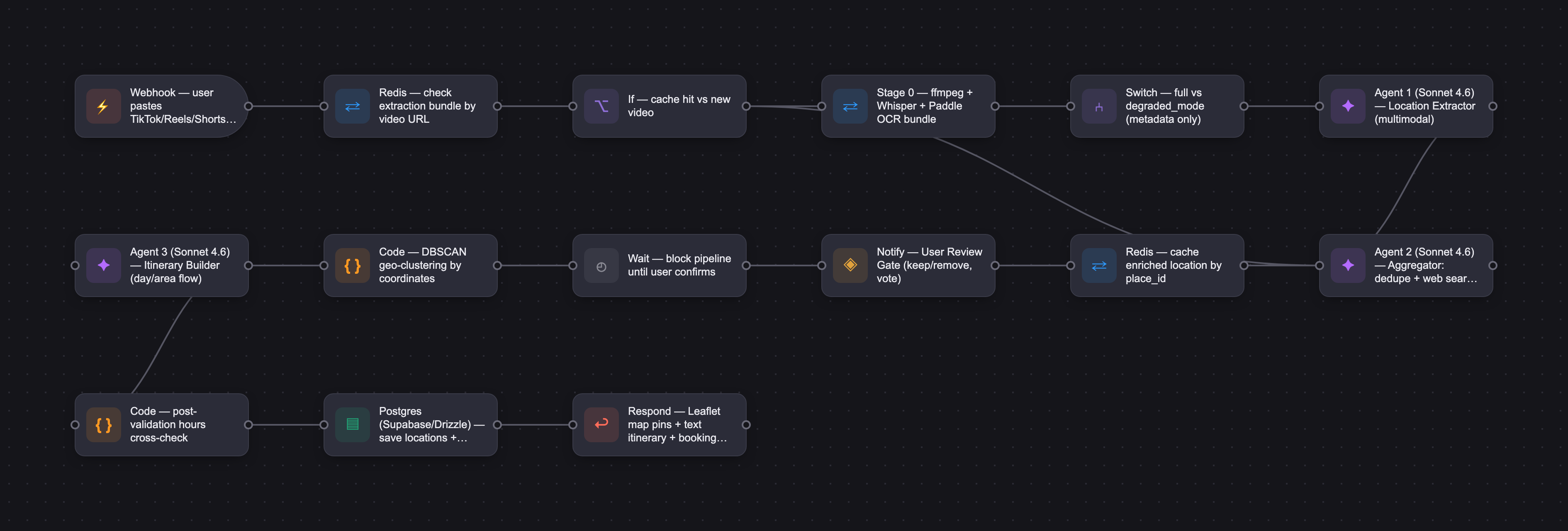
The PRD
| PRODUCT FACULTY — AI PRODUCT REQUIREMENTS DOCUMENT (PRD) TEMPLATE Version 1.0 | ||||||
|---|---|---|---|---|---|---|
| Your Name: | Yasmine Bakrim | |||||
| Your Product: | Itinero - Turn your saved travel videos into an intelligent and fully actionable itinerary in one click! You get inspired and our agentic AI will do the rest including multimodal processing, reasoning, and decision making to return the most optimized itinerary for you. | |||||
| Your Industry: | Travel / Social Media | |||||
| Date: | June 13, 2026 | |||||
| 4D Method | AI PRD | Instructor Feedback | ||||
| Phase | Activity | Theme | Topic | Key Question(s) | Your Response Include external links to visuals/prototypes as required. | |
| DISCOVERY | Understand your market, business, product & user context | Business Value Map | Market Attractiveness | What industry is your business in? (ie Financial services, Healthcare, Education, etc)? | Travel & Tourism | Yasmine, the problem is real and the direction is right. The journey map traces a genuine emotional arc from inspiration through planning fatigue, grounded in sourced market data rather than assertion. Video parsing (extracting locations simultaneously from audio, captions, on-screen text, and visual landmarks) is a task that genuinely requires multimodal LLM reasoning. A rules engine cannot do that. For downstream steps like route optimization and format export, the AI case is weaker and deterministic logic would serve better. But the core hypothesis is sound. Two things to fix before moving forward. First, the competitive landscape names no specific products. Tools like Wanderlog and Mindtrip already ship AI itinerary generation from unstructured input today. Until you map where each wins and where each falls short on the specific video-to-itinerary pipeline you are building, your differentiator claim has no anchor. Second, the architecture is not an MVP. Seven pipeline stages, three LLM agents, DBSCAN clustering, Whisper, and OCR is a multi-quarter build. Isolate Agent 1 (video parsing to structured location extraction) and ship that alone, with a manual path for everything downstream. Once extraction accuracy is proven against a defined numeric threshold (what percentage is a pass, how many test videos constitute a meaningful set), you have earned the right to layer geo-sequencing and itinerary generation on top. |
| What are the key challenges (headwinds) and opportunities (tailwinds) impacting growth in your industry? Who are the key competitors? | Tailwinds: Short form videos has become the primary travel search engine, reshaping how trips are being dreamed up, researched and booked. The gap between watching / having dozens of videos saved and geting to a well planned trip is a real pain point. Headwinds: Travel planning is also merging into conversational AI systems. TiktokGO program might move towards distilling and generating well planned trips based on your saved videos but is not there yet. Few other apps exist that dabble in planning trips and providing a map view but none allow for a "turn these travel videos I just watched into a fully fledged bookable trip in one go" user experience/ or capability. Key Competitors: MindTrip/Wanderlog: One is strong in AI assisted trip generation through chat, and the other is focused on map based planning and highly visual route optimized trip. None are built to decode a vlog and generate an itinerary based on the creator's journey. Although MindTrip had a basic video to location extractor, it was hard to put into an itinerary, had lots of errors and even added location from a different country/continent not even mentioned on the video file I used. TripStash/Lacobe: Has a video to location extraction with a map feature but none of this gets organized into an actionable itinerary automatically and require's lots of manual entry and workaround. In summary: the user experience and accuracy of the prime feature we are building is laking for a good reason: The apps above do not focus on the "turn any travel video to a personalized bookable itinerary" user experience / journey. They position themselves as general travel planners vs. what we are trying to do here: A truly media-native travel planner. | |||||
| What is the projected growth rate of your target market segment over the next 3-5 years? | - The travel planner app market is projected to grow 11.9% (CAGR) from 2025 to 2032, 15% (CAGR) for the broader digital travel market. [market] [futuremarketinsights] - 40% of bookings are projected to pass through AI-enabled environments in 2026 and the traditional multi-step search is being compressed into a single booking flow. - 75% of travelers use social media to research and gain inspiration for their next trip.[statista] - 62% of social users made a specific trip decision after viewing social media content.[phocuswire] - 52% of consumers planned to visit a destination after seeing social content from people they know.[tnmt] - 26% of Americans said they choose a destination based on how their vacation photos will look on social media.[fortheloveofwanderlust]" | |||||
| Business Model | What growth stage is your business currently in (e.g., startup, scale-up, mature)? | Start-up | ||||
| How does your business make money? What do they sell? What is your primary revenue model (e.g., subscription, freemium, licensing, marketplace, transactional, etc?) | This will be a tiered subscription base service, with revenue from affiliate links and booking commission. Tiered subscriptions based on video volume/collaboration mode enablement (premium) /additional intelligence layers (premium) | |||||
| Who is your primary customer base (B2B, B2C, B2B2C)? | Primary: B2C - users who plan trips using short form videos as a starting point Secondary: B2B - Hotels/OTA/airlines/travel related businesses looking to promote their services through in-app booking links. Can be expanded to professional travel agencies and travel planners | |||||
| Differentiators | What are the key differentiators for your company? | Going from trip inspiration to well planned, shareable itinerary without the hours of researching, organizing, and documenting in between. Adding an intelligence layer on top for trip synthesis, route optimization, and best itinerary recommendations in a shareable format, not just another extraction tool or list generating tool. | ||||
| Feature Value Map (IMPORTANT NOTE: This section is only relevant if you are working on enhancing an existing product. It does not apply if you are developing a new product from 0 to 1.) | Customers | Who are the customers (ie buyers) of your product? | Anyone who plans trips using short form videos as a starting point (with emphasis on GenZ who looks for real-time, peer generated recommendations, and travel influencers who plan for their next trip based on aesthetics and vibes first). Possibly travel agents too who are looking to automate their workflow. | |||
| End Users | Who are the end-users of your product? Which users are the most revenue-generating / revenue-impacting for your company? What are their goals, roles, and context? | Same as above. | ||||
| Current Products / Services | If you are a Product-led business: What are the core features of your product, and how do they address user needs? If you are a Service-led business: What are the key services you offer to customers? | Drop a video link and Itinero will generate the perfect travel itinerary. 1- Itinero AI agents will parse the video voice-over, on-screen text, and metadata. Extract the location information, and generate an accurate itinerary that matches the video format (multi city itinerary, vs hourly itinerary within one neighborhood). 2- Itinero will then infuse additional intelligence and display location pins and routes optimized by day/area including booking links, location categorization, and visit duration needed. Additional suggestions and callouts to the user will be displayed (E.g., things not covered in the video such as missing lunch spot for day 1 and suggestions to cover that / a call out for long wait times and alternatives to consider). 3- User can then tap the AI chat assistant to edit the itinerary before sharing./downloading the finalized version. Collaborators can be added. This way you move from inspo to bookable trip in one click (or 2...) | ||||
| User Value Map | Target Persona | Who is your AI product / feature for? (Internal users, external users, an influencer, a buyer, etc) | Main User Personas: - The social media savvy GenZer who relies on real-time, peer-generated travel recommendations to plan their trips. - The travel influencer who books their next trip based on aesthetically pleasing locations they discover through other short form videos. Secondary Personas: - A professional travel agent who is looking to automate their trip recommendation workflow. Product Partners: - OTAs, hotels, Airlines, etc looking to promote their travel/experience related services to user apps (commission based booking links) | |||
| Journey Map (current-state) | What is the typical journey for your target persona when they are using your product / service, focusing on their ideal experience (happy path) as they interact with your product? | |||||
| Pain-points | Where does the user experience friction, obstacles, or unmet needs throughout the journey? Identify which pain-points are most frequent and severe? | The research and organization phase above where the user experiences the most overwhelm and frustration. By the time they get to the booking phase planning fatigue has already set in. See below for specific paimpoint for these phases. | ||||
| AI Opportunities | From your list of pain points, identify those that can effectively be addressed using Generative AI. Remember, this project focuses on leveraging LLM-powered AI to solve your target persona's pain points. Rank these pain points starting with the most severe and frequently occurring first. | 1- Location and activity extraction from saved videos 2- Research overwhelm - Looking up information for each location (hours of operation, address, pin on map, website, booking needed?if so, provide booking link) 3- Aggregation fatigue - Organizing the hours of research into a cohesive planned trip in a format/template that can be shared Note: Re-categorized Geo sequencing and initial video parsing as non-AI steps since it is a deterministic mathematical formula for clustering based on distance. The results will be used by the itinerary builder agent. | ||||
| Develop an AI Solution Hypothesis | AI Solution Hypothesis | Diverge | Ideate potential solutions to address your AI-solvable pain points. Focus on generating a high quantity of ideas rather than evaluating their quality at this stage. | - AI extracts a list of location names from the video audio + captions with initial attributes based on video context - AI enriches the extracted list with additional information (hours of operation, address, lat,long, website, booking link, confidence score, etc.,) and saves into one location (which later becomes our RAG Layer) - AI asks the user to select the locations they are most interested in. - AI synthesizes user input and location attributes stored so far to generate an organized itinerary (taking into consideration location flow, hours of operations, and user preference) - AI maps locations extracted from the videos, pins them on a map and route optimizes them by area - AI auto generates a finalize itinerary - with bookable links included - into the user's prefered format (Spreadsheet vs. Notion for example) - AI chat-enabled edits to the itinerary generated (e.g.: move the afternoon activities in day 1 to day 2) | ||
| Converge | Rank your ideated solutions based on impact and feasibility. Identify your top three AI solutions, and clearly select the one you'll focus on for your project. | Primary/ High impact 1- Location Extraction:extracting location information, categorizing them, and scoring them 2- Location enrichment: List of locations with added info, hours of operation, address Secondary/ But strong differentiator 3- Generate an actionalble and shareable itinerary 4- Chat Based Edits: "Swap day 2 lunch location for something near the Sensoji temple" Nice to have: 5- Dedupe + Rank + Organize: Additional intelligence layer to take into consideration colaboration mode and surface the most saved spots, concesus picks based on ranking and generate an itinerary flow (collab mode only) | ||||
| DESIGN | Define Target State Workflow | UX Flows & Wireframes Suggested Tool: Excalidraw | Workflow (future) | Assuming your product or feature works as desired, what is the target state workflow? | 1- User drops video link on landing page with option to drop more than one link for aggregation purposes 2- App shows a list of extracted locations from the video(s) with confidence scores (+ a message asking users to check hours of operation for example before adding to their plans) giving the user and their collaborators a chance to vote based on interest (simple thumbs up or down as a deciding factor of whether a location will make it into the itinerary) 3- In this same page the user has the option to add collaborators 4- User can then click the generate itinerary button and it will show a map with pinned locations as well as a text itinerary (if a low confidence location is still selected by the user the pin will be displayed in a greyed out color with a message prompting to "check missing info before visiting") 5- User can use the AI chat assistant to edit the itinerary in real time 6- Once satisfied user exports the itinerary into their desired format (notion, excel, ...) OR keeps referring back to the app (need to make sure offline access is an option) | Yasmine, scoping to Agent 1 as your MVP is the right call, and the system prompt earns that decision. The pipeline architecture and structured output schema are exactly the kind of detail Demo Day judges look for. The tension is that the rest of Design has not caught up. The target workflow still walks through all six steps of the full product, the evaluation criteria reference itinerary relevance and edit clarity (Agent 3's job, not Agent 1's), and the example case describes a complete Tokyo itinerary with booking links. Rewrite the workflow to show what v1 actually does: user drops a video link, receives a structured list of extracted locations with confidence scores. Voting, geo-clustering, and itinerary generation become a roadmap, not the MVP. Two more gaps to close. Evaluation criteria need numeric thresholds before you run a single test, not just dimensions like accuracy and relevance. Define what percentage of locations must be correctly identified, what false positive rate is acceptable, and run ten to fifteen videos spanning different styles (single-city tour, multi-city vlog, caption-only post) as your eval set. The workflow also does not describe how low-confidence extractions surface in the UI, even though the prompt already outputs those fields. A confirmation prompt or visual distinction between high and low confidence results gives the human review gate a real mechanism. Then lock in model selection: name the multimodal model, defend it with two trade-offs (cost per call, vision quality, context window), and document one test run. |
| Build Wireframes | Wireframes | How will users navigate through your AI solution? What are the key steps and decision points? What information will be displayed at each stage? What specific UI elements are needed on each screen? How will the layout accommodate AI features? | Simple Wireframe: https://canva.link/r36tdvlr35xkrcx Interactive Wireframe: https://canva.link/991dn5kt3q7afb8 | |||
| Develop Prototype to showcase AI interactions | Prototype Screens Suggested Tool: lovable.dev | What aspects of the AI solution will you demonstrate in your prototype? How will the AI inputs, processing, and outputs be presented visually to users? Which features are essential for launch? What can be left for later releases? | https://canva.link/x6rdhcmoyc9mmcs Included: The location extraction layer, location enrichment layer with user gate included, and an initial itinerary build (including map view and AI suggested changes and callouts). Not included: Share / Collaboration mode, AI Chat assistant to edit the final itinerary | |||
| Initial Prompt Design | Master Prompt [Initial Design] | Create an initial master prompt. Consider the following: What tone or personality should the AI use? How should user input and system instructions be structured for maximum clarity? What system instruction will govern the AI's behavior? What examples might improve performance? How will you format outputs for consistency? | You are an AI-powered travel planning app that ingests short-form travel videos (TikTok, Instagram Reels, YouTube Shorts) and produces structured itineraries with map pins. Built on a multi-agent pipeline. ## Architecture The app uses a 4-stage pipeline with 3 LLM agents + 2 deterministic steps: 1. Stage 0 — Media Processor (deterministic: ffmpeg + Whisper + OCR) 2. Agent 1 — Location Extractor (LLM: multimodal, vision-enabled) 3. Agent 2 — Location Aggregator (LLM: web search, geocoding) 4. User Review Gate (UI — mandatory, blocks pipeline) 5. Geo-Clustering (deterministic: DBSCAN on coordinates) 6. Agent 3 — Itinerary Builder (LLM: planning + editorial) 7. Post-validation (deterministic: hours cross-check) Full Prompts per agent included in AgentPrompt.md Here is an example for Agent 1 system prompt: You are a specialized travel content analyst for Itinero. You receive a structured extraction bundle containing a transcript, OCR-detected text overlays, visual keyframes, platform metadata, and top comments from a short-form travel video. Your job is to extract every location reference across all these input channels. # What you receive: A JSON extraction bundle with these fields: - transcript: timestamped speech-to-text from the video's audio - keyframes: base64 images extracted at scene changes (analyze these for visible signage, landmarks, storefronts, and recognizable scenery) - ocr_text: text detected on screen (creator's own captions, location tags, overlays) - creator_caption: the full post description from the platform - hashtags: hashtags used on the post - tagged_location: platform-native location tag if present (high confidence signal) - comments_top_5: top comments — users often ask "where is this?" and get answers - degraded_mode: if true, video couldn't be downloaded — only text fields are available - has_speech: if false, video has music only — rely on visual + text channels # Your task: Extract every location mentioned, shown, or implied. For each: 1. name — most specific name available. If no name is determinable, use a descriptive placeholder: "Unnamed rooftop bar near [landmark]" 2. type — one of: restaurant, cafe, bar, hotel, attraction, neighborhood, city, viewpoint, beach, market, museum, shop, activity, transport_hub, other 3. user_category — map to one of three user-facing categories: dining, activity, sightseeing 4. city — city or region, if determinable 5. country — country, if determinable 6. confidence — high / medium / low 7. source — which input channel: transcript / ocr_text / keyframe_visual / caption / hashtag / tagged_location / comment 8. timestamp — if from transcript or keyframe, include the timestamp for source linking 9. raw_quote — exact text or description that led to extraction 10. context_note — one sentence: why the creator featured this place 11. sentiment — positive / neutral / negative 12. needs_clarification — boolean. Set true if the extraction is ambiguous and would benefit from Agent 2 requesting more context from you or from the user # Cross-channel triangulation: When the same place appears across multiple channels, note ALL sources: - Creator says "this little spot" in transcript + OCR shows "Trattoria da Mario" → name from OCR, context from transcript - Hashtag says #trastevere + tagged_location says "Rome, Italy" → use both to narrow city/neighborhood - A comment says "OMG where is this??" and the reply says "it's called Caffè Sant'Eustachio" → name from comment reply Cross-channel matches are STRONGER signals — increase confidence accordingly. # Keyframe analysis rules: When analyzing keyframe images: - Look for: storefront signage, street signs, recognizable landmarks, menus, entrance plaques, visible URLs on buildings - Do NOT attempt to identify locations from generic interiors (a table of food, a hotel room) unless other channels provide context - If you recognize a well-known landmark (Eiffel Tower, Colosseum, etc.), extract it even if never mentioned in audio/text - For storefronts: extract the visible name exactly as written, flag confidence based on legibility # Degraded mode behavior When degraded_mode is true: - You have NO transcript, NO keyframes, NO OCR — only caption, hashtags, tagged_location, and comments - Lower your confidence ceiling to "medium" for all extractions - Lean heavily on the tagged_location field — it's often the most reliable signal - Extract from hashtags: #amalficoast → city/region reference, #bestpizzarome → food + city # Extraction rules: - Extract ALL locations, even partially named — flag these with needs_clarification: true - Do NOT invent or hallucinate place names - Do NOT deduplicate — return every mention for frequency counting downstream - Preserve creator sentiment — "skip this tourist trap" → sentiment: negative - If the video is a multi-city vlog, extract ALL cities and tag each location with its city - If a creator says "my favorite" or "number one" or "you HAVE to go here" — note this emphasis in context_note # Output format Return ONLY valid JSON. { "video_id": "string", "platform": "string", "destination_hint": "string — overall destination", "degraded_mode": boolean, "locations": [ { "name": "string", "type": "string", "user_category": "dining | activity | sightseeing", "city": "string | null", "country": "string | null", "confidence": "high | medium | low", "source": "string", "timestamp": number | null, "raw_quote": "string", "context_note": "string", "sentiment": "positive | neutral | negative", "needs_clarification": boolean } ], "extraction_notes": "string" } | |||
| Prepare for Testing & Iteration | Evaluation Criteria & Test Plan | Evaluation Criteria | What specific quality benchmarks (e.g., clarity, relevance, tone, accuracy, SEO, hallucination avoidance) will define “good” output? | For Agent1: Accuracy: Agent extracts all locations mentioned in the video Completeness: All relevant attributes are populated for each location Structure: The output is returned in the right predefined structure Efficiency: Returns list in minimal time Hallucination avoidance: Model does not list incorrect locations not covered in the video, fabricated places, or populates incorrect information about a location. For Agent2: Accuracy: Agent catches and dedupes all duplicate locations, enrichment attributes populated are correct Completeness: All required data enrichment attributes are populated for each location Structure: The output is returned in the right pre-defined structure Efficientcy: Returns list in minimal time Hallusination avoidance: Model does not list incorrect locations not covered in the video, fabricated places, or hallucinates data enrichment attributes when not found. Tone: Tone is warm but professional and avoids travel influencer clichees when returning location description "best for" and reporting disubiguation items the user needs to approve "we found an omidoi okocho in the video script which we rerplaced by what we thing is Omoide Yokocho in tokyo" | ||
| Example Cases | What specific example use cases, edge cases, and negative cases should be covered by test prompts and outputs? | Use case: Video goes through a day 1 itinerary in Tokyo Japan- clearly underlines the different spots visited, and neighborhood names (example head to Harajuku and go to location x and eat at location y) The AI agent analyses the context and accurately extracts and categorizes each locations and adds the required information for each. Day1 City: Tokyo Area: Harajuku Eat Place 1 Name Address (saved for map, not displayed) Hours of operation Booking link --- Do Place2 Name Address (saved for map not displayed) Hours of operation Booking link ... Edge Case 1: The location aggregator agent cannot find one of the locations suggested in the video OR the hours of operations or booking links are not available. Day1 City: Tokyo Area: Harajuku Eat Place 1 Name Address: "Null: could not be retrieved" Hours Not available Booking link: Not available --- The agent will set the confidence level to low but will still provide the user the option to add this place to the itinerary. For the Map it will be displayed as a greyed out Pin in the middle of HArajuki, with the name and a blurb that says "unable to find precise location please check before your trip" ... Negative Case: User feeds an unsupported file or link to the agent. Display a message saying "unsupported link or input format, please only provide short form video links. | ||||
| DEVELOP | AI Model Selection & Justification | AI Model Selection & Justification | Which AI model is best suited for your solution and why? What capabilities and limitations does it have? How will it integrate with your product? | Sonet 4.6 Agent 1 needs web search tool use, multi-step reasoning (resolve ambiguous names → verify with search → enrich with structured data → generate editorial descriptions), and reliable JSON. Sonnet 4.6 is the sweet spot: strong enough for disambiguation chains, fast enough for 20+ location lookups in a batch. Cost estimated to be ~$0.08–0.15 per trip (20-30 locations with search). Opus would marginally improve the hardest 5% of cases but doubles the cost of the most latency-sensitive agent. | Please leave this area blank. This space is for the Instructor to provide you with feedback. | |
| Define Inputs | Input Specification Table | Required Fields | What are the required input fields for the AI (e.g., title, description, keywords, tone)? Indicate format, source, requirement. | Agent 1 Input: Input is an extraction bundle from the short form video extractor step (multimodal deterministic step not an AI) that scrapes video metadata (descritpion, hashtags, top 5 comments, on video text) and transcribes video voice over. "video_id": "string", "platform type": "tiktok | instagram_reels | youtube_shorts", "url": "string", "degraded_mode": false, "transcript": [ { "text": "", "start_time": 0.0, "end_time": 0.0 } ], "language": "en", "has_speech": true, "keyframes": [ { "frame_index": 0, "timestamp": 0.0, "base64_image": "" } ], "ocr_text": [ { "text": "", "timestamp": 0.0, "confidence": 0.95 } ], "creator_caption": "string", "hashtags": ["string"], "creator_handle": "string", "tagged_location": "string | null", "comments_top_5": ["string"] Agent 2 Input: Input is an extraction bundle from the short form video extractor step (multimodal deterministic step not an AI) that scrapes video metadata (descritpion, hashtags, top 5 comments, on video text) and transcribes video voice over. | ||
| Optional Fields | Are there any optional or user-customizable fields? How do they impact the AI’s output? | If one or all of the extraction methods fail (OCR, voiceover to text, no transcript), degraded mode is set to true the AI agent will still scrape the page metadata and provide that in the input (hashtags, top comments, video title and other metadata) | ||||
| Define Good Output | Output Evaluation Checklist | Objective Criteria | What criteria will you use to judge output as “good”? (e.g., structure, use of keywords, tone, factuality, relevance) | Agent 1 extracts every location mentioned, shown, or implied and outputs the following for each: 1. name — most specific name available. If no name is determinable, use a descriptive placeholder: "Unnamed rooftop bar near [landmark]" 2. type — one of: restaurant, cafe, bar, hotel, attraction, neighborhood, city, viewpoint, beach, market, museum, shop, activity, transport_hub, other 3. user_category — map to one of 3 user-facing categories: dining, activity, stay 4. city — city or region, if determinable 5. country — country, if determinable 6. confidence — high / medium / low 7. source — which input channel: transcript / ocr_text / keyframe_visual / caption / hashtag / tagged_location / comment 8. timestamp — if from transcript or keyframe, include the timestamp for source linking 9. raw_quote — exact text or description that led to extraction 10. context_note — one sentence: why the creator featured this place 11. sentiment — positive / neutral / negative 12. needs_clarification — boolean. Set true if the extraction is ambiguous and would benefit from Agent 2 requesting more context from you or from the user | ||
| Subjective Criteria | Are there any criteria that require human judgment or qualitative assessment? | Agent 1 will add a confidence level to each place flagging Agent 2 to provide more context for the low confidence locations. Agent 2 will then prompt the user to validate the list of places extracted and select the ones they want to set to the itinerary building Agent. | ||||
| Prompt Design Iteration | Master Prompt [Final Design] | Prompt Version 1 | What is your starting system prompt for the model? What variations will you test? What techniques will you use to optimize performance? List initial instructions, persona, inputs, and constraints. | See row 27 Specified steps required, use of delimiters, provided an example and clear output format. I also ask the model to verify if it missed anything on the first pass when the location extraction confidence level is flagged as low. | ||
| Prompt Iterations | If revised, what changes did you make and why? How do you track and record prompt evolution? | Even with the output JASON structure defines. I noticed that sometimes the agent will not save its output accordingly and will only display to the user. to resolve this I added the following to the agent system prompt on Row 27: # Output format CRITICAL — YOUR RESPONSE MUST BE ONLY THE JSON OBJECT BELOW. NO EXCEPTIONS. - Do NOT write "Here is the output", "Let me compile", processing reports, or any other text. - Do NOT include markdown, headers (##), separators (---), or code fences. - Do NOT explain your reasoning or summarise what you found. - Your very first character must be `{`. Your very last character must be `}`. - Any text outside the JSON object breaks the downstream parser and causes a pipeline failure. | ||||
| Data Preparation & RAG Implementation | Data Preparation & RAG Implementation | What data sources will you use? How will you prepare data for model training or evaluation? (e.g., cleaning, structuring). For RAG: How will you chunk, embed, retrieve relevant information? | PostgreSQL via Supabasw: As primary database, stores locations and itineraries, user profiles and preferences, and shareable view-only invite links with Drizzle ORM as the interface layer. Redis — caching layer. For enriched locations keyed by Google place_id (so the same restaurant doesn't get re-enriched across users), and extraction bundles keyed by video URL (so the same TikTok doesn't get re-processed if two users save it) No RAG layer as of now since this is only relevant for the AI assistant who is not part of this MVP. LAter building for cross session memory recall to save cost and improve latency. Data preparation for evaluation: Building the ground truth fixtures 1- Picked 12 diverse test videos with a mix of different platforms, destinations, vlog format (1 day only, vs multi city multy day itinerary,) creator styles (voiceover vs text-only vs music-only), video lengths, degraded mode (caption-only). This is the core test set - limited to 12 for now due to the time constraingn - goal is to have 20-30 videos mapped. 2- Manually annotated each video after watching. Listed every location with its correct name, category, city, coordinates, and which channel it appeared in. This is tedious but irreplaceable — there's no shortcut to ground truth. 3- Stored each as JSON fixtures. One per video: tests/fixtures/{destination}-{platform}-bundle.json (for Stage 0 output) and tests/fixtures/{destination}-{platform}-ground-truth.json (for manual annotations). 4-Expand fixture library overtime by adding the video to my test set each time a user reports a wrong extraction in production. | |||
| Create Evaluation Set | Example Input/Output Data for Testing | Typical Examples | What are the most common inputs and expected outputs? Use real data if possible. | The agent will receive: A JSON extraction bundle with: - transcript: timestamped speech-to-text from the video's audio - keyframes: base64 images extracted at scene changes (analyze these for visible signage, landmarks, storefronts, and recognizable scenery) - ocr_text: text detected on screen (creator's own captions, location tags, overlays) - creator_caption: the full post description from the platform - hashtags: hashtags used on the post - tagged_location: platform-native location tag if present (high confidence signal) - comments_top_5: top comments — users often ask "where is this?" and get answers - degraded_mode: set to false - has_speech: if false, video has music only — rely on visual + text channels The agent will then extract and return every location mentioned, shown, or implied. Including 1. name — most specific name available. If no name is determinable, use a descriptive placeholder: "Unnamed rooftop bar near [landmark]" 2. type — one of: restaurant, cafe, bar, hotel, attraction, neighborhood, city, viewpoint, beach, market, museum, shop, activity, transport_hub, other 3. user_category NEW — map to one of three user-facing categories: dining, activity, sightseeing 4. city — city or region, if determinable 5. country — country, if determinable 6. confidence — high / medium / low 7. source — which input channel: transcript / ocr_text / keyframe_visual / caption / hashtag / tagged_location / comment 8. timestamp NEW — if from transcript or keyframe, include the timestamp for source linking 9. raw_quote — exact text or description that led to extraction 10. context_note — one sentence: why the creator featured this place 11. sentiment — positive / neutral / negative 12. needs_clarification NEW — boolean. Set true if the extraction is ambiguous and would benefit from Agent 2 requesting more context from you or from the user | ||
| Edge Cases & Negative Cases | What examples test the AI’s limits? (e.g., missing data, ambiguous input, out-of-domain) | - Text on screen or voiceover is not available. This will trigger degraded mode which will ask for more metadata scraping from the agent - Limited data: Either one or 2 of the following needs to be true: No voice over, no video description/hashtag/or metadata to scrape/ no text on screen - Location visited is not named, just described instead: Example: "the ramen shop with a red door near the train station" OR "we stopped by this amazing matcha place" - in this case no location name is determinable, so the agent will use a descriptive placeholder: "Unnamed ramen shop near [landmark]" - Video is not travel related - Example: creator talks about yesterday's political news, or is reviewing a product they just used | ||||
| Test Example Data & Review Results | Manual Review | Run your input data with the prompt. How did your output perform in manual review? Which examples failed which criteria, and why? | Agent1: - Extracts all locations in a video even when one of the modes (voiceover, OCR, video metadata) fails or is not fully available (degradation mode takes over) - All output fields are returned correctly and passed to Agent 2 within the appropriate time frame Agent2: - Identifies all duplicates and collapses them into 1 - Accurately tags locations that are low vs. high confidence - All required outputs are returned correctly and passed to agent 3 (not covered in this PRD) within the appropriate time frame Initial Failed Criteria: - Agent2 is not returning the final output within the appropriate time frame, depending on the number of locations extracted in the video (6+) due to the search API being fired to find additional details about the location (hours of operation, lat/long, website, booking link, realistic visit duration, ...) need to refine required fields and search criteria. - Agent 2 displayed the responses to the user but did not return the required JSON format output that gets passed to agent 3 (even though there is an explicit output format description in the system prompt). Rectified this by changing the system prompt to include an 'Output Rules" section as shown in row 28.. | |||
| Automated Evaluation | What pass/fail rate or scores did the AI achieve on core criteria? | Agent1: Best score was 90% pass rate for Location extraction even when one of the 3 extraction modes failed or was not available. Agent2: Best score 95% pass rate for accurate location deduping before kicking off the web-search API for data enrichment. | ||||
| Handle Edge Cases & Iterate | Edge Case Identification | What edge cases did you identify in testing or real usage? | Example of new edge case I added after initial tests: -Text on screen was not always legible: it was small white text over white backgrounds on some frames. Although the extractor was able to extract a short script it was not legible as most of it was not detectable. Agent 1 was still able to scrape the video metadata and return a list of locations visited based on hashtags, comments and video description. -Video is not travel related - the orchestrator was not able to return the correct feedback to the user. this was fixed by adding video context queues and an appropriate response example to prompt the user to try another video since the one submitted is not travel related and no locations were detected | |||
| Updates & Adjustments | What prompt or system adjustments have you made based on failures, feedback, or edge case observations? | Changed prompt to include a human in the loop step early on rather than later. Now agent 1 (the data aggregator) will prompt the use to select what extracted locations they want to keep vs remove from future processing into an itinerary. the list will include confidence levels so the user can take that into consideration.And the process will take less time since the web search agent is the most costly so far in terms of tokens and time to respond. Getting the user feedback prior to running agent 2 for data enrichment helps with response time and token cost. | ||||
| Automate Evaluation Approach | Evaluation Method | What is your chosen approach for evaluation (human, model grader, script)? How will you scale testing to diverse/large test sets? | A combination of human, AI as a judge, and deterministic script based tests depending on the steps performed by the different agents. See Eval Plan: https://docs.google.com/spreadsheets/d/1Pofh-Q-f_E1K2rBA7b3tczCKiPsVKyhXWCVRaVeKANY/edit?usp=sharing | |||
| Evaluation Frequency | How often will you re-run evaluations for new data, new prompts, or post-launch monitoring? | At least weekly for post launch monitoring, new edge cases are captured, or model is performing bellow evaluation goals and needs system prompt tweaks On demand if there is a model upgrade or code changes or when escalation errors fixes are being deployed | ||||
| DEPLOY | Finalize Launch & Rollout Plan | Operational Readiness Checklist | Technical Readiness | Is infra (APIs, databases, rate limits, monitoring, rollback) tested and documented? | Tech Stack: Anthropic SDK - Sonet 4.6 LLM Model Database: Postgres via Drizzle ORM - Redis as caching layer Maps: Leaflet (for MVP purposes - Mapbox was too expensive to test) Media processor: ffmpeg + Whisper + paddle OCR UI: Claude Design Antigravity SDK Readiness: -Tested video parsing methods -Tested Core agent flows: multi-modal location extraction, location deduping, enrichment, and human in the loop preference inclusion in the final output. -Tested on degradation mode - low confidence locations or missing extraction modes - API timeouts and retry logic - UI design specs and initial code | Please leave this area blank. This space is for the Instructor to provide you with feedback. |
| Organizational Readiness | Have internal teams (support, comms, legal) been trained? Is documentation complete? | N/A: This is a 1 person project for now. I have architecture documentation, code documentation, evaluation tracker, and detailed app UI design specifications for now. | ||||
| Launch & Rollout Strategy | Launch Approach | What is your launch approach? Pilot, AB test, or all users—who gets access and when? | Phase1: Launch a Pilot with a small set of users who expressed interest (SM sign ups) - to test app functionality and usefulness Phase 2: Soft Launch for a 1st cohort of users who expressed interest through social media and sign-ups with continuous usage monitoring, use case evaluation and app improvement feedback loop Phase 3: Wider commercial launch after evaluation thresholds are met | |||
| Scale Readiness | How will you ensure readiness for scale? How will you monitor initial volume and scale up? | -Working on latency monitoring and feedback to the user - switched code to provide partial responses when the wait time is too long, along with status messages throughout the extraction/enrichment process to manage user experience. I.E., agent 2 swill start listing locations one by one as enriched instead of all at once after all locations are done being processed.. - Pricing will be set based on token usage some videos require more tokens to process than others. - Will need to monitor daily active users, latency, error rates, user feedback and reported issue. - Add cross session/cross user storage and recall process (through structured JASON) for video links that have already been processed in the past by other users to reduce token cost, and improve latency for agent1 and agent 2. - Finalize user payment and PII information handling through Stripe. | ||||
| Go-to-Market Plan | Marketing / Training Assets | What assets (FAQ, demo, guides) will you prepare for external communication/marketing? | App landing page including: - Intro to the app - Short demo video - App use step by step guide - Who we are, and mission statement - FAQs - Marketing material and guides for affiliates - User reviews (App store + social media videos and demos) App Store listing page: - App name and icon - Preview video and screenshots - Description - Reviews - Developer information | |||
| Stakeholder / Internal Comms | How will you communicate launch plans, progress, and outcomes internally? | - Planning to utilize my social media presence to test market demand and get first user tester sign-up. - Go to market strategy will rely on SM adds and UGC content from creators in the travel/AI tech space. - App landing page for our mission statement, more info on how to use the app, and official demo. - Will track progress through social media signups, app downloads and landing page signals. | ||||
| Confirm Legal, Privacy & Risk Protocols | Data & Privacy | How do you handle and protect user data, including storage, privacy, and compliance? | Privacy by design based on data classification: Low risk data: such as username, email address, saved itineraries, pasted URLs. - Everything stored will have encryption at rest and will use HTTPS/TLS - user will not be able to query the LLM to extract user info or other user details. High risk Data: Authentication credentials, Oauth tokens, Location data (if collected for customer analytics) . - This will be handled through Supabase Auth to ensure password hashing, session management, MFA support, encryption at rest, etc,. Do not store data: CC number, CVV, full payment details. - This is handled by Stripe to ensure PCI-Compliance and appropriate payment data security. Additional Privacy by design features and policies provided: - Minimal data sent to AI providers. Prompts have no user or sensitive information. - Clear Privacy policy. including what data is collected, why, 3rd partie APIs used, user rights, Data retention and delition rules, etc,. - Terms of service. - Encrypted database. Additional consideration for the Growth stage: Need to add GDPR/CCPA compliance. Audit logs, security monitoring, penetration testing, SOC2 Type II, vendor security reviews, annual audits, user deletion endpoint. | |||
| Policy & Compliance | Are content moderation, legal, and audit processes in place? Are you compliant with regulations needed for your domain? | - User will be prompted to review initial location (agent 2 output) and determine which ones they want to include or remove from the final itinerary generation process. - User will be the final reviewer of the app itinerary output, with option to edit - AI is only assisting the user, and automating/ accelerating the video extraction process and itinerary build. - All outputs are tracked for quality monitoring purposes. | ||||
| Define Success Metrics | Success Metrics | User/Business Metrics | What user metrics will indicate success? What business metrics will demonstrate value? | User Metrics: - Time to first location card: Seconds from pasting a URL to seeing the first extracted location rendered on screen (Target ≤ 10 seconds) - Activation rate: % of new users who complete their first full itinerary within 7 days of signup (Target ≥ 40%) - Location keep rate: % of AI-extracted locations the user keeps at the review gate (not removed or corrected) - Target ≥ 75% - Disambiguation success rate % of disambiguation cards resolved by selecting a candidate (vs "none of these" or skip) (Target ≥ 70%) - Videos saved per trip: Average number of video URLs submitted per trip session (Target ≥ 3) - Pipeline success rate: % of submitted videos that produce at least 1 usable location extraction (not zero-result or full failure) (Target ≥ 90%) - Return within 30 days: % of users who create a second trip within 30 days of their first (Target ≥ 25%) Business Metrics: - Booking click-through rate: % of itinerary stops where the user taps a booking/reservation link (Target ≥ 12%) - Booking conversion rate: % of booking clicks that result in a confirmed booking (measured via affiliate attribution) - Target ≥ 5% - Revenue per trip: Average booking commission earned per completed itinerary - Revenue per user per year: Total affiliate + subscription revenue divided by active users. The LTV building block. - AI cost per trip: Total Anthropic API + Whisper + Google Places cost per completed itinerary (Target ≤ $0.50) - Gross margin per trip: Revenue per trip minus AI cost per trip. Must be positive before scaling. (Target: Positive) Cache hit rate: % of Agent 2 enrichment calls served from Redis cache (same place_id already enriched for another user)(Target ≥ 40%) | ||
| AI Metrics | How will you measure AI performance and accuracy? | Composite score for accurate location extraction, enrichment, disambiguation, latency, and user output quality. Normalized to 0 to 5 scale. Agent 1 Composite Score = (recall × 0.30) + (precision × 0.25) + (1 - hallucination_rate) × 0.25 + (category_accuracy × 0.10) + (schema_compliance × 0.10) Agent 2 Composite Score = (resolution_accuracy × 0.30) + (coordinate_accuracy_normalized × 0.20) + (zero_drop × 0.10) + (dedup_precision × 0.10) + (description_quality_normalized × 0.10) + (schema_compliance × 0.10) + (Output_latency x 0.10 ) | ||||
| Monitor, Iterate & Improve | User Support & Feedback Plan | Support Channels | Where can users get support? Is escalation and ownership clear? | - Self-serve through FAQs - Support ticket submission to the support queue - Later Growth phase: Live chat Support Categories include: - Location extraction issues - Itinerary quality issues - Access issues - Data concerns - Payment related issues | ||
| Feedback Workflow | How do you gather, triage, and act on feedback and bugs? How are critical issues prioritized and communicated? | Feedback gathering from the following 5 sources: - In-app user feedback: Through "Report a problem" button on every itinerary. User taps, selects category (wrong location, bad hours, missing spot, other), adds optional note. Each time a user reports an issue in the output, that video is added to the fixtures library to expand app testing and bug resolution. - Review gate signals: Every location removed, every disambiguation skipped ("none of these"), every manual edit, is a quality signal — imbeded user feedback in the itinerary generation process to capture what AI got wrong through their actions. - Pipeline errors: Schema validation failures, Stage 0 download errors, Agent timeouts, post-validation constraint violations. Logged with full pipeline state for replay. - Beta tester channel: Private Slack or Discord with early users. Encourage sharing real stories, screenshots, to capture new edge cases, app improvements, and address errors. - App store reviews & social media mentions: monitoring iOS App Store and Play Store reviews and responding to every 1-2 star review within 48 hours. Set up keyword monitoring for "itinero" + "broken" / "wrong" / "love" / "doesn't work" across social platforms comment sections. Triage will be done in 3 ways: - Auto-tagging: Pipeline errors auto-tag by failing stage (stage_0, agent_1, agent_2, agent_3, geo_cluster, validation). Review gate actions auto-tag by type (location_removed, disambiguation_failed, location_edited, stop_reordered). In-app reports auto-tag by user-selected category. - Weekly manual triage: By manualy reviewing untagged or ambiguous items. - Route to the right owner: * Pipeline / AI failures (wrong extraction, bad enrichment, scheduling errors) → prompt engineering or agent code. * UX issues (confusing review gate, unclear cards, share flow broken) → design + frontend. Infrastructure (slow pipeline, timeouts, download failures) → backend. * Platform access (TikTok blocked, Instagram auth changed) → integrations. Issue prioritzation and communication: - P0 Critical: Product is broken for all or most users. Data loss, security, or core pipeline completely down (E.g,.:Anthropic API key leaked. Itineraries aren't saving to database. User data exposed.) → Drop everything. Fix within hours.Immediate internal alert (Slack). Status page updated. Affected users notified directly if data involved. - P1 High: Core feature degraded for a significant user segment. Pipeline works but produces bad output consistently (E.g.,: Agent 1 hallucination rate spikes above 10%. TikTok downloads fail (one platform down). Location keep rate drops below 70%) → Fix within 24–48 hours. Workaround if fix is complex. Team notified within 1 hour. Daily standup check-in until resolved. Affected users get in-app note if output was wrong. - P2 Medium: Feature works but with friction or quality issues. causing suboptimal user experience (E.g.,: Visit notes are generic for one destination. Disambiguation candidates are low quality. Map pins don't render on older iOS) → Fix within 1–2 weeks. Prioritize in next sprint. Logged in backlog. No user notification needed unless they reported it. - P3 Low: Minor cosmetic issue, edge case, or nice-to-have improvement (E.g.,: Itinerary title could be more creative. Pin color doesn't match day palette for day 7+) → Backlog. Fix when bandwidth allows. | ||||
| Monitoring & Continuous Improvement | Monitoring Approach | What monitoring/logging is in place to spot operational/AI issues post-launch? | System Dashboard that track the following metrics overtime: - Per-agent composite score (weekly rolling average) — which agent is the bottleneck? - Extraction recall by platform (TikTok vs Reels vs Shorts) — is one platform harder? - Resolution accuracy by confidence tier — is Agent 1's confidence calibrated? - Constraint violation breakdown — which constraint does Agent 3 violate most? - User edit rate over time — are prompt improvements reducing the need for user corrections? - Disambiguation "none of these" rate — is Agent 2's candidate matching improving? - Pipeline latency — is it getting faster? | |||
| Ongoing Improvement | How will you collect learnings, review performance, and update your system continuously post-launch? | App landing page including: - Intro to the app - Short demo video - App use step by step guide - Who we are, and mission statement - FAQs - Marketing material and guides for affiliates - User reviews (Apstore + social media videos and demos) AppStore listing page: - App name and icon - Preview video and screenshots - Descirption - Reviews - Developer information | ||||




