
Productivity
My Events
My Events is an app that scans a Gmail inbox, finds likely event-related emails, extracts structured event details, and places those events onto a calendar. The MVP uses a three-stage pipeline: Gmail search for candidate emails, an AI pre-scan on sender and subject lines, and on-demand extraction from the email body. Users can review events in calendar or card view, then export them to Google Calendar or print them.
The problem
There is no longer a single source for entertainment events. Information arrives across mailing lists, Eventbrite, "things to do this weekend" articles, and Facebook groups — each publishing its own slice — so staying aware of what's coming up is hard, and it's easy to miss ticket windows or overlook smaller local events. Event details arrive by email in inconsistent, unstructured formats with no automatic way to capture them. Saving everything with full details is time-consuming, so users usually don't, and later have to revisit the source. Even when events are saved, without a calendar view it's hard to see the full landscape or notice that two events coincide.
The solution
My Events scans a Gmail inbox, finds likely event-related emails, extracts structured event details, and places them onto a calendar. It solves a problem earlier in the journey than Gmail's built-in calendar capture, which handles meeting invites and reservation confirmations — cases where the user has already found the event. My Events is about becoming aware of the event in the first place. The product automatically captures upcoming events, standardizes key details, and lets the user view everything in a calendar so overlapping events and conflicts become visible. Users review events in calendar or card view, then export them to Google Calendar or print them.
How it works
The MVP uses a three-stage pipeline. First, a Gmail search query (via read-only OAuth) pulls candidate emails. Second, an AI pre-scan classifies sender and subject lines to identify which likely contain events. Third, on-demand extraction reads the email body to pull structured event details, including multiple events from a single email. The app uses Claude Haiku 4.5 through the Anthropic SDK, chosen because email scanning is classification and extraction rather than complex reasoning — purpose-fit and roughly a third the cost of Sonnet, at under $1/month per user. On a 100-email test set the pre-filter reached 97.5% accuracy; extraction is accurate for emails with 1–5 events but degrades with larger numbers. Deduplication rules handle the same event described by different senders — matching on venue, date, and overlapping keywords.
Who it's for
My Events is for consumers who want to discover and track upcoming events, enabling both advance planning and spontaneous outings. The most likely users are young adults, who tend to go out more, and single or married women, who are typically the household planners. The MVP deliberately limits itself to a single email provider — Gmail — on the assumption that, given the prevalence of email marketing and mailing lists, a user's promotional email folder is a primary event source.
Why it matters
The global event discovery platforms market was valued at $6.8 billion in 2025 and is expected to reach $17.4 billion by 2034 at an 11.0% CAGR, with the hyperlocal segment growing even faster at 15.8%. Tailwinds include source fragmentation and "event searching overwhelm," AI enabling personalization at scale, a post-pandemic resurgence in live events, and email remaining a primary promotion channel. Built as a personal capstone project, My Events plans to validate with 5–10 beta users — extracting test sets from their email while they trial the UI — before asking them to use it weekly for four to six weeks. Planned enhancements include learning user preferences, sourcing beyond Gmail, and alerting on ticket windows.
The workflow
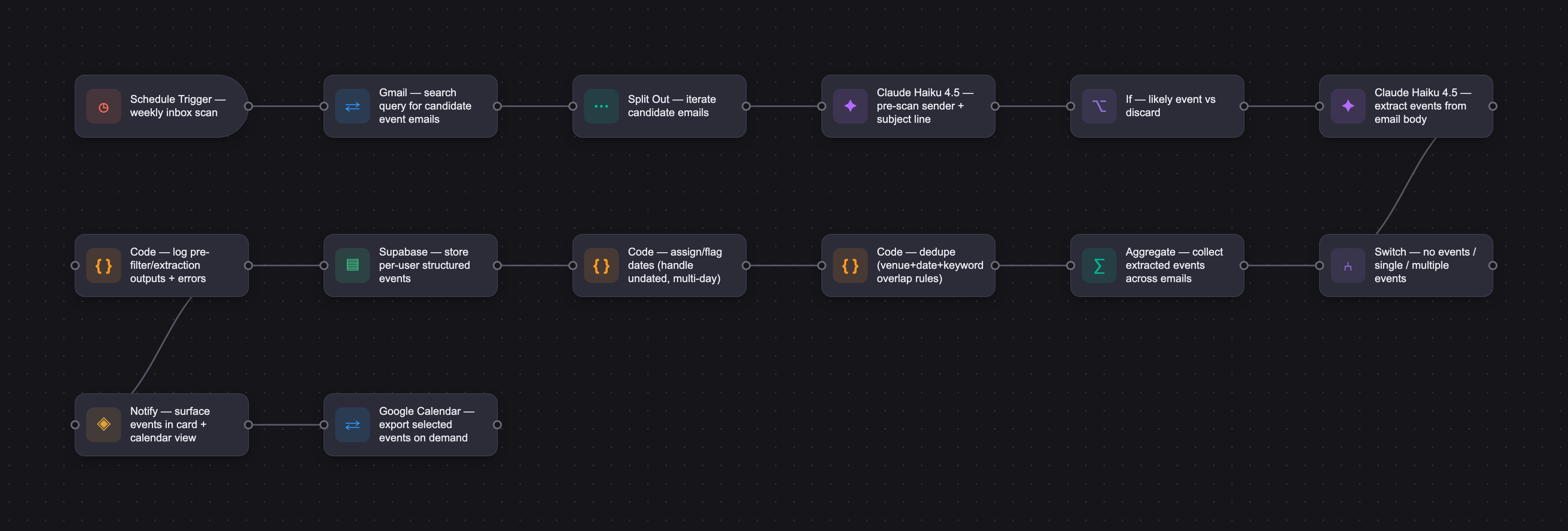
The PRD
| PRODUCT FACULTY — AI PRODUCT REQUIREMENTS DOCUMENT (PRD) TEMPLATE Version 1.0 | ||||||
|---|---|---|---|---|---|---|
| Your Name: | Elisabeth DeVos | |||||
| Your Product: | Mevents | |||||
| Your Industry: | Consumer Lifestyle Tech - Event Discovery | |||||
| Date: | May 8, 2026 | |||||
| 4D Method | AI PRD | Instructor Feedback | ||||
| Phase | Activity | Theme | Topic | Key Question(s) | Your Response Include external links to visuals/prototypes as required. | |
| DISCOVERY | Understand your market, business, product & user context | Business Value Map | Market Attractiveness | What industry is your business in? (ie Financial services, Healthcare, Education, etc)? | Consumer Lifestyle Technology - Event Discovery | Elisabeth, your current-state journey map is grounded in lived behavior rather than hypothetical pain, and that makes the rest of the PRD more trustworthy. The gap worth closing first is AI necessity. Your pain points center on fragmentation and manual effort, but Gmail already detects calendar events natively, and Google Calendar auto-imports them. The PRD never states what the LLM is doing that those existing integrations cannot. Unstructured formatting, ambiguity in venue details, events buried in newsletter prose: those are real LLM problems, but you need to name them explicitly. Without that, a skeptical reader sees a script, not an AI product. Second, the MVP scopes down to a single email source while the entire problem framing is about fragmentation across dozens of channels. That is a reasonable scoping decision, but you need to justify it. What percentage of your persona's discovered events arrive via email? If the answer is low, the MVP solves a sliver of the pain and the value proposition weakens. State the assumption and your evidence for it, even if anecdotal. Your market sizing is well sourced and the figures check out. One small note: the two reports cover overlapping but different market segments, and the PRD presents them side by side without distinguishing the relationship. A sentence clarifying that would sharpen credibility. Answering your questions directly On whether a non-chat interface is acceptable: yes, completely. Many of the strongest AI products have no chat component at all. Classification, extraction, and structured output are legitimate LLM use cases. The PRD template references a master prompt, and that applies to any system instruction governing AI behavior, not only conversational ones. You still need to document the prompts your model uses for extraction and classification. On whether to update design artifacts after the working app diverged: yes, update them. The design section is your source of truth for what the product does and why. When the implementation drifts (for example, calendar upload becoming manual instead of automatic), the design artifacts should reflect the current state so that anyone reviewing your work, including you in two weeks, can understand the actual product without reverse-engineering it from code. A quick pass to align the workflow diagram and screen descriptions with reality is worth doing now, before you fill out Develop. It does not need to be exhaustive. Thirty minutes to reconcile the major differences is enough. |
| What are the key challenges (headwinds) and opportunities (tailwinds) impacting growth in your industry? Who are the key competitors? | Headwinds: Lack of platform search APIs for many events sources/protectiveness of "big players" across commercial and social. Escalating concerns about privacy & cybersecurity make consumers hesitant to share data or trust new apps. Decreases in disposable income are shifting spending away from entertainment. Tailwinds: Increasing fragmentation of sources and "event searching overwhelm." AI enabling personalization at scale. Post-pandemic resurgence in live events and community engagement. Consumer fatigue with social media driving renewed interest in IRL experiences. Email remaining a primary channel for event promotion. Competitors: Eventbrite, Everout, Facebook Events | |||||
| What is the projected growth rate of your target market segment over the next 3-5 years? | Global event discovery platforms market valued at $6.8 billion in 2025. Expected to reach $17.4 billion by 2034 at a CAGR of 11.0% Software component held the largest share at 63.2% of total market revenue in 2025. North America dominated with 38.5% revenue share in 2025 (Source: https://dataintelo.com/report/event-discovery-platforms-market ). According to Stratistics MRC, the Global Hyperlocal Event Discovery Platforms Market is accounted for $2.8 billion in 2026 and is expected to reach $9.1 billion by 2034 growing at a CAGR of 15.8% during the forecast period. (Source: https://www.strategymrc.com/report/hyperlocal-event-discovery-platforms-market ) | |||||
| Business Model | What growth stage is your business currently in (e.g., startup, scale-up, mature)? | I don't have a business. | ||||
| How does your business make money? What do they sell? What is your primary revenue model (e.g., subscription, freemium, licensing, marketplace, transactional, etc?) | n/a | |||||
| Who is your primary customer base (B2B, B2C, B2B2C)? | Consumers | |||||
| Differentiators | What are the key differentiators for your company? | n/a | ||||
| 0-to-1 Product Value | User Problem | What is the core user problem that your product solves? | As a consumer attending events in my area, I struggle to track--or miss--events I am interested in because the information arrives via email in a variety of formats with no automatic way to capture it. | |||
| Unique Value Proposition | How is your solution unique? Why do existing solutions not solve the problem? | Mevents automatically finds events buried in your Gmail inbox and puts them in one place, so you never miss something you actually want to do. MEvents does three unique things: automatically captures upcoming events, standardizes key event detials, and enables the user to view all events of interest in a calendar format so the user can visualize overlapping events and events in relation to their other plans, NOTE: Gmail currently will capture events from email and add to your calendar, but these are either meeting invites or confirmation emails for reservations/tickets, which is a different use case because the user already found the event. MEvents solves a problem earlier in the journey, which is to become aware of the event in the first place-. (Note also that many events do not require tickets or users will choose not to purchase tickets in advance.) | ||||
| Feature Value Map (IMPORTANT NOTE: This section is only relevant if you are working on enhancing an existing product. It does not apply if you are developing a new product from 0 to 1.) | Customers | Who are the customers (ie buyers) of your product? | n/a | |||
| End Users | Who are the end-users of your product? Which users are the most revenue-generating / revenue-impacting for your company? What are their goals, roles, and context? | n/a | ||||
| Current Products / Services | If you are a Product-led business: What are the core features of your product, and how do they address user needs? If you are a Service-led business: What are the key services you offer to customers? | n/a | ||||
| User Value Map | Target Persona | Who is your AI product / feature for? (Internal users, external users, an influencer, a buyer, etc) | Consumers who want to discover and keep track of upcoming events of interest to enable both advance planning and spontaneous outings - most likely young adults (since they tend to go out more) and single or married women (who are typically the household planners). | |||
| Journey Map (current-state) | What is the typical journey for your target persona when they are using your product / service, focusing on their ideal experience (happy path) as they interact with your product? | (NOTE: This is the current user journey that the product is meant to replace.) A consumer receives emails from event mailing lists, searches sites such as Eventbrite, reads "things to do this weekend" articles in the online newspaper, and also receives alerts from Facebook groups. Each of these contain info on events that are potentially of interest. The user then has to either add those events to their calendar app, their paper calendar, or capture them in some other form. Since including all the details is time-consuming, they likely don't, so when they later see the event on their calendar or in their notes, they have to revisit (or search for) the source to get the details. The user doesn't realize some events coincide or misses the window for buying tickets for others. ABOUT GMAIL EVENTS: Gmail currently will capture events from email and add to your calendar, but these are either meeting invites or confirmation emails for reservations/tickets, which is a different use case because the user already found the event. MEvents solves a problem earlier in the journey, which is to become aware of the event in the first place-- and not also that many events do not require tickets or users will choose not to purchase tickets in advance. | ||||
| Pain-points | Where does the user experience friction, obstacles, or unmet needs throughout the journey? Identify which pain-points are most frequent and severe? | 1. There is no single source for entertainment events anymore, making it hard to stay aware of upcoming events, purchase tickets in advance when necessary, or now what smaller events are available on any given weekend. know what's coming up 1a. Sites like EventBrite are overly exhaustive and it takes time to go through everything. 1b. Smaller local events are often advertised at the venue or via mailing lists. 1c. Oftentimes, when a larger event is happening, it's not mentioned in the newspaper until tickets are sold out. 1d. Some special-interest events are only publicized on Facebook groups or simliar forums. 2. Keeping track of upcoming events of interest requires capturing information and saving it to a calendar or other reference. 3. Event information is not structured, so can be challenging to extract. 4. Even with all the information saved, unless it's in a calendar format, it's hard to visualize the full entertainment landscape and make choices. | ||||
| AI Opportunities | From your list of pain points, identify those that can effectively be addressed using Generative AI. Remember, this project focuses on leveraging LLM-powered AI to solve your target persona's pain points. Rank these pain points starting with the most severe and frequently occurring first. | 1. Important events are missed or discovered too late - AI can automatically check for events. 2. Users must manually extract and save event info -- AI can extract and save event info. 3. Event information is inconsistent/unstructured - AI can structure the event info. 4. Users must spend time filtering through too many events, most of which are not of interest - AI can also learn user preferences are find events of interest. | ||||
| Develop an AI Solution Hypothesis | AI Solution Hypothesis | Diverge | Ideate potential solutions to address your AI-solvable pain points. Focus on generating a high quantity of ideas rather than evaluating their quality at this stage. | Structure information as a calendar file or add it to a calendar app directly. Scrape websites for events. Search inbox for event related emails and capture the content. Create a consistent format for event information. Trigger alerts when tickets go on sale for events of interest or are selling fast. Filter and recommend events based on user preferences. | ||
| Converge | Rank your ideated solutions based on impact and feasibility. Identify your top three AI solutions, and clearly select the one you'll focus on for your project. | For the MVP: Capture event information from Gmail. Structure it consistently. Provide it to the user in card format for their curation. Create a calendar view of selected events. RATIONALE: In order to truly understand the prevalence of each type of event source (email, websites, Facebook, etc.), market research would be necessary. So for the sake of this project, we are assuming that because of the prevalence of email marketing and mailing lists, a user's promotional email folder is a primary event source. Due to time constraints, the MVP is limited to one email provider integration (Gmail). | ||||
| DESIGN | Define Target State Workflow | UX Flows & Wireframes Suggested Tool: Excalidraw | Workflow (future) | Assuming your product or feature works as desired, what is the target state workflow? | Workflow Diagram | Elisabeth, the prompt iteration work is the strongest piece here. Calling out seven specific failures in the auto-generated prompt and fixing each one is the kind of reasoning that separates an AI product from a code-generated demo, and the pre-filter pass came from a real performance problem, not theory. Three things to tighten before Demo Day: your 95% eval targets need a ground truth set (twenty manually labeled emails is enough to give you a real baseline and a clean pass/fail story); missed events are your hardest failure mode since buttons catch false positives but not misses, so a simple coverage indicator gives users a reason to trust the system; and the Haiku-vs-Sonnet call needs rough cost math on a realistic weekly email volume to make the choice defensible instead of just sensible. On your question about adding a "problem + why incumbents fail" section — yes, totally agree, that belongs at the top of Discovery for any 0-to-1 build, and one paragraph each on the user problem and why Gmail, Eventbrite, and Facebook Events fall short makes every downstream section easier to evaluate. |
| Build Wireframes | Wireframes | How will users navigate through your AI solution? What are the key steps and decision points? What information will be displayed at each stage? What specific UI elements are needed on each screen? How will the layout accommodate AI features? | Wireframes | |||
| Develop Prototype to showcase AI interactions | Prototype Screens Suggested Tool: lovable.dev | What aspects of the AI solution will you demonstrate in your prototype? How will the AI inputs, processing, and outputs be presented visually to users? Which features are essential for launch? What can be left for later releases? | Prototype Screens MVP: AI identification of relevant emails (from prefiltered set) and extraction of events and unstructured information based on user-provided categories of interest. ENHANCEMENTS: AI "learns" from mistakes and user interest/disinterest. App can source events beyond Gmail. App can alert user to upcoming events or ticket purchase windows. User can flag "missed events." | |||
| Initial Prompt Design | Master Prompt [Initial Design] | Create an initial master prompt. Consider the following: What tone or personality should the AI use? How should user input and system instructions be structured for maximum clarity? What system instruction will govern the AI's behavior? What examples might improve performance? How will you format outputs for consistency? | This project does not involve a chat interface. | |||
| Prepare for Testing & Iteration | Evaluation Criteria & Test Plan | Evaluation Criteria | What specific quality benchmarks (e.g., clarity, relevance, tone, accuracy, SEO, hallucination avoidance) will define “good” output? | 1. Capture of 95% of events in user's email. 2. Accurate information extraction for 95% of events. THESE CRITERIA ARE OUT OF SCOPE FOR THE MVP: 3. Improved event pre-selection based on user preference (metric TBD) over time. 4. Accurate learning of "not an event" feedback (metric TBD). 5. Event emails forwareded by someone else, which changes the sender. | ||
| Example Cases | What specific example use cases, edge cases, and negative cases should be covered by test prompts and outputs? | 1. Emails containing multiple events. 2. Events spanning multiple dates. | ||||
| DEVELOP | AI Model Selection & Justification | AI Model Selection & Justification | Which AI model is best suited for your solution and why? What capabilities and limitations does it have? How will it integrate with your product? | Starting with Claude Haiku 4.5 because it is fast, cheap and the correct model for my use cases. Model choice: Haiku 4.5 at $1/$5 per million tokens (input/output) vs Sonnet 4.6 at $3/$15 — a 3× cost difference. Why Haiku for Mevents: Email scanning is classification and extraction, not complex reasoning. Haiku is purpose-fit and a third the cost. Volume: 10 candidate emails/day, scanned once/week = 70 emails/batch. Token estimate: ~1,000–1,300 tokens per 4,000-character email. Weekly cost per user: ~$0.16 (input + output combined). Under $1/month. Bottom line: At this volume, cost is negligible. Model choice is driven by extraction quality, not economics. Start with Haiku; move to Sonnet only if quality proves insufficient. INTEGRATION: The app uses the Anthropic SDK (@anthropic-ai/sdk) to make API calls to Claude from the server-side TanStack Start functions. Specifically, it calls anthropic.messages.create() for both the pre-scan filter and the full event extraction. | Please leave this area blank. This space is for the Instructor to provide you with feedback. | |
| Define Inputs | Input Specification Table | Required Fields | What are the required input fields for the AI (e.g., title, description, keywords, tone)? Indicate format, source, requirement. | AI Input Table | ||
| Optional Fields | Are there any optional or user-customizable fields? How do they impact the AI’s output? | AI Input Table | ||||
| Define Good Output | Output Evaluation Checklist | Objective Criteria | What criteria will you use to judge output as “good”? (e.g., structure, use of keywords, tone, factuality, relevance) | AI Output Fields, For the first pass, the AI should correctly identify which emails likely contain events. For the second pass, the AI should extract correct and complete information for each event, and extract multiple events when present. | ||
| Subjective Criteria | Are there any criteria that require human judgment or qualitative assessment? | Yes. Both passes need to be reviewed (during product development) by humans to determine correctness. | ||||
| Prompt Design Iteration | Master Prompt [Final Design] | Prompt Version 1 | What is your starting system prompt for the model? What variations will you test? What techniques will you use to optimize performance? List initial instructions, persona, inputs, and constraints. | Prompts & Discussion | ||
| Prompt Iterations | If revised, what changes did you make and why? How do you track and record prompt evolution? | Prompts & Discussion, I worked through the prompt improvements with Claude & Claude Code which of course gives me a record in the chat log. However, these are simple prompts. If they were more complex and/or for a chat interface, I would number the prompt versions and capture them along with test findings. | ||||
| Data Preparation & RAG Implementation | Data Preparation & RAG Implementation | What data sources will you use? How will you prepare data for model training or evaluation? (e.g., cleaning, structuring). For RAG: How will you chunk, embed, retrieve relevant information? | The data source is the user's Gmail. I'm using a Gmail search query. If I was shipping this product to the consumer, I would use AI to optimize that query. | |||
| Create Evaluation Set | Example Input/Output Data for Testing | Typical Examples | What are the most common inputs and expected outputs? Use real data if possible. | Input is not provided by users; it is provided by email senders/marketers. | ||
| Edge Cases & Negative Cases | What examples test the AI’s limits? (e.g., missing data, ambiguous input, out-of-domain) | The first challenge for the AI will be correctly inferring from sender + subject line which emails likely contain events. The AI will have to correctly interpret subject lines that imply events, such as "Laughter heading your way." It will also have to recognize when an event sender is not writing about an event. The second challenge will be correctly extracting event details from unstructured data (i.e. email bodies). Issues: events without dates, multi-day events. | ||||
| Test Example Data & Review Results | Manual Review | Run your input data with the prompt. How did your output perform in manual review? Which examples failed which criteria, and why? | I extracted 100 of my own recent emails using the Gmail search query as a test set. I had Claude Code print a log of the AI calls so I could manually review the accuracy of its output on both calls. The challenges I encountered are documented along with the prompts (see links above). | |||
| Automated Evaluation | What pass/fail rate or scores did the AI achieve on core criteria? | 97.5% on the pre-filtering pass. For extraction: AI correctly identifies when an email does NOT contain extractable events. It is accurate for emails containg 1-5 events, but its performance degrades for larger numbers of events. I'm still investigating why. | ||||
| Handle Edge Cases & Iterate | Edge Case Identification | What edge cases did you identify in testing or real usage? | Different senders emailing about the same event and/or the same event being titled slightly differently (e.g. "Astros at Mariners" vs. "Mariners vs. Astros". I decided to use the below rules to address this. Another edge case is a multi-day event on non-contiguous days. Events in images cannot be extracted. Finally, I did not test for event emails that someone else forwarded to me. RULES: If the venue and date are the same, and there is at least one overlapping keyword: dedup. If the venue is the same, and the date is directly adjacent (day before or after) and there is at least one overlapping keyword: mark as likely duplicate. | |||
| Updates & Adjustments | What prompt or system adjustments have you made based on failures, feedback, or edge case observations? | Detailed in the preceding reply and in the Prompts discussion. | ||||
| Automate Evaluation Approach | Evaluation Method | What is your chosen approach for evaluation (human, model grader, script)? How will you scale testing to diverse/large test sets? | If I were planning to make this app publicly available, I would want to acquire at least 10 sample data sets of 100 emails from ten different people's Gmail accounts to encounter more variety of senders and edge cases. At scale, I believe that another model could grade its outputs as I found Claude Code to do a reasonably good job of assessing them (without being asked, I might add!). | |||
| Evaluation Frequency | How often will you re-run evaluations for new data, new prompts, or post-launch monitoring? | Initially, once a week. If the performance is stable, then I would decrease the frequency. | ||||
| DEPLOY | Finalize Launch & Rollout Plan | Operational Readiness Checklist | Technical Readiness | Is infra (APIs, databases, rate limits, monitoring, rollback) tested and documented? | n/a for a personal project | Please leave this area blank. This space is for the Instructor to provide you with feedback. |
| Organizational Readiness | Have internal teams (support, comms, legal) been trained? Is documentation complete? | n/a for a personal project | ||||
| Launch & Rollout Strategy | Launch Approach | What is your launch approach? Pilot, AB test, or all users—who gets access and when? | First, find a group of 5-10 beta users and extract test sets from their email. While I'm validating the test sets, they can try out the UI and provide feedback. Once the test sets are validated and any UI fixes made, I would ask the beta users to use the app weekly for 4-6 weeks to ensure it functions properly. | |||
| Scale Readiness | How will you ensure readiness for scale? How will you monitor initial volume and scale up? | This app is cheap to run, but at scale the operational costs would have to be funded or offset by montezation. As an example, for every 10 emails from which MEvents extracts events, the cost is under $0.02 (on average). | ||||
| Go-to-Market Plan | Marketing / Training Assets | What assets (FAQ, demo, guides) will you prepare for external communication/marketing? | A short demo video (2-3 min) showing the sign-in → scan → cards → calendar flow, an FAQ covering common questions (which emails get scanned, how date extraction works, privacy/data handling), and a quick-start guide for first-time users walking through connecting Gmail and exporting their first event to a calendar. | |||
| Stakeholder / Internal Comms | How will you communicate launch plans, progress, and outcomes internally? | Weekly async updates (Slack or email) during build covering progress against the roadmap, blockers, and decisions made. A launch readiness review before go-live summarizing scope, known limitations, and success metrics. Post-launch, a brief retro/outcomes summary shared with stakeholders covering adoption and key learnings from the first weeks. | ||||
| Confirm Legal, Privacy & Risk Protocols | Data & Privacy | How do you handle and protect user data, including storage, privacy, and compliance? | Gmail access is requested via OAuth with read-only scope limited to the user's own inbox; no email content is stored permanently beyond what's needed to render extracted events (event title, date, location, source snippet). Extracted event data is stored per-user and not shared across accounts. Users can disconnect Gmail access and delete their data at any time. No PII is sent to third parties beyond the AI provider (Claude API) for extraction processing, and that data isn't used for model training. | |||
| Policy & Compliance | Are content moderation, legal, and audit processes in place? Are you compliant with regulations needed for your domain? | Given this is a personal/capstone project rather than a commercial product, formal audit and legal review processes aren't in scope, but the design follows Google's OAuth and API usage policies for Gmail access, and data handling practices align with general privacy-by-design principles (minimal data collection, user control over access and deletion). If this were to move toward production, a privacy policy, terms of service, and a review of Google API verification requirements would be needed. | ||||
| Define Success Metrics | Success Metrics | User/Business Metrics | What user metrics will indicate success? What business metrics will demonstrate value? | User metrics: percentage of scanned emails that surface as relevant candidates (signal-to-noise), percentage of extracted events the user keeps vs. discards, time from sign-in to first calendar export, and repeat usage (does the user return to scan again). Business/value metrics for this capstone context: does the tool save meaningful time compared to manual event-hunting, and would the user (or test users) continue using it unprompted. | ||
| AI Metrics | How will you measure AI performance and accuracy? | Precision and recall on the pre-filter stage (are relevant emails being surfaced, are irrelevant ones being excluded), accuracy of extracted event details (date, time, location) against ground truth, and rate of date-assignment errors specifically (e.g., incorrectly dating undated events) — a known issue area being actively tuned. | ||||
| Monitor, Iterate & Improve | User Support & Feedback Plan | Support Channels | Where can users get support? Is escalation and ownership clear? | For this capstone, support is informal — direct feedback to the developer (you) via a feedback form or email, since there's no dedicated support team. Escalation and ownership default to the developer for all issues. | ||
| Feedback Workflow | How do you gather, triage, and act on feedback and bugs? How are critical issues prioritized and communicated? | Feedback is collected through direct user testing sessions and a lightweight feedback form. Bugs and issues are logged (e.g., in GitHub Issues), triaged by severity (broken extraction vs. UI polish vs. edge cases), and critical issues (e.g., false event creation, privacy concerns) are prioritized for immediate fixes ahead of cosmetic improvements. | ||||
| Monitoring & Continuous Improvement | Monitoring Approach | What monitoring/logging is in place to spot operational/AI issues post-launch? | Application logging captures extraction pipeline runs (pre-filter results, extraction outputs, errors) to help diagnose issues like false positives or incorrect date assignment. Basic error tracking flags failed API calls (Gmail or Claude) so issues surface quickly during testing. | |||
| Ongoing Improvement | How will you collect learnings, review performance, and update your system continuously post-launch? | Regular review of extraction accuracy using real test data, with prompt refinements made iteratively (e.g., addressing the undated-event date assignment issue). Test cases are added based on observed failure patterns. Post-launch, periodic review of usage patterns and feedback would inform prioritization of new features (e.g., better calendar export options, additional email source filters). | ||||




