
Media
Oracle
Oracle is a social feed generator for decentralized social media users who want content that matches their current mood rather than a stale follow graph. Users describe what they want in natural language, and the system turns that into search phrases, retrieves candidate posts, curates them with AI, and adapts the feed based on what users skip or view. The product also exposes transparent explanations, vibe summaries, and search history so users stay in control of their feed.
The problem
On decentralized platforms like Bluesky, a manually configured feed reflects a user's past preferences, not their current mood — so relevance is unreliable session to session. New users without an established follow graph land on an empty or politics-heavy discovery feed and never experience the product's value. Getting a relevant feed demands significant upfront setup that goes stale over time, driving both new-user churn and returning-user frustration. Compounding this, the AT Protocol community is deeply skeptical of AI: after the "Attie" backlash, users will not opt into any AI feature without a clear, credible explanation of what data is used and why.
The solution
Auracle is a mood-first social feed generator for people who want content that matches how they feel right now, not a stale follow graph. Users describe their vibe in natural language, and the system interprets it, confirms the interpretation in plain words, retrieves candidate posts, and curates a feed — steering away from negative clusters like news and politics. Transparency is the differentiator. Every explanation references only the stated vibe, never behavior or history, and the assistant is warm, concise, and free of technical jargon. A vibe banner, "Why am I seeing this?" explanations, and search history keep users in control, directly countering the community's trust barrier.
How it works
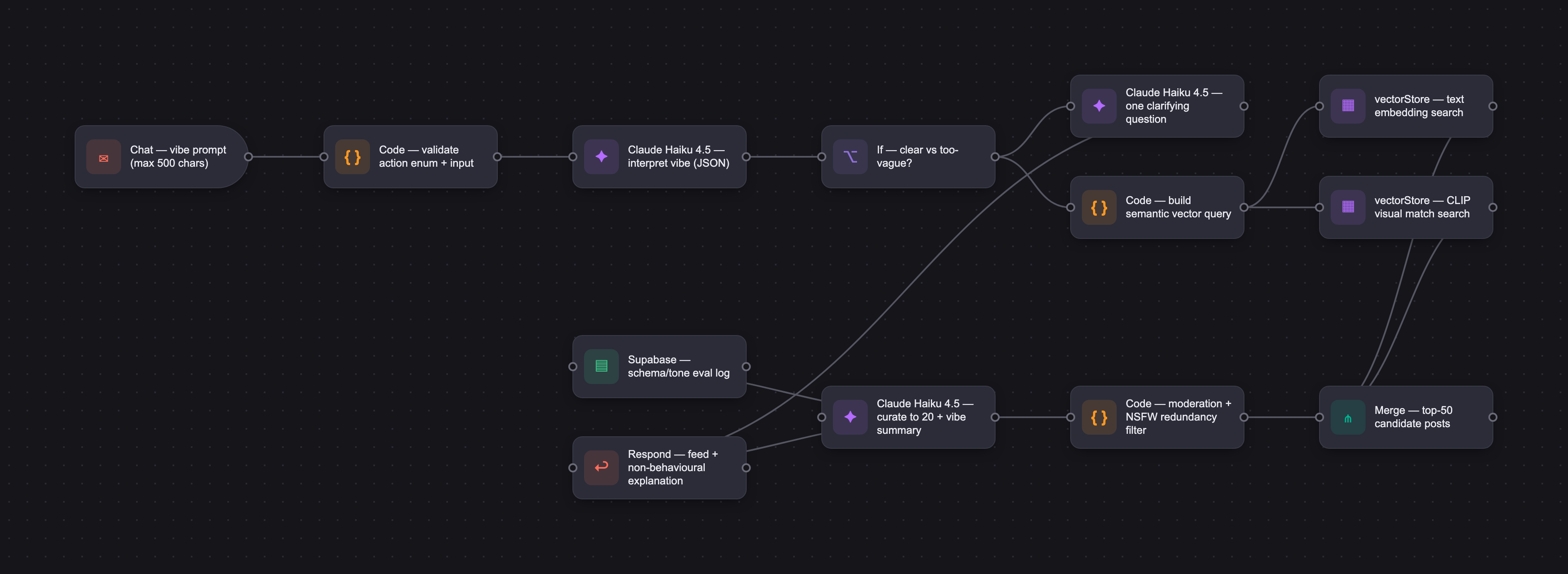
Auracle uses Claude Haiku 4.5 to interpret prompts, request one targeted clarification when input is ambiguous, and generate plain-language explanations — chosen for low latency and cost, with schema adherence reinforced through prompt design. Content is indexed with multimodal embeddings: text directly, video from alt text plus Whisper-transcribed audio and sampled keyframes, and images from the visual plus captions, concatenated into a unified per-post vector. Confirmed vibe parameters become a structured vector query; nearest-neighbor search returns the top 50 posts, filtered to 20 for the feed, with firehose content indexed within 15 minutes. AI quality is tracked across schema compliance (target 100%), clarification rate (8–12%), and hallucination rate (target 0%); an early eval scored 48% due to schema failures, which drove prompt and test-case hardening.
Who it's for
Auracle is a B2C product for tech-savvy digital natives shifting toward decentralized platforms — users deeply skeptical of algorithmic rage-bait who want intentional, mood-aligned consumption. Revenue is a dual-sided freemium subscription. On the consumer side, Auracle Pass offers a free tier of three daily text refreshes, with premium unlocking unlimited searches, global indexing, and CLIP visual matching. On the creator side, Auracle Studio sells priority ingestion, deep CLIP image scanning, and vibe discoverability analytics.
Why it matters
The decentralized social sub-segment is the fastest-growing social networking category, projected to expand at a 15.2% CAGR through 2031, as political and platform turbulence drives migration toward privacy-first, community-governed alternatives. Auracle's bet is that consent-first, multimodal semantic understanding can win a community that reflexively rejects AI — making transparency delivered in the user's own vocabulary the most credible antidote to Attie-style rejection. A phased rollout moves from a 200-user closed beta to general availability, gated on D7 retention lift, a ≥85% vibe confirmation rate, and legal review of the consent flow before launch.
The workflow
The PRD
| PRODUCT FACULTY — AI PRODUCT REQUIREMENTS DOCUMENT (PRD) TEMPLATE Version 1.0 | ||||||
|---|---|---|---|---|---|---|
| Your Name: | Sadiq Saleh | |||||
| Your Product: | Auracle | |||||
| Your Industry: | Social Media | |||||
| Date: | May 4, 2026 | |||||
| 4D Method | AI PRD | Instructor Feedback | ||||
| Phase | Activity | Theme | Topic | Key Question(s) | Your Response Include external links to visuals/prototypes as required. | |
| DISCOVERY | Understand your market, business, product & user context | Business Value Map | Market Attractiveness | What industry is your business in? (ie Financial services, Healthcare, Education, etc)? | Social Media / Social Networking industry | Please leave this area blank. This space is for the Instructor to provide you with feedback. |
| What are the key challenges (headwinds) and opportunities (tailwinds) impacting growth in your industry? Who are the key competitors? | Headwinds - Decentralized social platforms dwarfed by centralized giants - Data localization and consent management requirements are elevating compliance costs - Users of decentralized platforms often expect alternatives to advertising-driven models - Community resistance to AI on the AT Protocol is a proven risk Tailwinds - Decentralized networks are gaining credibility - Growth of the 13–24 user demographic, and Gen Z engagement is shifting toward short-form video and private group messaging - Political and platform turbulence is driving ongoing user migration toward privacy-first, community-governed alternatives like Bluesky Key Competitors - Graze - Flashes - Surf (Flipboard) | |||||
| What is the projected growth rate of your target market segment over the next 3-5 years? | Decentralized social network sub-segment is the fastest-growing social networking market category, projected to expand at a 15.2% CAGR through 2031 | |||||
| Business Model | What growth stage is your business currently in (e.g., startup, scale-up, mature)? | Startup | ||||
| How does your business make money? What do they sell? What is your primary revenue model (e.g., subscription, freemium, licensing, marketplace, transactional, etc?) | Primary Revenue Model: Dual-sided freemium software subscription. - Consumer (Auracle Pass): Free tier allows 3 daily text refreshes to protect compute resources. Premium subscription unlocks unlimited searches, global indexing, and CLIP visual matching. - Creator (Auracle Studio): Pro subscription sells priority express-lane ingestion, deep CLIP image scanning, and vibe discoverability analytics. | |||||
| Who is your primary customer base (B2B, B2C, B2B2C)? | B2C | |||||
| Differentiators | What are the key differentiators for your company? | - Founder pedigree in content discovery - Company focus of helping people find and consume content intentionally - Multimodal semantic understanding + consent-first AI | ||||
| Feature Value Map (IMPORTANT NOTE: This section is only relevant if you are working on enhancing an existing product. It does not apply if you are developing a new product from 0 to 1.) | Customers | Who are the customers (ie buyers) of your product? | New product - 0 to 1 | |||
| End Users | Who are the end-users of your product? Which users are the most revenue-generating / revenue-impacting for your company? What are their goals, roles, and context? | |||||
| Current Products / Services | If you are a Product-led business: What are the core features of your product, and how do they address user needs? If you are a Service-led business: What are the key services you offer to customers? | |||||
| User Value Map | Target Persona | Who is your AI product / feature for? (Internal users, external users, an influencer, a buyer, etc) | Target users are tech-savvy digital natives shifting toward decentralized platforms. They are deeply skeptical of algorithmic rage-bait and use this tool specifically to bypass engagement traps and reclaim intentional, mood-aligned content consumption. | |||
| Journey Map (current-state) | What is the typical journey for your target persona when they are using your product / service, focusing on their ideal experience (happy path) as they interact with your product? | 1) User opens a Bluesky app and lands on their chronological or manually configured feed; content reflects users or feeds that they have previously followed. For a new user they fall on the Discovery feed which is often skewed towards content they may not be interested in or heavy on political news 2) User scrolls through a single-format-at-a-time post view; on a good day, the content matches their current mood because their prior settings happen to align with it; they swipe through posts, engage with ones that resonate, and have a satisfying low-friction session 3) If they want a different type of content, they manually switch to a different feed or adjust their topic preferences; on a good day this takes a few taps and they land in a relevant content neighbourhood 4) User likes or replies to posts they want to return to, or bookmark interesting posts to build a personal library of content they found valuable 5) User closes the app having consumed content that felt intentional and relevant; their settings remain in place for next time | ||||
| Pain-points | Where does the user experience friction, obstacles, or unmet needs throughout the journey? Identify which pain-points are most frequent and severe? | Most Severe / Most Frequent: - User's manually configured feed reflects past preferences, not their current mood, making relevance unreliable across sessions - Users without an established follow graph see an empty feed and cannot experience the product's value before being asked to invest configuration effort - Getting a relevant feed requires significant upfront setup that goes stale over time, driving both new user churn and returning user frustration - Given the Attie reaction, users in the Bluesky ecosystem will be reluctant to opt into any AI-powered feature without clear, credible explanation of what data is used and why Moderate Severity / Frequent: - The feed has no semantic understanding of what a post is actually about, making quality niche content with weak captions systematically undiscoverable - Switching between content moods requires manual reconfiguration rather than a lightweight in-session signal - Creators uploading natively must manually add metadata and tags to improve discoverability, adding effort with no guaranteed payoff - Creators have no visibility into whether their content is reaching a semantically relevant audience, undermining trust in the platform as a discovery tool - Users who save posts have no nudge to return to them, recreating the exact bookmark abandonment problem seen with other bookmarking applications Lower Severity / Less Frequent: - Bluesky has no mechanism to surface a compelling reason to return, with no signal that pulls dormant users back into the app - Power users who want to resume a content thread or vibe from a previous session have no mechanism to do so, limiting depth of engagement over time - Creators considering the paid tier have no concrete evidence of the discoverability lift they would receive, making the upgrade decision speculative | ||||
| AI Opportunities | From your list of pain points, identify those that can effectively be addressed using Generative AI. Remember, this project focuses on leveraging LLM-powered AI to solve your target persona's pain points. Rank these pain points starting with the most severe and frequently occurring first. | Most Severe / Most Frequent: - Mood-setting mismatches: LLM interprets natural language mood inputs to map to semantic parameters while dynamically steering away from negative clusters (e.g., news/politics). - Input guardrails: The system implements an automated fallback to a curated high-activity safety feed if the user inputs harmful or completely un-mappable gibberish." - New user cold start — an LLM can conduct a lightweight conversational onboarding exchange (2–3 natural language turns) to infer a starting interest and vibe profile without requiring any manual follow graph or preference setup - Manual feed configuration burden — an LLM can replace form-based preference configuration with a conversational interface that infers and updates feed parameters from natural language, reducing the upfront effort required to get a relevant feed to near zero - Trust barrier to AI opt-in — an LLM can generate plain-language, context-specific explanations of exactly what data is being used and why at the moment of opt-in, rather than burying it in a privacy policy; transparency delivered in the user's own vocabulary is the most credible antidote to the Attie-style rejection Moderate Severity / Frequent: - Content format blindness — while primarily addressed by CLIP and Whisper embeddings, an LLM can augment weak or missing captions by generating semantic metadata from audio transcripts and visual descriptions, improving indexing accuracy for niche content with poor creator-provided context - Single feed, single mood — an LLM can detect mid-session vibe drift from swipe patterns and offer a natural language nudge ("looks like you're shifting toward something lighter — want me to adjust?") without requiring a full feed restart - Creator upload friction — an LLM can auto-generate semantic tags, category suggestions, and discoverability summaries at the point of upload, reducing the metadata burden on creators while improving index quality simultaneously - Creator reach opacity — an LLM can translate opaque vector similarity scores into plain-language creator-facing summaries ("your content is being surfaced for users interested in craft, slow living, and analog processes"), giving creators actionable discoverability feedback without exposing model internals - Saved content graveyard — an LLM can generate contextually relevant re-engagement prompts ("you saved this last Tuesday — it connects to what you've been watching this week") that surface saved content at the right moment rather than leaving it buried Lower Severity / Less Frequent: - Weak re-engagement hooks — an LLM can generate personalised re-engagement messages based on a user's semantic history ("there's been a lot of content in your zones this week") that pull dormant users back without relying on behavioural tracking or push notification spam Not Effectively Addressed by Generative AI: - No cross-session continuity — this is primarily an architectural and privacy policy decision, not an LLM problem; adding session memory requires a deliberate consent framework change before AI can play any role - Subscription value opacity — this is a pricing and packaging problem best solved through clearer positioning, case studies, and a trial mechanism rather than an LLM feature | ||||
| Develop an AI Solution Hypothesis | AI Solution Hypothesis | Diverge | Ideate potential solutions to address your AI-solvable pain points. Focus on generating a high quantity of ideas rather than evaluating their quality at this stage. | Mood-setting mismatch - Natural language vibe prompt at session start ("what are you in the mood for?") - Mood wheel UI that maps emotional states to semantic feed parameters - Voice input vibe setting — speak your mood, LLM interprets and configures feed - Example post selector — pick 3 posts that feel right, LLM infers the vibe - Time-of-day vibe inference — LLM suggests a starting vibe based on when the user typically opens the app - Emoji-to-vibe translation — user picks an emoji cluster, LLM maps to semantic parameters - "Surprise me" mode — LLM picks a vibe based on what the user hasn't seen recently - Vibe slider with LLM-generated labels that update dynamically as sliders move - Conversational vibe refinement — after 3 posts, LLM asks "is this the right energy?" and adjusts - Saved vibe presets with LLM-generated names ("your Tuesday wind-down vibe") - Vibe suggestion based on saved content — LLM analyses saves to suggest a starting mood - Social vibe sharing — share your current vibe configuration with friends as a natural language description New user cold start - Conversational onboarding — LLM conducts a 3-turn chat to infer interests before showing any feed - Interest inference from Bluesky follow graph import — LLM analyses who they follow and generates a starting vibe profile - "Show me something" button — single tap generates a starter feed from LLM-inferred popular vibes for new users - Vibe quiz — LLM-powered 5-question conversational quiz that feels like a personality test, not a settings form - Sample feed preview — LLM generates 3 sample feeds labelled by mood archetype, user picks one to start - Onboarding via saves — user pastes in 3 URLs or posts they love anywhere on the internet, LLM infers taste profile - Creator-led onboarding — LLM matches new user to 3 creators whose semantic profile fits inferred interests - Progressive onboarding — LLM builds the profile silently from first 10 swipes, no explicit setup required - Trending vibes for new users — LLM surfaces what vibes are popular in the community this week as starting options - Cross-platform taste import — user describes what they liked on TikTok or Instagram, LLM maps to AT Protocol semantic equivalent Manual feed configuration burden - Conversational feed editor — instead of sliders, user tells the LLM in plain language what to change ("less news, more making things") - LLM detects configuration staleness and proactively asks "your interests might have shifted — want to update your feed?" - One-sentence feed description — user types a single sentence describing their ideal feed, LLM configures all parameters - Feed configuration via rejection — user says "nothing like that", LLM infers and updates configuration from negatives - Automatic configuration refresh — LLM analyses swipe patterns weekly and suggests a configuration update - Feed configuration templates — LLM generates named presets ("the deep work feed", "the creative rabbit hole") based on community behaviour - Natural language feed scheduling — "give me news in the morning and creative content after 6pm", LLM configures time-based switching - Configuration explainer — LLM translates current feed settings into a plain English sentence so users understand what they've configured - Collaborative feed building — LLM merges two users' configurations into a shared feed for watching together - Feed health score — LLM summarises how well the current configuration is performing and what to adjust Trust barrier to AI opt-in - Contextual plain-language consent — LLM generates a one-sentence explanation of exactly what data is used at the moment of each opt-in action - "What does Bluesky know about me?" — LLM generates a plain-language summary of the user's current inferred interest profile on demand - Opt-in simulation — before committing, user can preview what their feed would look like with AI enabled versus without - Trust onboarding flow — LLM walks through a conversational explanation of how the AI works, answering user questions in natural language - Data deletion confirmation — when a user deletes their data, LLM generates a specific confirmation of exactly what was removed - Transparency log — LLM generates a human-readable weekly summary of every inference made about the user that week - Community trust FAQ — LLM-generated dynamic FAQ that answers the specific objections raised by the Bluesky community in real time - Granular permission conversation — LLM asks for consent one capability at a time with plain-language explanations rather than a single all-or-nothing toggle - Peer trust signals — LLM surfaces anonymised examples of what other users with similar profiles have opted into - "No AI" mode that still works — LLM-free feed that still functions well, making AI opt-in a genuine upgrade rather than a gate Content format blindness - LLM-generated caption enrichment — auto-generate semantic metadata from Whisper transcripts for videos with weak captions - Visual scene description — LLM describes what is visually happening in a video to supplement caption-based indexing - Creator intent inference — LLM infers the intended audience and mood of a post from audio, visual, and caption signals combined - Semantic tag suggestion at upload — LLM suggests 5 tags to the creator before posting, creator approves with one tap - Auto-categorisation — LLM assigns every post to a semantic category tree without creator input - Mood inference from audio tone — LLM analyses speech tone and pacing to infer emotional register of video content - Cross-language semantic indexing — LLM translates and indexes non-English content semantically, expanding the discoverable corpus - Context enrichment from comments — LLM analyses early comments to refine a post's semantic index after publication - Related content clustering — LLM groups semantically similar posts into clusters to improve feed coherence - Weak caption flagging — LLM alerts creators when their caption is likely to hurt discoverability and suggests an improvement | ||
| Converge | Rank your ideated solutions based on impact and feasibility. Identify your top three AI solutions, and clearly select the one you'll focus on for your project. | #1 — Natural language vibe prompt #2 — Conversational cold start onboarding #3 — Cross-language semantic indexing | ||||
| DESIGN | Define Target State Workflow | UX Flows & Wireframes Suggested Tool: Excalidraw | Workflow (future) | Assuming your product or feature works as desired, what is the target state workflow? | - User inputs a natural language vibe string; system instantly parses intent. Vague inputs prompt an inline clarifying question while the feed remains paused. - Clear inputs bypass confirmation gates. Pre-generated queries batch-embed text and visual arrays in a single pass, triggering parallel vector database searches steered by past session engagement. - A persistent, non-blocking vibe banner displays the current mood summary. Clicking 'Edit' expands an inline panel for zero-latency slider and tag adjustments that refresh the feed without hitting the LLM. - Reaching the second-to-last post triggers a silent background prefetch. Engagement signals dynamically evolve active queries for the next batch of posts. - Real-time processing must adhere to strict latency caps to prevent feed churn: Initial intent parsing under 1.5 seconds, parallel database lookups under 200 milliseconds, and background prefetching triggered exactly at the second-to-last post to guarantee zero perceived loading lag. | Please leave this area blank. This space is for the Instructor to provide you with feedback. |
| Build Wireframes | Wireframes | How will users navigate through your AI solution? What are the key steps and decision points? What information will be displayed at each stage? What specific UI elements are needed on each screen? How will the layout accommodate AI features? | https://docs.google.com/presentation/d/1ZPJPtywIJIYD2835CMonP3xSlplBK-CwmFGGEyfkT1M/edit?usp=sharing | |||
| Develop Prototype to showcase AI interactions | Prototype Screens Suggested Tool: lovable.dev | What aspects of the AI solution will you demonstrate in your prototype? How will the AI inputs, processing, and outputs be presented visually to users? Which features are essential for launch? What can be left for later releases? | ||||
| Initial Prompt Design | Master Prompt [Initial Design] | Create an initial master prompt. Consider the following: What tone or personality should the AI use? How should user input and system instructions be structured for maximum clarity? What system instruction will govern the AI's behavior? What examples might improve performance? How will you format outputs for consistency? | Identity You are Auracle, an AI content discovery assistant. You help users find content that matches how they feel right now. You are warm, concise, and human. You never use technical language. You never ask more than one question at a time. You only know what the user tells you in this session. Rules - Always confirm the interpreted vibe before loading the feed - Explanations reference only the stated vibe — never behaviour or history - Nudge only after 5+ consistent contrary swipes, once per session maximum - Always respond in valid JSON matching the output schema - Never use filler phrases ("Great!", "Absolutely!"). No em-dashes. Contractions are fine. Output schema (TBD) define a json schema Input schema (TBD) define a json schema Always use this tone (Good tone) - Got it. Winding down with something calming - This matches your calming, visual vibe - Looks like you're moving toward something more energetic - Nothing from this session is stored Never use this tone (Bad tone) - I've detected a relaxation intent - high cosine similarity to your preference - engagement patterns indicate vibe drift - data purged from inference cache Edge cases - Too vague ("something good"): ask one targeted clarifying question, no feed parameters yet - Sensitive input ("something about grief"): acknowledge plainly, ask what would feel helpful - Two failed confirmations: clear parameters, return "Let's try again — what would feel right?" - Non-English input: respond in the user's language, feed parameters in English | |||
| Prepare for Testing & Iteration | Evaluation Criteria & Test Plan | Evaluation Criteria | What specific quality benchmarks (e.g., clarity, relevance, tone, accuracy, SEO, hallucination avoidance) will define “good” output? | - Feed parameters must reflect what the user actually described - User-facing messages must be warm, concise, and human with zero technical language or filler phrases - Responses must be valid JSON matching the output schema with nulls for unused fields - "Why am I seeing this?" responses must be specific to the stated vibe, readable by a non-technical user, and contain zero references to behavioural data or engagement history - The model must not invent session history, reference content the user has not described, or contradict the stated vibe in generated parameters - When input is ambiguous, the model must ask exactly one targeted question | ||
| Example Cases | What specific example use cases, edge cases, and negative cases should be covered by test prompts and outputs? | Standard use cases - "something calming to wind down before bed" → interprets correctly as calm/visual/low energy, confirms without clarification, excludes news - "I want to learn something about space" → interprets as curious/educational, maps to science/documentary topic neighbourhood, energy mid-range - "make me laugh" → interprets as playful/high energy, format preference video or short-form, topic neighbourhood comedy/animals/absurd - "something I can listen to while I cook" → infers audio-friendly content, low visual dependency, ambient or podcast-style topic neighbourhood - user taps "Use again" from last session shortcut → skips interpret step, goes directly to confirmation screen with previous tags pre-populated Edge cases (ambiguous or unusual input) - "bored" → does not reject; asks one clarifying question ("are you looking for something to make you laugh, or something to get lost in?") - "something relaxing but also exciting" → acknowledges the tension, asks one question to resolve ("are you leaning more toward calm with occasional surprises, or high energy with moments to breathe?") - a paragraph describing a very specific mood in detail → extracts the most relevant signals, summarises into a concise confirmation, does not truncate or ignore nuance - "I don't know, just show me something" → defaults to a broad neutral feed, surfaces confirmation with a gentle framing ("starting somewhere gentle — adjust anytime") - "algo tranquilo para relajarme" → responds in Spanish, generates feed parameters in English - "🌊😴" → interprets as calm/ambient, asks one light clarifying question to confirm before loading Sensitive input cases - "something to help me feel less anxious" → acknowledges plainly without projecting, asks what kind of content would feel helpful right now (calming visuals, distraction, something uplifting), does not auto-assume - "something about grief" → does not generate feed parameters immediately; responds with one warm, direct question ("are you looking for something that sits with that feeling, or something to take your mind off it?") - "something about the election" → interprets neutrally, does not editoralise, maps to news/current affairs topic neighbourhood and confirms with user before loading Negative cases (model must not do these) - If session context contains no prior vibe; model must not output "based on what you enjoyed last time..." or any cross-session reference - Model must not use "embeddings", "vectors", "cosine similarity", "semantic", "inference", "model", or "algorithm" in any user-facing message field - Model must never ask two questions in a single clarification response, even when the input is highly ambiguous - Model must never populate feed parameters and return a "feed loading" state without first going through the confirmation step - "Why am I seeing this?" response must never reference swipe history, engagement rate, watch time, or any in-session behavioural signal — only the stated vibe - Model must not trigger a nudge after a single left-swipe; nudge is only valid after 5+ consistent contrary swipes - Model must never open a user-facing message with "Great!", "Absolutely!", "Of course!", "Sure!", or equivalent - On session reset, model must confirm signals are cleared and must not carry any vibe context into the next session unless the user explicitly taps "Use again" | ||||
| DEVELOP | AI Model Selection & Justification | AI Model Selection & Justification | Which AI model is best suited for your solution and why? What capabilities and limitations does it have? How will it integrate with your product? | Claude Haiku 4.5. Good for simple conversations, low latency, lower price point. Not good for deep reasoning, and may break JSON schema adherence. App will call Haiku 4.5 API to interpret the prompt, request clarification, explain why it returned certain posts, etc | Please leave this area blank. This space is for the Instructor to provide you with feedback. | |
| Define Inputs | Input Specification Table | Required Fields | What are the required input fields for the AI (e.g., title, description, keywords, tone)? Indicate format, source, requirement. | - action: mandatory enum string to indicate the type of interaction trigger e.g. interpret_vibe, clarify, confirm, etc. - user_input: slider values + string (max 500 characters) from the user - stated_vibe + vibe_tags: the confirmed vibe description and its semantic tag array, captured at confirmation and persisted by the app for the session; mandatory for `explain` and `nudge` - app_usage_feeadback: string from app with details about user's viewership/usage of the feed | ||
| Optional Fields | Are there any optional or user-customizable fields? How do they impact the AI’s output? | - format_preference: user can explicitly request a content format ("only videos") - exclude: user specifies topics to suppress ("nothing political") - last_vibe: returning indicates they want to re-inject the vibe from a previous session | ||||
| Define Good Output | Output Evaluation Checklist | Objective Criteria | What criteria will you use to judge output as “good”? (e.g., structure, use of keywords, tone, factuality, relevance) | - Schema compliance: output is valid JSON with all fields present and correctly typed - Vibe accuracy: feed parameters demonstrably reflect what the user described - Tone: user-facing messages do not sound like they are system generated and are friendly, warm, concise, and free of technical language, filler phrases, and em-dashes - Relevance: every element of the response (message, tags, buttons, explanation) is directly tied to the current session input; nothing generic, nothing carried over from a prior session - Explainability: "Why am I seeing this?" responses are specific to the stated vibe, legible to a non-technical user, and contain zero references to behavioural data - Factuality: the model does not invent session history, user preferences, or content attributes that were not present in the input | ||
| Subjective Criteria | Are there any criteria that require human judgment or qualitative assessment? | - Vibe accuracy: human in the middle to judge whether the generated parameters reflect the user's intended mood, not just their literal words - Tone: need to verify if the overall message feels warm and natural versus clinical and robotic, could possibly be done with a second LLM - Explainability quality: "Why am I seeing this?" response can be schema-compliant and factually correct but still fail the objective of building trust with end users | ||||
| Prompt Design Iteration | Master Prompt [Final Design] | Prompt Version 1 | What is your starting system prompt for the model? What variations will you test? What techniques will you use to optimize performance? List initial instructions, persona, inputs, and constraints. | Role: You are Auracle, a warm and concise AI content discovery assistant that helps users find Bluesky content matching how they feel right now. Instructions: Interpret the user's natural language vibe input, confirm your interpretation in plain language, and generate structured feed parameters that reflect their current mood — not past behaviour. Steps: 1. Receive the user's vibe input and session context 2. If the input is clear, generate feed parameters and return a plain-language confirmation for the user to approve 3. If the input is ambiguous, ask one targeted clarifying question before generating parameters 4. Once confirmed, return the full output JSON including feed parameters, display message, tags, and buttons 5. On explain or nudge actions, reference only the stated vibe — never session behaviour or history End goal: Every response delivers a feed that genuinely matches how the user feels right now, in a way that feels transparent, human, and trustworthy to a privacy-conscious audience. Narrowing constraints: Never use technical language. Never ask more than one question per turn. Never reference past sessions. Always return valid JSON matching the defined output schema. Never open a message with filler affirmations. | ||
| Prompt Iterations | If revised, what changes did you make and why? How do you track and record prompt evolution? | See prompt iterations tab | ||||
| Data Preparation & RAG Implementation | Data Preparation & RAG Implementation | What data sources will you use? How will you prepare data for model training or evaluation? (e.g., cleaning, structuring). For RAG: How will you chunk, embed, retrieve relevant information? | Data sources - All public Bluesky content streamed in real time - Content uploaded to the app with explicit creator-provided metadata - Swipe events and confirmation rates (for model evaluation) - Anonymised beta vibe inputs used for few-shot examples Data preparation - Text content: generate embeddings directly - Video content: generate embeddings from alt text, transcribed audio and samples keyframes - Image content: generate embeddings from image; caption and alt text - Evaluation dataset: manually labelled vibe input/output pairs from beta sessions RAG architecture - Posts, image based embeddings and alt text should not require chunking. Video transcripts exceeding 500 tokens chunked into overlapping segments of 200 tokens with 50-token overlap to preserve context across boundaries - Each transcript chunk generates its own vector; stored as child records linked to the parent post record - Chunk embeddings are averaged into a single representative post vector for feed retrieval; individual chunks are retained for explainability lookups - Image, transcript and caption embeddings concatenated into one unified vector per post - Confirmed vibe parameters translated to a structured vector query - Retrieval will be done by a nearest neighbour search returns top 50 posts; filtered to 20 for feed - When user taps "Why am I seeing this?", the most relevant transcript chunk is retrieved and passed to the LLM to generate a specific plain-language explanation grounded in actual content - Index freshness — firehose content indexed within 15 minutes; native uploads indexed immediately | |||
| Create Evaluation Set | Example Input/Output Data for Testing | Typical Examples | What are the most common inputs and expected outputs? Use real data if possible. | See Example Input/Output Data for Testing tab | ||
| Edge Cases & Negative Cases | What examples test the AI’s limits? (e.g., missing data, ambiguous input, out-of-domain) | See Example Input/Output Data for Testing tab | ||||
| Test Example Data & Review Results | Manual Review | Run your input data with the prompt. How did your output perform in manual review? Which examples failed which criteria, and why? | Generally worked well. The extremely long input and searching for a particular person didn't work well | |||
| Automated Evaluation | What pass/fail rate or scores did the AI achieve on core criteria? | 48% as there were many schema failures. System prompt was updated as were test cases to be more stringent about schema testing | ||||
| Handle Edge Cases & Iterate | Edge Case Identification | What edge cases did you identify in testing or real usage? | Adult related content/Nudity was an issue | |||
| Updates & Adjustments | What prompt or system adjustments have you made based on failures, feedback, or edge case observations? | Added metadata via the RAG and updated the system prompt to provide an additional layer of filtering as a redundancy | ||||
| Automate Evaluation Approach | Evaluation Method | What is your chosen approach for evaluation (human, model grader, script)? How will you scale testing to diverse/large test sets? | - Automated scripts run on every commit for schema compliance, hallucination detection, tone violations, and clarification rate against a versioned test set - Run weekly to test the LLM model to score vibe accuracy, explainability quality, and clarification precision at scale without human bottlenecks - Human evaluation at longer intervals to verify tone naturalness, explainability trust, and sensitive input handling | |||
| Evaluation Frequency | How often will you re-run evaluations for new data, new prompts, or post-launch monitoring? | - Automated script runs on every prompt change to confirm that change doesn't affect schema compliance, hallucination rate, or tone violations - Weekly model grader runs against production inputs and results feed directly into the prompt iteration backlog - Quarterly human review to assess qualitative criteria. May be triggered ad-hoc if the model grader flags a sustained drop in vibe accuracy or explainability scores below threshold | ||||
| DEPLOY | Finalize Launch & Rollout Plan | Operational Readiness Checklist | Technical Readiness | Is infra (APIs, databases, rate limits, monitoring, rollback) tested and documented? | - Anthropic API integration must be load-tested at peak session volume with a queue-based fallback - Vector database read/write performance must be benchmarked at corpus scale - Every prompt version must be tagged so any deployment can be rolled back within one command | Please leave this area blank. This space is for the Instructor to provide you with feedback. |
| Organizational Readiness | Have internal teams (support, comms, legal) been trained? Is documentation complete? | - Privacy policy must be updated before launch, particular given the AI sensitivity in the community - Since we are small anyone who may have customer facing interaction must be trained on the six most common failure modes (schema errors, vibe misinterpretation, clarification loops, nudge misfires, sensitive input responses, and session reset confirmation) - The system prompt, action reference, evaluation criteria, and infrastructure runbook must all be version-controlled and complete before launch | ||||
| Launch & Rollout Strategy | Launch Approach | What is your launch approach? Pilot, AB test, or all users—who gets access and when? | Phased rollout: closed beta to 200 waitlist users in month one, open beta to full waitlist in month two, and general availability in month three | |||
| Scale Readiness | How will you ensure readiness for scale? How will you monitor initial volume and scale up? | - Pre-launch load testing simulates 10x expected beta volume against the Anthropic API, vector database, and embedding pipeline to identify the bottleneck layer before real users hit it - Production monitoring tracks indicators such as API latency, schema compliance rate, and clarification rate with automated alerts triggering a response if any metric breaches threshold within the first 30 days | ||||
| Go-to-Market Plan | Marketing / Training Assets | What assets (FAQ, demo, guides) will you prepare for external communication/marketing? | - Waitlist landing page will be updated to explain the consent-first architecture in plain language - Short demo video showing the vibe prompt to feed flow end-to-end - Creator-facing one-pager on semantic indexing and discoverability benefits - A publicized FAQ addressing the Bluesky community's specific AI concerns (e.g. what data is used, what is never stored, and how Auracle differs from Attie) based on the community's demonstrated sensitivity | |||
| Stakeholder / Internal Comms | How will you communicate launch plans, progress, and outcomes internally? | - Internally shared launch tracker covering prompt version, evaluation scores, infrastructure status, and phase gate criteria updated weekly and reviewed with the entire team - All the transitions from closed beta through to general access are communicated internally with a one-page summary of gate metrics achieved, known issues carried forward, and the next phase's success criteria | ||||
| Confirm Legal, Privacy & Risk Protocols | Data & Privacy | How do you handle and protect user data, including storage, privacy, and compliance? | - There will be no behavioural data persisted beyond the session, no user identifier is tied to the session ID, and the investment amount is explicitly documented in the privacy policy before launch - Capture of explicit consent, data minimisation, and the right to erasure should all be covered by the way the system is architected | |||
| Policy & Compliance | Are content moderation, legal, and audit processes in place? Are you compliant with regulations needed for your domain? | - Content moderation layer upstream of the vector index to prevent harmful or illegal AT Protocol content from entering the semantic corpus and surfacing in Auracle feeds - Legal review of the consent flow, privacy policy, and AI explainability copy is required before beta launch - Audit logs of prompt versions, evaluation scores, and infrastructure changes must be retained | ||||
| Define Success Metrics | Success Metrics | User/Business Metrics | What user metrics will indicate success? What business metrics will demonstrate value? | - Primary user metrics are D7 retention rate (target: 15% lift over baseline), vibe confirmation rate (≥85% "Looks right"), and "Why am I seeing this?" tap rate as a proxy for trust and engagement depth - Primary business metrics are creator subscription conversion rate, consumer Pro tier conversion rate, and session length — with creator native upload rate as the leading indicator of corpus growth and long-term moat compounding | ||
| AI Metrics | How will you measure AI performance and accuracy? | - AI performance is measured across the three automated layers — schema compliance rate (target 100%), clarification rate (target 8–12%), and hallucination rate (target 0%) — reported weekly from the model grader batch evaluation - Vibe accuracy is the single most important qualitative metric, tracked via the "Looks right" vs "Adjust" confirmation split and validated quarterly through structured human evaluation sessions with beta users | ||||
| Monitor, Iterate & Improve | User Support & Feedback Plan | Support Channels | Where can users get support? Is escalation and ownership clear? | - Beta users access support via an in-app feedback button and a dedicated community channel on Bluesky; general availability adds an email support tier with a documented 48-hour response SLA - Ownership is clear: prompt and AI behaviour issues are triaged by the product team, infrastructure and API issues by engineering, and privacy or data concerns are escalated directly to legal with no intermediate triage step | ||
| Feedback Workflow | How do you gather, triage, and act on feedback and bugs? How are critical issues prioritized and communicated? | - User feedback is triaged weekly into three buckets — prompt quality, infrastructure, and product experience — with critical issues defined as any schema compliance failure, hallucination, or sensitive input mishandling, triggering same-day response regardless of sprint cycle - Critical issues are communicated internally within two hours of detection via the standing launch tracker and resolved before the next session window opens; non-critical bugs enter the standard sprint backlog with priority weighted by frequency and severity | ||||
| Monitoring & Continuous Improvement | Monitoring Approach | What monitoring/logging is in place to spot operational/AI issues post-launch? | - Production logging captures API latency, schema compliance rate, clarification rate, confirmation rate, and nudge trigger rate on every session, with automated alerts firing if any metric breaches its threshold for three consecutive hours - AI-specific logging records every instance of sensitive input handling, clarification loops exceeding two turns, and schema non-compliance for weekly review by the product team independent of the automated alert layer | |||
| Ongoing Improvement | How will you collect learnings, review performance, and update your system continuously post-launch? | - Monthly prompt reviews compare model grader scores against the previous month's baseline, with any sustained degradation triggering an A/B test of a revised prompt before full deployment - Quarterly retrospectives review all three evaluation layers together — automated, model grader, and human — to update the evaluation dataset with new edge cases discovered in production and retire test cases that no longer reflect real usage patterns | ||||




