
Health
OrthoPathway
OrthoPathway is an AI scheduling assistant for orthopedic surgery workflows, especially for patients whose pre-op needs are affected by cardiac risk and other complexity. It assesses patient risk, recommends scheduling options, and surfaces model analyses against hospital procedures while preserving human override. The demo contrasts more structured versus overly permissive prompting to show how model and prompt choices affect safe scheduling behavior.
The problem
In orthopedic surgery scheduling, friction hits when a patient reschedules a piece of the pre-op care path. If there aren't enough days between events, it creates a real obstacle — a single changed step can quietly break a required test downstream. Untrained or new scheduling staff allow gaps in care because they don't remember or know all the details, and the incumbent is manual scheduling inside the existing EHR, where dates slip through the cracks. Patients shouldn't be able to request dates that negatively impact procedures downstream, but today nothing reliably catches that.
The solution
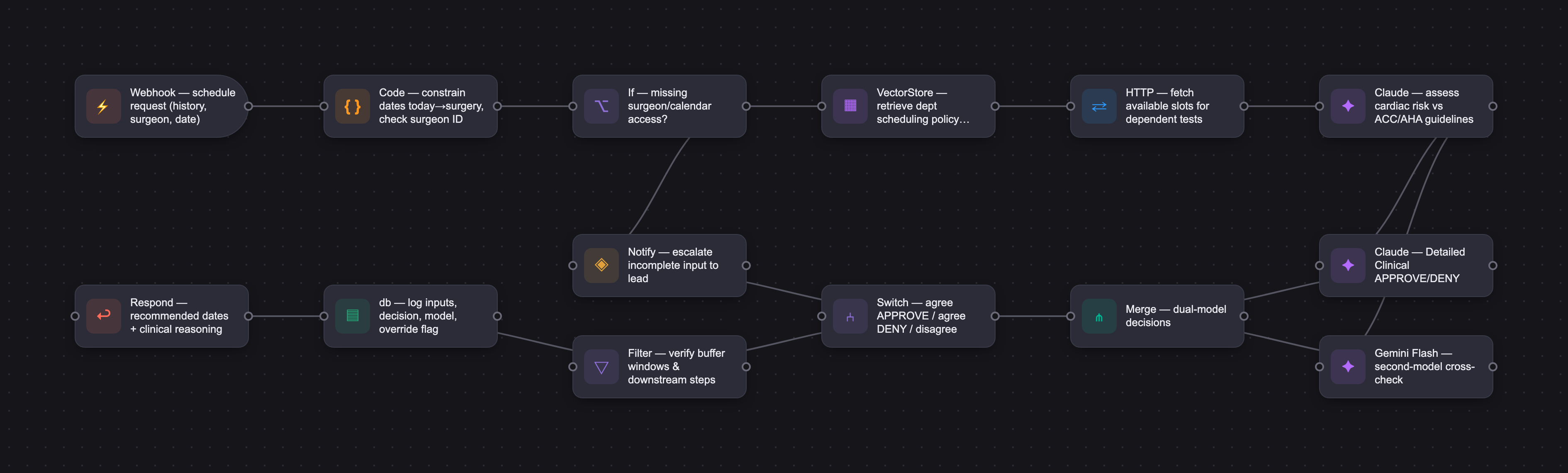
OrthoPathway is an AI scheduling assistant that catches scheduling issues before they become problems. It assesses patient risk — especially cardiac risk affecting anesthesia clearance — recommends scheduling options against hospital policy, and surfaces its reasoning while preserving human override. The assistant is baked into the existing scheduling interface as an additional pane, so staff work the way they already do. It issues structured APPROVE/DENY decisions with clinical reasoning: deny when a reschedule makes it impossible to complete required pre-op steps in time, approve when the timeline still allows all steps to be completed safely — with the ability to override and escalate when a patient can't meet the schedule.
How it works
The assistant takes health history, current doctor, and a suggested surgery date, and checks the proposed schedule against ACC/AHA perioperative guidelines, required buffer windows, and department availability, with local department policies chunked into a RAG layer so the model reasons from loaded policy rather than inventing rules. The demo contrasts multiple prompt styles and shows how using more than one LLM (Claude and Gemini Flash were both tested) helps validate a response. Evaluation at this stage was manual: the same test cases — a simple schedule, a complex multi-step schedule, and a reschedule — were run through five prompt variations. Only the "Detailed Clinical" variation consistently produced the right call with sound reasoning; Vague and No Context failed, Overly Cautious denied safe schedules, and Overly Aggressive broke buffer rules. A key system fix constrained the model to only offer dates between today and the surgery date, so impossible options are never on the table. Future production anticipates a HIPAA-compliant or local model.
Who it's for
This is a B2B internal tool. The buyers are hospital administration, and the end users are scheduling staff — internal users who interface with patients during the scheduling process. It's especially valuable for newer or untrained schedulers who don't yet carry all the policy in their heads, encoding rules they'd otherwise learn slowly on the job. It is not a public-facing product; the assistant supports staff decisions rather than replacing them.
Why it matters
Orthopedic surgery volume rises every year, so scheduling volume keeps growing, at a projected 4-6.5% rate. The headwind is that hospitals adopt technology slowly due to budgets, compliance, and training, but the broader spread of AI is lowering that resistance. Launch is a pilot in one orthopedic department, expanding department by department roughly eight weeks after each is judged successful — loading a vetted policy set per department rather than retraining a model. Success is measured by fewer downstream scheduling errors, a declining override rate signaling growing trust, and shorter ramp time for new staff. Because every output is an overridable recommendation inside the hospital's HIPAA-covered environment, the audit trail is the core compliance control.
The workflow
The PRD
| PRODUCT FACULTY — AI PRODUCT REQUIREMENTS DOCUMENT (PRD) TEMPLATE Version 1.0 | ||||||
|---|---|---|---|---|---|---|
| Your Name: | Paul Osborne | |||||
| Your Product: | Orthopathway - Scheduling Assistant | |||||
| Your Industry: | Healthcare - I'm not involved with healthcare but I'll do my best to answer this. | |||||
| Date: | April 25, 2026 | |||||
| 4D Method | AI PRD | Instructor Feedback | ||||
| Phase | Activity | Theme | Topic | Key Question(s) | Your Response Include external links to visuals/prototypes as required. | |
| DISCOVERY | Understand your market, business, product & user context | Business Value Map | Market Attractiveness | What industry is your business in? (ie Financial services, Healthcare, Education, etc)? | Healthcare | Please leave this area blank. This space is for the Instructor to provide you with feedback. |
| What are the key challenges (headwinds) and opportunities (tailwinds) impacting growth in your industry? Who are the key competitors? | Tailwind: the number of orthopedic surgeries rises every year, so scheduling volume keeps growing. Headwind: from talking with friends in the field, hospitals are painfully slow to adopt new technology — budgets, compliance, and staff training all get in the way. The opportunity is that the broader spread of AI is starting to lower that resistance and could help a tool like this get adopted. There isn't a direct competitor so much as an incumbent: manual scheduling inside the existing EHR, which is exactly the gap this fills. | |||||
| What is the projected growth rate of your target market segment over the next 3-5 years? | 4-6.5% | |||||
| Business Model | What growth stage is your business currently in (e.g., startup, scale-up, mature)? | Not my company, I built this as I saw a need for it but I'm not involved with healthcare. | ||||
| How does your business make money? What do they sell? What is your primary revenue model (e.g., subscription, freemium, licensing, marketplace, transactional, etc?) | Like any hospital or surgical center does. | |||||
| Who is your primary customer base (B2B, B2C, B2B2C)? | B2B | |||||
| Differentiators | What are the key differentiators for your company? | Not my company, I built this as I saw a need for it but I'm not involved with healthcare. | ||||
| Feature Value Map (IMPORTANT NOTE: This section is only relevant if you are working on enhancing an existing product. It does not apply if you are developing a new product from 0 to 1.) | Customers | Who are the customers (ie buyers) of your product? | hospital administration | |||
| End Users | Who are the end-users of your product? Which users are the most revenue-generating / revenue-impacting for your company? What are their goals, roles, and context? | Scheduling staff | ||||
| Current Products / Services | If you are a Product-led business: What are the core features of your product, and how do they address user needs? If you are a Service-led business: What are the key services you offer to customers? | Surgery department offers all types of surgeries. | ||||
| User Value Map | Target Persona | Who is your AI product / feature for? (Internal users, external users, an influencer, a buyer, etc) | Internal users that interface with external customers. | |||
| Journey Map (current-state) | What is the typical journey for your target persona when they are using your product / service, focusing on their ideal experience (happy path) as they interact with your product? | Patients meet with surgeons to determine need and eligibility. Patients then meet with front desk staff to determine dates of next steps. | ||||
| Pain-points | Where does the user experience friction, obstacles, or unmet needs throughout the journey? Identify which pain-points are most frequent and severe? | 1. Current friction comes in when a patient tries to reschedule pieces of the care path leading up to surgery. If there are not enough days in between events it can create a real scheduling obstacle. 2. Untrained staff allow gaps in care or dates because they don't remember or know all the details. | ||||
| AI Opportunities | From your list of pain points, identify those that can effectively be addressed using Generative AI. Remember, this project focuses on leveraging LLM-powered AI to solve your target persona's pain points. Rank these pain points starting with the most severe and frequently occurring first. | 1. Adhearing to hospital policy and not having dates slip through the cracks. Patients should not be allowed to request dates for care that have a negative impact on procedures downstream from the required test. 2. An LLM won't have the same forgetfulness or limited knowledge-base as a new or untrained employee. 3. An updated document in the RAG will also provided a quicker update rather than trying to train/re-train all employees. | ||||
| Develop an AI Solution Hypothesis | AI Solution Hypothesis | Diverge | Ideate potential solutions to address your AI-solvable pain points. Focus on generating a high quantity of ideas rather than evaluating their quality at this stage. | 1. Assist the scheduling rules. 2. Completely automate all scheduling. | ||
| Converge | Rank your ideated solutions based on impact and feasibility. Identify your top three AI solutions, and clearly select the one you'll focus on for your project. | 1. AI Assisted Scheduling | ||||
| DESIGN | Define Target State Workflow | UX Flows & Wireframes Suggested Tool: Excalidraw | Workflow (future) | Assuming your product or feature works as desired, what is the target state workflow? | The scheduling assistant is built into the current scheduling interface. When employees interact with patient they will receive the AI analysis/assistance in the standard interface they are already used to. The target state, is that scheduling works similar to how it does now however with AI assistance it can catch scheduling issues before they become issues. Therefore helping patients in the long run. | Please leave this area blank. This space is for the Instructor to provide you with feedback. |
| Build Wireframes | Wireframes | How will users navigate through your AI solution? What are the key steps and decision points? What information will be displayed at each stage? What specific UI elements are needed on each screen? How will the layout accommodate AI features? | It would be baked into their current scheduling tool. Just be an additional field or pane used in the scheduling process. | |||
| Develop Prototype to showcase AI interactions | Prototype Screens Suggested Tool: lovable.dev | What aspects of the AI solution will you demonstrate in your prototype? How will the AI inputs, processing, and outputs be presented visually to users? Which features are essential for launch? What can be left for later releases? | I will demonstrate the LLM response and how using more than 1 LLM can be beneficial when testing/evaluating the response. | |||
| Initial Prompt Design | Master Prompt [Initial Design] | Create an initial master prompt. Consider the following: What tone or personality should the AI use? How should user input and system instructions be structured for maximum clarity? What system instruction will govern the AI's behavior? What examples might improve performance? How will you format outputs for consistency? | You are a pre-surgical scheduling assistant for orthopedic procedures. Your role is to: 1. Analyze patient health history and identify cardiac risk factors relevant to anesthesia clearance. 2. Determine the appropriate pre-surgical testing pathway based on risk classification. 3. Validate scheduling decisions against timing constraints and buffer requirements. 4. Provide clinical reasoning for scheduling approvals or denials. When assessing a patient, provide: - A brief clinical summary of cardiac risk factors relevant to anesthesia clearance - Your assessment of the proposed appointment schedule — comment on whether the timing and spacing between steps is appropriate, which available dates you'd recommend and why, and any scheduling concerns - Keep your assessment under 300 words When validating a scheduling decision, provide a brief clinical opinion on whether the scheduling is appropriate. Always consider: - ACC/AHA perioperative cardiovascular guidelines - Patient-specific cardiac history and intervention timelines - Required buffer windows between pre-operative steps - Department availability and scheduling constraints - DENY if the reschedule would make it impossible to complete all required pre-operative steps before surgery - DENY if there are 0 available slots for dependent tests within the required window - APPROVE if the timeline still allows all steps to be completed safely - Consider patient safety implications of any delays given their health conditions Respond with structured decisions (APPROVED/DENIED) and clear clinical reasoning. | |||
| Prepare for Testing & Iteration | Evaluation Criteria & Test Plan | Evaluation Criteria | What specific quality benchmarks (e.g., clarity, relevance, tone, accuracy, SEO, hallucination avoidance) will define “good” output? | A "good" output is a recommended schedule that adheres to scheduling rules and recognizes risk with the patients schedule or reschedule. Tone will be professional, however it's an assistant to the scheduling staff in the hospital not public facing. | ||
| Example Cases | What specific example use cases, edge cases, and negative cases should be covered by test prompts and outputs? | 1. Patients that have a simple schedule. 2. Patients with complications and a more complicated schedule. 3. Patients that need to reschedule a part of their care. Negative cases - test that patients will try to reschedule 1 item of their care without knowing the downstream effects of their change. | ||||
| DEVELOP | AI Model Selection & Justification | AI Model Selection & Justification | Which AI model is best suited for your solution and why? What capabilities and limitations does it have? How will it integrate with your product? | We tested both Claude and Gemini Flash. In the future, we would anticipate needing a local model (or something HIPPA compliant) that can be reinforced to ensure it knows everything related to medical care that it needs. | Please leave this area blank. This space is for the Instructor to provide you with feedback. | |
| Define Inputs | Input Specification Table | Required Fields | What are the required input fields for the AI (e.g., title, description, keywords, tone)? Indicate format, source, requirement. | Health history. Current doctor. Suggest surgical date as we're trying to work toward that. | ||
| Optional Fields | Are there any optional or user-customizable fields? How do they impact the AI’s output? | I don't envision having user-customizable fields. | ||||
| Define Good Output | Output Evaluation Checklist | Objective Criteria | What criteria will you use to judge output as “good”? (e.g., structure, use of keywords, tone, factuality, relevance) | The suggested dates. Adhering to hospital policy. Ensuring that it keeps patient with the assigned surgeon. No "cross-talk" among surgeons. | ||
| Subjective Criteria | Are there any criteria that require human judgment or qualitative assessment? | Need ability to override/escalate when patient can't meet the schedule. | ||||
| Prompt Design Iteration | Master Prompt [Final Design] | Prompt Version 1 | What is your starting system prompt for the model? What variations will you test? What techniques will you use to optimize performance? List initial instructions, persona, inputs, and constraints. | Starting system prompt was labeled "Detailed Clinical". Other variations include Vague, No Context, Overly Cautious, and Overly Aggressive" | ||
| Prompt Iterations | If revised, what changes did you make and why? How do you track and record prompt evolution? | We would track these by keep date stamped versions of the prompts as well as the style name. New versions only rolled out after pilot testing. | ||||
| Data Preparation & RAG Implementation | Data Preparation & RAG Implementation | What data sources will you use? How will you prepare data for model training or evaluation? (e.g., cleaning, structuring). For RAG: How will you chunk, embed, retrieve relevant information? | We would chunk the local policies for the department so that the LLM is aware of all this info when reviewing the patient data and recommended schedules. | |||
| Create Evaluation Set | Example Input/Output Data for Testing | Typical Examples | What are the most common inputs and expected outputs? Use real data if possible. | Most common input is the health history and available schedule dates. Expected outputs are recommended status as well as recommendation on moving forward with procedures. | ||
| Edge Cases & Negative Cases | What examples test the AI’s limits? (e.g., missing data, ambiguous input, out-of-domain) | Not having access to the calendar or missing the surgeon name/ID would test the limits. Extremely long health history would also test the limits of the LLM. | ||||
| Test Example Data & Review Results | Manual Review | Run your input data with the prompt. How did your output perform in manual review? Which examples failed which criteria, and why? | Failed my expectations when the prompt was too vague and the LLM didn't seem to understand what it was trying to do or validate. | |||
| Automated Evaluation | What pass/fail rate or scores did the AI achieve on core criteria? | Evaluation at this stage was manual rather than automated. I ran the same set of test cases — a simple schedule, a complex multi-step schedule, and a reschedule request — through all five prompt variations and compared each output against the correct scheduling decision. On manual review, Detailed Clinical was the only variation that consistently produced the right APPROVE/DENY call with sound reasoning. Vague and No Context failed because the model couldn't tell what it was meant to validate; Overly Cautious denied safe schedules; Overly Aggressive approved schedules that broke the buffer rules. | ||||
| Handle Edge Cases & Iterate | Edge Case Identification | What edge cases did you identify in testing or real usage? | The central edge case came straight from the real situation: a reschedule of a single step (the EKG) whose downstream effects aren't visible to the person making the change — the failure mode the product exists to catch. I tested date validation directly by feeding dates the system shouldn't accept: dates outside the scheduling window, dates in the past, and dates after the surgery date. This exposed a design fix — rather than relying on the model to reject bad dates after the fact, we constrained it to only offer dates between today and the requested surgery date, so impossible options are never on the table. Other cases from manual testing: long or contradictory health histories that bury the relevant cardiac factors, a requested date too tight to fit the required pre-op buffers, and missing inputs like surgeon ID or no calendar access, which left the weaker prompt variations guessing and approving reschedules that quietly broke a downstream step. | |||
| Updates & Adjustments | What prompt or system adjustments have you made based on failures, feedback, or edge case observations? | The biggest system-level change came from the date testing: instead of relying on the model to catch bad dates, I constrained it to only offer dates between today and the surgery date, so out-of-bounds options can't be selected in the first place. On the prompt side, the move from the Vague variation to Detailed Clinical was the main fix. | ||||
| Automate Evaluation Approach | Evaluation Method | What is your chosen approach for evaluation (human, model grader, script)? How will you scale testing to diverse/large test sets? | Evaluation so far has been human manual review — running test cases (a simple schedule, a complex multi-step schedule, a reschedule, and out-of-bounds date cases) through each prompt variation and checking the output against the correct scheduling decision. To scale beyond hand-checking, the plan is a hybrid approach. The hard, objective rules — dates within the today-to-surgery window, buffer spacing, surgeon continuity, downstream feasibility — are deterministic, so they can be checked by a script that passes or fails an output automatically. A product team would also be involved with more thorough testing. | |||
| Evaluation Frequency | How often will you re-run evaluations for new data, new prompts, or post-launch monitoring? | The full test set runs as a gate before any prompt or model change ships — nothing rolls out without passing it, so a tweak that fixes one case can't silently break another. During the pilot it re-runs weekly as a regression check, and any time a department policy or a RAG document is updated, since a content change can shift the model's decisions. Post-launch it moves to a monthly cadence, with an automatic re-run triggered whenever monitoring flags a spike in overrides or denials — that's the early signal that the model has drifted or a policy has gone stale. | ||||
| DEPLOY | Finalize Launch & Rollout Plan | Operational Readiness Checklist | Technical Readiness | Is infra (APIs, databases, rate limits, monitoring, rollback) tested and documented? | Not yet — at this stage the product is a working prototype validated through manual testing, not production-ready infrastructure. The technical readiness checklist for an actual pilot would need: the model API and the scheduling/EHR integration tested under expected load with defined rate limits and a failover path to a second model (the multi-LLM design from the demo) if the primary is slow or unavailable; request and decision logging in place; and a rollback mechanism — a feature flag that hides the assistant pane and reverts schedulers to the existing manual flow with no downtime. The policy data behind the assistant would be versioned so content can be rolled back too. None of this is built yet; it's what readiness would require before going live in a clinical setting. | Please leave this area blank. This space is for the Instructor to provide you with feedback. |
| Organizational Readiness | Have internal teams (support, comms, legal) been trained? Is documentation complete? | Readiness here would be staged around the orthopedic pilot. Scheduling staff are trained hands-on — We would sit with them through the first weeks of rollout rather than hand off a manual, since the assistant lives inside the tool they already use. Support gets briefed ahead of launch on the feedback and escalation paths and on who owns an issue when it's raised. Clinical leadership reviews and signs off on the policy content loaded behind the assistant, since they own the rules it enforces. Legal and privacy review PHI handling and the override/escalation workflow before go-live. Documentation to complete before launch: a scheduler quick-start, an SOP for overrides and escalations, and a plain-language explainer of how the assistant reaches a decision so staff understand and trust it. | ||||
| Launch & Rollout Strategy | Launch Approach | What is your launch approach? Pilot, AB test, or all users—who gets access and when? | Pilot this with just one department (orthopedic). Roll out to other departments 8 weeks after deemed successful. | |||
| Scale Readiness | How will you ensure readiness for scale? How will you monitor initial volume and scale up? | The pilot stays orthopedics-only, and before expanding I'd watch request volume, response latency, decision accuracy on real cases, and the override and escalation rates — a high override rate means the assistant isn't trusted or isn't right yet, so that gates the next step. Expansion goes department by department, roughly eight weeks after the prior one is judged successful, rather than a hospital-wide switch. Each new department brings its own scheduling rules and policies, so scaling means loading a vetted policy set for that department behind the assistant — not retraining a model — which keeps each rollout contained and reviewable. On the infrastructure side, API throughput is planned against projected volume with the failover path in place, so added load doesn't take the assistant down mid-workflow. | ||||
| Go-to-Market Plan | Marketing / Training Assets | What assets (FAQ, demo, guides) will you prepare for external communication/marketing? | his is an internal tool for scheduling staff, not an externally marketed product, so the assets are about internal enablement and adoption rather than marketing. Planned materials: a one-page quick-start, a short screen-recorded walkthrough of a real scheduling case (the demo video serves as the starting point), an FAQ covering the common questions and failure cases staff will hit, a plain-language "how the assistant decides" explainer to build trust in its APPROVE/DENY calls, and a cheat sheet for when and how to override or escalate. During the pilot I'd also hold office hours so staff can raise issues in real time while the tool is new. | |||
| Stakeholder / Internal Comms | How will you communicate launch plans, progress, and outcomes internally? | Communication is structured around the three stages the launch moves through, aimed at the people it actually affects: scheduling staff, the clinical leaders who own the policies, support, and the pilot sponsor. Plans (before launch): a kickoff with the orthopedic scheduling team and clinical leadership to walk through what the assistant does, what it doesn't, and the override and escalation paths — so no one is caught off guard when an AI suggestion shows up in a workflow they already know. Progress (during the pilot): I'd sit with the scheduling staff through the first weeks rather than hand them a manual, and run a brief weekly check-in that shares the signals we're already tracking — request volume, override and escalation rates, and any cases that went wrong. That keeps leadership looking at real data instead of anecdotes. Outcomes (after the pilot): a readout against the success metrics — fewer downstream scheduling errors, time saved, staff confidence — which becomes the go/no-go decision for expanding to the next department on the roughly eight-week cadence. | ||||
| Confirm Legal, Privacy & Risk Protocols | Data & Privacy | How do you handle and protect user data, including storage, privacy, and compliance? | I imagine that hospitals know how to do this and would keep storage and privacy with most of their other electronic healthcare data. | |||
| Policy & Compliance | Are content moderation, legal, and audit processes in place? Are you compliant with regulations needed for your domain? | Compliance applies directly here, given PHI and the patient-safety impact of scheduling decisions. The assistant would operate inside the hospital's existing HIPAA-covered environment and audit processes rather than standing up its own. Because every output is an APPROVE/DENY recommendation a human can override — not an autonomous action — the audit trail (who scheduled what, what the assistant recommended, whether staff overrode it) is the core compliance control. Content moderation in the consumer sense doesn't apply, but its equivalent does: keeping the model's reasoning grounded in the loaded policies rather than inventing rules, which is why a HIPAA-compliant or local model is the intended production path. | ||||
| Define Success Metrics | Success Metrics | User/Business Metrics | What user metrics will indicate success? What business metrics will demonstrate value? | User metrics (is it working for scheduling staff): a drop in downstream scheduling errors — reschedules that break a later step, the exact problem from Barb's case; the override rate trending down over time, which signals staff are coming to trust the assistant's calls; time-to-schedule per patient; and staff-reported confidence, especially among newer schedulers who don't yet carry all the policy in their heads. Business metrics (does it create value for the hospital): fewer surgeries delayed or cancelled because a required pre-op step couldn't be completed in time; fewer policy violations caught downstream; less rescheduling churn and the staff hours that go with it; and shorter ramp time for new scheduling staff, since the assistant encodes rules they'd otherwise learn slowly on the job. | ||
| AI Metrics | How will you measure AI performance and accuracy? | The core metric is decision accuracy: how often the assistant's APPROVE/DENY call matches the correct scheduling decision on a labeled set of cases. Within that, denials matter more than approvals — missing an unsafe reschedule (a false approval) is the costly error, so I'd track recall on denials closely, while watching precision so the assistant isn't over-denying safe schedules and training staff to ignore it. Alongside decision accuracy: rule-adherence rate — does it respect the date window, buffer spacing, and surgeon continuity; groundedness — is the reasoning drawn from the loaded policies rather than invented; and response latency, since a slow assistant won't get used mid-workflow. So far these have been judged by manual review; at scale they'd be measured with the script-plus-model-grader approach from F44. | ||||
| Monitor, Iterate & Improve | User Support & Feedback Plan | Support Channels | Where can users get support? Is escalation and ownership clear? | Scheduling staff use the same internal support channel they already rely on for the scheduling tool, so there's nothing new to learn for routine help. The in-tool escalation button (in the feedback workflow) routes anything the assistant can't handle to a named owner — during the pilot, a designated product/clinical lead — so ownership of escalations is explicit rather than assumed. | ||
| Feedback Workflow | How do you gather, triage, and act on feedback and bugs? How are critical issues prioritized and communicated? | Provide a feedback button in the interface to hear from staff. The escalation button will also give us info, specifically how often it's used. | ||||
| Monitoring & Continuous Improvement | Monitoring Approach | What monitoring/logging is in place to spot operational/AI issues post-launch? | Every request would be logged with the inputs, the APPROVE/DENY decision, the model used, response latency, and whether the scheduler overrode it. That log is the backbone of monitoring on two fronts. Operationally, dashboards track latency, error rates, and request volume to catch infrastructure problems or a failover to the backup model. On the AI side, the key signal is the override and escalation rate — a rising override rate is the earliest sign the assistant has drifted, or that a policy behind it has gone stale, before it shows up as a bad outcome. Alerts fire on spikes in overrides, denials, or failures, and a sample of decisions gets human-audited on a schedule to verify the reasoning is still grounded in the loaded policies. | |||
| Ongoing Improvement | How will you collect learnings, review performance, and update your system continuously post-launch? | Learnings come from the channels already built into the design: the feedback button, the escalation data, and the override logs from monitoring. Overridden cases are the richest source — each one is a place the assistant and the staff disagreed, so those get reviewed and folded back into the test set as new labeled cases, which keeps evaluation reflecting real use rather than a fixed batch. Performance gets reviewed on a regular cadence with scheduling staff and clinical leadership against the success metrics, and that review decides what changes. Updates flow through the right layer: when a department's rules change, the policy content behind the assistant is updated — faster than retraining staff and the main reason the system stays current; when the model's behavior needs adjusting, the prompt is revised and re-versioned. Either way, no change ships until it passes the evaluation gate from F45, so an improvement can't quietly break something that worked. | ||||




