
E-commerce
Popstack
Popstack is AI-powered event operations software for independent makers who run multi-vendor pop-up stores. It helps organizers create events in natural language, ingest product data in whatever format participants send, track sales live, and automatically calculate payouts at the end of the event. The product is designed to replace fragmented workflows spread across WhatsApp, email, social media, and spreadsheets.
The problem
Independent makers who run multi-vendor pop-up stores manage the entire operation by hand, spread across WhatsApp, Instagram, email, and spreadsheets. The critical bottleneck is manual sales logging: every sale means reading a tag, writing on a notepad, and later transcribing to Excel — which works at low volume but breaks down entirely during busy periods, when queues form and items get missed. Supplier coordination and terms collection are fragmented and manual, suppliers have zero real-time visibility into what's selling, and post-event reconciliation — calculating each supplier's payout from raw notes — is time-consuming and error-prone. No existing tool solves the full workflow end-to-end; Square plus spreadsheets is the dominant workaround, fragile above ~50 products.
The solution
Popstack is event operations software purpose-built for the maker pop-up format, framed around a single event lifecycle rather than a permanent shop. Organizers create an event by describing it in natural language, suppliers add products in whatever format they already have, sales are tracked live via QR codes, and payouts are calculated automatically at event close. The MVP focuses on two architecturally coupled AI features: conversational event creation and AI-powered product upload. Both replace the manual intake workflow, and no AI output is ever saved without passing through a mandatory human review step. A per-supplier payout summary is the next high-priority feature in the build sequence.
How it works
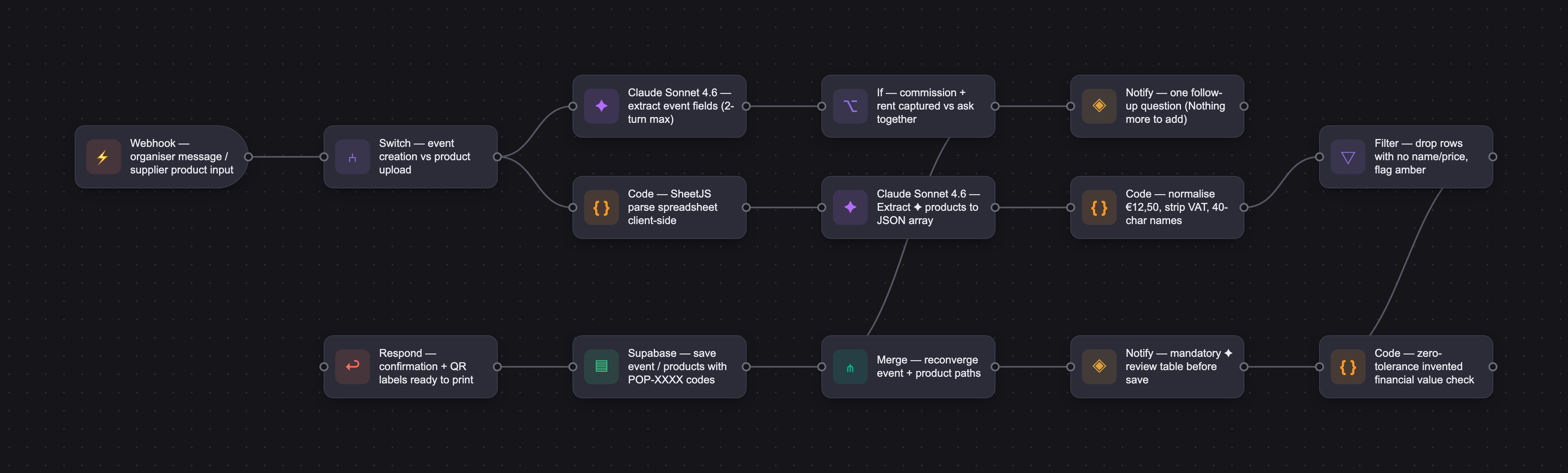
Popstack runs on Claude Sonnet 4.6, selected for its instruction-following on multi-step conversation flows and reliable null-versus-invented-value behavior — critical for a tool handling money. For event creation, the AI extracts fields across a strict two-turn maximum, asking for commission rate and rent fee together if missing and generating JSON on "Review draft." For product upload, it silently parses free text or a spreadsheet (converted client-side by SheetJS) into a JSON array, excluding rows with no name or price and normalizing European decimal formats. The stack is Lovable, Supabase Edge Functions, and the Anthropic API, with no RAG or fine-tuning — both features rely on prompt engineering alone. A hard rule runs throughout: never invent financial values. Automated evaluation reached 100% on both features after iteration, with zero invented financial values across all runs, and AI features can be disabled by removing the Edge Function without affecting core functionality.
Who it's for
Popstack is B2B2C. The primary buyer is the event organizer — an independent maker running 2–6 multi-vendor pop-ups a year, coordinating 3–12 suppliers, based in the Netherlands or UK, with no dedicated POS, accountant, or inventory manager. The secondary persona is the supplier, who gains real-time sales visibility and payout summaries. The long-term growth model relies on converting suppliers — who experience the tool from the inside — into organizers, turning the supplier experience into the primary acquisition channel.
Why it matters
The settlement layer — inventory intake through QR-based selling to automatic payout — is an unmet need across existing POS and consignment tools, and pop-up retail is a growing format with tight-knit maker communities that drive word-of-mouth. Popstack sits at the intersection of three tailwinds: pop-up retail (9–12% CAGR), vertical SaaS (18–22%), and the European creator economy (22%). The product is pre-launch (0-to-1) on a hybrid model — €15–25 per event for early adopters, converting to a €15–25/month subscription for organizers running 3+ events a year. It launches as a single-organiser, 10-supplier pilot at one real event in August 2026: lowest blast radius, fastest learning.
The workflow
The PRD
| PRODUCT FACULTY — AI PRODUCT REQUIREMENTS DOCUMENT (PRD) TEMPLATE Version 1.0 | ||||||
|---|---|---|---|---|---|---|
| Your Name: | Iulia Banciu | |||||
| Your Product: | PopStack | |||||
| Your Industry: | Vertical SaaS for the maker/craft economy | |||||
| Date: | 01.05.2026 | |||||
| 4D Method | AI PRD | Instructor Feedback | ||||
| Phase | Activity | Theme | Topic | Key Question(s) | Your Response Include external links to visuals/prototypes as required. | |
| DISCOVERY | Understand your market, business, product & user context | Business Value Map | Market Attractiveness | What industry is your business in? (ie Financial services, Healthcare, Education, etc)? | Vertical SaaS for the maker/craft economy — specifically, event operations software for independent makers who organise multi-vendor pop-up stores. | Iulia, the eval rigor here is the strongest part of the submission. The Feature 1 progression from 47 to 100 percent with an honest root-cause diagnosis at each run, the two-layer scoring split between a deterministic script and a temperature-zero Claude grader, and the zero-invented-financial-values constraint carried consistently from model selection through to your pause signals all show real engineering discipline. The mandatory review-before-save step and the spark icon marking every AI-generated field are trust decisions that earn credibility in a workflow where a wrong number costs a supplier real money. For the video, lead with the organiser pain at high volume, show AI extraction on a non-trivial input such as a messy spreadsheet with non-standard columns, and close on the eval evidence while being candid that it is a pre-launch confidence check rather than field-proven. The August pilot is your first real data, so naming that honestly is stronger than implying the numbers are already validated. One thing to tighten before then: your necessity argument for event creation rests on structure over speed, which is true but lighter than your product-upload case. Naming the specific failure a rigid form would produce, the way you did when you ruled out benchmark-based smart defaults for hallucination risk, would make that feature feel inevitable rather than nice to have. |
| What are the key challenges (headwinds) and opportunities (tailwinds) impacting growth in your industry? Who are the key competitors? | Headwinds: Small, fragmented target market with no dominant acquisition channel. Low event frequency per organiser (2–4/year) creates retention risk. Organiser rate among makers is uncertain and likely small (estimated 2–10% of event-selling makers). Willingness to pay is unproven — most current users rely on spreadsheets and accept the friction. Tailwinds: No tool currently solves the full multi-vendor pop-up workflow end-to-end (inventory intake → QR-based selling → automatic payout settlement). The settlement layer is an unmet need across all existing POS and consignment tools. Pop-up retail is growing as a format. Tight-knit maker communities create strong word-of-mouth potential. Key competitors: Consignment Helper (closest fit, but US-focused and volunteer/fundraiser-oriented), ConsignPro / SimpleConsign / Ricochet (permanent shop tools, wrong mental model), Square + spreadsheets (dominant real-world workaround, fragile above ~50 products). | |||||
| What is the projected growth rate of your target market segment over the next 3-5 years? | No single published figure exists for the maker pop-up operations software niche specifically. Using adjacent markets as proxies: - the global pop-up retail market is growing at 9–12% CAGR (2024–2033); - the vertical SaaS category is growing at 18–22% CAGR; - the Europe creator economy — the closest proxy for PopStack's user base — is projected to grow at 22% CAGR through 2032. PopStack sits at the intersection of all three tailwinds. | |||||
| Business Model | What growth stage is your business currently in (e.g., startup, scale-up, mature)? | Pre-launch / 0-to-1. PopStack is in active development with one real organiser confirmed as first tester. No paying customers yet. | ||||
| How does your business make money? What do they sell? What is your primary revenue model (e.g., subscription, freemium, licensing, marketplace, transactional, etc?) | Hybrid pricing model. Per-event pricing (€15–25/event) for early adopters, lowering the barrier to first payment and matching how organisers budget. Subscription (€15–25/month) as the growth model for organisers running 3+ events per year. The conversion path from per-event to subscription is the primary revenue expansion mechanism, supported by the supplier-to-organiser growth loop. | |||||
| Who is your primary customer base (B2B, B2C, B2B2C)? | B2B2C. The primary buyer is the event organiser (B), who uses PopStack to manage suppliers (C) during a pop-up event. Suppliers receive real-time sales visibility and post-event payout summaries through the platform. The long-term growth model relies on converting suppliers into organisers — turning the supplier experience into the primary acquisition channel. | |||||
| Differentiators | What are the key differentiators for your company? | Current differentiators: 1. Event-scoped mental model — built exclusively for temporary, multi-vendor pop-ups, not permanent shops. Setup, selling, and settlement are all framed around a single event lifecycle, not ongoing retail operations. 2. End-to-end settlement layer for the maker pop-up context — existing tools either serve permanent consignment shops (wrong mental model) or handle only parts of the workflow. Consignment Helper is the closest competitor but is positioned for volunteer-run fundraiser events in the US market, with limited presence in the EU/UK maker community. PopStack is purpose-built for the independent maker pop-up format, with payout calculation designed around the organiser-as-maker context (rent split, commission on profit after rent, supplier-facing summaries). 3.AI-powered setup — event creation and product cataloguing via natural language or spreadsheet upload, reducing the time to launch from hours to minutes. 4. Supplier experience as growth engine — suppliers get their own login and real-time sales visibility, creating a built-in conversion path from supplier to organiser. 5. Lightweight by design — no hardware dependencies, no monthly commitment required for early adopters, no training needed. Designed for makers, not retail managers. Long-term differentiation: Community platform vision — PopStack's long-term direction extends beyond event operations toward a community layer for independent makers: supplier and organiser profiles, reputation and reviews, location discovery, and network building. The ops tool is the entry point; the community is the moat. This positions PopStack as fundamentally different from pure ops tools like Consignment Helper, which have no community or network dimension. | ||||
| Feature Value Map (IMPORTANT NOTE: This section is only relevant if you are working on enhancing an existing product. It does not apply if you are developing a new product from 0 to 1.) | Customers | Who are the customers (ie buyers) of your product? | N/A — PopStack is a new product being built from 0 to 1. There is no existing product or feature set to map from. | |||
| End Users | Who are the end-users of your product? Which users are the most revenue-generating / revenue-impacting for your company? What are their goals, roles, and context? | N/A | ||||
| Current Products / Services | If you are a Product-led business: What are the core features of your product, and how do they address user needs? If you are a Service-led business: What are the key services you offer to customers? | N/A | ||||
| User Value Map | Target Persona | Who is your AI product / feature for? (Internal users, external users, an influencer, a buyer, etc) | Primary persona - Independent maker and pop-up event organiser. • Typically runs 2–6 multi-vendor pop-up stores per year, coordinating 3–12 suppliers on a consignment or revenue-share model. • Based in the Netherlands or UK. No dedicated POS, accountant, or inventory manager. • Manages everything personally — product intake, sales tracking, payout calculation, and supplier communication. Organiser persona is based on one in-depth user interview with an Amsterdam-based independent maker and organiser, supported by desk research across Reddit communities (r/CraftFairs, r/EtsySellers, r/smallbusiness), craft fair forums, and competitive analysis of existing tools. Secondary persona — the supplier: an independent maker participating in someone else's event. • Goals: know what's selling, get paid correctly and quickly, minimise communication overhead with the organiser. • Potential future organiser — suppliers who experience PopStack from the inside are the most likely candidates to run their own events, having already seen the tool work from the inside. Key assumptions — particularly organiser rate among makers and willingness to pay — have not yet been tested across a broader population and require validation through 5–10 additional interviews before launch. The interviewed organiser indicated the manual workaround breaks down entirely during high-volume periods, suggesting acute pain. Makers in this space already pay for event-day tools (SumUp is near-universal in this community), indicating baseline willingness to pay for operational software. Pricing validation remains a pre-launch priority. | |||
| Journey Map (current-state) | What is the typical journey for your target persona when they are using your product / service, focusing on their ideal experience (happy path) as they interact with your product? | 1. Pre-event: Supplier recruitment — Organiser contacts known makers via WhatsApp or Instagram DM, shares a pre-written briefing text with event details, commission rate, and rent split. 2. Pre-event: Terms & conditions — Organiser manually drafts participation terms, shares them individually with each supplier, and waits for each to sign and return the document. 3. Pre-event: Product intake — Each supplier brings their products on setup day. Organiser assigns each supplier a number. Suppliers optionally create their own article numbers. Products are tagged manually with supplier number, article number, and price. 4. Event day: Selling — Customer selects items. Organiser reads tags, notes supplier number, article number, and price on a notepad. Customer pays in one transaction via SumUp. During quiet moments, organiser transfers notepad entries to an Excel sheet. 5. Event day: Stock awareness — Organiser visually monitors shelves. Suppliers check in periodically or message to ask what's selling. 6. Post-event: Reconciliation — Organiser updates Excel with all sales, calculates each supplier's total revenue, deducts commission, and prepares individual payout amounts. 7. Post-event: Settlement — Organiser messages each supplier their amount. Supplier sends an invoice for 100% of their revenue; organiser invoices back for the commission. Organiser transfers payouts. | ||||
| Pain-points | Where does the user experience friction, obstacles, or unmet needs throughout the journey? Identify which pain-points are most frequent and severe? | 1. Manual sales logging is the critical bottleneck (high frequency, high severity) — Every sale requires reading a tag, writing on a notepad, and later transcribing to Excel. At low volume this works; at high volume (busy Sinterklaas period) it breaks down entirely — queues form, items get missed, errors compound. 2. Supplier coordination is fragmented and manual (high frequency, moderate severity) — Organiser manages all supplier communication via WhatsApp, manually preparing and sending event briefings, commission terms, and logistics details to each participant individually. No centralised communication or record of what was sent to whom. 3. Terms & conditions preparation and collection is manual and time-consuming (high frequency, moderate severity) — Organiser manually drafts participation terms for each event, shares them individually via WhatsApp or email, and waits for each supplier to sign and return the document. The process is sequential, has no central tracking, and requires manual follow-up with suppliers who haven’t responded. 4. Suppliers have zero real-time visibility (high frequency, moderate severity) — Suppliers don’t know what’s selling until the organiser manually tells them. They can’t make restocking decisions independently. 5. Stock management is invisible and manual (medium frequency, high severity) — No live stock count exists. The organiser doesn’t know when a product hits zero unless they physically notice an empty shelf. Restocking is reactive, not proactive. 6. Post-event reconciliation is time-consuming and error-prone (low frequency, high severity) — Calculating per-supplier payouts from raw sales notes takes significant time and is vulnerable to transcription errors. 7. Invoicing process is unnecessarily complex (low frequency, moderate severity) — The double-invoice workaround adds friction for both sides and exists purely as a tax workaround, not by design. | ||||
| AI Opportunities | From your list of pain points, identify those that can effectively be addressed using Generative AI. Remember, this project focuses on leveraging LLM-powered AI to solve your target persona's pain points. Rank these pain points starting with the most severe and frequently occurring first. | 1. Unstructured event setup creates downstream operational debt — Organiser describes their event in natural language; AI structures it into a reusable data model — suppliers, products, commission rules, rent split — that automatically feeds every subsequent step. LLM justification: the value is not speed, it is structure. AI converts a casual description into an operational foundation that eliminates the manual rebuilding that currently happens at every stage. 2. Product cataloguing is a barrier for suppliers — Supplier types a description or uploads a spreadsheet in any format; AI maps it to the correct product schema. LLM justification: supplier input varies too much for a rigid form to handle reliably. 3. Post-event payout communication is manual — AI generates a personalised plain-language payout summary per supplier. LLM justification: the calculation is rule-based, but the communication requires natural language tailored to each supplier. Supports supplier trust and the supplier-to-organiser conversion loop. 4. Sales insights are non-existent — AI generates a short post-event narrative summary for the organiser: top performers, stock-out moments, restocking recommendations. LLM justification: small datasets don’t support dashboards; an actionable 60-second read is more useful. 5. Restocking is reactive — AI drafts a personalised nudge to the supplier when a product hits zero. Note: primarily automation; LLM adds value in message tone and context. Lowest priority for V1 | ||||
| Develop an AI Solution Hypothesis | AI Solution Hypothesis | Diverge | Ideate potential solutions to address your AI-solvable pain points. Focus on generating a high quantity of ideas rather than evaluating their quality at this stage. | 25 ideas generated across five pain point areas before evaluation: Pre-event: Setup, Pre-event: Intake, Event day: Stock, Post-event: Settlement, Post-event: Insights Full list with descriptions: see AI ideas tab | ||
| Converge | Rank your ideated solutions based on impact and feasibility. Identify your top three AI solutions, and clearly select the one you'll focus on for your project. | All 25 ideas evaluated on impact and feasibility. Full ranking table: see 'AI Ideas' tab.Top 3 selected: Conversational event creation (Impact: 10, Feasibility: 9) — Highest impact because it fires first and affects every downstream step. LLMs are highly reliable at extracting structured data from constrained natural language input. Time saving per event unvalidated — requires first-tester confirmation. AI-powered product upload (Impact: 9, Feasibility: 9) — Combines free-text and spreadsheet paths. Removes the main supplier onboarding barrier. Mandatory review step before saving contains any parsing errors. Real-world spreadsheet variation is the main feasibility risk. Per-supplier payout summary (Impact: 9, Feasibility: 9) — Replaces manual per-supplier WhatsApp messages, verified pain from interview. Calculation is fully deterministic; LLM adds natural language only. Very low hallucination risk. MVP focus: conversational event creation + AI-powered product upload. These two are architecturally coupled — both operate at the pre-event setup stage and together replace the entire manual intake workflow. The payout summary is high priority and will be built in sequence. | ||||
| DESIGN | Define Target State Workflow | UX Flows & Wireframes Suggested Tool: Excalidraw | Workflow (future) | Assuming your product or feature works as desired, what is the target state workflow? | Feature 1 — Conversational event creation Organiser clicks “Create event” → AI asks them to describe the event in natural language → AI asks targeted follow-up questions for any missing required fields (commission rate, rent cost) → organiser can click “Nothing more to add” at any point → AI pre-fills the full event form → organiser reviews, edits any fields, and saves → event is live and organiser is automatically added as a supplier. Branch: If AI misreads a field, organiser corrects it in the review form before saving. No AI output is saved without passing through the mandatory review step. Feature 2 — AI-powered product upload Supplier navigates to their product list → clicks “Add products” → describes products in free text or uploads a spreadsheet → clicks “Extract ✦” → input sent to Edge Function → Claude returns a JSON array of extracted products → supplier reviews a pre-filled editable table → corrects any rows flagged in amber (missing quantity) or error rows (no name or price) → confirms → products saved with system-generated POP-XXXX codes and QR labels ready to print. Branch: Rows with no name or price excluded entirely, shown as error rows with original text for manual re-entry. Review step is mandatory — no skip path. Supplier can also add a product manually via escape hatch link. | Please leave this area blank. This space is for the Instructor to provide you with feedback. |
| Build Wireframes | Wireframes | How will users navigate through your AI solution? What are the key steps and decision points? What information will be displayed at each stage? What specific UI elements are needed on each screen? How will the layout accommodate AI features? | Wireframes cover: both AI features across + other supportinng flows See wireframes: https://sites.google.com/view/popstack-wireframes/home Event creation (6 states): entry point with “Tell me about your event” card and “Add new event manually” escape hatch; AI conversation with one-question-at-a-time follow-ups and persistent “Nothing more to add” link; second follow-up turn; pre-filled review form with AI-generated fields marked with ✦ spark icon in rust (#e8583c); validation error state; saved confirmation with invite suppliers CTA. Product upload (8 states): describe screen with free-text input, paperclip upload icon, Extract ✦ CTA (disabled until input present), and “Add a product manually” escape hatch; file-attached state showing filename confirmation row with ✕ to remove and Extract ✦ active; AI parsing loading state; editable review table with ✦ on all AI-extracted fields and amber flagging for missing quantity; product list home; row expanded inline editing; missing stock expanded; submit confirmation. | |||
| Develop Prototype to showcase AI interactions | Prototype Screens Suggested Tool: lovable.dev | What aspects of the AI solution will you demonstrate in your prototype? How will the AI inputs, processing, and outputs be presented visually to users? Which features are essential for launch? What can be left for later releases? | Live prototype: https://popstack-events.lovable.app/ (published Lovable app, login via email) The prototype demonstrates both MVP AI features end-to-end along the happy path. -> MVP optimized for mobile based on user needs Event creation: organiser describes the event in natural language, AI detects it has all required fields and moves to the draft automatically, organiser clicks “Review draft ✦”, reviews the pre-filled form with ✦-marked fields, edits and saves. Product upload: supplier describes products in free text or uploads a spreadsheet via the paperclip icon — SheetJS converts it client-side before passing to the AI. Either path leads to the same Extract ✦ → loading → review table → save flow. AI-extracted fields marked ✦ with amber flagging for missing quantities. Supporting flows (sell screen, sales log, stock receiving, payout) are built and shown to demonstrate the full event lifecycle. Essential for launch: both AI flows with live Anthropic API, both product input paths, review/edit before save, ✦ field marking, supporting screens. Deferred: error states, payout summary AI feature. | |||
| Initial Prompt Design | Master Prompt [Initial Design] | Create an initial master prompt. Consider the following: What tone or personality should the AI use? How should user input and system instructions be structured for maximum clarity? What system instruction will govern the AI's behavior? What examples might improve performance? How will you format outputs for consistency? | For full prompts: see tab Initial Prompts Event creation — Tone: warm and efficient. AI extracts event name, description, address, dates, commission rate (optional, default 0), rent fee (optional, default 0), supplier instructions. Two-turn max: asks for commission rate and rent fee together if missing (defaults to 0 if not provided), then one optional sweep for remaining fields. Generates JSON on “Review draft ✦”. Never invents values. Product upload — Silent extraction. Parses free text or spreadsheet input into: name, price, quantity (null if missing), my_product_number (null if missing). Excludes rows with no name or price. Returns JSON array only. | |||
| Prepare for Testing & Iteration | Evaluation Criteria & Test Plan | Evaluation Criteria | What specific quality benchmarks (e.g., clarity, relevance, tone, accuracy, SEO, hallucination avoidance) will define “good” output? | Event creation — what “good” looks like: • Extraction accuracy — all fields mentioned by the organiser correctly extracted into the JSON. No invented values. • Format — valid JSON, all required keys present, null for missing optional fields, dates in ISO 8601. • Conversation flow — commission rate and rent fee asked together in one question if missing; optional sweep is one question; no further questions after that. • No hallucination — AI does not invent commission rates, dates, or addresses not mentioned. • Scope — if organiser goes off-topic, AI redirects to event description without extracting unrelated content. Product upload — what “good” looks like: • Extraction accuracy — name, price, quantity, and reference number correctly extracted where present in the input. • Format — valid JSON array, no markdown, no explanation text. • Completeness — every product with at least a name appears in the JSON output. No silent drops. Missing price, quantity, and my product number return as null. • No hallucination — AI does not invent prices, quantities, or product numbers not present in the input. • Price normalisation — European decimal format (12,50) correctly converted to numeric (12.5). • Unrelated input — if input contains no recognisable product names, AI returns an empty array. Ship threshold: ≥85% pass rate across 15 test cases per feature. Zero tolerance for invented financial values. | ||
| Example Cases | What specific example use cases, edge cases, and negative cases should be covered by test prompts and outputs? | Event creation: Use cases: Full description with all fields in one message; partial description with commission and rent fee missing; European date format (“12 april”); ambiguous commission phrasing (“15% of what they make after the table fee”). Edge cases: Only event name provided — AI asks for commission and rent fee, then optional sweep; commission stated as “same as last time” — AI returns null, does not invent; past date provided — AI extracts as given without correcting. Negative cases: Empty input — AI asks for a description, does not generate empty JSON; organiser goes off-topic mid-conversation — AI redirects without extracting unrelated content. Product upload: Pre-AI failures (handled before AI is called): Wrong file format (.pdf, .jpg, .docx) — rejected at upload; corrupted or password-protected file — SheetJS parse fails, user sees error before AI is called. Use cases: Free text with name, price, quantity and my product number for all products; free text with missing quantities on some rows; spreadsheet with standard column names; spreadsheet with non-standard column names (“artikel”, “prijs”, “aantal”). Edge cases: Mixed rows — some with quantity, some without; price in European format (“€12,50”); single product only; large list (20+ products). Negative cases: Row with name but no price — included in JSON with price as null, flagged amber in review table; row with no name — excluded from JSON entirely; user accidentally types a question instead of a product list — AI returns empty array; completely empty input — AI returns empty array. | ||||
| DEVELOP | AI Model Selection & Justification | AI Model Selection & Justification | Which AI model is best suited for your solution and why? What capabilities and limitations does it have? How will it integrate with your product? | Selected model: Claude Sonnet 4.6 (claude-sonnet-4-6, Anthropic) — best instruction-following on multi-step conversation flows, reliable null vs. invented value behaviour, and zero switching cost within the Anthropic stack. Selection criteria: Five criteria were used to evaluate candidates, in priority order: 1.JSON extraction reliability — zero tolerance for invented financial values 2. Conversation turn control — precise multi-step sequencing, turn limits, conditional branching 3. Latency — sub-second response for event-day use 4. Cost — viable at €15–25/event pricing 5. Integration simplicity — fast build via Supabase Edge Functions Modeles considered: Claude Sonnet 4.6, Claude Haiku 4.5, GPT-5.4 mini, Gemini 2.5 Flash See full comparion in AI Model selection tab | Please leave this area blank. This space is for the Instructor to provide you with feedback. | |
| Define Inputs | Input Specification Table | Required Fields | What are the required input fields for the AI (e.g., title, description, keywords, tone)? Indicate format, source, requirement. | Feature 1: Event creation • User message · Required · Free text, any phrasing · Source: user input Organiser’s natural language description. Primary input for all extraction. • Event name · Required · Extracted from free text · Source: user input Identifies the event in the system. Cannot be null. • Conversation history · Required · JSON array · Source: system — passed per request Enables multi-turn extraction. No context without it. Feature 2: Product upload • Raw input · Required · Free text or parsed spreadsheet · Source: user input Full content passed to AI. Spreadsheet pre-parsed client-side before API call. • Product name · Required · Extracted from free text or spreadsheet cell · Source: raw input Rows with no name excluded from output entirely. | ||
| Optional Fields | Are there any optional or user-customizable fields? How do they impact the AI’s output? | Feature 1: Event creation • Commission rate · Optional · Extracted from free text, various phrasings accepted · Default: 0 AI normalises to numeric (e.g. “fifteen percent” → 15). Unresolvable references return null, never invented. Zero-tolerance for invented values. • Rent fee · Optional · Extracted from free text, various phrasings accepted · Default: 0 AI normalises to numeric (e.g. “thirty euros” → 30). Unresolvable references return null, never invented. Zero-tolerance for invented values. • Event description · Optional · Extracted from free text · Default: null Provides context about the event. Included in output if mentioned, null otherwise. • Address · Optional · Extracted from free text · Default: null Venue or location. Extracted as given, not validated or geocoded. • Start date / end date · Optional · Extracted from free text — any format, European convention default · Default: null AI normalises to ISO 8601 (e.g. “12 april”, “volgende zaterdag”, “12/04/2026” → 2026-04-12). Unresolvable dates return null, never invented. • Supplier instructions · Optional · Extracted from free text · Default: null Any instructions the organiser wants passed to suppliers. Extracted verbatim. Feature 2: Product upload • Price · Optional · Extracted from free text or spreadsheet cell — numeric €, European decimal accepted · Default: null AI normalises European format (e.g. “€12,50” → 12.5). Rows with no price return null and flagged in review. Zero-tolerance for invented values. • Quantity · Optional · Extracted from free text or spreadsheet cell — numeric · Default: null Included in output if present, null if missing. Never invented. • My product number · Optional · Extracted from free text or spreadsheet cell — any reference code · Default: null Included in output if present, null if missing. Never invented. | ||||
| Define Good Output | Output Evaluation Checklist | Objective Criteria | What criteria will you use to judge output as “good”? (e.g., structure, use of keywords, tone, factuality, relevance) | Feature 1: Event creation • Valid JSON — output is parseable JSON with all required keys present (name, description, address, start_date, end_date, commission_rate, rent_fee, supplier_instructions). Pass/fail. • No invented values — no field contains a value not present in the conversation. Zero-tolerance. Any invented financial value (commission rate, rent fee) = automatic fail. • Null handling — optional fields not mentioned by the organiser return null, not empty string or placeholder. Pass/fail. • Date normalisation — any date mentioned is returned in ISO 8601 format. Pass/fail per date field. • Financial normalisation — commission and rent fee returned as numeric, not string (e.g. “15%” → 15). Pass/fail. • Conversation flow — commission and rent fee prompted together in one question if missing; optional sweep is one question; no further questions after that. Pass/fail per turn. • Scope — no content extracted from off-topic organiser input. Pass/fail. • No markdown — output contains no markdown formatting or explanation text. Pass/fail. Feature 2: Product upload • Valid JSON array — output is a parseable JSON array. Pass/fail. • Completeness — every row with a product name appears in the output. No silent drops. Pass/fail per row. • No invented values — no price, quantity, or my product number invented. Zero-tolerance for invented financial values. Any invented price = automatic fail. • Null handling — missing price, quantity, and my product number return as null, not empty string or zero. Pass/fail per field. • Name exclusion — rows with no product name excluded from output entirely. Pass/fail. • Price normalisation — European decimal format correctly converted to numeric (e.g. “€12,50” → 12.5). Pass/fail per price field. • No markdown — output contains no markdown formatting or explanation text. Pass/fail. Ship threshold: ≥85% field-level accuracy across 10 test inputs per feature. Zero tolerance for invented financial values regardless of overall accuracy score. | ||
| Subjective Criteria | Are there any criteria that require human judgment or qualitative assessment? | Feature 1: Event creation • Tone — AI responses feel warm and efficient, not robotic or overly formal. Organiser feels guided, not interrogated. Assessed by human reviewer reading the conversation transcript. • Question phrasing — follow-up questions are clear and natural. An organiser with no technical background would understand what’s being asked without re-reading. Feature 2: Product upload • Name cleaning — extracted product names are clean and label-ready (e.g. “silver ring turquoise” not “silver ring, turquoise stone, very pretty”). Assessed by human reviewer checking whether names would work on a 12×22mm label. • Ambiguous input handling — when input is messy or inconsistent, the AI makes reasonable extraction choices rather than silently failing or producing unusable output. Both features • Organiser confidence — after seeing the review screen, would a real organiser trust the extracted output enough to save with minor corrections? Assessed via first-tester observation at the live pop-up event. | ||||
| Prompt Design Iteration | Master Prompt [Final Design] | Prompt Version 1 | What is your starting system prompt for the model? What variations will you test? What techniques will you use to optimize performance? List initial instructions, persona, inputs, and constraints. | For full prompts see tab: Final Prompts Feature 1: Event creation — Final prompt (v2) Persona: Event setup assistant for PopStack — warm, efficient, no jargon. Instructions: Extract event fields from natural language conversation. Follow strict turn sequence: (1) ask for commission rate and rent fee together if missing, default both to 0 if not provided; (2) silently extract all fields captured so far, ask ONE question about genuinely missing fields only — if all fields captured respond "I have everything I need. Go to review when you're ready."; (3) generate JSON on "Review draft". Never ask further questions. Inputs: User message, conversation history (passed per request). Today's date injected at runtime. Constraints: Never invent values; never show reasoning process; commission_rate and rent_fee always numeric, never null; dates normalised to ISO 8601 using today's date as reference; ranges return null; unresolvable values return null; venue names and locations count as address; no markdown in conversation or final JSON — JSON only on final turn. Examples: Included in prompt. Feature 2: Product upload — Final prompt (v1) Persona: Product data extraction assistant for PopStack — accurate, conservative, never fills gaps. Instructions: Extract product data from free text or pre-parsed spreadsheet. Return JSON array only. Inputs: Raw text or pre-parsed spreadsheet content. Constraints: Exclude rows with no name; price, quantity, my_product_number return null if missing; price ranges and unresolvable prices return null; European decimal format accepted; VAT notes stripped; approximate quantities normalised; emojis stripped; names sentence case max 40 chars; my_product_number extracted only if explicitly labelled; no markdown — JSON array only. Examples: Included in prompt. | ||
| Prompt Iterations | If revised, what changes did you make and why? How do you track and record prompt evolution? | Tracked via a change log: see tab Prompt iterations log | ||||
| Data Preparation & RAG Implementation | Data Preparation & RAG Implementation | What data sources will you use? How will you prepare data for model training or evaluation? (e.g., cleaning, structuring). For RAG: How will you chunk, embed, retrieve relevant information? | No fine-tuning, RAG, or external knowledge base. Both features rely entirely on prompt engineering and the model’s pre-trained capabilities. Runtime inputs only: Feature 1: System prompt + full conversation history passed with each API call - Feature 2: System prompt + raw user input (free text or pre-parsed spreadsheet) passed per call No vector database, no embeddings, no data pipeline. SheetJS handles spreadsheet parsing client-side before the API call — the AI receives plain text only. | |||
| Create Evaluation Set | Example Input/Output Data for Testing | Typical Examples | What are the most common inputs and expected outputs? Use real data if possible. | Feature 1: Event creation Input: "I want to set up a Christmas market at Westergasfabriek, 20% commission, €25 rent per supplier, 20 and 21 december, bring your own display stand" Output: name=Christmas Market, commission_rate=20, rent_fee=25, start_date=2026-12-20, end_date=2026-12-21, supplier_instructions="Bring your own display stand" Feature 2: Product upload Input: "Silver ring turquoise €12,50 x5 / Ceramic mug blue €8 x10 / Linen tote €25 x3" Output: 3 rows extracted — Silver ring turquoise €12.50 qty 5, Ceramic mug blue €8.00 qty 10, Linen tote €25.00 qty 3 Full test cases: PopStack-Eval-TestCases.xlsx | ||
| Edge Cases & Negative Cases | What examples test the AI’s limits? (e.g., missing data, ambiguous input, out-of-domain) | Feature 1: Event creation • Unresolvable reference (edge) Input: "same setup as last time, 15% commission" → "same as before" Output: commission_rate=15, rent_fee=0, address=null, start_date=null — nothing invented ✓ • Ambiguous range (edge) Input: "Pop-up on 1st of June, commission is between 10 and 20 percent" Output: commission_rate=null — range not guessed, never invented ✓ Feature 2: Product upload • TBD price and approximate quantities (edge) Input: "Dried lavender wreath TBD / Beeswax candle small €6 ~20" Output: wreath price=null, candle quantity=20 — nothing invented ✓ • Very long description (edge) Input: "hand painted silk scarf, one of a kind, took me 3 weeks to make, inspired by Dutch Golden Age paintings, gorgeous colours €85" Output: name="Hand painted silk scarf", price=85 ✓ • Empty input (negative) Input: (empty) Output: [] — empty array, no crash, no invented rows ✓ Full test cases: PopStack-Eval-TestCases.xlsx | ||||
| Test Example Data & Review Results | Manual Review | Run your input data with the prompt. How did your output perform in manual review? Which examples failed which criteria, and why? | Evaluation ran automatically via script. After each run, failing test raw outputs were manually inspected to diagnose root cause. Run 1 (47% Feature 1 / 93% Feature 2): 9 failures reviewed manually. Dates returning wrong year — prompt missing date context Commission range defaulting to 0 — prompt missing range rule Grader failures — script bug, grader not receiving conversation history PU-006 sentence case — script false positive on "A5" Run 2 (73% Feature 1 / 100% Feature 2): 4 failures reviewed manually. All confirmed test case expected value errors — AI behaviour was correct. Run 3 (100% both features): all outputs reviewed. No failures. Zero invented financial values across all runs. | |||
| Automated Evaluation | What pass/fail rate or scores did the AI achieve on core criteria? | Node.js script ran all 30 tests against the live API automatically. Two-layer scoring: Objective checks (script): JSON validity, field types, null handling, numeric normalisation, name length and case — deterministic pass/fail per criterion Subjective checks (Claude grader, temperature=0): tone, question phrasing, name cleaning quality — consistent across re-runs Results: Feature 1: Event creation Run 1: 47% — prompt missing date context and range handling; grader not receiving conversation history Run 2: 73% — prompt and script fixed; 4 remaining failures were test case expected value errors Run 3: 100% — test cases corrected ✓ Feature 2: Product upload Run 1: 93% — one script false positive on sentence case check (A5 abbreviation) Run 2: 100% — script fix applied ✓ Run 3: 100% — confirmed ✓ Zero invented financial values across all runs and both features. More details: Eval test cases, Eval results final run, Eval Run 3 Json | ||||
| Handle Edge Cases & Iterate | Edge Case Identification | What edge cases did you identify in testing or real usage? | Feature 1: Event creation Unresolvable references ("same as last time") → null, never invented Commission/rent stated as range → null, never guessed Dates without year → resolved to next upcoming occurrence via runtime date injection Off-topic questions mid-flow → answered helpfully, JSON unaffected Feature 2: Product upload TBD and approximate values → null or normalised correctly Emoji input → stripped cleanly from names Long descriptions → cleaned to 40-char label-ready name Empty input → returns empty array, no crash | |||
| Updates & Adjustments | What prompt or system adjustments have you made based on failures, feedback, or edge case observations? | Feature 1: Event creation Added today's date injection → resolved wrong-year date failures Added range → null rule → resolved silent defaulting on ambiguous commission inputs Corrected grader to receive full conversation history → resolved invalid subjective checks Corrected test case expected dates for past months Feature 2: Product upload Sentence case check updated to exempt abbreviations (A4, A5) → resolved false positive Pass rate: Feature 1: 47% → 100% · Feature 2: 93% → 100% Full version history: PopStack-Prompt-Versions-Eval-Log.md | ||||
| Automate Evaluation Approach | Evaluation Method | What is your chosen approach for evaluation (human, model grader, script)? How will you scale testing to diverse/large test sets? | Combined approach: Script: deterministic pass/fail on objective criteria (JSON validity, types, null handling, normalisation) Claude grader (temperature=0): subjective criteria (tone, name cleaning, ambiguous input handling). Receives full conversation history for Feature 1. Consistent across re-runs. Human review: grader verdicts reviewed once per run (~15 min) Scales to larger test sets by adding cases to testCases.js and re-running. | |||
| Evaluation Frequency | How often will you re-run evaluations for new data, new prompts, or post-launch monitoring? | • Re-run after every prompt change during development • Re-run before August trial event (first real-world validation) • Re-run before Christmas event (higher-stakes validation) • Post-launch: re-run monthly or when user feedback surfaces new failure patterns • JSON scorecard enables direct pass rate comparison between runs Current status: 100% on both features. Prompts locked for MVP build. | ||||
| DEPLOY | Finalize Launch & Rollout Plan | Operational Readiness Checklist | Technical Readiness | Is infra (APIs, databases, rate limits, monitoring, rollback) tested and documented? | Infrastructure: Lovable (frontend, deployed via Vercel) + Supabase (database, auth, real-time, edge functions) + Anthropic API. All managed services — no server maintenance required. Hosting and Supabase both handle scaling automatically at MVP volume (1 event, 10 suppliers). Observability: Supabase dashboard provides query logs and error monitoring. Lovable provides deployment logs. Anthropic API provides usage and error logs. No custom monitoring needed at trial scale. Rollback: Lovable supports rollback to previous deployment. Supabase schema changes managed via migrations. AI features can be disabled by removing the Edge Function without affecting core functionality. Known issues and limitations: • SumUp not integrated — payment recorded manually • No automated alerts on AI failures — monitored manually at trial scale • Single organiser, single device — multi-till not supported • VAT calculations deferred • Desktop layout deferred — mobile-first MVP | Please leave this area blank. This space is for the Instructor to provide you with feedback. |
| Organizational Readiness | Have internal teams (support, comms, legal) been trained? Is documentation complete? | No internal team. Iulia handles all support, communications, and documentation directly. Pre-launch documentation complete: one-page onboarding guide for the organiser, label printing instructions for suppliers, and this PRD as the full technical and product reference. | ||||
| Launch & Rollout Strategy | Launch Approach | What is your launch approach? Pilot, AB test, or all users—who gets access and when? | Rollout strategy: Pilot Single organiser, 10 suppliers, one real event in August 2026. Lowest blast radius. Fastest learning. Direct feedback loop. Access: Organiser onboarded directly by Iulia. Suppliers invited via magic link email from the organiser. No self-signup in Phase 1. Support: Direct WhatsApp or email to Iulia for any issues during the event. No support workflow needed at this scale. -> Signals to pause: - AI produces incorrect financial values (invented commission or prices) - Payout calculation errors - Auth failures preventing supplier access on event day -> Signals to scale (Phase 2): - Organiser completes event successfully with minimal intervention - Suppliers submit products without assistance - Payout report accepted as accurate without manual correction Phase 2: Recruit 5 additional organisers + second event with same organiser. Later this year. | |||
| Scale Readiness | How will you ensure readiness for scale? How will you monitor initial volume and scale up? | At trial scale (1 event, 10 suppliers, ~100 products) all managed services operate well within free/starter tier limits. Scale readiness is not a concern for Phase 1. Graceful failure design: - AI feature failure → organiser can enter event details manually; supplier can enter products manually. Core functionality unaffected. - Supabase real-time failure → page refresh restores current state from database - QR scan failure → manual product code entry available as fallback Phase 2 scale considerations: - Monitor Supabase real-time connection limits as concurrent events increase - Monitor Anthropic API costs per event as volume grows — Haiku 4.5 available as cost fallback on same SDK - Lovable scales automatically, no action needed | ||||
| Go-to-Market Plan | Marketing / Training Assets | What assets (FAQ, demo, guides) will you prepare for external communication/marketing? | Phase 1 (August trial — closed pilot, no public marketing): One-page organiser onboarding guide: create event, invite suppliers, run the till, close and pay out Label printing instructions for suppliers (included on product list screen) No public-facing marketing assets needed for closed pilot Phase 2 (broader rollout): Short demo video showing event creation and product upload AI flows Simple landing page with prototype link | |||
| Stakeholder / Internal Comms | How will you communicate launch plans, progress, and outcomes internally? | Solo build — no internal comms needed. Progress tracked in this PRD and the Google Drive folder. Outcomes from the August trial captured via on-site observation and post-event debrief. | ||||
| Confirm Legal, Privacy & Risk Protocols | Data & Privacy | How do you handle and protect user data, including storage, privacy, and compliance? | User data (email, product data, sales data) stored in Supabase (Postgres), GDPR-compliant with EU data processing. No personal data sent to Anthropic API — only product descriptions and event details. Anthropic does not train on API data. Supabase provides automatic daily backups. | |||
| Policy & Compliance | Are content moderation, legal, and audit processes in place? Are you compliant with regulations needed for your domain? | August trial is a closed pilot — no public-facing content, no moderation needed. Planned for public launch: formal privacy policy, terms of service, and GDPR data deletion flow. Organisers responsible for their own VAT compliance in MVP. AI disclosure in place: AI-generated fields marked with ✦, mandatory human review before saving. | ||||
| Define Success Metrics | Success Metrics | User/Business Metrics | What user metrics will indicate success? What business metrics will demonstrate value? | Business/UX metrics (August trial): - Organiser completes event setup without assistance - All 10 suppliers submit product lists before event day - Payout report accepted as accurate at event close without manual correction - Organiser willing to use PopStack again for next event (qualitative) - At least 1 supplier expresses interest in organising their own event (conversion signal) Phase 2 targets: - 5 organisers onboarded - ≥80% event setup completion rate without Iulia intervention - Supplier-to-organiser conversion rate tracked (baseline from Phase 1) | ||
| AI Metrics | How will you measure AI performance and accuracy? | AI-specific metrics: - Event creation: organiser reaches review screen in ≤3 turns - Product upload: ≥90% of product rows correctly extracted without manual correction - Zero invented financial values in production (commission rate, rent fee, price) - AI feature used vs skipped: track whether organiser and suppliers use AI flow or default to manual entry | ||||
| Monitor, Iterate & Improve | User Support & Feedback Plan | Support Channels | Where can users get support? Is escalation and ownership clear? | Phase 1 (August trial): Direct WhatsApp or email to Iulia for any issues during or after the event. Single owner — no escalation path needed at this scale. Phase 2: Same channel. As organiser base grows, a dedicated support email will be set up. | ||
| Feedback Workflow | How do you gather, triage, and act on feedback and bugs? How are critical issues prioritized and communicated? | Phase 1: On-site observation during August event. Post-event debrief with organiser. Informal feedback from suppliers via WhatsApp. Issues logged manually and triaged by Iulia. Phase 2: In-app thumbs up/down on AI review screen. WhatsApp/email channel for organiser feedback. Critical issues (invented financial values, payout errors, auth failures) trigger immediate fix — AI feature disabled via Edge Function removal if needed. Non-critical issues queued for next prompt or build iteration. | ||||
| Monitoring & Continuous Improvement | Monitoring Approach | What monitoring/logging is in place to spot operational/AI issues post-launch? | Supabase dashboard: query logs and error monitoring. Lovable: deployment logs. Anthropic API: usage and error logs. No automated alerting at trial scale — monitored manually. Phase 2: automated alerts on API error rate and latency spikes planned. | |||
| Ongoing Improvement | How will you collect learnings, review performance, and update your system continuously post-launch? | Feedback → identify failure pattern → update prompt → re-run eval → confirm fix → deploy. Prompt versions tracked in PopStack-Prompt-Versions-Eval-Log.md. Eval re-run before August trial, before Christmas event, and monthly post-launch. On-site observation at August trial feeds directly into Phase 2 build priorities. | ||||




