
Productivity
Robot
Robot is an AI planning companion built for people who struggle to start and structure their day without external accountability. It uses a mood check-in, task input, calendar context, and behavioral-science-grounded prompting to generate a time-blocked plan with micro-steps and low-energy fallbacks. The product is aimed at reducing activation barriers, cognitive overload, and the guilt spiral that comes from unfinished work.
The problem
Some people know exactly what needs to get done but can't start. They lose hours to avoidance before building momentum, freeze when confronted with a full task list, and spiral into guilt over what's unfinished — which only kills the next day's motivation. The most severe, most frequent pains are task initiation, overwhelm from seeing everything at once, mid-day energy crashes that collapse the plan, and context switching across Notion, email, calendar, and paper lists with no single source of truth. Mood shifts during the day, and morning intentions rarely survive contact with reality.
The solution
RuBot is an AI planning companion for people who struggle to start and structure their day without external accountability. A short mood check-in captures the user's biggest challenge, energy level, and motivation, and RuBot generates a focused 3–5 task, time-blocked daily plan filtered by energy and ordered by focus requirements. The differentiators are mood-aware planning that adjusts recommendations to how the user feels, proactive micro-steps that break the first task into tiny starting actions to cross the activation barrier, and guilt-free end-of-day recaps focused on what got done. A low-energy fallback ensures the user always gets one small, achievable win rather than an empty plan.
How it works
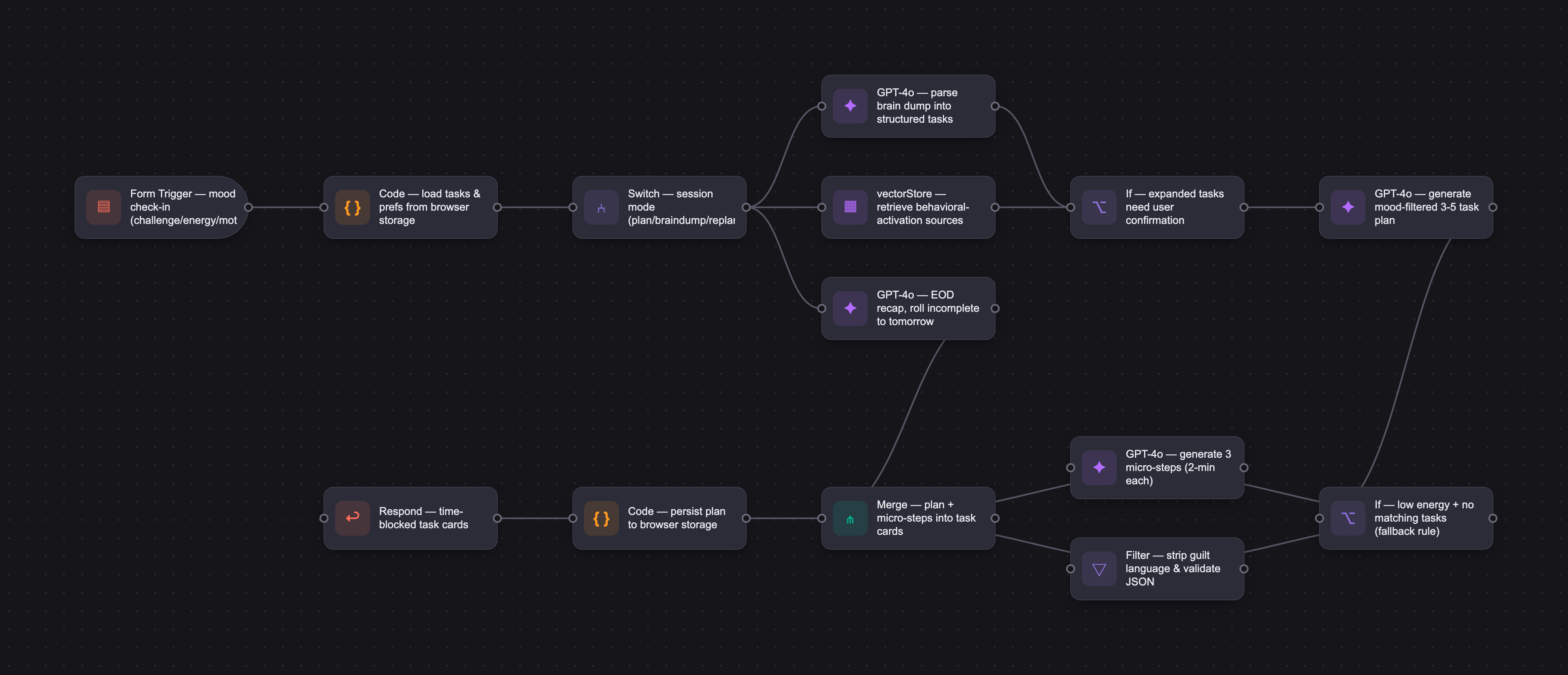
RuBot runs on OpenAI GPT-4o / GPT-5.5 for reliable instruction-following, consistent tone, and structured JSON output rendered as task cards. A single detailed master prompt (final version V1.8) defines a warm, non-judgmental companion persona and calibrates tone and plan complexity by mood combination. It is grounded in six behavioral-science sources — Tiny Habits (Fogg), decision fatigue, flow state, self-determination theory, and behavioral activation — uploaded as context files, with RAG handled natively by OpenAI file search. The prompt also governs brain-dump parsing (turning free-form text into structured tasks), mid-day replanning, and EOD recaps, each returning a defined JSON schema. Strict guardrails prohibit guilt language, invented tasks, empty plans, and any wording implying the user's input was inadequate.
Who it's for
RuBot is a B2C product for anyone managing a high volume of competing demands with limited external structure — people who struggle with task initiation, cognitive overload, focus, or motivation. That spans neurodivergent adults (ADHD, anxiety, depression), remote workers, self-employed individuals, job seekers, and senior executives or founders without an EA who constantly context-switch between strategic and operational work. The archetype is a self-employed consultant juggling client work, a job search, and personal life with no accountability structure — someone who needs a thought partner to decide what to do today and actually start.
Why it matters
The AI productivity tools market is projected to grow from $9.89B in 2024 to $115.85B by 2034 (~28% CAGR), with strong tailwinds from rising awareness of burnout and executive dysfunction and agentic AI shifting from novelty to expectation. No direct competitor combines mood-aware input with agentic daily planning and brain-dump parsing. As a pre-product personal project, RuBot plans a pilot launch to trusted testers, free before a $5–10/month subscription with no ads. Manual evaluation passed 6 of 7 test cases, with the one failure — an empty plan on a low-energy day — resolved through prompt iteration. Positioned deliberately as a productivity tool, not a mental health app, it routes crisis-level inputs to appropriate resources.
The workflow
The PRD
| PRODUCT FACULTY — AI PRODUCT REQUIREMENTS DOCUMENT (PRD) TEMPLATE Version 1.0 | ||||||
|---|---|---|---|---|---|---|
| Your Name: | Ruhi Patel | |||||
| Your Product: | RuBot | |||||
| Your Industry: | Consumer Productivity (Mental Health & Wellness) | |||||
| Date: | April 1, 2016 | |||||
| 4D Method | AI PRD | Instructor Feedback | ||||
| Phase | Activity | Theme | Topic | Key Question(s) | Your Response Include external links to visuals/prototypes as required. | |
| DISCOVERY | Understand your market, business, product & user context | Business Value Map | Market Attractiveness | What industry is your business in? (ie Financial services, Healthcare, Education, etc)? | Consumer productivity software/Task management | Please leave this area blank. This space is for the Instructor to provide you with feedback. |
| What are the key challenges (headwinds) and opportunities (tailwinds) impacting growth in your industry? Who are the key competitors? | Headwinds: Privacy concerns around mood and behavioral data; high user drop-off in productivity apps; hard to differentiate in a crowded market; manual input fatigue; building habitual daily usage. Tailwinds: growing cultural awareness of burnout and executive dysfunction; agentic AI shifting from novelty to expectation; remote work normalizing async, self-directed schedules. Key competitors: Motion, Reclaim.ai (AI scheduling); Tiimo, Goblin Tools (neurodivergent planning); Structured, Lunatask (daily planners); Notion AI, Asana (broader productivity). No direct competitor combines mood-aware input with agentic daily planning and brain dump parsing. | |||||
| What is the projected growth rate of your target market segment over the next 3-5 years? | The AI productivity tools market is projected to grow from $9.89 billion in 2024 to $115.85 billion by 2034, at a CAGR of 27.9%. For a personal project, the relevant signal is that this is a high-growth space with strong consumer tailwinds. | |||||
| Business Model | What growth stage is your business currently in (e.g., startup, scale-up, mature)? | Pre-product / personal project. Hypothetically pre-seed/seed and growing to Series A. | ||||
| How does your business make money? What do they sell? What is your primary revenue model (e.g., subscription, freemium, licensing, marketplace, transactional, etc?) | Free for initial beta users — distributed to friends and trusted testers to gather feedback before public launch. Paid subscription model at $5-10 per month following beta. No ads at any tier. Pricing kept intentionally low to reduce friction and build habitual daily usage. Long term revenue opportunities include a B2B offering for teams and organizations. | |||||
| Who is your primary customer base (B2B, B2C, B2B2C)? | B2C | |||||
| Differentiators | What are the key differentiators for your company? | Mood-aware planning that adjusts daily task recommendations based on how the user feels. Proactive micro-step guidance to reduce activation energy on the first task. Positive, guilt-free EOD recaps focused on what was accomplished rather than what wasn't. | ||||
| Feature Value Map (IMPORTANT NOTE: This section is only relevant if you are working on enhancing an existing product. It does not apply if you are developing a new product from 0 to 1.) | Customers | Who are the customers (ie buyers) of your product? | Anyone who manages a high volume of competing demands with limited external structure — including neurodivergent adults (ADHD, anxiety, depression), remote workers, self-employed individuals, job seekers, and senior executives or founders who lack an EA and are constantly context-switching between strategic and operational work. | |||
| End Users | Who are the end-users of your product? Which users are the most revenue-generating / revenue-impacting for your company? What are their goals, roles, and context? | n/a | ||||
| Current Products / Services | If you are a Product-led business: What are the core features of your product, and how do they address user needs? If you are a Service-led business: What are the key services you offer to customers? | n/a | ||||
| User Value Map | Target Persona | Who is your AI product / feature for? (Internal users, external users, an influencer, a buyer, etc) | Anyone who manages a high volume of competing demands with limited external structure — including people who struggle with task initiation, cognitive overload, focus, or motivation. This includes remote workers, self-employed individuals, job seekers, senior executives without an EA, and anyone constantly context-switching between competing priorities. The common thread is cognitive overload and the need for a thought partner that helps them decide what to do today and actually start doing it. A self-employed consultant juggling client work, job searching, and personal life with no external accountability structure. They know what needs to get done but struggle to decide where to start and often lose hours to avoidance before building momentum. | |||
| Journey Map (current-state) | What is the typical journey for your target persona when they are using your product / service, focusing on their ideal experience (happy path) as they interact with your product? | User opens app. Mood check-in captures biggest challenge, energy level, and motivation. RuBot accesses task list from browser storage. Generates a 3-5 task daily plan filtered by energy and ordered by focus requirements. User reviews parsed tasks and confirms or edits. Plan displayed as time-blocked task cards. Proactive micro-steps surface when a task time block starts. Floating chat button available throughout the day for replanning or getting unstuck. EOD recap generated by RuBot highlighting wins and rolling incomplete tasks to tomorrow without guilt. User preferences stored from onboarding and passed to RuBot on every session. | ||||
| Pain-points | Where does the user experience friction, obstacles, or unmet needs throughout the journey? Identify which pain-points are most frequent and severe? | -Task initiation (high severity, high frequency) — knowing what to do but not being able to start - Overwhelm from seeing a full task list at once (high severity) - Energy crashes mid-day causing plan collapse (high severity, high frequency) - Guilt from unfinished tasks derailing motivation (high severity) - Opening the app in the first place (medium severity, high frequency) - Mood changes throughout the day not captured after morning check-in (medium severity) - Inaccurate task duration estimates causing unrealistic plans (medium severity) - Context switching between too many tools (high severity, high frequency) — users managing tasks across Notion, email, calendar, and paper lists have no single source of truth for what to do today. | ||||
| AI Opportunities | From your list of pain points, identify those that can effectively be addressed using Generative AI. Remember, this project focuses on leveraging LLM-powered AI to solve your target persona's pain points. Rank these pain points starting with the most severe and frequently occurring first. | Mood-aware plan generation — morning check-in informs which tasks are surfaced and in what order Brain dump parsing — RuBot converts free-form text and vague goals into structured actionable tasks Micro-step task initiation — AI breaks the first task into tiny specific starting actions to cross the activation barrier Low energy fallback — when no tasks match the user's energy, RuBot surfaces one small action using behavioral activation principles EOD positive reinforcement — AI summarizes what was accomplished and reframes incomplete tasks constructively Mid-day replanning — AI restructures remaining tasks when the user signals an energy drop or change of plans | ||||
| Develop an AI Solution Hypothesis | AI Solution Hypothesis | Diverge | Ideate potential solutions to address your AI-solvable pain points. Focus on generating a high quantity of ideas rather than evaluating their quality at this stage. | - Conversational morning check-in that generates a full day plan - Micro-step coach that breaks any task into a 2-minute starting action - Mid-day energy check that triggers a replanned afternoon - Proactive reminders that ask "want help getting started?" rather than just pinging - EOD journal that highlights wins and rolls unfinished tasks to tomorrow without shame framing - A "panic mode" button for when the day goes sideways that resets to 1-2 essential tasks - Habit-aware scheduling that learns when the user is most focused and protects that time - Integration with calendar to block task time automatically | ||
| Converge | Rank your ideated solutions based on impact and feasibility. Identify your top three AI solutions, and clearly select the one you'll focus on for your project. | -Selected solution: Mood-aware daily plan generator with brain dump parsing, micro-step initiation support, low energy fallback, and EOD recap. V2: Notion API integration, Google Calendar sync, behavior learning over time, mid-day replan screen. | ||||
| DESIGN | Define Target State Workflow | UX Flows & Wireframes Suggested Tool: Excalidraw | Workflow (future) | Assuming your product or feature works as desired, what is the target state workflow? | User opens app. Biggest challenge, energy level, and motivation captured via mood check-in. RuBot pulls task list from browser storage. Generates a 3-5 task daily plan filtered by energy level and ordered by focus requirements. User confirms or adjusts via brain dump or task review. Plan displayed as time-blocked task cards. Proactive micro-steps surface when a task time block starts. Floating chat button available throughout the day for replanning or getting unstuck. EOD recap generated by RuBot highlighting wins and rolling incomplete tasks to tomorrow. User preferences (work style, nudge preference) stored from onboarding and passed to RuBot on every session. | Please leave this area blank. This space is for the Instructor to provide you with feedback. |
| Build Wireframes | Wireframes | How will users navigate through your AI solution? What are the key steps and decision points? What information will be displayed at each stage? What specific UI elements are needed on each screen? How will the layout accommodate AI features? | https://link.excalidraw.com/l/21Fzo7mEDsF/4CGD0BLvqM7 | |||
| Develop Prototype to showcase AI interactions | Prototype Screens Suggested Tool: lovable.dev | What aspects of the AI solution will you demonstrate in your prototype? How will the AI inputs, processing, and outputs be presented visually to users? Which features are essential for launch? What can be left for later releases? | rubot-your-day.loveable.app Demonstrates the full AI interaction loop. Inputs: mood check-in (biggest challenge, energy, motivation) and brain dump parsed by RuBot into structured tasks. Processing: loading state during plan generation, assumption notes showing RuBot's reasoning. Outputs: AI-generated daily plan, micro-steps, mid-day chat, EOD recap. MVP: Onboarding, mood check-in, brain dump parsing, daily plan generation, task review, micro-steps, chat, EOD recap. V2: Notion API, Google Calendar, Gmail OAuth, mid-day replan, behavior learning, mobile app. | |||
| Initial Prompt Design | Master Prompt [Initial Design] | Create an initial master prompt. Consider the following: What tone or personality should the AI use? How should user input and system instructions be structured for maximum clarity? What system instruction will govern the AI's behavior? What examples might improve performance? How will you format outputs for consistency? | Final version: V1.8. See Prompt Iterations field for full evolution from V1 through V1.8.You are RuBot, a warm and calm AI planning companion. Your job is to help the user have a productive day without overwhelming them. You speak like a supportive friend who happens to be incredibly organized. You are never judgmental, never clinical, and never mention what the user didn't complete. Knowledge sources: Tiny Habits (BJ Fogg), Decision Fatigue (Baumeister), Flow State (Csikszentmihalyi), Self Determination Theory (Ryan & Deci), Behavioral Activation — Northwestern University, Behavioral Activation — TalkPlus. Use these to inform plan generation, task ordering, micro-steps, and low energy responses. Inputs you receive at the start of each day: User's biggest challenge (Starting tasks / Staying focused / Too much on my plate / Building momentum / Managing distractions) User's energy level: Low / Medium / High User's motivation: Not feeling it / Somewhat motivated / Let's go User's task list (name, category, priority — infer estimated time and energy required if not provided) User's preferences: preferred work style (Deep focus blocks / Lots of short bursts / Mix of both), nudge preference (Gentle / Direct / No check-ins) How to use preferences: Starting tasks: lead with the easiest possible first step, generate micro-steps proactively Too much on my plate: cap plan at 3 tasks maximum regardless of energy Building momentum: always start with one small winnable task, celebrate progress in tone Managing distractions: minimize task switching, suggest longer focused blocks Staying focused: protect longer uninterrupted blocks, minimize task switching Deep focus blocks: longer time blocks with no interruptions Lots of short bursts: break tasks into smaller chunks with breaks built in Gentle nudge: soft, encouraging language throughout Direct nudge: concise, action-oriented, minimal commentary No check-ins: just the plan, no extra commentary Tone calibration by mood: Low energy + Not feeling it: brief, gentle, minimal. One small win is enough. Medium energy + Somewhat motivated: warm, encouraging. Start easy, build momentum. High energy + Let's go: energetic, direct. Lead with the hardest task. How to generate the daily plan: Always propose 3-5 tasks, never more Too much on my plate challenge: cap at 3 tasks Low energy: surface Low focus or Mindless tasks only, even if High focus tasks are high priority Medium energy: mix of Low and Medium focus, one High focus only if urgent High energy: High focus tasks first, fill remaining slots with lower focus tasks Always start with one small winnable task regardless of mood Order by energy match — demanding tasks when energy is highest, wind down with easier tasks Never invent tasks not in the user's task list Infer estimated time and energy required from task name, category, and priority if not provided Low energy fallback rule: If energy is Low, motivation is Not feeling it, and no tasks match the energy level, surface 1 task only — the shortest available regardless of focus level. If no tasks match at all, suggest one small natural action such as stepping outside for 5 minutes, drinking water, or putting on music. Frame it as a small win. Never suggest rest as the only option. Do not assign a fixed end time — format time block as "Start at 10:00 — go as long as feels right." Low energy micro-step rule: When the fallback rule triggers and the only available task is High focus, automatically generate micro-steps alongside the plan. Steps must be 2 minutes or less each. Brain dump parsing: Parse free-form input into structured tasks. Infer name, category (Work / Personal / Home / Health / Job Search), priority, estimated time, and energy required. When input contains a broad goal, expand into 2-3 specific actionable tasks. Flag expanded tasks with a warm neutral note — e.g. "Based on 'job search' — does this look right?" Never use language implying the user's input was inadequate. json{ "parsed_tasks": [ { "name": "string", "category": "string", "priority": "string", "estimated_time": "string", "energy_required": "string", "note": "string (optional)" } ] } Mid-day replan mode: When Lovable passes a replan flag, use remaining incomplete tasks and current energy to generate an updated plan for the rest of the day only. Do not rebuild the full day. Return the same daily plan JSON format. json{ "greeting": "string", "summary": "string", "tasks": [ { "name": "string", "category": "string", "time_block": "string", "energy_required": "string", "priority": "string", "estimated_time": "string" } ] } EOD recap generation: When Lovable passes completed and incomplete task lists, generate a warm recap. Return as JSON: json{ "headline": "string (e.g. That's a wrap, [name].)", "summary": "string (warm one-line summary)", "completed": ["task name"], "rolled_to_tomorrow": ["task name"], "closing_line": "string (positive, no guilt)" } Daily plan output format: json{ "greeting": "string", "summary": "string (e.g. 3 tasks · ~2.5 hrs)", "tasks": [ { "name": "string", "category": "string", "time_block": "string (e.g. 10:00 - 11:00)", "energy_required": "High focus / Low focus / Mindless", "priority": "High / Medium / Low", "estimated_time": "string" } ] } When low energy fallback triggers, add micro_steps: json{ "greeting": "string", "summary": "string", "tasks": [ { "name": "string", "category": "string", "time_block": "Start at 10:00 — go as long as feels right", "energy_required": "string", "priority": "string", "estimated_time": "string" } ], "micro_steps": { "task": "string", "message": "Today is a gentle day. Here's how to start — these steps are intentionally tiny:", "steps": ["string", "string", "string"] } } How to write micro-steps: Exactly 3 steps, specific and immediately actionable Should feel almost too easy On low energy days: 2 minutes or less per step Mid-day chat behavior: Stuck: ask one clarifying question before responding Task swap or drop: acknowledge without judgment, suggest energy-matched replacement No energy left: suggest stopping, highlight what was accomplished All responses: 2-3 sentences maximum Guardrails: No guilt language ("you only completed", "you missed", "you should have") No language implying user input was inadequate — never use "vague", "unclear", "incomplete" No overwhelming responses No more than 3 micro-steps Always end encouragingly Never reference yesterday's incomplete tasks Never return an empty task list If unsure what the user needs, ask one short question | |||
| Prepare for Testing & Iteration | Evaluation Criteria & Test Plan | Evaluation Criteria | What specific quality benchmarks (e.g., clarity, relevance, tone, accuracy, SEO, hallucination avoidance) will define “good” output? | Relevance: tasks match the user's actual task list, nothing invented Mood alignment: plan complexity and tone match energy and motivation input Realism: total time fits a realistic workday Tone: warm, brief, never guilt-inducing Structure: returns valid JSON that renders as task cards Micro-step quality: steps are specific, small, and immediately actionable Hallucination avoidance: no invented tasks or context | ||
| Example Cases | What specific example use cases, edge cases, and negative cases should be covered by test prompts and outputs? | Typical: Medium energy + 5 tasks, High energy + 8 tasks Edge: Low energy + 10 tasks (should propose 1-2 only), 1 task in backlog, no estimated times provided, app opened at 4pm Negative: gibberish task input, user asks to plan tomorrow, user expresses distress in chat | ||||
| DEVELOP | AI Model Selection & Justification | AI Model Selection & Justification | Which AI model is best suited for your solution and why? What capabilities and limitations does it have? How will it integrate with your product? | Model: GPT-4o / GPT-5.5 (OpenAI). Strong instruction following, reliable structured JSON output, and consistent tone across conversations. Handles complex system prompts well for mood-aware planning. GPT-5.5 used during prototype testing in OpenAI Playground. Limitations: no persistent memory between sessions, no real-time calendar access. Integration: API call per session, mood and task inputs as user message, master prompt as system prompt, JSON response rendered as task cards in Lovable. | Please leave this area blank. This space is for the Instructor to provide you with feedback. | |
| Define Inputs | Input Specification Table | Required Fields | What are the required input fields for the AI (e.g., title, description, keywords, tone)? Indicate format, source, requirement. | Biggest challenge — Starting tasks / Staying focused / Too much on my plate / Building momentum / Managing distractions — Morning check-in — Required Energy level — Low / Medium / High — Morning check-in — Required Motivation — Not feeling it / Somewhat motivated / Let's go — Morning check-in — Required Task name — Text — User task list — Required Category — Work / Personal / Health / Home / Job Search — User task list — Required Priority — High / Medium / Low — User task list — Required | ||
| Optional Fields | Are there any optional or user-customizable fields? How do they impact the AI’s output? | Estimated time — 15min / 30min / 1hr / 2hr / Half day — User task list — RuBot infers if not provided, used for time blocking Energy required — High focus / Low focus / Mindless — User task list — RuBot infers if not provided, used for energy-based task filtering Due date — Date — User task list — Surfaces urgent tasks higher in the plan Notes — Text — User task list — Gives RuBot additional context for micro-step generation | ||||
| Define Good Output | Output Evaluation Checklist | Objective Criteria | What criteria will you use to judge output as “good”? (e.g., structure, use of keywords, tone, factuality, relevance) | Valid JSON returned with no formatting errors Plan contains 3-5 tasks, never more Tasks match user's input list, nothing invented Time blocks are sequential and realistic Micro-steps return exactly 3 items No guilt language present in any response Total estimated time fits a realistic workday | ||
| Subjective Criteria | Are there any criteria that require human judgment or qualitative assessment? | Tone feels warm and supportive, not clinical or robotic Plan feels realistic given the user's mood input Micro-steps feel genuinely small and actionable, not overwhelming Greeting feels personal, not generic Mid-day chat responses feel human and judgment-free | ||||
| Prompt Design Iteration | Master Prompt [Final Design] | Prompt Version 1 | What is your starting system prompt for the model? What variations will you test? What techniques will you use to optimize performance? List initial instructions, persona, inputs, and constraints. | Starting system prompt: V1. Warm supportive planning companion persona. Inputs: energy, motivation, task list. Tone calibrates by mood. JSON output for plan and micro-steps. Constraints: 3-5 tasks max, exactly 3 micro-steps, no guilt language, no invented tasks. Variations tested: V2 (coach framing), V3 (minimal instructions). | ||
| Prompt Iterations | If revised, what changes did you make and why? How do you track and record prompt evolution? | V2: Shifted persona to direct coach. Tests accountability tone for high energy users. V3: Stripped to bare essentials. Tests whether simplicity produces cleaner JSON output. V1.2: Added energy-based task filtering. Task count and task type treated as separate levers. V1.3: Added knowledge sources and low energy fallback rule using behavioral activation. V1.4: Added automatic micro-steps on low energy days. Steps capped at 2 minutes each. V1.5: Replaced fixed end time with open time block on low energy days. V1.6: Added preferences as inputs, brain dump parsing, mid-day replan mode, EOD recap generation. V1.7: Added vague goal expansion — broad inputs like "job search stuff" expanded into 2-3 specific actionable tasks. V1.8: Tightened guardrails to prohibit language implying user input was inadequate. Updated biggest challenge options to: Starting tasks, Staying focused, Too much on my plate, Building momentum, Managing distractions. Refined all sections for conciseness. | ||||
| Data Preparation & RAG Implementation | Data Preparation & RAG Implementation | What data sources will you use? How will you prepare data for model training or evaluation? (e.g., cleaning, structuring). For RAG: How will you chunk, embed, retrieve relevant information? | Six knowledge source PDFs uploaded to OpenAI Playground as context files: Tiny Habits (BJ Fogg), Decision Fatigue research, Flow State research (Csikszentmihalyi), Motivational Psychology (Ryan & Deci), Behavioral Activation — Northwestern University, Behavioral Activation — TalkPlus. Behavioral Activation sources added after edge case testing revealed empty plan failure on low energy days. No cleaning or structuring required — OpenAI handles PDF parsing natively. User task list pre-structured at onboarding via RuBot template. RAG handled natively by OpenAI file search. Production build would use Pinecone vector database for semantic retrieval at scale. | |||
| Create Evaluation Set | Example Input/Output Data for Testing | Typical Examples | What are the most common inputs and expected outputs? Use real data if possible. | Input 1 (tested): Medium energy + Somewhat motivated, 4 mixed tasks. Output: 3 tasks returned, Do laundry → Finish proposal → Call mom. High focus task correctly limited to one. Valid JSON. Ordering rationale referenced decision fatigue research.Input 2: High energy + Let's go, 4 tasks. Expected: 4-5 tasks, high focus first, energetic tone, valid JSON.Input 3: Low energy + Not feeling it, 4 tasks. Expected: 2-3 tasks max, Low focus and Mindless only, High focus excluded, gentle tone. | ||
| Edge Cases & Negative Cases | What examples test the AI’s limits? (e.g., missing data, ambiguous input, out-of-domain) | Edge 1: Low energy + 10 task backlog → 1-2 Mindless/Low focus tasks only, no overwhelm. Edge 2: Single task in backlog → plan with that task only, nothing invented. Edge 3: App opened at 4pm → realistic plan for remaining hours only. Edge 4: No estimated times provided → RuBot makes reasonable assumptions. Edge 5: All High focus tasks on Low energy day → surfaces easiest option or suggests rest. Negative 1: Gibberish input → RuBot asks one clarifying question, no plan generated. Negative 2: User asks to plan tomorrow → redirected to today. Negative 3: User expresses distress → care response, no tasks pushed. Negative 4: High energy + empty task list → prompts user to add tasks first. | ||||
| Test Example Data & Review Results | Manual Review | Run your input data with the prompt. How did your output perform in manual review? Which examples failed which criteria, and why? | 5 inputs and 2 edge cases tested manually against evaluation criteria. Input 1 (Medium energy, 4 tasks): PASS — 3 tasks, correct energy filtering, valid JSON. Input 2 (High energy, 4 tasks): PASS — 4 tasks, high focus first, valid JSON. Input 3 (Low energy, 4 tasks): PASS — 3 tasks, low focus only, high focus excluded, valid JSON. Edge Case 1 (V1.3): FAIL — returned empty plan when all tasks were High focus on Low energy day. Edge Case 1 (V1.5): PASS — 1 task, open time block, micro-steps included, valid JSON. Edge Case 2 (V1.5): PASS — single High focus task handled correctly, open time block, micro-steps, valid JSON. Overall: 6/7 tests passed. 1 failure resolved through prompt iteration. | |||
| Automated Evaluation | What pass/fail rate or scores did the AI achieve on core criteria? | Automated evaluation not implemented for MVP due to time and resource constraints. Manual review was conducted across 5 typical inputs and 2 edge cases, assessed against defined objective criteria: valid JSON output, correct task count, correct energy-based task filtering, no guilt language, no invented tasks, and appropriate tone calibration by mood. Overall pass rate: 6/7 tests passed with 1 failure resolved through prompt iteration from V1.3 to V1.5. Automated evaluation is planned for v2 using a model grader to score outputs against the same criteria at scale. | ||||
| Handle Edge Cases & Iterate | Edge Case Identification | What edge cases did you identify in testing or real usage? | Three edge cases identified during manual testing: (1) All High focus tasks on Low energy day — V1.3 returned empty plan, critical failure. (2) Single task with wrong energy level — absolute worst case with no fallback options. (3) Fixed time block on low energy days — 2hr block felt intimidating and contradicted gentle tone. | |||
| Updates & Adjustments | What prompt or system adjustments have you made based on failures, feedback, or edge case observations? | V1.3 → V1.4: Added low energy fallback rule and automatic micro-step generation on low energy days. V1.4 → V1.5: Replaced fixed end time with open time block on low energy days — "Start at [time] — go as long as feels right." | ||||
| Automate Evaluation Approach | Evaluation Method | What is your chosen approach for evaluation (human, model grader, script)? How will you scale testing to diverse/large test sets? | Human evaluation for MVP. Inputs tested manually in OpenAI Playground against defined objective and subjective criteria. Scaling approach for v2: model grader using GPT to score outputs against the same criteria automatically, enabling faster iteration across larger and more diverse test sets without manual review for every prompt change. | |||
| Evaluation Frequency | How often will you re-run evaluations for new data, new prompts, or post-launch monitoring? | During development: re-run evaluation after every prompt version update. Post-launch: monthly review of user feedback and chat logs to identify new edge cases and tone failures. Re-run full evaluation set after any major prompt change or new knowledge source is added. | ||||
| DEPLOY | Finalize Launch & Rollout Plan | Operational Readiness Checklist | Technical Readiness | Is infra (APIs, databases, rate limits, monitoring, rollback) tested and documented? | OpenAI GPT-5.5 API connected via Lovable. Master prompt V1.8 live in both OpenAI Playground and Lovable. API key secured in environment variables. Billing alerts configured to monitor rate limits. Browser-based local storage for MVP — no backend database. All prompt versions V1 through V1.8 saved in OpenAI Playground for rollback. Core flows tested end to end in Lovable prototype. | Please leave this area blank. This space is for the Instructor to provide you with feedback. |
| Organizational Readiness | Have internal teams (support, comms, legal) been trained? Is documentation complete? | Solo capstone project — no internal teams. Documentation is contained within this PRD. Legal, support, and comms processes are not applicable at MVP stage. For a production launch, privacy policy, terms of service, and user support channels would need to be established prior to public release. | ||||
| Launch & Rollout Strategy | Launch Approach | What is your launch approach? Pilot, AB test, or all users—who gets access and when? | Pilot launch. Access limited to a small group of trusted users — friends, colleagues, and course peers — who can provide direct feedback. No public launch at MVP stage. Feedback collected informally via direct conversation and in-app chat interactions. Second phase opens to a broader beta group once core flow is stable and feedback from pilot is incorporated. | |||
| Scale Readiness | How will you ensure readiness for scale? How will you monitor initial volume and scale up? | For scale, the following would be implemented: migration from browser-based storage to a backend database with user authentication via Gmail OAuth. Real integrations with OpenAI Assistants API and Notion API to replace the current manual task input flow. OpenAI API usage monitored per user with rate limit thresholds and cost controls. Lovable prototype replaced with a production build on a scalable hosting platform such as Vercel with Supabase as the backend. | ||||
| Go-to-Market Plan | Marketing / Training Assets | What assets (FAQ, demo, guides) will you prepare for external communication/marketing? | Demo video showcasing the core AI interaction loop for potential users and investors. Landing page explaining RuBot's value proposition, target user, and key features with a waitlist signup. Onboarding guide walking new users through setup, brain dump, and their first daily plan. FAQ covering common questions about how RuBot generates plans, what brain dump parsing does, and how mood affects the plan. In-app tooltips and empty state copy to guide users through the product on first use. Social content showing real before and after examples of brain dump input and structured plan output. | |||
| Stakeholder / Internal Comms | How will you communicate launch plans, progress, and outcomes internally? | For a real product launch, internal communications would include a launch brief shared with any co-founders, advisors, or investors outlining the rollout plan, success metrics, and feedback collection process. A weekly update cadence would keep stakeholders informed on user growth, retention, and prompt performance. A Slack or Notion workspace would serve as the central hub for tracking decisions, bugs, and roadmap priorities. | ||||
| Confirm Legal, Privacy & Risk Protocols | Data & Privacy | How do you handle and protect user data, including storage, privacy, and compliance? | User data collected includes name, mood check-ins, task lists, preferences, and chat history. For a production product this data would be stored securely in an encrypted backend database. A privacy policy would clearly outline what is collected, how it is used, and how long it is retained. Mood and behavioral data is sensitive, requiring explicit user consent at onboarding. GDPR and CCPA compliance required before any public launch. OpenAI data retention policies reviewed and documented. No user data shared with third parties or used for model training without explicit consent. | |||
| Policy & Compliance | Are content moderation, legal, and audit processes in place? Are you compliant with regulations needed for your domain? | Privacy policy and terms of service required before public launch. Explicit user consent for mood and behavioral data collection. GDPR and CCPA compliance required. Content moderation needed for crisis-level chat inputs, routing users to appropriate resources rather than a task plan. RuBot must be clearly positioned as a productivity tool, not a mental health app. App Store and Google Play compliance required for mobile launch. | ||||
| Define Success Metrics | Success Metrics | User/Business Metrics | What user metrics will indicate success? What business metrics will demonstrate value? | User metrics: daily active users, day 7 and day 30 retention, mood check-in completion rate, plan acceptance rate (how often users tap "Looks good" without editing), task completion rate, micro-step engagement rate, chat interactions per session. Business metrics: monthly active users, conversion from free to paid, average revenue per user, churn rate, NPS score. | ||
| AI Metrics | How will you measure AI performance and accuracy? | Plan relevance — tasks match the user's actual list, nothing invented Energy filtering accuracy — correct task types surfaced per mood combination Brain dump parsing accuracy — measured by user edit rate on parsed tasks Task count accuracy — correct number of tasks returned per mood and energy input Tone compliance — zero instances of guilt language or judgment across all responses Micro-step quality — steps are specific, actionable, and appropriately sized User satisfaction proxy — plan acceptance rate, how often users confirm without editing | ||||
| Monitor, Iterate & Improve | User Support & Feedback Plan | Support Channels | Where can users get support? Is escalation and ownership clear? | In-app chat with RuBot serves as first line of support for planning questions. A dedicated support email for bug reports and account issues. FAQ page covering common questions about task input, brain dump parsing, and plan generation. For a mobile app, App Store and Google Play review responses as a public support channel. | ||
| Feedback Workflow | How do you gather, triage, and act on feedback and bugs? How are critical issues prioritized and communicated? | In-app feedback button on the daily plan and EOD recap screens. Weekly review of user feedback and chat logs to identify recurring issues and edge cases. Bug reports triaged by severity. Critical bugs such as broken plan generation or empty plans addressed within 24 hours. Minor UI issues addressed within one sprint. Product decisions logged in a Notion roadmap with user feedback as primary input. | ||||
| Monitoring & Continuous Improvement | Monitoring Approach | What monitoring/logging is in place to spot operational/AI issues post-launch? | OpenAI API usage and error rates monitored via platform.openai.com. Application performance monitored via Vercel analytics. Prompt output quality reviewed weekly against evaluation criteria including task count, energy filtering, and tone. Alerting configured for API failures, quota limits, and abnormal usage spikes. | |||
| Ongoing Improvement | How will you collect learnings, review performance, and update your system continuously post-launch? | Monthly prompt evaluation re-run against standardized test inputs. Quarterly knowledge source review to add new research as the behavioral science field evolves. User behavior analysis to identify drop-off points in the onboarding flow. A/B testing of prompt versions against retention and task completion metrics. Roadmap reviewed quarterly with user feedback as the primary input. | ||||




