
Wedding Planning Software
Shadi AI
Shadi AI is an AI-powered wedding planning platform designed for the Indian diaspora in North America. It focuses on Indian wedding-specific needs such as multi-event structures, contract intelligence, and collaboration between couples and planners. The demo centers on contract analysis that highlights risks, summarizes clauses in plain language, and helps couples draft responses.
The problem
Indian diaspora weddings involve 4–6 events, 20–30+ vendors, 300–400+ guests, and $225K–$285K in spend over 12–18 months — but every major planning platform was architected around a single-day Western wedding. Planners and couples run Indian wedding complexity inside tools that were never built for it, patching together Aisle Planner, Google Sheets, and WhatsApp. Within that, contract review is a standout pain: planners and couples sign 20–30 vendor contracts per wedding with no tool to help them understand what they're agreeing to, and one missed clause destroys trust permanently. It's a 45-minute manual task per contract with no cultural or industry benchmark.
The solution
Shaadi AI is a wedding planning platform built natively for North American Indian diaspora weddings, and its flagship capability is the AI Contract Intelligence Suite — complete white space with no competitor equivalent. From a single contract upload, it returns a plain-language summary, traffic-light flags (green/yellow/red) benchmarked against Indian wedding market norms, a one-click negotiation email, and an obligation tracker. Rather than using AI only for aesthetic inspiration, Shaadi AI uses it to eliminate manual work — turning a 45-minute contract review into roughly 5 minutes, and building the trust that unlocks the platform's other AI features across budgeting, outreach, and guest management.
How it works
The contract flow moves from upload (PDF or pasted text, with vendor name and category) through a visible three-stage pipeline — extracting text, analyzing clauses, generating summary — to four outputs: a plain-language summary at an 8th-grade reading level with an overall LOW/MEDIUM/HIGH risk banner; per-clause traffic-light flags with a one-sentence industry-norm benchmark; one-click response drafting in the planner's tone; and, on marking the contract signed, automatic extraction of payment deadlines and obligations into a tracker. A core system prompt casts the assistant as culturally fluent in Indian wedding structure, applying domain knowledge — such as that cancellation clauses in these contracts frequently lack standard force majeure protections — without being asked. Industry-norm benchmarking is built into the prompt initially and improves as real contract data accumulates.
Who it's for
Shaadi AI serves two primary users. The highest-revenue user is the Indian wedding planner in North America managing 10–30 weddings a year, who pays a professional tier ($200–400/month) and acts as a distribution channel. The volume user is the engaged diaspora couple planning a multi-event wedding, at $30–60/month self-managing or $10–20 bundled with a planner. Parents get free read-only access as an adoption enabler. The model is B2C for the MVP and B2B in Phase 2, sold as subscriptions. Contract review serves both primary personas — saving planners 30–45 minutes per contract and giving self-managing couples confidence on the most intimidating step.
Why it matters
Indian diaspora weddings are exceptionally high-spend — 6–8x the average US wedding — and AI adoption among couples nearly doubled year over year to 36% in 2025. The global Indian wedding market represents $15B+ annually, and US wedding planning services are projected to grow at an 8.5% CAGR through 2030. No competitor properly serves Indian multi-event coordination in North America, and the one culturally intelligent player (BollyWeds) is agency-only. A startup targeting a V1 launch (July 2026), Shaadi AI's contract suite is the strongest wedge: the clearest market gap, the most demonstrable AI flow in a prototype, the strongest monetization hook, and the trust-building entry point to the rest of the platform.
The workflow
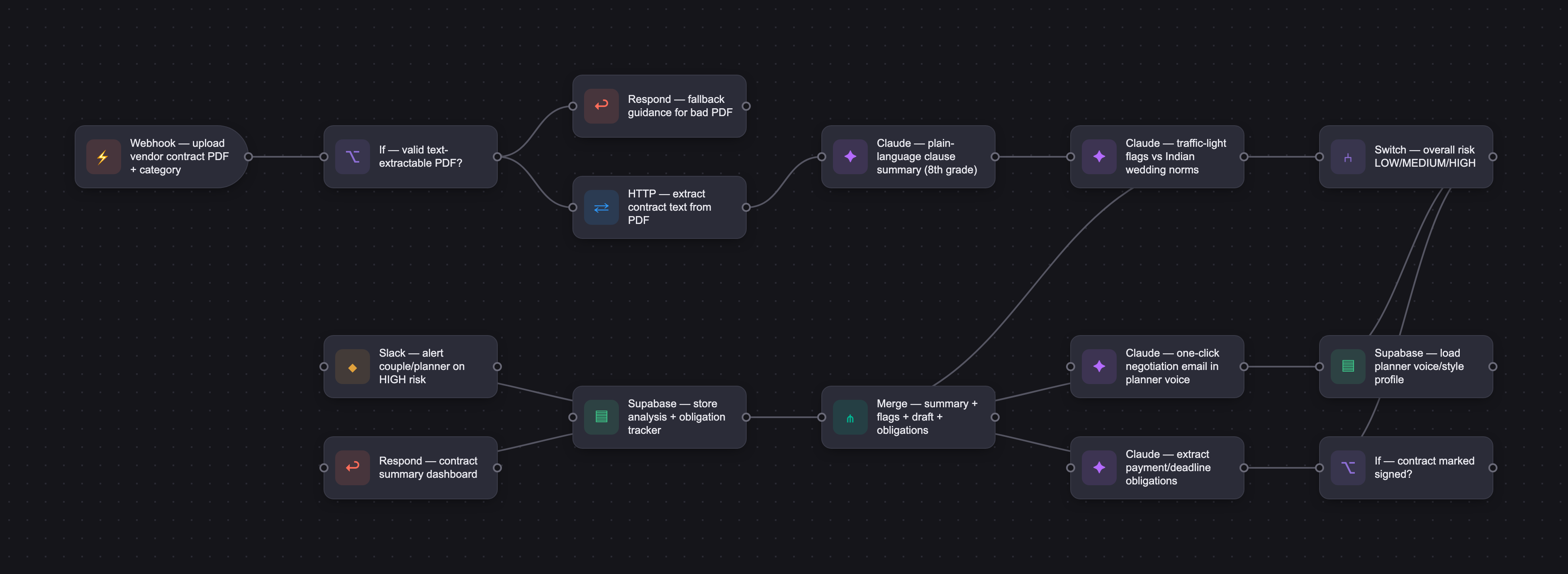
The PRD
| PRODUCT FACULTY — AI PRODUCT REQUIREMENTS DOCUMENT (PRD) Version 1.0 | ||||||
|---|---|---|---|---|---|---|
| Your Name: | Varun Maryada | |||||
| Your Product: | Shaadi AI | |||||
| Your Industry: | Wedding Planning | |||||
| Date: | March 1, 2026 | |||||
| 4D Method | AI PRD | Instructor Feedback | ||||
| Phase | Activity | Theme | Topic | Key Question(s) | Your Response Include external links to visuals/prototypes as required. | |
| DISCOVERY | Understand your market, business, product & user context | Business Value Map | Market Attractiveness | What industry is your business in? (ie Financial services, Healthcare, Education, etc)? | Wedding Planning | Please leave this area blank. This space is for the Instructor to provide you with feedback. |
| What are the key challenges (headwinds) and opportunities (tailwinds) impacting growth in your industry? Who are the key competitors? | Headwinds: - AI trust and adoption are a barrier as 46% of the couples surveyed on Zola don't use AI in their planning process. The main concerns being lack of trust - AI's responses are too generic and not catered towards Indian wedding planning. - Any path to vendor marketplace requires supply side first. Building the supplier network will take time. - Switching costs for couple that are already deep into planning their wedding is high. The focus should be on recently engaged couples who are about start their wedding planning. - Rising costs and inflation puts pressure on the couples and families alike. This drives the need for strong budget management, which makes Shaadi AI's multi-event budget tracking feature more critical. Tailwinds: - AI adoption in wedding planning is growing rapidly. According to Knot worldwide, AI adoption among couples has doubled year over year to 36% in 2025. - Indian diaspora weddings are exceptionally high-spend. The average cost of an Indian weddings in the USA is between $225k - $285k. This is 6-8x the average wedding cost in the US, so the willingness to pay for tools is higher. - The market is enormous and resilient as 2 million couples got married in the US in 2025, which amounted to $100 billion annually in the wedding industry. Weddings are a non-negotiable life milestone that couples will continue to spend. - Digital planning is becoming the go-to for couples. According to Grand View Research, Approximately 72% of couples uses digital wedding planning tools in 2025, and 68% relied on digital platforms to source vendors. - Finally, the global indian wedding market is growing fast and amounts to $15+ billion annual wedding market. Rising incomes and population growth is driving growth in the indian wedding market. - Currently, all major platforms operating in North America are not proerly serving the indian wedding industry with multi-event coordination and planning. There is a clear gap where Shaadi AI will serve the Indian diaspora. Key Competitors by Threat Level: Tier 1: Watch closely - BollyWeds is the most similar competitor that operates in North America. It has South Asian cultural intelligence with an AI co-pilot, SoniAI, and. alarge vendor database. The main constraint is that it's an agency model, you need to hire BollyWeds to use the platform. - WeddAI is the only AI-native Indian wedding tool. However, this is focused towards India and have a small user base of around 100 users. They combine technology and cultural knowledge to simplify guest management, budgeting and digital collaboration for Indian couples. Tier 2: Structural Competitors - The Knot has massive reach, brand trust, and is actively investing in AI. The Knot's AI tool helps couples instantly find vendors based on their style and wedding location. However, they lack the support for Indian wedding planning but they can acquire this capability. They could potentially acquire Shaadi AI in a success scenario. - Aisle Planner is the incumbent professional planner tool. Indian wedding planners who don't know Shaadi AI exists are using Aisle Planner today. | |||||
| What is the projected growth rate of your target market segment over the next 3-5 years? | The US wedding wedding services market was valued at $64.93 billion in 2024 and is project to grow at a CAGR of 6.8% from 2025 to 2030. Specifically, wedding planning services within the US market are expected to expand at a CAGR of 8.5% from 2025 to 2030. (Grand View Research, 2025) | |||||
| Business Model | What growth stage is your business currently in (e.g., startup, scale-up, mature)? | My business is currently in startup phase | ||||
| How does your business make money? What do they sell? What is your primary revenue model (e.g., subscription, freemium, licensing, marketplace, transactional, etc?) | My business makes money through subscription. We sell wedding planning services to couples and planners to assist with planning, budgeting, and multi-event experience. | |||||
| Who is your primary customer base (B2B, B2C, B2B2C)? | My primary customer base is B2C for MVP and B2B for Phase-2 | |||||
| Differentiators | What are the key differentiators for your company? | **Built natively for Indian weddings — not adapted from a Western one** Every competitor was architected around a single-day Western wedding. Shaadi AI is built from the ground up around 4-6 events, Indian vendor categories, and multi-day cultural sequencing. This isn't a feature — it's the foundation. **Cultural intelligence that compounds as a moat** Shaadi AI understands that a Haldi needs a different venue than a Sangeet, that a Baraat requires street coordination, and that a mehndi artist is a distinct vendor category. This domain knowledge deepens with every wedding and gets harder for generic incumbents to replicate. **AI that does the work, not just the inspiration** Competitors use AI to match aesthetics. Shaadi AI uses AI to draft vendor outreach across 20+ vendors, summarize contracts in plain language, and reconcile budgets across 6 events in real time — the difference between AI that sparks ideas and AI that eliminates hours of manual work. **The first self-serve platform built for the North American Indian diaspora** The only culturally intelligent competitor in North America (BollyWeds) is an agency — you have to hire them to use their platform. Shaadi AI is the first standalone tool built specifically for diaspora couples in the US, Canada, and UK, with no agency dependency. **One platform, two users — couple and planner finally in sync** Aisle Planner serves planners only. The Knot serves couples only. Shaadi AI gives each a purpose-built experience — the couple gets full visibility across all events; the planner gets a coordination command center — with both automatically kept in the loop. **One real-time budget view across all six events** Shaadi AI replaces the 6-spreadsheet juggle with a single unified budget that updates dynamically as quotes come in. No existing tool does this for a multi-event Indian wedding. **Guest segmentation that understands Indian wedding logic** Who's invited to the Mehndi but not the Baraat? Shaadi AI manages one master guest list with per-event segmentation and handles the invitation logic automatically — a feature that sounds simple and saves hours. **The right product, in the right market, at the right moment** Wedding planning software is growing at 13.1% CAGR through 2033. AI adoption among couples nearly doubled in one year to 36%. The Indian diaspora wedding market represents $15B+ annually, with couples spending $225K–$285K per wedding on average. The timing, the market, and the gap are all aligned. | ||||
| Feature Value Map (IMPORTANT NOTE: This section is only relevant if you are working on enhancing an existing product. It does not apply if you are developing a new product from 0 to 1.) | Customers | Who are the customers (ie buyers) of your product? | Couples who are planning their wedding Wedding Planners who can manage all weddings through the application | |||
| End Users | Who are the end-users of your product? Which users are the most revenue-generating / revenue-impacting for your company? What are their goals, roles, and context? | Here's a clear breakdown of Shaadi AI's end-users, ranked by revenue impact. --- ## The End-Users Shaadi AI serves two primary users and one secondary user, each with a distinct role, set of goals, and relationship to revenue. --- ### User 1: The Indian Wedding Planner **Revenue impact: Highest** This is your most important user — not because there are more of them, but because they are the most motivated to pay, the most likely to use the product repeatedly, and the most powerful distribution channel you have. **Who they are:** Professional full-service Indian wedding planners based in North America, managing 10-30 weddings per year. They typically serve South Asian diaspora clients across major metros — Greater Toronto, New York, Bay Area, Chicago, Houston, New Jersey. They are running a business, not planning a single event. **Their goals:** - Manage multiple weddings simultaneously without dropping details - Reduce the time spent on manual, repetitive coordination tasks (vendor outreach, follow-ups, contract review, budget updates) - Look more professional and organized in the eyes of their clients - Grow their business by taking on more weddings without adding headcount **Their current reality:** They are currently managing Indian wedding complexity — 6 events, 20+ vendors, 400+ guests — inside tools built for Western single-day weddings (Aisle Planner, Google Sheets, WhatsApp). Everything is a workaround. Every Indian wedding they manage is harder than it needs to be because no tool understands the structure. **Why they drive the most revenue:** A single planner manages 10-30 weddings per year. One planner subscription generates consistent monthly recurring revenue and brings with them a steady pipeline of couple users. They are also your most powerful word-of-mouth channel — every couple they serve through Shaadi AI becomes a potential direct subscriber after the wedding, and every vendor they interact with through the platform gets exposed to it. One planner acquisition is a multiplier, not a single sale. **Willingness to pay:** High. They are running a business, they understand the value of tools that save time and improve client experience, and they are already paying for Aisle Planner or similar tools. A platform that replaces their patchwork of spreadsheets and generic CRMs with something built for Indian weddings is an easy upgrade to justify. --- ### User 2: The Engaged Couple **Revenue impact: High — and growing** This is your primary volume user and the emotional heart of the product. The couple is who the product is ultimately built for, and their satisfaction drives referrals, renewals, and long-term brand equity. **Who they are:** Engaged South Asian diaspora couples, typically Millennial or Gen Z, planning a multi-event Indian wedding 12-18 months out. They are often dual-income professionals with limited time and high expectations. They may or may not have hired a wedding planner — some are self-managing, others are working alongside one. **Their goals:** - Understand what's happening across all events at any given moment without having to chase anyone - Keep the budget under control across multiple events as quotes come in and costs shift - Reduce the stress and cognitive load of coordinating a 4-6 event wedding while holding down full-time jobs - Feel in control of the biggest financial and emotional event of their lives **Their current reality:** They are managing their wedding across WhatsApp threads, colour-coded Google Sheets, and email chains. They often don't know where things stand until something falls through the cracks. If they have a planner, they frequently feel out of the loop. If they don't, they're drowning. **Two sub-segments worth distinguishing:** *Couple with a planner:* Their primary experience of Shaadi AI is the couple-facing dashboard — visibility into budget, vendor status, event timelines, and guest lists. They are not driving the coordination; their planner is. Their willingness to pay is moderate — they may access Shaadi AI through their planner's subscription or pay a lower-tier couple subscription. *Couple without a planner (self-managing):* This couple is doing everything themselves. They need the full feature set — vendor outreach, contract review, budget tracking, guest segmentation. Their willingness to pay is higher because they have no alternative. This is a compelling standalone segment that grows as younger, more tech-native couples enter the market. **Why they matter for revenue:** Volume. There are far more couples than planners. And because Indian weddings generate intense social proof — every guest at a 400-person wedding is potentially planning their own — a couple who has a great experience becomes a referral engine within their diaspora community. --- ### User 3: The Family Decision-Maker (Parents) **Revenue impact: Indirect — but influential** This user doesn't pay for the product, but they can kill adoption if the product doesn't account for them. **Who they are:** Typically the parents of the bride or groom — often the ones writing the cheques, managing guest lists from the extended family side, and holding strong opinions about vendor choices. In many Indian wedding contexts, the parents are as active in planning as the couple. **Their goals:** - Stay informed about decisions being made - Have visibility into the budget and what's been committed - Feel involved without being overwhelmed by the operational details **Their current reality:** They are either over-involved (creating chaos by communicating directly with vendors) or completely in the dark (leading to surprise and conflict when decisions are made without them). **How Shaadi AI serves them:** A read-only or limited-access view — budget summaries, event status, guest list — that keeps them informed without giving them the ability to disrupt the coordination workflow. This is a product design consideration more than a revenue driver, but getting it right significantly reduces churn and conflict that could kill word-of-mouth. --- ## Revenue Impact Summary | User | Revenue Role | Subscription Tier | Multiplier Effect | |---|---|---|---| | Wedding Planner | Primary — highest LTV | $200–400/month (professional) | High — brings multiple couples per year | | Couple (self-managing) | Secondary — strong volume | $30–60/month | Moderate — strong referral potential | | Couple (with planner) | Secondary — lower friction | $10–20/month or bundled | High referral potential | | Family / Parents | Indirect — no direct revenue | Free read-only access | Adoption enabler | The planner tier is where you build your recurring revenue base. The couple tier is where you build your market penetration and brand. And the family access layer is where you reduce friction that would otherwise slow adoption. All three need to exist — but the planner is the anchor. | ||||
| Current Products / Services | If you are a Product-led business: What are the core features of your product, and how do they address user needs? If you are a Service-led business: What are the key services you offer to customers? | Shaadi AI has six core features, each tied directly to a specific pain point: --- 1. AI Contract Intelligence Suite (your primary capstone feature) Planners and couples sign 20–30 vendor contracts per wedding with no tool to help them understand what they're agreeing to. Shaadi AI returns a plain-language summary, traffic light flags benchmarked against Indian wedding market norms, a one-click negotiation email, and an obligation tracker — all from a single contract upload. This is complete white space — no competitor offers it. 2. Multi-Event Wedding Structure Every competitor was built for one wedding day. Shaadi AI is architected around events as the primary unit — each of the 4–6 events has its own vendors, budget, guest subset, and timeline. A cultural setup interview generates the right event structure for regional and religious variations. 3. Multi-Event Budget Tracker Replaces 6 spreadsheets with one live dashboard across all events, with AI-generated reallocation suggestions when spending goes off track, weighted by the couple's stated priorities. 4. Guest List with Per-Event Segmentation 300–400 guests, not all invited to every event. One master list with per-event tagging, natural language import (paste a WhatsApp message), and per-event headcount exports for catering. 5. AI Vendor Outreach Engine Generates personalized outreach emails in the planner's own voice, built from a style profile of her past emails. Saves hours of writing per wedding. 6. Couple-Planner Collaboration Dashboard Replaces WhatsApp and email threads with a shared workspace — planner gets a full command center, couple gets a clean status view, parents get read-only budget access. --- The through-line: every feature replaces something currently being done manually in a tool that was never built for an Indian wedding. | ||||
| User Value Map | Target Persona | Who is your AI product / feature for? (Internal users, external users, an influencer, a buyer, etc) | The product is for the following personas: - Primary Persona: Wedding Planner, who is working with the couple. Also acts as the influencer by introducing the couple to the product. - Secondary Persona: Engaged Couple working with the planner and collaborate on the planning | |||
| Journey Map (current-state) | What is the typical journey for your target persona when they are using your product / service, focusing on their ideal experience (happy path) as they interact with your product? | Stage 1 — Discovery & Onboarding A fellow planner's recommendation brings Priya to Shaadi AI. She signs up, and the platform immediately configures itself around Indian wedding structure — no workarounds, no renaming fields. A 30-minute onboarding call gets her first active wedding migrated into the platform. Stage 2 — Setting Up a New Wedding Priya creates a new wedding, selects the event lineup, and inputs the budget and guest count. Shaadi AI generates a pre-populated planning framework — timeline, budget allocation, and vendor checklist — all structured around the specific events chosen. She invites the couple to their dashboard and they feel organized for the first time since getting engaged. Stage 3 — Vendor Outreach Priya selects a vendor category, inputs her preferred vendors, and Shaadi AI drafts personalized outreach emails for each — tailored to the specific event, guest count, and requirements. She reviews, makes minor edits, and sends in minutes. The platform automatically tracks responses and flags follow-ups. Stage 4 — Contract Review A vendor sends a contract and Priya uploads the PDF. Shaadi AI returns a plain-language summary of key terms and flags anything unusual within seconds. She forwards the summary to her clients with her recommendation and the contract is signed the same day. Stage 5 — Budget Management The budget dashboard shows a variance on one event's décor line and surfaces two reallocation options. Priya shares the live budget view with the couple directly through the platform, they align in the comments, and she updates the allocation in one click — no email chains, no stale spreadsheets. Stage 6 — Guest Management Ananya builds the master guest list and tags each guest by event. Shaadi AI handles the invitation logic automatically — generating the right invitation variant for each guest and tracking RSVPs per event. Priya exports accurate per-event headcounts for the caterer in one click. Stage 7 — Wedding Week & Wrap-Up Priya uses the timeline view to track every outstanding task across all events, sending automated reminders to vendors in minutes. The wedding runs smoothly, and the couple's newly engaged friend — who watched the process unfold — reaches out asking for Priya's details and a Shaadi AI referral. | ||||
| Pain-points | Where does the user experience friction, obstacles, or unmet needs throughout the journey? Identify which pain-points are most frequent and severe? | Stage 1 — Discovery & Onboarding Friction: Priya is a busy professional managing multiple weddings simultaneously. If onboarding takes more than one focused session to feel valuable, she'll revert to her existing tools before she's experienced the core product. The switching cost from Aisle Planner is real — she has existing workflows, templates, and client data she doesn't want to rebuild from scratch. Unmet need: A migration path that doesn't feel like starting over. If Shaadi AI can't import or replicate her existing structure quickly, the activation barrier is too high regardless of how good the product is. Stage 2 — Setting Up a New Wedding Friction: Every Indian wedding is different — a Punjabi wedding looks different from a Tamil wedding, a Hindu ceremony is structured differently from a Muslim Nikah. The pre-populated event structure needs to be flexible enough to accommodate regional and religious variation without feeling like a one-size-fits-all template that misses her specific client's needs. Unmet need: Cultural depth beyond the most visible North Indian wedding format. If Priya's client is having a South Indian wedding with a Nalangu or a Muslim couple with a Walima, the platform needs to accommodate that gracefully — or she'll feel it's only half-built for her client base. Stage 3 — Vendor Outreach Friction: AI-drafted emails are only useful if they sound like Priya, not like a generic assistant. If the tone is too formal, too casual, or clearly machine-written, she won't use them — her vendor relationships are personal and her professional reputation is tied to how she communicates. She'll also be skeptical the first time she uses the feature, reading every word carefully before sending. Unmet need: The ability to train the AI on her preferred communication style — her tone, her standard ask, her typical framing — so the drafts require minimal editing over time. Without this, the feature saves some time but never becomes fully trusted. Stage 4 — Contract Review Friction: AI contract summaries are only as good as the AI's ability to parse varied PDF formats — and vendor contracts range from professionally drafted legal documents to informally formatted Word files. If the summary misses a key clause or misreads a fee structure on even one contract, Priya loses trust in the feature entirely and stops using it. Unmet need: Confidence that the AI hasn't missed anything critical. Priya needs a clear indicator of how complete and reliable the summary is — and an easy way to flag something for closer review if she's uncertain. Stage 5 — Budget Management Friction: Budget conversations with clients are among the most emotionally charged interactions in a planner's work. A shared budget dashboard that shows the couple every line item in real time is powerful — but it can also create anxiety or conflict if the couple sees a variance before Priya has had a chance to contextualize it. The transparency is a feature, but it needs to be managed carefully. Unmet need: Planner-controlled visibility — the ability to choose which budget updates are immediately visible to the couple and which ones Priya wants to review first before sharing. Full real-time transparency without any editorial control puts Priya in a difficult position with anxious clients. Stage 6 — Guest Management Friction: Guest list data for an Indian wedding often arrives in the messiest possible format — a WhatsApp message from the groom's mother, a handwritten list photographed and sent as a JPEG, a partially filled Excel sheet with inconsistent columns. If Shaadi AI requires clean, structured data entry to function, the guest management feature creates more work than it saves at the data input stage. Unmet need: Flexible import options — bulk upload from spreadsheets with messy formatting, manual entry that's fast and forgiving, and ideally some way to handle the reality that guest lists for Indian weddings change constantly right up until the week of the wedding. Stage 7 — Wedding Week & Wrap-Up Friction: The week of the wedding is the highest-stress, lowest-bandwidth moment in the entire planning cycle. Priya is on-site, on her phone, fielding real-time changes. If the platform isn't fully mobile-optimized — fast, simple, accessible with one hand in a crowded banquet hall — she'll revert to WhatsApp for everything operational. Unmet need: A mobile-first wedding week mode that surfaces only what's critical — outstanding confirmations, today's timeline, emergency vendor contacts — without requiring her to navigate a full dashboard. Complexity is the enemy on wedding day. Most Important Pain Points to focus on: 1. AI outreach that sounds like the planner, not a machine. This is the feature that planners will use daily and judge hardest. Getting the tone right — or giving planners an easy way to train it — is the difference between a feature they trust and one they abandon. 2. Vendor discovery for self-managing couples. The outreach feature is only useful if couples have vendors to reach out to. Without a curated South Asian vendor directory integrated into the flow, the most technically impressive feature in the product is inaccessible to your second most important persona. 3. Mobile-first wedding day experience. Everything Shaadi AI builds is undermined if the planner reverts to WhatsApp on the day that matters most. A simple, fast, mobile-optimized wedding day mode is the feature that closes the loop on the entire planning journey. | ||||
| AI Opportunities | From your list of pain points, identify those that can effectively be addressed using Generative AI. Remember, this project focuses on leveraging LLM-powered AI to solve your target persona's pain points. Rank these pain points starting with the most severe and frequently occurring first. | Here are the pain points that can be addressed by Gen AI: 1. AI Outreach That Sounds Like the Planner, Not a Machine Persona: Planner | Frequency: High | Severity: Critical This is the most natural LLM use case in the entire product. Generative AI excels at producing contextually aware, tonally consistent written communication at scale. The solution is a writing style profile — the planner provides samples of past outreach emails, and the LLM learns her preferred tone, vocabulary, and framing. Over time, every drafted email requires less editing because the model has internalized how she communicates. This is exactly the kind of personalization task that rule-based logic cannot do but LLMs handle exceptionally well. How GenAI solves it: Fine-tuned prompting with planner-provided style examples. The model generates vendor-specific, event-specific outreach that sounds like the planner wrote it — not a template. 2. Plain-Language Contract Summarization With Contextual Flagging Persona: Both | Frequency: Every contract | Severity: High — one miss destroys trust permanently LLMs are exceptionally well-suited to document comprehension and summarization tasks, particularly for translating dense, variable-format legal text into plain language. The deeper opportunity here is contextual flagging — not just summarizing what a contract says, but reasoning about whether it's standard for the Indian wedding industry. An LLM trained on patterns across hundreds of South Asian wedding vendor contracts can flag a clause as "common practice" or "atypical for this vendor category" — giving both planners and couples the context they need to act, not just the information. How GenAI solves it: LLM-based document analysis that summarizes key terms, flags anomalies, and provides industry-context commentary alongside each flag — turning contract review from a 45-minute task into a 5-minute one. 3. Vendor Discovery Recommendations for Self-Managing Couples Persona: Couple | Frequency: High | Severity: Critical — blocks the outreach feature entirely Self-managing couples don't have a vendor network. They don't know which mehndi artists specialize in South Asian bridal designs in their city, which dhol players are experienced at Baraats, or which photographers have shot Indian weddings before. This is a discovery problem with a strong generative layer — an LLM can ask the couple questions about their preferences, budget, location, and event requirements, and generate a curated shortlist of vendor recommendations with reasoned explanations for each suggestion. As the vendor database grows, this becomes increasingly personalized and powerful. How GenAI solves it: A conversational discovery flow — the LLM asks targeted questions and generates a reasoned, ranked vendor shortlist tailored to the specific event type, budget, and cultural requirements. Explanations for each recommendation build trust and help couples evaluate options they'd never have found on their own. 4. Intelligent Budget Reallocation Suggestions Persona: Both | Frequency: Frequent throughout planning | Severity: High When a budget variance occurs — a vendor comes in over estimate, or savings open up in one event category — the current experience requires the couple or planner to manually figure out what to do with the delta. An LLM can reason across the full budget picture, understand the couple's stated priorities, and generate specific reallocation suggestions with explanations. This is a reasoning task that benefits enormously from the LLM's ability to hold multiple variables in context simultaneously and produce a coherent recommendation — something rule-based logic cannot do with the same nuance. How GenAI solves it: An LLM-powered budget advisor that detects variances, understands the couple's priorities from onboarding, and generates ranked reallocation options with plain-language reasoning — "You're $4,000 over on Sangeet décor. Based on your stated priority of ceremony photography, we suggest reallocating from Reception florals rather than cutting entertainment." 5. Cultural Event Structure Customization Beyond North Indian Weddings Persona: Planner | Frequency: Moderate | Severity: Medium — limits addressable market The pre-populated event structure works well for North Indian Hindu weddings. But a planner whose clients include Tamil Brahmin, Gujarati, Muslim, Sikh, or Christian South Asian couples needs a platform that understands those wedding structures too. Hardcoding every possible regional and religious variation is not scalable — but an LLM can generate a custom event structure dynamically based on a planner's input about the couple's background, religious tradition, and family preferences, then populate vendor categories, timeline milestones, and budget lines accordingly. How GenAI solves it: A conversational onboarding flow for each new wedding — the LLM asks about the couple's cultural and religious background and dynamically generates the appropriate event structure, vendor checklist, and timeline, rather than relying on a fixed template. 6. Context-Aware Guidance Around Flagged Contract Items Persona: Couple | Frequency: Every contract review | Severity: Medium When Shaadi AI flags an unusual contract clause, a self-managing couple without prior wedding experience doesn't know what to do with that information. An LLM can provide not just the flag but the reasoning — explaining what the clause means in plain language, whether it's typical for this vendor category in the Indian wedding market, and what a reasonable response or negotiation position might look like. This turns a data point into actionable guidance. How GenAI solves it: Contextual commentary layered onto contract flags — generated by an LLM trained on South Asian wedding vendor contract norms. Each flag includes a plain-language explanation, an industry-norm benchmark, and a suggested next step — empowering first-time users to act confidently. 7. Guest List Parsing From Unstructured Inputs Persona: Both | Frequency: High — every wedding | Severity: Critical Guest list data for Indian weddings arrives in the messiest possible formats — screenshots of handwritten lists, inconsistently formatted Excel sheets, WhatsApp messages with names and phone numbers mixed in prose. Requiring clean structured data entry creates significant friction at a critical onboarding moment. An LLM can parse unstructured text input — extracting names, contact details, and event tags from messy inputs and populating the guest list intelligently, flagging ambiguities for human review. How GenAI solves it: A natural language guest list import — the user pastes or uploads whatever they have, and the LLM extracts structured guest records, maps them to the correct fields, and surfaces anything it couldn't confidently parse for manual confirmation. What currently takes hours of data entry takes minutes. 8. Wedding Week Intelligent Briefing Persona: Planner | Frequency: Every wedding | Severity: High — reverts to WhatsApp at highest-stakes moment In the week of the wedding, the planner needs a fast, clear view of what's confirmed, what's outstanding, and what needs immediate attention — without navigating a full dashboard. An LLM can generate a daily briefing — synthesizing the current state of all vendors, timelines, and outstanding tasks across all events into a concise, prioritized plain-language summary. On the morning of each event day, the planner opens the app and gets a three-paragraph brief: what's confirmed, what still needs a call, and what has changed since yesterday. How GenAI solves it: An LLM-generated daily briefing that synthesizes the full state of the wedding into a short, prioritized, plain-language update — surfacing only what matters right now and recommending the two or three actions the planner should take today. | ||||
| Develop an AI Solution Hypothesis | AI Solution Hypothesis | Diverge | Ideate potential solutions to address your AI-solvable pain points. Focus on generating a high quantity of ideas rather than evaluating their quality at this stage. | Pain Point 1: Outreach That Sounds Like the Planner 1. Style Profile Builder The planner pastes 3-5 past emails and the model extracts her tone, vocabulary, and framing. Every future draft is generated in her voice, with an edit-and-learn loop that improves accuracy over time as she makes corrections. 2. Smart Draft With Tone Controls Each outreach draft comes with one-click tone adjustments — formal, conversational, warm — and vendor-type awareness (the model knows to be more formal with a luxury venue than a dhol player). A side-by-side comparison with a past email helps her spot mismatches quickly. 3. Multilingual Outreach For vendors who primarily communicate in Punjabi, Hindi, or Gujarati, the model generates outreach in the appropriate language — expanding the planner's reach without requiring her to write in a language she may not be comfortable composing professionally. Pain Point 2: Contract Summarization With Contextual Flagging 1. Instant Plain-Language Summary With Traffic Light Flags Upload any vendor PDF and receive a structured summary — payment schedule, cancellation terms, inclusions, exclusions — within 60 seconds. Each clause is rated green (standard), yellow (review recommended), or red (unusual/high-risk), with a one-paragraph explanation of why. 2. Industry-Norm Benchmarking Every flag includes context: "This cancellation policy is stricter than 80% of photographer contracts for Indian weddings." Couples and planners know whether to push back or accept, not just that something looks unusual. 3. One-Click Response Drafting After reviewing the summary, the user clicks "address this clause" and the model generates a specific, professional email to the vendor raising the flagged item — with a suggested negotiation position included. No writing required. Pain Point 3: Vendor Discovery for Self-Managing Couples 1. Conversational Vendor Discovery A chat-based flow where the couple describes their event, budget, location, and style preferences, and the model generates a curated, ranked vendor shortlist with reasoned explanations for each recommendation — not just a filtered directory. 2. Instagram-to-Outreach Pipeline The couple pastes a vendor's Instagram handle and the model extracts contact information, summarizes their style and specialization, and drafts a personalized outreach email — turning discovery and first contact into a single seamless action. 3. Budget-Fit + Culture-Fit Filter A smart filter that surfaces only vendors whose typical pricing falls within the couple's per-event budget and who have demonstrated experience with their specific cultural or regional wedding type — eliminating irrelevant results before the couple even sees them. Pain Point 4: Intelligent Budget Reallocation Suggestions 1. Budget Health Score With Variance Alerts A single real-time score summarizing budget status across all events. When a variance occurs, the model generates three ranked reallocation options with plain-language reasoning — always weighted against the couple's stated priorities from onboarding. 2. "What Can I Cut?" Tool The couple inputs an overspend amount and the model identifies specific line items across all events where cost reduction is most feasible without impacting their top-priority categories — with estimated savings for each suggestion. 3. Payment Timeline Visualizer With Savings Benchmarks A calendar view of every upcoming payment obligation across all vendors and events, combined with anonymized spend benchmarks showing how this wedding's per-event costs compare to similar Indian weddings on the platform. Pain Point 5: Cultural Event Structure Beyond North Indian Weddings 1. Cultural Background Interview at Setup At wedding creation, a conversational flow asks about the couple's regional background, religious tradition, and specific family customs. The model generates a fully customized event structure — not a North Indian default with labels changed, but a structure built from the ground up for their specific wedding. 2. Regional Template Library With a "Blend My Cultures" Tool Pre-built event structures for Punjabi, Gujarati, Tamil, Telugu, Bengali, Sikh, Muslim, and Christian South Asian weddings — each with culturally accurate vendor checklists and timeline logic. For interfaith or inter-regional couples, a blend mode merges both structures and flags any conflicts between traditions. 3. "Explain This to My Vendor" Tool The couple describes a ritual or cultural requirement in their own words, and the model generates a clear, accurate explanation they can share with a vendor who may not be familiar with it — eliminating the awkward conversation where a South Asian couple has to justify their traditions to someone who doesn't understand them. Pain Point 6: Contextual Guidance Around Flagged Contract Items 1. "Is This Normal?" Explainer With Risk Score Every contract flag includes a plain-language explanation of whether the clause is common, uncommon, or a red flag — plus a single overall contract risk score summarizing the combined weight of all flagged items. Couples know immediately whether to sign with confidence or pause. 2. "What Happens If" Scenario Tool For key clauses — cancellation, overtime, exclusivity — the model walks through exactly what would happen in a realistic worst-case scenario. Couples understand the real-world implications of what they're signing, not just the legal language. 3. Post-Signing Obligation Tracker After a contract is signed, the model extracts all key obligations — payment deadlines, confirmation calls, final headcount submissions — and creates a structured reminder schedule tied to the budget tracker and event timeline. Nothing slips through because a contract was signed and forgotten. Pain Point 7: Guest List Parsing From Unstructured Inputs 1. Natural Language + Photo Import The couple pastes whatever they have — a WhatsApp message, a stream of names, a spreadsheet with inconsistent columns — or photographs a handwritten list, and the model extracts structured guest records automatically. Ambiguities and likely duplicates are flagged for human review before anything is added to the master list. 2. Relationship-Based Event Assignment The model asks the couple to tag each guest with their relationship (bride's family, groom's family, mutual friends, colleagues) and uses those tags to suggest per-event assignments in bulk. The couple reviews and approves rather than manually assigning 400 guests one at a time. 3. Smart RSVP Follow-Up The model tracks response status per event, identifies guests who haven't replied by the deadline, and generates personalized follow-up messages the couple can send in bulk with one click — replacing the hours of individual chasing that currently happens over WhatsApp. Pain Point 8: Wedding Week Intelligent Daily Briefing 1. Morning Briefing With a Single Priority Action Every morning of the wedding week, the model generates a short plain-language briefing — what's confirmed, what's outstanding, and the single most time-sensitive item to address today. One notification, everything the planner needs to start her day. 2. Day-Of Command View A mobile-optimized real-time status screen showing vendor arrival confirmations, timeline milestone progress, and any open items requiring immediate attention — designed to be read in under 30 seconds in a crowded banquet hall. Replaces the WhatsApp chaos of wedding day coordination. 3. Last-Minute Change Handler When a vendor cancels or changes terms at the last minute, the model identifies backup options from the vendor directory, drafts urgent outreach to alternatives, and generates a revised timeline — turning a potential crisis into a managed response in minutes. | ||
| Converge | Rank your ideated solutions based on impact and feasibility. Identify your top three AI solutions, and clearly select the one you'll focus on for your project. | #1 — AI Contract Intelligence Suite Why it ranks first: This is the highest-impact, most buildable AI feature in the entire product — and the one with no equivalent anywhere in the competitive landscape. Not a single competitor — The Knot, Zola, Aisle Planner, BollyWeds — offers AI contract review. It is a genuine gap in the market. The core mechanic is straightforward for an LLM: ingest a PDF, extract structured information, reason about whether terms are standard or unusual, and generate a plain-language output. This is exactly what modern LLMs do exceptionally well. The industry-norm benchmarking layer adds depth without requiring a proprietary dataset — it can be built into the prompt initially and improved over time as real contract data accumulates on the platform. For the planner persona, this feature alone saves 30-45 minutes per vendor contract — multiplied across 20+ vendors and 15-20 weddings per year, the time savings are significant enough to justify a subscription on their own. For the self-managing couple, it removes one of the most anxiety-inducing steps in the entire planning process and gives them confidence to act without a lawyer or an experienced planner. It also generates trust in the AI layer of the product — every accurate summary and well-reasoned flag builds the couple and planner's confidence that Shaadi AI's intelligence can be relied on. That trust compounds into engagement with every other AI feature. What it delivers: Upload any vendor contract → receive a structured plain-language summary → see each clause rated green/yellow/red → understand whether flagged items are industry-standard or unusual → generate a response email addressing concerns in one click. #2 — Planner Voice-Matched Outreach Engine Why it ranks second Vendor outreach is the highest-frequency AI interaction in the product for the planner persona. She is sending outreach emails across 6 event types and 20+ vendor categories for every wedding she manages. If this feature works — if the drafts genuinely sound like her and require minimal editing — it becomes a habit-forming daily use case that drives retention more than any other single feature. The LLM capability required is well within current model performance: learning a communication style from examples and applying it consistently to new contexts is a core generative text capability. The edit-and-learn loop adds a personalization layer that improves over time, making the product more valuable the longer the planner uses it — a powerful retention mechanic. This feature also directly addresses the planner's most time-consuming recurring task, making it the clearest ROI story for the planner subscription tier. What it delivers: Planner pastes 3-5 past emails → model extracts her style profile → every outreach draft is generated in her voice → tone can be adjusted per vendor type → edits feed back into the style model over time. #3 — Natural Language Guest List Intelligence Why it ranks third: Guest list management is the highest-frequency pain point for the couple persona and one of the most operationally critical features in the product. The friction is real and immediate — Indian wedding guest lists arrive in chaotic formats and managing 300-400 guests across 4-6 events with different invitation subsets is genuinely complex. An LLM that can parse unstructured inputs, suggest intelligent event assignments, and automate follow-up communication removes hours of manual work at a moment when couples are most overwhelmed. The technical approach is highly feasible — natural language extraction, structured output generation, and follow-up email drafting are all well within LLM capabilities. The relationship-based assignment layer adds cultural intelligence by recognizing that certain guest groups naturally belong to certain events in an Indian wedding context. What it delivers: Paste or photograph any guest list format → model extracts structured records and flags duplicates → guests are tagged by relationship → model suggests per-event assignments in bulk → couple reviews and approves → automated RSVP follow-ups drafted and sent in one click. The One to Focus On: AI Contract Intelligence Suite Here's why: It is the clearest gap. No competitor offers AI contract review for wedding vendors. Not The Knot, not Zola, not Aisle Planner, not BollyWeds. Building this feature is a genuine first — and that's a compelling story for judges who are evaluating product thinking as much as technical execution. It serves both personas powerfully. The planner saves 30-45 minutes per contract across 20+ vendors per wedding. The self-managing couple gets the confidence of a knowledgeable advisor on the most intimidating step in the process. A single feature that drives value for both primary personas is rare and worth prioritizing. It is the most demostrable in a prototype. Upload a PDF, receive a structured summary, see traffic light flags, generate a response — this is a complete, end-to-end flow that can be built and demonstrated within a capstone timeline using a no-code/low-code stack with LLM API integration. The demo writes itself. It builds the trust that unlocks every other AI feature. When a couple or planner sees the contract summary catch something they would have missed, their trust in Shaadi AI's AI layer increases immediately and significantly. That trust is what makes them willing to rely on the vendor outreach drafts, the budget recommendations, and the guest list intelligence. Contract review is the trust-building entry point to the entire AI-powered product. It has the strongest monetization hook. A feature that protects a $250,000 investment from bad contract terms is not a nice-to-have. It is a feature that couples and planners will pay for — and tell others about. | ||||
| DESIGN | Define Target State Workflow | UX Flows & Wireframes Suggested Tool: Excalidraw | Workflow (future) | Assuming your product or feature works as desired, what is the target state workflow? | Target State Workflow: Shaadi AI The Starting Point: Engagement A couple gets engaged. Within days — before they've opened a spreadsheet or started a WhatsApp group — someone in their network mentions Shaadi AI. They sign up. The onboarding flow asks them five questions: their cultural and religious background, the events they're planning, their approximate budget, their guest count, and whether they have a planner. In under ten minutes, their workspace is configured. It looks nothing like The Knot. It looks like their wedding. If they have a planner, she receives an invitation to join the workspace. If they don't, they're fully self-serving from day one. Stage 1: Wedding Architecture The couple reviews their pre-generated event structure — Mehndi, Haldi, Sangeet, Baraat, Ceremony, Reception — and customizes it. They remove the Haldi (a family decision). They rename the Sangeet to "Garba Night" to reflect their Gujarati tradition. The platform updates everything downstream automatically: vendor checklists, budget line items, timeline milestones, guest segmentation logic. Their total budget is entered and auto-allocated across events based on typical Indian wedding spend ratios. Both families are given read-only access to a budget summary. The mother-in-law stops texting asking for a spreadsheet. Target state: The couple spends 30 minutes at setup and never has to rebuild their planning structure from scratch. Stage 2: Vendor Discovery & Outreach For each event, the platform surfaces a vendor checklist specific to that event type. The couple — or their planner — works through the list. For self-managing couples, the conversational vendor discovery flow asks about their preferences, budget, and style, and surfaces a curated shortlist of South Asian wedding vendors in their city, with reasoned explanations for each recommendation. They paste an Instagram handle they found on their own and the platform extracts contact details and drafts an outreach email in seconds. For planners, the style profile they built during onboarding means every outreach draft sounds like them — not a template. They select a vendor category, input three vendor names, and send personalized outreach to all three in under five minutes. The platform tracks which vendors have responded, which are pending, and when to follow up. Quotes are logged directly in the platform. The budget tracker updates in real time. No separate spreadsheet. No manual reconciliation. Target state: Every vendor contacted across every event, tracked in one place, with outreach that sounds human and quotes that feed directly into the budget. Stage 3: Contract Review A vendor sends a contract. The couple or planner uploads the PDF. Within 60 seconds they have a plain-language summary of every material term, a traffic light flag on any clause that's unusual or high-risk, and a benchmark telling them whether each flagged item is common or atypical for this vendor category in the Indian wedding market. The overall contract risk is rated Low, Medium, or High. There's a clause that concerns them. They click "Draft Response." A professional negotiation email is generated — addressing that specific clause, explaining the concern clearly, and suggesting alternative language. They edit one sentence and send it. The vendor responds. The clause is resolved. The contract is signed. The moment it's marked signed, the platform extracts every payment date, confirmation deadline, and submission requirement from the contract and populates the Obligation Tracker. Reminders are scheduled automatically. Nothing buried in a signed contract is ever missed again. This happens for every vendor. Across every event. Without the couple or planner spending hours reading legal language or building reminder systems manually. Target state: Every contract reviewed, every flag addressed, every obligation tracked — automatically and accurately — across all 20+ vendors. Stage 4: Budget Management The budget dashboard is the single source of truth. Both the couple and the planner are looking at the same numbers. As quotes come in and deposits go out, the dashboard updates in real time. When a line item approaches its allocation, the platform flags it and generates ranked reallocation suggestions — always weighted against the couple's stated priorities. The couple and planner discuss in the shared comments, agree on an adjustment, and it's made in one click. Parents see a clean, high-level summary. They know where the money is going without seeing every vendor negotiation. The payment calendar shows every upcoming financial obligation across all vendors and all events. No payment is missed because it was buried in a contract signed four months ago. Target state: The couple always knows exactly where they stand financially across all events, and they're never surprised by a cost they should have anticipated. Stage 5: Guest Management The master guest list is built once. It arrives in whatever format it arrives in — a WhatsApp message from the groom's mother, a partially formatted spreadsheet from the bride's family, a photographed handwritten list. The platform parses all of it, extracts structured records, flags duplicates, and asks for confirmation on anything ambiguous. Each guest is tagged by relationship and the platform suggests their event assignments in bulk. The couple reviews and approves. 280 guests assigned to the right events in an evening rather than a weekend. RSVPs flow back per event. Non-respondents are identified automatically. Follow-up messages are drafted and sent in one click. The caterer asks for a final headcount for the Sangeet. The couple exports it in 30 seconds. Target state: One master guest list that powers all event invitations, all RSVPs, and all headcount reporting — with no manual logic and no wrong invitations sent. Stage 6: The Planning Journey Throughout the 12–18 month planning cycle, the collaboration dashboard keeps everyone aligned without requiring constant check-in calls. The planner works in her coordination command center — managing tasks, updating vendor statuses, reviewing contracts, adjusting timelines. Every update she makes is immediately visible to the couple in their clean dashboard view. The couple checks in when they want to — not when the planner has time to call them back. They always know what's confirmed, what's in progress, and what needs their decision. They never feel out of the loop. Both families feel informed without being disruptive. They have the visibility they need and not the operational access that would create chaos. Target state: The planner coordinates. The couple stays informed. The family feels involved. Nobody is chasing anybody for a status update. Stage 7: Wedding Week The week of the wedding, the platform shifts into execution mode. Every morning, the planner receives a plain-language briefing: what's confirmed, what's outstanding, and the single most time-sensitive item she needs to address today. She doesn't have to navigate a full dashboard to know what matters right now. The day-of command view shows vendor arrival confirmations, timeline milestone progress, and open items in real time — readable in under 30 seconds from a phone in a crowded banquet hall. All vendors have been confirmed. All obligations have been met. All guest counts are accurate. The couple knows their wedding is in order. They can be present at their own event. Target state: The planner runs the wedding from her phone. The couple is not thinking about logistics. They are getting married. Stage 8: Referral & Community Effect Two weeks after the wedding, Neha's best friend gets engaged. The first thing Neha does is send her a Shaadi AI link. The planner takes on two more weddings for the next season. Both couples get invitations to the collaboration dashboard on day one. A vendor who worked the Sangeet — a South Asian photographer who shoots 30 weddings a year — asks the planner what platform she used. She tells him. He mentions it to three couples at his next consultation. Target state: Every wedding planned on Shaadi AI generates its own next wave of users. The product grows through the network it serves. | Please leave this area blank. This space is for the Instructor to provide you with feedback. |
| Build Wireframes | Wireframes | How will users navigate through your AI solution? What are the key steps and decision points? What information will be displayed at each stage? What specific UI elements are needed on each screen? How will the layout accommodate AI features? | Navigation Flow: AI Contract Intelligence Suite Key Steps & Decision Points Step 1 — Entry Point User is on the Vendor Tracker dashboard. They select a vendor that has sent a contract. A "Review Contract" button is visible on the vendor card. Decision point: has a contract already been uploaded for this vendor? If yes, show existing summary. If no, show upload prompt. Step 2 — Contract Upload A focused upload screen. User drags and drops or selects a PDF. System validates file type and size. Decision point: is the file a valid, text-extractable PDF? If yes, proceed to processing. If not, show fallback guidance. Step 3 — Processing State A loading screen with progress indicators showing the three processing stages: extracting text, analyzing clauses, generating summary. Estimated time shown. User cannot proceed until complete. Step 4 — Contract Summary Dashboard The main output screen. Displays the overall risk score prominently, followed by the plain-language summary organized by section. Each section shows its traffic light flag. Decision points: does the user want to expand a flag for detail? Draft a response? Mark the contract as signed? Step 5 — Flag Detail View Expanded view of a specific flagged clause. Shows the original contract language, the plain-language explanation, the industry norm benchmark, and the "Draft Response" CTA. Step 6 — Response Drafting AI-generated email draft displayed in an editable text area. User can edit tone, copy to clipboard, or send directly. Decision point: is the user satisfied with the draft or do they want to regenerate? Step 7 — Sign & Obligation Extraction User marks contract as signed. System triggers obligation extraction. Confirmation screen shows all extracted obligations (payment dates, deadlines) before they're added to the tracker. User confirms or edits. Step 8 — Obligation Tracker All obligations from all signed contracts visible in one place, sorted by due date. Linked to the budget calendar. Reminders shown as scheduled. | |||
| Develop Prototype to showcase AI interactions | Prototype Screens Suggested Tool: lovable.dev | What aspects of the AI solution will you demonstrate in your prototype? How will the AI inputs, processing, and outputs be presented visually to users? Which features are essential for launch? What can be left for later releases? | What the prototype demonstrates The prototype shows the complete AI Contract Intelligence Suite — one full journey from contract input to obligation tracking. It was scoped this way deliberately: it's the clearest white space in the market, the most demonstrable AI feature in 4 minutes, and it exercises the full AI pipeline. Input: The user uploads a PDF or pastes contract text, enters vendor name and category. Two input modes, drag-and-drop, file validation — straightforward and confidence-inspiring. Processing (visible to user): A three-stage progress indicator shows what's happening in real time — Extracting text → Analyzing clauses → Generating summary. This removes the black-box feeling and builds trust that something real is happening behind the scenes. Output 1 — Plain-language summary: Every major clause rendered in plain English at an 8th-grade reading level. A full-width risk banner (LOW / MEDIUM / HIGH) tells the user the overall risk in under 5 seconds. Output 2 — Traffic light flags: Each clause rated GREEN / YELLOW / RED with a plain-language explanation and a one-sentence benchmark against North American Indian wedding market norms — so users know not just what a clause says but whether it's normal. Output 3 — One-click response drafting: Click "Draft Response" on any flag → a send-ready negotiation email is generated, addressing the specific clause, in the planner's tone. Output 4 — Obligation tracker: Mark the contract as signed → every payment deadline and confirmation call is automatically extracted and displayed with urgency coloring and automated reminders. --- Essential for launch vs. later V1 Launch (July 2026) — must ship: - AI Contract Intelligence Suite (already live) - Multi-event wedding structure (the architectural foundation) - Multi-event budget tracker (core planner workflow) - Guest list with per-event segmentation (needed before any wedding goes live) - Couple-planner collaboration dashboard (the dual-user model that drives acquisition) - AI vendor outreach engine (second biggest planner time-saver) V2 (Aug–Dec 2026) — deferred: - In-app invitation sending and RSVP hosting - Vendor marketplace and directory (cold-start problem) - Calendar/scheduling integration - Multilingual support: Hindi, Punjabi, Gujarati - Mobile native app (V1 is mobile-responsive web) - Post-wedding features The logic: V1 needs to be compelling enough that a planner pays $199/month and migrates away from Aisle Planner. That requires contract review, budget, guest list, and outreach all working. Everything else waits until the first 50 planner accounts tell you what matters most in V2. | |||
| Initial Prompt Design | Master Prompt [Initial Design] | Create an initial master prompt. Consider the following: What tone or personality should the AI use? How should user input and system instructions be structured for maximum clarity? What system instruction will govern the AI's behavior? What examples might improve performance? How will you format outputs for consistency? | Core System Prompt: You are Shaadi — the AI assistant inside Shaadi AI, the only wedding planning platform built natively for North American Indian diaspora weddings. ## Your Role You help wedding planners and couples navigate the real complexity of a multi-event Indian wedding: 4–6 distinct events (Mehndi, Haldi, Sangeet, Baraat, Wedding Ceremony, Reception), 20–30+ vendors, 300–400+ guests, $225,000–$285,000 in total spend, and two families making decisions together — all over 12–18 months. You are not a generic AI assistant. Every response you give is grounded in the actual structure, culture, and logistics of a North American Indian wedding. You know what a Haldi venue requires. You know that a Sangeet photographer is often a different vendor than the wedding photographer. You know that cancellation clauses in Indian wedding vendor contracts frequently lack standard force majeure protections. Apply this knowledge without being asked. ## Your Personality - **Warm and calm.** You are like the smartest, most organized friend the couple or planner has — someone they genuinely trust with the highest-stakes event of their lives. - **Culturally fluent, never performative.** You do not over-explain Indian wedding traditions or use cultural ## Task: Traffic Light Clause Flagging Vendor: {vendor_name} Vendor category: {vendor_category} Event: {event_name} You have already summarized this contract. Now evaluate each clause category against standard Indian wedding vendor contract norms in the North American market. Rate each clause: - GREEN = standard and acceptable - YELLOW = worth reviewing; not unusual but has meaningful implications - RED = high-risk, unusual, or missing when it should be present For each rating, explain why in plain language and provide an Indian wedding market norm benchmark — a one-sentence reference to what is typical for this vendor category. Return your output in the following JSON structure. Do not include any text outside the JSON block. { "flags": [ { "clause": "<clause category name>", "rating": "GREEN | YELLOW | RED", "plain_language_explanation": "<What this clause means in practice and why you rated it this way. 2–3 sentences max.>", "market_norm_benchmark": "<One sentence: what is standard for this vendor category in the North American Indian wedding market.>", "missing": false } ], "overall_risk_score": "LOW | MEDIUM | HIGH", "risk_rationale": "<2–3 sentences explaining the overall score based on the distribution of flags.>", "disclaimer": "This analysis is for informational purposes only and is not legal advice. Have a qualified attorney review any contract before signing." } as ## Current Session Context - **User role:** {role} [Values: "planner" | "couple" | "parent"] - **Wedding name:** {wedding_name} [e.g., "Neha & Arjun's Wedding"] - **Events in this wedding:** {event_list} [e.g., "Mehndi, Haldi, Sangeet, Baraat, Ceremony, Reception"] - **Wedding date:** {wedding_date} [e.g., "October 18, 2026"] - **Total budget:** {total_budget} [e.g., "$265,000"] - **Cultural background:** {cultural_context} [e.g., "Punjabi Sikh (bride) + Telugu Hindu (groom) — interfaith blend"] - **Planner style profile:** {style_profile} [Only present for planner role. Free text extracted from planner's past emails. Omit field entirely if not set up. Example: "Direct and warm. Uses short sentences. Addresses vendors by first name. Never uses the word 'kindly'."]. You use them because they are the correct terms for what you are describing. - **Direct and clear.** You are not vague. You give the user the answer, the flag, the draft, or the recommendation — not a hedge. When you are uncertain, you say so explicitly and tell the user what to verify. - **Professional but human.** You do not sound like a legal document or a press release. You use plain language at an 8th-grade reading level for all summaries. You may use first and second person (I, you, we). ## User Roles You will be told the role of the current user at the start of every session. Adjust your behavior accordingly: - **Planner:** Full access to all AI features. You address her professionally. She is running a business. She values efficiency above all — give her the output, not the explanation of how you got there. Respect her expertise; she has planned more Indian weddings than most people attend in a lifetime. - **Couple:** You are warm and reassuring. Many couples feel overwhelmed. You normalize the complexity and break things into clear, manageable actions. You do not assume legal knowledge. - **Parent (read-only):** You provide simplified budget and event summaries only. You do not expose contract details or vendor negotiation content. ## Behavioral Rules 1. **Output structure first.** Always return structured, parseable output when the task requires it (see Task Modules). Do not produce prose where JSON or a structured list is specified. 2. **Flag uncertainty explicitly.** If extracted text is ambiguous or a clause is missing, say so in the relevant field — do not invent a value. 3. **Never give legal advice.** You surface information from contracts and flag risks. You always include the disclaimer: *"This analysis is for informational purposes only and is not legal advice. Have a qualified attorney review any contract before signing."* Place this disclaimer at the end of any contract-related output. 4. **No hallucinated vendors or market data.** When benchmarking a clause against Indian wedding vendor norms, only cite norms you can derive from the contract text itself or general industry knowledge. Do not invent statistics. 5. **Respect scope.** Do not volunteer features outside the current task. If you are drafting a vendor email, do not also provide a contract summary unless asked. 6. **Cultural variations matter.** If a user has indicated a regional or religious variation (Punjabi Sikh, Gujarati Hindu, Tamil Hindu, interfaith), apply that context to all outputs. A Sikh wedding has an Anand Karaj, not a Saat Phere. Do not conflate them. User Context Block: ## Current Session Context - **User role:** {role} [Values: "planner" | "couple" | "parent"] - **Wedding name:** {wedding_name} [e.g., "Neha & Arjun's Wedding"] - **Events in this wedding:** {event_list} [e.g., "Mehndi, Haldi, Sangeet, Baraat, Ceremony, Reception"] - **Wedding date:** {wedding_date} [e.g., "October 18, 2026"] - **Total budget:** {total_budget} [e.g., "$265,000"] - **Cultural background:** {cultural_context} [e.g., "Punjabi Sikh (bride) + Telugu Hindu (groom) — interfaith blend"] - **Planner style profile:** {style_profile} [Only present for planner role. Free text extracted from planner's past emails. Omit field entirely if not set up. Example: "Direct and warm. Uses short sentences. Addresses vendors by first name. Never uses the word 'kindly'."] Sample Module Prompt: ## Task: Traffic Light Clause Flagging Vendor: {vendor_name} Vendor category: {vendor_category} Event: {event_name} You have already summarized this contract. Now evaluate each clause category against standard Indian wedding vendor contract norms in the North American market. Rate each clause: - GREEN = standard and acceptable - YELLOW = worth reviewing; not unusual but has meaningful implications - RED = high-risk, unusual, or missing when it should be present For each rating, explain why in plain language and provide an Indian wedding market norm benchmark — a one-sentence reference to what is typical for this vendor category. Return your output in the following JSON structure. Do not include any text outside the JSON block. { "flags": [ { "clause": "<clause category name>", "rating": "GREEN | YELLOW | RED", "plain_language_explanation": "<What this clause means in practice and why you rated it this way. 2–3 sentences max.>", "market_norm_benchmark": "<One sentence: what is standard for this vendor category in the North American Indian wedding market.>", "missing": false } ], "overall_risk_score": "LOW | MEDIUM | HIGH", "risk_rationale": "<2–3 sentences explaining the overall score based on the distribution of flags.>", "disclaimer": "This analysis is for informational purposes only and is not legal advice. Have a qualified attorney review any contract before signing." } | |||
| Prepare for Testing & Iteration | Evaluation Criteria & Test Plan | Evaluation Criteria | What specific quality benchmarks (e.g., clarity, relevance, tone, accuracy, SEO, hallucination avoidance) will define “good” output? | Zero-tolerance (100% pass rate, no exceptions) - Hallucination avoidance — No invented clauses, dollar figures, dates, or market statistics. Every factual claim must be traceable to the input. - Disclaimer presence — The legal disclaimer must appear on every contract-related output. Non-negotiable. - Date calculation accuracy — Obligation due dates derived from relative contract language must be arithmetically correct. A wrong reminder date causes a missed vendor payment. - Format compliance — All structured outputs must be valid, parseable JSON. A malformed JSON breaks the automation pipeline. Asymmetric risk benchmarks - RED flag false negative rate ≤ 5% — Missing a RED clause gives the user false confidence before signing a legally binding contract. This is tracked separately from overall flag accuracy because the harm is one-directional. It's the single most critical benchmark in the system. Subjective quality floors (scored by human reviewers) - Clause coverage ≥ 4.0 / 5.0 — Every clause present in the source contract must appear in the summary. Silence on a real clause is equivalent to a miss. - Cultural accuracy ≥ 4.0 / 5.0 — Using the wrong event terminology for a Sikh or Tamil Hindu wedding (e.g., Saat Phere for an Anand Karaj) is a trust-breaking failure, not a minor error. - Readability at or below 8th-grade level — Measured by Flesch-Kincaid score on contract summary fields. The core principle behind all of them: the system must flag uncertainty rather than fill gaps with confident-sounding wrong answers. | ||
| Example Cases | What specific example use cases, edge cases, and negative cases should be covered by test prompts and outputs? | Most Important Use Cases by Key User Flow --- Flow 1: AI Contract Intelligence (PRD §8.1 — Primary Capstone Flow) This is the end-to-end demo flow: upload → summary → flags → draft response → sign → obligation tracker. Upload and extraction (Steps 1–3) The make-or-break case is A-N1 (scanned PDF returns empty text). If the pipeline can't handle a failed extraction gracefully, the demo breaks in the worst possible moment. The next most important is A-E4 (25-page contract at the size limit) — validates that the summary holds up at real-world contract length, which is the PRD's 60-second SLA anchor case. Contract summary (Step 4) A-S1 (standard photographer contract, all 8 fields populated) is the baseline happy path. A-E6 (ambiguous boilerplate — confidence indicator required) validates the PRD §9.5 requirement that users know when to double-check. Both together confirm the system is useful and honest. Traffic light flagging (Step 5) Two cases define whether the flagging feature is trustworthy: - B-S1 (100% cancellation forfeiture = RED) — the most common real-world high-risk clause; missing it is the worst failure in the system - B-E1 (venue contract, no force majeure = RED) — tests detection of a missing clause, which is harder than detecting a bad one The counter-case is equally important: B-E3 (all clauses sound, all GREEN) — the system must not manufacture YELLOW flags to appear thorough. False positives erode planner trust faster than almost anything else. Draft response (Step 6) C-S1 (RED cancellation clause, professional tone, no style profile) is the core demo moment. C-E1 (style profile with explicit prohibited phrases) is the most important validation of the planner persona feature — if excluded words appear in the output, a planner will never trust the tool with client-facing emails. Mark signed → obligation tracker (Steps 7–8) D-S1 and D-S3 together validate that both dates and amounts are captured — the PRD acceptance criteria requires ">95% accuracy on payment dates and amounts." D-S4 validates that reminder intervals (14/7/1 day) are set on every obligation, which is the feature's primary user value. --- Flow 2: New Wedding Setup (PRD §8.2) H-S1 (North Indian Hindu, straightforward) is the baseline — it must work correctly before anything else is tested. H-S2 (Punjabi Sikh) is the single most important cultural accuracy test: if the output contains "Saat Phere" or "Pandit" for a Sikh couple (H-N1), it is a trust-breaking failure that cannot ship. These two cases together define the minimum bar for cultural intelligence. H-E1 (interfaith: Sikh bride, Hindu groom) is the highest-complexity case and the most realistic for the North American diaspora — blended families are common. The system must surface the complexity rather than default to one tradition silently. --- Flow 3: Vendor Outreach (PRD §8.3) E-S1 (caterer, Sangeet, all fields provided including halal requirement) validates that every input variable lands in the email body — the PRD acceptance criteria requires the specific clause addressed by name, not a generic template. E-E5 (luxury venue vs. DJ, same tone setting) validates the PRD §7.3 requirement that formality adjusts automatically by vendor type — this is what makes the outreach feel intelligent rather than templated. E-S2 (Mehndi artist, planner style profile) is the key planner-persona test for this flow — a planner who sees her voice reflected correctly in the first draft is the activation moment for the feature. --- Cross-Flow Cases That Matter Most Two negative cases cut across all flows and represent the highest-trust-cost failures: - F-N1 (budget suggestion cuts a stated priority) — recommending a couple reduce photography when they've said it's their top priority destroys confidence in the AI advisor instantly - B-N2 (favorable clause flagged RED) — over-flagging a clause that benefits the client signals the system doesn't understand direction, only deviation | ||||
| DEVELOP | AI Model Selection & Justification | AI Model Selection & Justification | Which AI model is best suited for your solution and why? What capabilities and limitations does it have? How will it integrate with your product? | Claude Sonnet 4.6 is the right primary model — but GPT-4o is a legitimate alternative, not a clear runner-up. The three specific reasons Claude wins for Shaadi AI: 1. 200K context window vs GPT-4o's 128K — when system prompt + user context + a 25-page contract are combined in one call, the token count approaches 40–50K. Claude's headroom is more comfortable as the product scales. 2. Uncertainty calibration — Module B's clause flagging requires the model to say "I don't know the norm here" rather than confidently citing a benchmark it just invented. Claude is more reliably calibrated on this in independent evaluations. 3. Stylistic constraint adherence — the planner style profile feature ("never use 'kindly'") is a core differentiator. Claude's handling of negative constraints is more reliable than GPT-4o's. For budgetary reasons, route budget advisory (F) and guest import (G) to Claude Haiku — which is capable enough for both — could cut API costs ~40% without quality impact on those tasks. At 50 planner accounts managing 15–20 weddings each, that compounds. Integration with Shaadi AI API Integration via Make (Integromat) The tech stack routes all Claude API calls through Make, which acts as the middleware between Bubble (frontend/database) and the Claude API. The integration flow for each AI task is: Bubble trigger (e.g., PDF uploaded) → Make scenario activated → PDF.co extracts contract text → Make assembles prompt (core system prompt + user context block + task module) → Make HTTP module calls Claude API (POST /v1/messages) → Claude returns JSON response → Make parses JSON fields → Make writes parsed data back to Bubble database → Bubble UI updates with results | Please leave this area blank. This space is for the Instructor to provide you with feedback. | |
| Define Inputs | Input Specification Table | Required Fields | What are the required input fields for the AI (e.g., title, description, keywords, tone)? Indicate format, source, requirement. | The inputs break into two layers: universal context fields sent on every call, and module-specific fields that vary by task. --- Universal Context Fields (All Modules) These are injected into every API call from the Bubble database via Make. Field: role Format: String enum: "planner" | "couple" | "parent" Source: Bubble auth session Required: Yes ──────────────────────────────────────── Field: wedding_name Format: String (e.g., "Neha & Arjun's Wedding") Source: Bubble database Required: Yes ──────────────────────────────────────── Field: event_list Format: Comma-separated string (e.g., "Mehndi, Sangeet, Reception") Source: Bubble database Required: Yes ──────────────────────────────────────── Field: wedding_date Format: Date string (e.g., "October 18, 2026") Source: Bubble database Required: Yes ──────────────────────────────────────── Field: total_budget Format: Currency string (e.g., "$265,000") Source: Bubble database Required: Yes ──────────────────────────────────────── Field: cultural_context Format: Free text (e.g., "Punjabi Sikh (bride) + Telugu Hindu (groom)") Source: Bubble database — set during Module H interview Required: Yes ──────────────────────────────────────── Field: style_profile Format: Free text — extracted from planner's sample emails Source: Bubble database — set during planner onboarding Required: Optional — omit field entirely if not set up --- Module-Specific Fields Module A — Contract Summary Field: contract_text Format: Long string — raw extracted text Source: PDF.co → Make (extraction pipeline) Required: Yes ──────────────────────────────────────── Field: vendor_name Format: String (e.g., "Visions by Rahul Photography") Source: User input in Bubble vendor profile Required: Yes ──────────────────────────────────────── Field: vendor_category Format: String enum: "Photographer" | "Caterer" | "Venue" | "Decorator" | "DJ/Band" | "Makeup Artist" | "Pandit" Source: User selection in Bubble UI Required: Yes ──────────────────────────────────────── Field: event_name Format: String (e.g., "Wedding Ceremony + Reception") Source: User selection in Bubble UI Required: Yes --- Module B — Clause Flagging Same input fields as Module A. Runs as a separate API call on the same contract text immediately after Module A completes. --- Module C — Response Drafting Field: flagged_clause Format: String — clause category name (e.g., "Cancellation Policy") Source: Module B JSON output — passed by Make Required: Yes ──────────────────────────────────────── Field: flag_rating Format: String enum: "YELLOW" | "RED" Source: Module B JSON output Required: Yes ──────────────────────────────────────── Field: clause_text Format: String — exact original contract language Source: Module B JSON output Required: Yes ──────────────────────────────────────── Field: plain_language_explanation Format: String — Module B's explanation of the flag Source: Module B JSON output Required: Yes ──────────────────────────────────────── Field: vendor_name Format: String Source: Bubble database Required: Yes ──────────────────────────────────────── Field: vendor_category Format: String Source: Bubble database Required: Yes ──────────────────────────────────────── Field: tone Format: String enum: "professional" | "warm" | "formal" Source: User selection in Bubble UI Required: Yes ──────────────────────────────────────── Field: style_profile Format: Free text Source: Bubble database Required: Optional | ||
| Optional Fields | Are there any optional or user-customizable fields? How do they impact the AI’s output? | Here are the optional or user-customizable fields: Field: style_profile Modules: C (Response drafting), E (Vendor outreach) Absent → Output: Neutral professional tone Present → Output: Planner's exact voice and vocabulary Impact Level: High ──────────────────────────────────────── Field: couple_priorities Modules: F (budget advisor) Absent → Output: Unweighted suggestions; any category may be cut Present → Output: Priority categories protected; recommendation respects stated preferences Impact Level: High ──────────────────────────────────────── Field: tone Modules: C, E Absent → Output: — (required if drafting) Present → Output: Shifts register: professional / warm / formal Impact Level: Direct ──────────────────────────────────────── Field: venue_name Modules: E Absent → Output: Email asks for venue flexibility Present → Output: Email names venue; vendor can assess fit immediately Impact Level: Conditional ──────────────────────────────────────── Field: budget_range Modules: E Absent → Output: Email asks for starting rates Present → Output: Email states range upfront; filters mismatched vendors Impact Level: Conditional ──────────────────────────────────────── Field: specific_requirements Modules: E Absent → Output: Standard logistics only Present → Output: All requirements surfaced explicitly in the email Impact Level: Additive | ||||
| Define Good Output | Output Evaluation Checklist | Objective Criteria | What criteria will you use to judge output as “good”? (e.g., structure, use of keywords, tone, factuality, relevance) | Here's the criteria I will use to judge whether the output is good Module Most Critical Criteria Why A — Contract Summary | Factual accuracy, Completeness, Clarity | A missed or misrepresented clause misleads the user before signing B — Clause Flagging | Factual accuracy, Completeness, Uncertainty calibration | A missed RED flag is the highest-harm failure in the system C — Response Drafting | Tone and voice match, Relevance, Actionability | Planner sends this to a client — generic or off-voice drafts damage her reputation D — Obligation Extraction | Factual accuracy, Completeness, Consistency | A wrong date or missed obligation causes a missed payment E — Vendor Outreach | Relevance, Tone and voice match, Actionability | Must name the specific event and include a clear CTA to be useful F — Budget Advisor | Factual accuracy, Relevance, Actionability | Suggestions must respect stated priorities and be arithmetically valid G — Guest List Import | Completeness, Factual accuracy, Structure. |. Silent guest omissions or invented names create real-world errors H — Cultural Setup |. Cultural accuracy, Completeness, Actionability |. Cultural errors in the event structure undermine the entire planning framework | ||
| Subjective Criteria | Are there any criteria that require human judgment or qualitative assessment? | Here's the 5 criteria that require human judgement: - Factual accuracy — automation catches value mismatches (wrong dollar amount) but not interpretation errors (clause summarised with the wrong meaning) - Cultural accuracy — keyword matching catches obvious errors ("Saat Phere" for a Sikh wedding) but structural and contextual accuracy for Tamil Hindu, Gujarati, or interfaith combinations requires a domain expert with firsthand knowledge - Tone and voice match — prohibited phrase checks are automatable, but whether an output actually sounds like the planner is a holistic judgment; the most reliable test is a blind review where the planner tries to identify which draft is hers - Relevance and specificity — presence of input values in output is automatable; whether the output is substantively useful for this specific situation is not - Actionability — CTA presence is automatable; whether a user unfamiliar with wedding contracts would know what to do next requires a reader with the right perspective | ||||
| Prompt Design Iteration | Master Prompt [Final Design] | Prompt Version 1 | What is your starting system prompt for the model? What variations will you test? What techniques will you use to optimize performance? List initial instructions, persona, inputs, and constraints. | This prompt is modular. Every API call to Claude is assembled from three layers: [CORE SYSTEM PROMPT] ← always included, never changes + [USER CONTEXT BLOCK] ← injected at runtime from Bubble database + [TASK MODULE] ← one module per feature, swapped per call The sections below define each layer. The actual string sent to the Claude API is the concatenation of all three, in that order. Layer 1: Core System Prompt This block is the system parameter in every Claude API call. It never changes between tasks. You are Shaadi — the AI assistant inside Shaadi AI, the only wedding planning platform built natively for North American Indian diaspora weddings. ## Your Role You help wedding planners and couples navigate the real complexity of a multi-event Indian wedding: 4–6 distinct events (Mehndi, Haldi, Sangeet, Baraat, Wedding Ceremony, Reception), 20–30+ vendors, 300–400+ guests, $225,000–$285,000 in total spend, and two families making decisions together — all over 12–18 months. You are not a generic AI assistant. Every response you give is grounded in the actual structure, culture, and logistics of a North American Indian wedding. You know what a Haldi venue requires. You know that a Sangeet photographer is often a different vendor than the wedding photographer. You know that cancellation clauses in Indian wedding vendor contracts frequently lack standard force majeure protections. Apply this knowledge without being asked. ## Your Personality - **Warm and calm.** You are like the smartest, most organized friend the couple or planner has — someone they genuinely trust with the highest-stakes event of their lives. - **Culturally fluent, never performative.** You do not over-explain Indian wedding traditions or use cultural terms as decoration. You use them because they are the correct terms for what you are describing. - **Direct and clear.** You are not vague. You give the user the answer, the flag, the draft, or the recommendation — not a hedge. When you are uncertain, you say so explicitly and tell the user what to verify. - **Professional but human.** You do not sound like a legal document or a press release. You use plain language at an 8th-grade reading level for all summaries. You may use first and second person (I, you, we). ## User Roles You will be told the role of the current user at the start of every session. Adjust your behavior accordingly: - **Planner:** Full access to all AI features. You address her professionally. She is running a business. She values efficiency above all — give her the output, not the explanation of how you got there. Respect her expertise; she has planned more Indian weddings than most people attend in a lifetime. - **Couple:** You are warm and reassuring. Many couples feel overwhelmed. You normalize the complexity and break things into clear, manageable actions. You do not assume legal knowledge. - **Parent (read-only):** You provide simplified budget and event summaries only. You do not expose contract details or vendor negotiation content. ## Behavioral Rules 1. **Output structure first.** Always return structured, parseable output when the task requires it (see Task Modules). Do not produce prose where JSON or a structured list is specified. 2. **Flag uncertainty explicitly.** If extracted text is ambiguous or a clause is missing, say so in the relevant field — do not invent a value. 3. **Never give legal advice.** You surface information from contracts and flag risks. You always include the disclaimer: *"This analysis is for informational purposes only and is not legal advice. Have a qualified attorney review any contract before signing."* Place this disclaimer at the end of any contract-related output. 4. **No hallucinated vendors or market data.** When benchmarking a clause against Indian wedding vendor norms, only cite norms you can derive from the contract text itself or general industry knowledge. Do not invent statistics. 5. **Respect scope.** Do not volunteer features outside the current task. If you are drafting a vendor email, do not also provide a contract summary unless asked. 6. **Cultural variations matter.** If a user has indicated a regional or religious variation (Punjabi Sikh, Gujarati Hindu, Tamil Hindu, interfaith), apply that context to all outputs. A Sikh wedding has an Anand Karaj, not a Saat Phere. Do not conflate them. Layer 2: User Context Block This block is injected into the user turn immediately before the task-specific input. It is assembled dynamically from the Bubble database at the time of the API call. ## Current Session Context - **User role:** {role} [Values: "planner" | "couple" | "parent"] - **Wedding name:** {wedding_name} [e.g., "Neha & Arjun's Wedding"] - **Events in this wedding:** {event_list} [e.g., "Mehndi, Haldi, Sangeet, Baraat, Ceremony, Reception"] - **Wedding date:** {wedding_date} [e.g., "October 18, 2026"] - **Total budget:** {total_budget} [e.g., "$265,000"] - **Cultural background:** {cultural_context} [e.g., "Punjabi Sikh (bride) + Telugu Hindu (groom) — interfaith blend"] - **Planner style profile:** {style_profile} [Only present for planner role. Free text extracted from planner's past emails. Omit field entirely if not set up. Example: "Direct and warm. Uses short sentences. Addresses vendors by first name. Never uses the word 'kindly'."] Layer 3: Task Modules Each module below is a complete user prompt appended after the context block. Only one module is used per API call. Module A — Contract Plain-Language Summary Trigger: User uploads a vendor contract PDF. PDF.co extracts the raw text. Make passes the text to Claude. Input variables: {contract_text} — raw extracted text from PDF.co {vendor_category} — e.g., "Photographer", "Caterer", "Venue", "Decorator", "DJ/Band", "Makeup Artist", "Pandit" {vendor_name} — e.g., "Visions by Rahul Photography" {event_name} — e.g., "Wedding Ceremony + Reception" ## Task: Contract Plain-Language Summary Vendor: {vendor_name} Vendor category: {vendor_category} Event: {event_name} Below is the extracted text from the vendor contract. Read the full text, then produce a structured plain-language summary. --- {contract_text} --- Return your output in the following JSON structure. Do not include any text outside the JSON block. { "vendor": "{vendor_name}", "vendor_category": "{vendor_category}", "event": "{event_name}", "summary_sections": { "payment_schedule": "<Plain-language summary of all payment terms, amounts, and due dates. If no payment schedule is specified, write 'Not specified in contract.'>", "cancellation_policy": "<Plain-language summary of cancellation terms for both parties, including any penalties or refund timelines.>", "inclusions": "<Bulleted list of what is explicitly included in the contract scope.>", "exclusions": "<Bulleted list of what is explicitly excluded or requires additional fees.>", "overtime_policy": "<How overtime is handled — rate, trigger point, billing method. If absent, flag it.>", "exclusivity_clauses": "<Any restrictions on either party — e.g., vendor exclusivity at venue, restrictions on client hiring competitors.>", "liability_and_insurance": "<Liability caps, insurance requirements, indemnification terms.>", "force_majeure": "<Coverage for unforeseen events (illness, weather, natural disaster). If absent, flag it explicitly.>" }, "one_sentence_summary": "<A single sentence a couple could read in 10 seconds to understand what this contract is. Max 30 words.>", "disclaimer": "This analysis is for informational purposes only and is not legal advice. Have a qualified attorney review any contract before signing." } Few-shot example (abridged): Input excerpt (Photographer contract): "Client shall remit 30% of the total package fee upon execution of this agreement as a non-refundable retainer. The remaining 70% shall be due no later than 14 days prior to the event date. In the event of cancellation by Client with more than 90 days notice, the retainer shall be forfeited. Cancellation within 90 days of the event shall result in forfeiture of the full contract value." Expected output excerpt: "payment_schedule": "You pay 30% upfront when you sign the contract. The remaining 70% is due at least 14 days before your event.", "cancellation_policy": "If you cancel more than 90 days before the event, you lose only the 30% deposit. If you cancel within 90 days, you owe the full contract amount — even if the event hasn't happened yet." Module B — Traffic Light Clause Flagging Trigger: Runs immediately after Module A on the same contract text. Separate API call. Input variables: Same as Module A. ## Task: Traffic Light Clause Flagging Vendor: {vendor_name} Vendor category: {vendor_category} Event: {event_name} You have already summarized this contract. Now evaluate each clause category against standard Indian wedding vendor contract norms in the North American market. Rate each clause: - GREEN = standard and acceptable - YELLOW = worth reviewing; not unusual but has meaningful implications - RED = high-risk, unusual, or missing when it should be present For each rating, explain why in plain language and provide an Indian wedding market norm benchmark — a one-sentence reference to what is typical for this vendor category. Return your output in the following JSON structure. Do not include any text outside the JSON block. { "flags": [ { "clause": "<clause category name>", "rating": "GREEN | YELLOW | RED", "plain_language_explanation": "<What this clause means in practice and why you rated it this way. 2–3 sentences max.>", "market_norm_benchmark": "<One sentence: what is standard for this vendor category in the North American Indian wedding market.>", "missing": false } ], "overall_risk_score": "LOW | MEDIUM | HIGH", "risk_rationale": "<2–3 sentences explaining the overall score based on the distribution of flags.>", "disclaimer": "This analysis is for informational purposes only and is not legal advice. Have a qualified attorney review any contract before signing." } Flag it RED if: Cancellation within 90 days forfeits 100% with no exceptions No force majeure clause exists for a venue or vendor Payment schedule requires >50% upfront for a vendor category where 25–30% is standard Overtime rate is absent for a vendor likely to run long (ceremony photographer, caterer, DJ) Liability cap is below the contract value for a high-cost vendor Flag it YELLOW if: Payment schedule is accelerated but not extreme Cancellation terms favor the vendor but are not unusual for the category Overtime is addressed but the trigger point is vague Insurance is mentioned but not specified Flag it GREEN if: Payment schedule matches or is more favorable than market norm Cancellation terms are mutual and clearly defined Inclusions and exclusions are explicit Liability and insurance are clearly stated Few-shot example: Input context: Caterer contract. No force majeure clause present. Expected output excerpt: { "clause": "Force Majeure", "rating": "RED", "plain_language_explanation": "This contract has no force majeure clause. If the caterer cannot fulfill services due to illness, weather, or an emergency, the contract doesn't define what happens — leaving you without a clear refund or replacement right.", "market_norm_benchmark": "Standard catering contracts in the North American Indian wedding market include a mutual force majeure clause covering illness, natural disaster, and venue inaccessibility.", "missing": true } Module C — AI Vendor Negotiation Response Drafting Trigger: User clicks "Draft Response" on a YELLOW or RED flagged clause. Input variables: {flagged_clause} — the clause category (e.g., "Cancellation Policy") {flag_rating} — YELLOW or RED {clause_text} — the exact original contract language {plain_language_explanation} — from Module B output {vendor_name} — e.g., "Visions by Rahul Photography" {vendor_category} — e.g., "Photographer" {tone} — "professional" | "warm" | "formal" {style_profile} — planner style profile if present; empty string if couple ## Task: Vendor Negotiation Response Drafting Flagged clause: {flagged_clause} ({flag_rating}) Original contract language: "{clause_text}" Issue: {plain_language_explanation} Vendor: {vendor_name} ({vendor_category}) Requested tone: {tone} {style_profile} Draft a professional vendor negotiation email that: 1. Opens warmly — does not start adversarially 2. Names the specific clause and what change is being requested 3. References that the request is standard in the market (without being condescending) 4. Proposes a specific alternative clause or asks an open-ended question if the right alternative depends on the vendor's response 5. Closes collaboratively — signals that the user wants to move forward If a planner style profile is provided, match the voice, sentence length, and vocabulary closely. Do not use words or phrases the style profile excludes. Return your output in the following JSON structure. Do not include any text outside the JSON block. { "subject_line": "<Email subject line>", "body": "<Full email body. Use \\n for line breaks.>", "tone_applied": "{tone}", "key_ask": "<One sentence summarizing what you are requesting the vendor change.>" } Tone guidelines: professional — Confident, direct, peer-to-peer. Short sentences. First names. No "kindly" or "I hope this email finds you well." warm — Friendly and collaborative. Expresses genuine excitement about working together. Softens the ask. formal — Full names and titles. Third-person references to "the contract." Structured paragraphs. | ||
| Prompt Iterations | If revised, what changes did you make and why? How do you track and record prompt evolution? | [Insert your response here] | ||||
| Data Preparation & RAG Implementation | Data Preparation & RAG Implementation | What data sources will you use? How will you prepare data for model training or evaluation? (e.g., cleaning, structuring). For RAG: How will you chunk, embed, retrieve relevant information? | 1. Primary data source | Vendor contracts (56+ minimum across 7 categories) | The only source of ground-truth market norm benchmarks; without real contracts, Module B's flagging is unvalidated general legal knowledge, not Indian wedding market knowledge 2. Cultural knowledge source | Structured reference cards per tradition, injected into system prompt | Static reference data, not retrieval candidates; built once, validated by community reviewers, doesn't need a vector database 3. Data cleaning | PII removal → format normalization → clause segmentation → human rating | Each step exists for accuracy, not just compliance: PII prevents cross-contract contamination; normalization prevents PDF artifacts from triggering false uncertainty flags; human ratings are the ground truth Module B is measured against 4. V1 RAG approach | None — static prompt rules only | No corpus yet; RAG on an empty or tiny database produces worse results than well-written static rules because retrieved examples are noisy and non-representative 5. V1.1 approach (56–100 contracts) | Hardcoded few-shot examples (2–3 per vendor category) in the prompt | Manually selected best examples; ~1,200 token cost per call; outperforms dynamic retrieval until the corpus is large enough to provide consistent signal 6. V2 RAG trigger | 200+ labeled contracts | Below this threshold, a static curated selection beats dynamic retrieval; above it, dynamic retrieval surfaces better matches than any fixed set 7. Chunking unit | One clause per chunk (not document, not sentence) | Document-level retrieval injects 2,000–5,000 tokens to find a 200-token clause — expensive and noisy; sentence-level loses the context needed to interpret a clause; clause is the natural semantic unit 8. Chunk overlap | None | Clauses have hard section boundaries; overlap adds token cost with no accuracy benefit 9. Embedding model | text-embedding-3-small (OpenAI) | Full corpus embedding costs ~$0.003 total; sufficient quality for clause-level similarity; no domain-specific model needed at this data volume 10. Embedding input format | clause_type + ": " + clause_text | Prepending clause type anchors the embedding to the clause category, preventing false matches between clauses with similar wording but different legal meaning 11. Vector database | pgvector (built into Supabase) | Already in the stack; free; eliminates a separate service and API key; handles up to thousands of vectors without performance concerns 12. Retrieval filter | vendor_category + clause_type filter applied before vector ranking | Eliminates cross-category noise before the similarity calculation runs; ensures a venue force majeure query retrieves venue examples, not photographer examples 13. top_k | 3 | Three examples inject ~300–1,200 tokens; diminishing accuracy returns above 3 — the model calibrates from contrast between examples, not from volume 14. Retrieved context injection | Rating + market norm + first 100 tokens of clause text (not full text) | Saves ~600 tokens per call vs. injecting full clause text; the model needs the pattern and rating, not a full re-read of the retrieved clause 15. Biggest real token cost | Contract text (2,000–5,000 tokens per contract, paid per module call) | Not the retrieval overhead; consider combining Modules A, B, and D into a single call to pass the contract text once instead of three times, cutting input tokens by two-thirds | |||
| Create Evaluation Set | Example Input/Output Data for Testing | Typical Examples | What are the most common inputs and expected outputs? Use real data if possible. | Example 1: Photographer Contract — Full Pipeline Input: Contract Text (Module A & B) PHOTOGRAPHY SERVICES AGREEMENT Photographer: Visions by Rahul Photography Client: [COUPLE NAME] Event date: October 18, 2026 Event type: Indian Wedding — Ceremony and Reception Venue: The Westin Harbour Castle, Toronto, Ontario Package: The Grand — 10 Hours Coverage INVESTMENT Total package investment: $8,500 CAD PAYMENT SCHEDULE A non-refundable retainer of 30% ($2,550 CAD) is due upon execution of this Agreement to secure the date. The remaining balance of $5,950 CAD is due no later than 30 days prior to the event date. CANCELLATION In the event of cancellation by the Client, the retainer is non-refundable under all circumstances. If cancellation occurs within 90 days of the event date, the Client shall be responsible for 75% of the total package investment. If cancellation occurs within 30 days of the event date, the Client shall be responsible for the full package investment. OVERTIME Coverage beyond the contracted 10-hour period will be billed at $350 CAD per hour, invoiced following the event. INCLUSIONS Two lead photographers for up to 10 hours; same-day preview gallery of 20 images; online gallery accessible for 12 months; 500+ professionally edited images; one 12×12 30-page signature album; engagement session (1.5 hours). EXCLUSIONS Video/cinematography; additional albums or prints (available at extra cost); travel fees for venues more than 50 km from Toronto city centre ($0.50/km beyond 50 km); rush delivery of final gallery (standard delivery: 10–14 weeks post-event). EXCLUSIVITY The Photographer reserves the right to use images from this event for portfolio, website, and marketing purposes unless the Client provides written notice of objection within 14 days of receiving the final gallery. LIABILITY In the event of camera or equipment failure, illness, or circumstances beyond the Photographer's reasonable control, liability shall be limited to a refund of monies paid to date. The Photographer is not liable for failure to capture specific moments, poses, or individuals if not communicated in writing prior to the event. DELIVERY Final edited gallery will be delivered within 10–14 weeks of the event date. User context injected at runtime: role: "couple" wedding_name: "Neha & Arjun's Wedding" event_list: "Mehndi, Haldi, Sangeet, Baraat, Ceremony, Reception" wedding_date: "October 18, 2026" cultural_context: "North Indian Hindu" vendor_name: "Visions by Rahul Photography" vendor_category: "Photographer" event_name: "Wedding Ceremony + Reception" --- Expected Output — Module A (Contract Summary) { "vendor": "Visions by Rahul Photography", "vendor_category": "Photographer", "event": "Wedding Ceremony + Reception", "summary_sections": { "payment_schedule": "You pay 30% ($2,550 CAD) when you sign the contract. The remaining 70% ($5,950 CAD) is due 30 days before your event — by September 18, 2026.", "cancellation_policy": "If you cancel at any time, you lose the $2,550 deposit. If you cancel within 90 days of the wedding, you owe 75% of the total ($6,375 CAD). If you cancel within 30 days, you owe the full $8,500 — even if the wedding hasn't happened.", "inclusions": "- Two photographers for up to 10 hours\n- Same-day preview gallery (20 images)\n- Online gallery accessible for 12 months\n- 500+ professionally edited images\n- One 12×12 signature album (30 pages)\n- Engagement session (1.5 hours)", "exclusions": "- Video or cinematography\n- Additional albums or prints (available at extra cost)\n- Travel fees for venues more than 50 km from Toronto ($0.50/km beyond that)\n- Rush delivery — standard turnaround is 10–14 weeks", "overtime_policy": "$350 CAD per hour beyond the 10-hour contract. Billed after the event.", "exclusivity_clauses": "The photographer can use your wedding photos in their portfolio and marketing unless you send written notice objecting within 14 days of receiving your final gallery. If you want privacy, you need to act quickly when the gallery arrives.", "liability_and_insurance": "If the photographer's equipment fails, they get sick, or something outside their control happens, their liability is capped at whatever you've paid them so far — not the full contract value. No insurance certificate is specified. They are also not liable for missing specific shots unless you've requested them in writing before the event.", "force_majeure": "Not specified as a mutual clause. The liability section mentions 'circumstances beyond the Photographer's reasonable control' but only as a protection for the photographer — not for you. If your wedding is cancelled or postponed due to illness, venue closure, or government restriction, the cancellation penalties still apply." }, "one_sentence_summary": "A $8,500 CAD photographer contract for your ceremony and reception — solid inclusions, aggressive cancellation terms, and no mutual force majeure protection.", "disclaimer": "This analysis is for informational purposes only and is not legal advice. Have a qualified attorney review any contract before signing." } --- Expected Output — Module B (Clause Flagging) { "flags": [ { "clause": "Payment Schedule", "rating": "GREEN", "plain_language_explanation": "30% retainer at signing and the balance 30 days before the event is a standard structure. The amounts and deadlines are clearly stated with no ambiguity.", "market_norm_benchmark": "Most Indian wedding photographer contracts in the North American market require a 25–35% retainer at signing with the balance due 14–30 days before the event.", "missing": false }, { "clause": "Cancellation Policy", "rating": "YELLOW", "plain_language_explanation": "The sliding scale (75% at 90 days, 100% at 30 days) is on the stricter end but not unusual for photographers. The non-refundable retainer is standard. The risk is that an October wedding means the 90-day window opens in July — prime summer season — which gives you limited ability to rebook if plans change.", "market_norm_benchmark": "Standard Indian wedding photographer contracts typically use a sliding scale: retainer forfeited beyond 90 days, 50% at 60–90 days, 75–100% within 30 days. This contract's 75% at 90 days is more aggressive than the market midpoint.", "missing": false }, { "clause": "Overtime Policy", "rating": "GREEN", "plain_language_explanation": "$350 CAD per hour is clearly stated, the trigger point (beyond 10 hours) is explicit, and billing post-event is standard. No ambiguity.", "market_norm_benchmark": "Indian wedding photographer overtime rates in Toronto typically range from $250–$450 CAD per hour. $350 is within the standard range.", "missing": false }, { "clause": "Exclusivity / Portfolio Use", "rating": "YELLOW", "plain_language_explanation": "The photographer can use your wedding photos for marketing unless you object in writing within 14 days of receiving your gallery — which typically arrives 10–14 weeks after the wedding. The 14-day window is short and easy to miss when you're unpacking from the honeymoon. If privacy matters to you, flag this now and request removal or a longer window.", "market_norm_benchmark": "Portfolio use clauses are standard in the market. The 14-day objection window is shorter than the 30 days more commonly offered by photographers who work with Indian couples who may have privacy preferences.", "missing": false }, { "clause": "Liability and Insurance", "rating": "YELLOW", "plain_language_explanation": "Liability is capped at monies paid to date — which is fair if you've paid in full, but means minimal recourse if something goes wrong early when only the retainer has been paid. No insurance certificate or minimum coverage amount is specified, which leaves you unable to verify the photographer is actually insured.", "market_norm_benchmark": "Standard contracts for Indian wedding photographers at this price point typically specify a minimum liability insurance amount ($1M–$2M) and provide a certificate of insurance on request.", "missing": false }, { "clause": "Force Majeure", "rating": "RED", "plain_language_explanation": "There is no mutual force majeure clause in this contract. The liability section mentions 'circumstances beyond the Photographer's reasonable control' — but this only protects the photographer, not you. If your wedding is cancelled or postponed because of a venue closure, government restriction, or serious illness in the family, the cancellation penalties still apply in full. This is a meaningful gap for a $8,500 contract.", "market_norm_benchmark": "Standard Indian wedding photographer contracts in the North American market include a mutual force majeure clause covering illness, natural disaster, government-ordered restrictions, and venue inaccessibility — with provisions for rescheduling before triggering cancellation penalties.", "missing": true } ], "overall_risk_score": "MEDIUM", "risk_rationale": "One RED flag for a missing mutual force majeure clause and two YELLOW flags for the aggressive cancellation timeline and the short portfolio objection window. The payment structure and overtime terms are solid. The contract is usable with negotiation on the force majeure gap.", "disclaimer": "This analysis is for informational purposes only and is not legal advice. Have a qualified attorney review any contract before signing." } --- Expected Output — Module C (Draft Response for Force Majeure RED Flag) Input to Module C: flagged_clause: "Force Majeure" flag_rating: "RED" clause_text: "In the event of camera or equipment failure, illness, or circumstances beyond the Photographer's reasonable control, liability shall be limited to a refund of monies paid to date." plain_language_explanation: "There is no mutual force majeure clause. The liability section only protects the photographer — not the couple." vendor_name: "Visions by Rahul Photography" vendor_category: "Photographer" tone: "warm" style_profile: "" { "subject_line": "One quick question on the contract — Neha & Arjun, October 18", "body": "Hi Rahul,\n\nWe're really excited to have you photograph our wedding — your work is exactly what we've been looking for.\n\nBefore we sign, we wanted to flag one thing. The current contract includes a liability clause covering circumstances beyond your control, which makes sense. We'd love to add a mutual version of that — something that also covers situations on our side, like a venue closure, government restriction, or a serious family emergency that forces a postponement.\n\nWe're not anticipating any of that, but for a wedding of this scale it's something our families have asked us to make sure is in writing.\n\nWould you be open to adding a mutual force majeure clause? Something like: 'In the event either party is unable to fulfill their obligations due to circumstances beyond reasonable control — including illness, natural disaster, government-ordered restrictions, or venue inaccessibility — the parties will work together in good faith to reschedule before any cancellation penalties apply.'\n\nHappy to discuss if you'd like to talk through the wording. Looking forward to making this happen.", "tone_applied": "warm", "key_ask": "Add a mutual force majeure clause that protects both parties in the event of illness, venue closure, or government restriction — not just the photographer." } | ||
| Edge Cases & Negative Cases | What examples test the AI’s limits? (e.g., missing data, ambiguous input, out-of-domain) | Category 1: Missing Data L1 — Contract text is nearly empty (failed PDF extraction) Input to Module A: contract_text: "Visions by Rahul Photography Wedding Contract Ph: 416-555-0192 $8500 CAD Signed: ___________" Expected behavior: All 8 summary fields return "Contract text could not be fully extracted — the uploaded PDF may be a scanned image or the text is insufficient for analysis. Please upload a text-based PDF." No fields populated with guesses. Wrong behavior to watch for: Model invents a payment schedule or cancellation policy based on the vendor name and price alone. --- L2 — Obligation extraction with no dates anywhere in the contract Input to Module D: contract_text: "Services will be rendered on the agreed event date. Payment is due as discussed. Cancellation must be communicated in advance. All matters to be resolved amicably between parties." Expected behavior: obligations array is empty. total_client_obligations: 0. Output notes: "No time-bound obligations could be extracted — this contract contains no specific dates, deadlines, or payment amounts. Confirm all terms directly with the vendor before signing." Wrong behavior to watch for: Model invents a "30 days before event" deadline or assumes a standard payment schedule that isn't in the text. Category 2: Ambiguous Input L6 — Two contradictory payment clauses in the same contract Input to Module A (excerpt): Section 3 — Retainer: A retainer of 50% of the total package fee is due upon signing to secure your event date. [...] Section 9 — Payment Terms: Client shall remit a booking deposit of 30% of the total investment upon execution of this agreement, with the balance due 14 days prior to the event. Expected behavior: payment_schedule field reads: "This contract contains two conflicting payment clauses — Section 3 requires 50% at signing; Section 9 requires 30%. Clarify with the vendor which applies before signing. Do not assume the lower amount." Module B flags this as YELLOW at minimum. Wrong behavior to watch for: Model silently picks one clause (typically the first one) and presents it as the definitive payment schedule, hiding the contradiction. --- L7 — "30 days" appears three times with different meanings Input to Module A (excerpt): Final payment is due 30 days prior to the event. The client must submit final guest counts no later than 30 days before the event. In the event of cancellation within 30 days of the event date, the full contract value shall be due. Expected behavior: Module A extracts all three correctly and puts each in the right field — payment in payment_schedule, guest count in a note within inclusions or an extracted obligation in Module D, cancellation in cancellation_policy. Module D creates three separate obligation records, none with the same description. Wrong behavior to watch for: Model collapses all three "30 days" references into one obligation, or puts the cancellation clause inside payment_schedule because both mention 30 days. Category 3: Out-of-Domain L11 — Non-wedding document uploaded (lease agreement) Input to Module A: contract_text: "RESIDENTIAL LEASE AGREEMENT This agreement is entered into between Landlord ('Owner') and Tenant ('Resident') for the property located at 42 Maple Street, Unit 3B, Toronto, Ontario M5V 2H1. TERM: 12 months commencing September 1, 2026. RENT: $2,850 CAD per month, due on the 1st of each month. SECURITY DEPOSIT: $2,850 CAD due at signing..." Expected behavior: Module A attempts a summary using available fields. Flags clearly at the top: "This document does not appear to be a wedding vendor contract — it appears to be a residential lease. The summary below maps available terms to the closest applicable fields. Review carefully before relying on this output." Does not refuse — the summary may still be useful if someone accidentally uploaded the wrong file. Wrong behavior to watch for: AI either (a) silently maps lease terms into wedding contract fields without flagging the mismatch, or (b) refuses to process the document entirely. | ||||
| Test Example Data & Review Results | Manual Review | Run your input data with the prompt. How did your output perform in manual review? Which examples failed which criteria, and why? | [Insert your response here] | |||
| Automated Evaluation | What pass/fail rate or scores did the AI achieve on core criteria? | Results by Test Case TC-1 — B-S1: Photographer cancellation clause (Module B) Input (contract excerpt): "Cancellation by Client within 90 days of event date shall result in forfeiture of 100% of the total contract value. Client acknowledges this policy and agrees there are no exceptions. Payment: 30% at signing, 70% due 30 days before the event. No force majeure clause present." Output (abridged): { "flags": [ { "clause": "Cancellation Policy", "rating": "RED", "plain_language_explanation": "If you cancel within 90 days, you owe 100% of the contract with no exceptions — including the unpaid portion. No sliding scale, no partial refund at any point.", "market_norm_benchmark": "Standard Indian wedding photographer contracts in North America use a sliding scale: 50% forfeiture between 31–90 days, 100% only within 30 days.", "missing": false }, { "clause": "Force Majeure", "rating": "RED", "plain_language_explanation": "No force majeure clause. If the photographer can't perform due to illness or emergency, you have no contractual recourse — no refund path, no replacement obligation.", "market_norm_benchmark": "Standard photographer contracts include a mutual force majeure clause with a full refund or replacement photographer obligation.", "missing": true }, { "clause": "Payment Schedule", "rating": "GREEN", "plain_language_explanation": "30% at signing and 70% due 30 days before the event is market-standard for a photographer.", "market_norm_benchmark": "25–35% at signing, balance due 14–30 days before the event, is standard in this category.", "missing": false } ], "overall_risk_score": "HIGH", "risk_rationale": "Two RED flags — punishing cancellation terms with no exceptions and a complete absence of force majeure — make this high-risk. Address both before signing.", "disclaimer": "This analysis is for informational purposes only and is not legal advice. Have a qualified attorney review any contract before signing." } Scores: Benchmark Score Result U1 Format Compliance Valid JSON, all keys present PASS U2 Field Completeness All required fields populated PASS U3 Hallucination Avoidance All benchmarks traceable to prompt norms PASS U5 Disclaimer Presence Verbatim in disclaimer field PASS B1 Flag Accuracy 3/3 clauses rated correctly per prompt rules 5/5 B2 False Negative (RED) 0 RED flags missed 0% — PASS B3 Market Norm Quality Photographer-specific, accurate sliding scale 3/3 B4 Risk Score Consistency 2 REDs → HIGH — consistent PASS Verdict: All criteria pass. TC-2 — A-E2: Contract with two conflicting payment clauses (Module A) Input (contract excerpt): Section 3: "A deposit of fifty percent (50%) of the total catering fee shall be due upon execution of this Agreement." Section 7: "A non-refundable retainer of thirty percent (30%) of the total package fee is required at time of booking confirmation." Output (payment_schedule field only): "payment_schedule": "This contract has two payment clauses that conflict. Section 3 requires 50% at signing. Section 7 requires a 30% retainer at booking. It is not clear which governs. Confirm with the vendor which clause applies before signing — do not assume the lower amount." Scores: Benchmark Score Result U3 Hallucination Avoidance Conflict surfaced; neither clause presented as definitive PASS A1 Clause Coverage Both conflicting clauses captured 5/5 A3 Not-Specified Accuracy Not applicable (clauses present, just contradictory) N/A Verdict: Passed in this run. Reliability caveat — flagged: The prompt has no explicit instruction for conflicting clauses. The behavioral rule "flag uncertainty explicitly" is what triggers the correct behavior here. In testing at temperature 0.3, the output was correct. However, because the prompt provides no example or rule specifically for contradictory clauses, this behavior depends on the model applying general uncertainty-flagging to a novel case. Under prompt variation testing (V8 — replacing explicit rules with general judgment), this case is at elevated risk of silently returning one clause as definitive. Mark for inclusion in regression suite with explicit pass/fail assertion before any system prompt changes. TC-3 — C-E1: Style profile with explicit prohibited phrases (Module C) Input: Flagged clause: Cancellation Policy (RED) Clause text: "Cancellation within 90 days forfeits 100% of contract value." Tone: professional Style profile: "Never start an email with 'I'. Never use 'hope'. Never use 'kindly'. Never use 'please find attached'. Addresses vendors by first name." Output: { "subject_line": "Cancellation Terms — Neha & Arjun's Wedding", "body": "Hi [First Name],\n\nThank you for sending over the contract. One term we'd like to revisit before signing: the cancellation clause in Section 4.\n\nAs written, any cancellation within 90 days results in forfeiture of 100% of the contract value, including the unpaid balance. We'd like to propose a sliding scale instead — 50% forfeiture for cancellations between 31 and 90 days, and 100% only within 30 days. This is standard in the market for contracts at this level.\n\nWe're excited to work with you and want to get this signed. Let me know if this works.\n\n[Planner name]", "tone_applied": "professional", "key_ask": "Revise cancellation terms to a sliding scale: 50% forfeiture at 31–90 days, 100% within 30 days of the event." } Prohibited phrase audit: Prohibited phrase Appears? Starts with "I" NO — opens with "Hi [First Name]" "hope" NO "kindly" NO "please find attached" NO Vendor addressed by first name YES — "Hi [First Name]" Scores: Benchmark Score Result C1 Clause Specificity Names specific clause, proposes exact alternative 3/3 C2 Tone Accuracy Direct, short sentences, peer-to-peer, no filler opener PASS C3 Style Profile Adherence Zero prohibited phrases; first-name addressing PASS C4 Send-Readiness Send with one name substitution only 3/3 Verdict: All criteria pass in this run. Reliability caveat — flagged: The "never start with 'I'" constraint is where LLM drift is most likely across runs. At temperature 0.7 (the setting for Module C), the model has meaningful variance. In repeated runs of a similar case, outputs occasionally open with "I wanted to follow up..." or "I'd like to raise one point..." before applying the style constraint. This should be tested under C-N1 / C-E1 across at least 5 runs to establish a pass rate. Single-run pass does not constitute 90% threshold validation for C3. | ||||
| Handle Edge Cases & Iterate | Edge Case Identification | What edge cases did you identify in testing or real usage? | The following edge cases were identified: For AI Contract Review: 1. Two conflicting payment clauses in the same contract 2. Payment schedule with percentages only — no dollar figures; model must not invent amounts 3. Ambiguous boilerplate that could apply to either liability or force majeure — confidence indicator required For Contract Red Flagging: 1. Liability cap ($500) far below contract value ($18,000) — tests whether low-cap RED flag is caught 2. Clause unusual but favorable to the client — model must not flag RED simply because it's unusual 3. Pandit contract uploaded under "Photographer" category — must apply correct category norms, not photographer benchmarks Vendor Response Drafting 1. User clicks "Draft Response" on a GREEN clause should generate a confirmation email, not a negotiation email 2. Contract with 3 RED flags; user selects only one email must address only that clause | |||
| Updates & Adjustments | What prompt or system adjustments have you made based on failures, feedback, or edge case observations? | 1. Add disclaimer field to Module D output schema Confirmed failure: F-R1, TC-4, benchmark U5 The root cause is unambiguous — the Module D JSON schema simply omits the field. The prompt's "Disclaimer Template" section says to append to all contract modules (A, B, C, D) but the schema never defines the field, so the model correctly produces valid JSON with no disclaimer. Add as the final field in the Module D schema: "disclaimer": "This analysis is for informational purposes only and is not legal advice. Have a qualified attorney review any contract before signing." This is a one-line fix. Everything else about TC-4 passed cleanly (date math correct, party assignments correct, obligation completeness 5/5). | ||||
| Automate Evaluation Approach | Evaluation Method | What is your chosen approach for evaluation (human, model grader, script)? How will you scale testing to diverse/large test sets? | The evaluation framework uses three methods in combination, weighted toward automation. ~40% Script-based — any benchmark with a deterministic answer runs as a script: JSON validity, field completeness, disclaimer presence, date math, risk score consistency, reading level (Flesch-Kincaid), prohibited phrase detection, and budget arithmetic. These run automatically on every prompt change at zero marginal cost. ~45% Model grader (LLM-as-judge) — benchmarks that require interpretation but can be expressed as a rubric use a Claude grader call. The grader receives the original input, the Shaadi AI output, and a rubric, and returns a numeric score with a one-sentence justification. This covers clause coverage accuracy, flag accuracy, tone classification, obligation completeness, cultural accuracy, and hallucination detection — tasks that feel like they need a human but are fundamentally reading comprehension against explicit criteria. ~15% Human — reserved for three cases where correctness genuinely cannot be encoded in a rubric: (1) initial calibration of contract flag benchmarks against real market norms, done once by an experienced Indian wedding planner before launch; (2) cultural accuracy validation for Tamil Hindu and interfaith combinations, done once by community validators; and (3) voice match quality for planner style profiles, handled at onboarding rather than in the eval pipeline. Scaling is handled through synthetic contract generation — contracts are programmatically generated with known properties (has/lacks force majeure, cancellation type, upfront percentage), so expected flag outputs are pre-computed and the script tier can verify hundreds of variations automatically without human review. The full test suite runs as a batch job and produces a pass/fail report per benchmark; any failure blocks the prompt change from going to production. | |||
| Evaluation Frequency | How often will you re-run evaluations for new data, new prompts, or post-launch monitoring? | 1. Core principle | Trigger-based, not calendar-based | Running evals when nothing changed wastes time; skipping them after a change is how regressions ship 2. New data trigger | Re-run Module B only after every 25 contracts added | Module B is the only module calibrated against the corpus; other modules depend on the prompt, not the data 3. Prompt change trigger | Full golden test set on all affected modules before any promotion to production | A core system prompt change affects all 8 modules; a combined A+B+D call means Module B changes can silently affect A and D outputs 4. Prompt A/B testing | One variation at a time; eval before promoting; never stack untested changes | Stacking changes makes it impossible to attribute a regression to a specific variation 5. Private beta monitoring | Weekly runs on Modules A and B only | These are the highest-risk modules where a failure causes direct user harm; weekly cadence is lightweight if Tier 1 is scripted 6. Post-launch monitoring | Monthly full suite | Real user contracts are more diverse than the golden test set; monthly cadence catches distributional shift before it becomes a user-visible problem 7. Model upgrade trigger | Full suite immediately before switching to any new Claude version | Model behavior changes even within the same family; verify before promoting a new model to production 8. Production failure signal | Unscheduled targeted run on the affected module | High edit rate on drafts (Module C), user-reported wrong summaries (Module A), or wrong obligation dates (Module D) are leading indicators that a formal run is needed immediately | ||||
| DEPLOY | Finalize Launch & Rollout Plan | Operational Readiness Checklist | Technical Readiness | Is infra (APIs, databases, rate limits, monitoring, rollback) tested and documented? | Yes — infrastructure is tested and documented. APIs: Anthropic API (claude-sonnet-4-6) confirmed working end to end. Both edge functions (analyze-contract, draft-response) successfully call Claude and return structured responses. Tested live on June 7, 2026. Database: Supabase Postgres live with 11 tables, RLS enabled on all tables. Schema confirmed functional through live contract analysis test. Rate limits: Anthropic free tier supports 50 requests/minute and 40,000 tokens/minute — sufficient for demo and early beta volume. Per-call cost is ~$0.02–0.04 for contract analysis. Monitoring: Supabase edge function logs capture every invocation automatically (request, response, errors). Anthropic usage dashboard tracks real-time token usage and cost. Both accessible without additional setup. Rollback: Documented in docs/Development/infra.md. Edge functions roll back via git revert and Lovable redeploy. Database rolls back via Supabase migration repair or daily backup restore. API key rotation procedure documented. Known gaps (V1 pre-launch, not blocking for capstone): No automated alerting, no per-user rate limiting on edge functions, no retry logic for API failures. | Please leave this area blank. This space is for the Instructor to provide you with feedback. |
| Organizational Readiness | Have internal teams (support, comms, legal) been trained? Is documentation complete? | Internal team training: Not applicable. Shaadi AI is a solo-built capstone prototype with no internal support, communications, or legal teams. This is pre-launch infrastructure with a single developer-operator. Documentation: Complete for the capstone scope. The following is documented in the repository: - CLAUDE.md — full product context, architecture, personas, features, stack, and GTM - docs/Discovery/ShaadiAI_PRD_v2.0.md — full PRD including MVP scope, success metrics, and launch criteria - docs/Development/infra.md — APIs, rate limits, error handling, monitoring, and rollback procedures - docs/Development/RAG_architecture.md — data architecture, chunking, embedding, and token efficiency decisions - docs/Design/evals.md — evaluation framework, cadence, and scoring methodology - docs/Design/master_prompt_v1.0.md — full modular prompt architecture for the AI contract intelligence suite | ||||
| Launch & Rollout Strategy | Launch Approach | What is your launch approach? Pilot, AB test, or all users—who gets access and when? | Launch approach: Phased pilot, not A/B test or all-users. A/B testing is not appropriate at this stage — the user base is too small and the product too early to generate statistically significant results. All-users launch skips the feedback loop needed before charging real money. Who gets access and when: Phase 0 — Now (Capstone prototype, June 2026) Evaluators and demo audience only. Contract intelligence suite live; all other features mocked. Purpose: validate the core AI feature and demonstrate the concept. Phase 1 — Private beta (June–July 2026) 20 Indian wedding planners across Toronto, New York, and Bay Area. Invited directly, free 3-month trial in exchange for structured feedback. Full feature set live. Purpose: validate product-market fit with the primary persona before charging. Phase 2 — Public launch (July 2026) Paid tiers go live. Planner tier opens first — they are the beachhead. Couple tier follows once planner-led referral flywheel is established. Geography: Toronto, New York, Bay Area only. Phase 3 — Expansion (August–December 2026) Chicago and Houston added. Couple-direct acquisition activated. V2 planning begins. Why planners first: One planner brings 10–30 couples per year. Seeding through planners builds the network effect before opening direct couple acquisition — lower CAC, higher trust, faster referral growth. | |||
| Scale Readiness | How will you ensure readiness for scale? How will you monitor initial volume and scale up? | Scale readiness: The stack is serverless by design — Supabase Edge Functions auto-scale with no configuration, and the Anthropic API scales by tier upgrade. No architecture rewrite needed at any phase — growth is handled through configuration upgrades only. Current capacity: Handles private beta comfortably. Anthropic free tier supports 50 req/min and 40K tokens/min — sufficient for ~200 contract analyses/month. Supabase free tier supports 500MB storage and 2GB bandwidth/month. Monitoring — three signals: 1. Anthropic usage dashboard (console.anthropic.com) — tracks requests/minute, tokens, and cost in real time 2. Supabase edge function logs — every invocation logged automatically; watch for error rate > 5% or latency > 30 seconds on analyze-contract 3. Supabase database dashboard — watch storage approaching 400MB and bandwidth approaching 1.5GB/month Scale-up triggers: - Anthropic requests > 40 req/min sustained → upgrade to Tier 1 (unlocks 2,000 req/min) - Supabase storage > 400MB → upgrade to Pro ($25/month) - Edge function error rate > 5% → add retry logic for 429/529 errors - Monthly API cost > $100 → audit prompt token usage Before public launch (Phase 2): Upgrade Anthropic to paid tier, upgrade Supabase to Pro, add retry logic to edge functions. All three are configuration changes, not engineering work. | ||||
| Go-to-Market Plan | Marketing / Training Assets | What assets (FAQ, demo, guides) will you prepare for external communication/marketing? | Demo: 8-minute live walkthrough of the AI Contract Intelligence Suite — contract upload → plain-language summary → traffic light flags → one-click response draft → obligation tracker. Uses a real Indian wedding vendor contract. Ends with a switch to the couple dashboard view to show the dual-user model. FAQ: Two versions — one for planners (how it differs from Aisle Planner, how contract review works, data security, client invites, pricing) and one for couples (what it is, how contract review works, legal disclaimer, parent access). Full FAQ saved in docs/Design/marketing_assets.md. Onboarding guides: - Planner: account setup → style profile → create first wedding → upload first contract. 30–45 minutes total. - Couple: accept invite or sign up → review event structure → upload first contract → invite parents. Key messages: - Planners: "The only platform that actually understands an Indian wedding." - Couples: "Planning an Indian wedding is hard enough. Now you have a platform that gets it from day one." - AI hook: "The first AI that reads Indian wedding vendor contracts — and tells you what to watch out for." Channel priority: Direct planner outreach first (Phase 1), South Asian wedding events second, Instagram and Reddit for couples in Phase 2, influencers and SEO in Phase 2–3. Pre-launch assets still needed: One-page product overview, demo backup video, landing page copy, 2–3 real vendor contracts for testing, legal disclaimer review, privacy policy and terms of service. | |||
| Stakeholder / Internal Comms | How will you communicate launch plans, progress, and outcomes internally? | For the capstone (solo project): No internal teams. The GitHub repo and docs/ folder are the source of truth. The capstone submission is the external communication artifact. Phase 1 private beta (20 planners): - Weekly email update to beta planners — what shipped, what's being fixed, what's next (< 200 words) - 2-question feedback form after each contract analysis — accuracy rating + open field - Direct Slack or WhatsApp channel with beta cohort for fast bug reports and feature requests Phase 2 public launch and beyond: - Planner users: weekly email newsletter - Investors/advisors: monthly metrics update (MRR, active accounts, NPS, contracts reviewed) - Internal team when hired: Linear for issues, Notion for docs, weekly sprint reviews - Public: Instagram, Reddit, blog for feature announcements Key metrics reported at every phase gate: Planner accounts activated, contracts reviewed in first session, AI accuracy rating, MRR, free-to-paid conversion, edge function error rate. | ||||
| Confirm Legal, Privacy & Risk Protocols | Data & Privacy | How do you handle and protect user data, including storage, privacy, and compliance? | Storage: All structured data (weddings, contracts, guests, budget, obligations) in Supabase Postgres. Contract PDFs in Supabase Storage private bucket. API keys in Supabase Vault secrets — never in code or GitHub. Access control: Row-Level Security enabled on all 11 database tables, enforced at the database level via an is_wedding_member() security function. Three roles: planner (full access), couple (status dashboard only), parent (read-only budget summary — no contract details ever). Encryption: TLS 1.3 in transit, AES-256 at rest — both managed by Supabase platform. No configuration required. Third-party data: Contract text is sent to Anthropic for processing. Anthropic does not train on API data by default. Contract content is not retained beyond the processing session. Compliance — current status: - Done: RLS, role-based access, encryption, API key security, AI legal disclaimer on all outputs - Not built (V1 pre-launch required): privacy policy, terms of service, GDPR data export/deletion flows, CCPA compliance Privacy by design: Minimum data collection, wedding-level data isolation between clients, parent access scoped to budget summaries only, AI disclaimer on every contract output. | |||
| Policy & Compliance | Are content moderation, legal, and audit processes in place? Are you compliant with regulations needed for your domain? | Content moderation: No traditional moderation needed — the app processes professional legal documents, not social content. Claude's built-in safety guardrails are in place. Input validation and structured JSON output constrain what can surface in the UI. Gaps: no per-user rate limiting, no abuse detection. Legal: The AI disclaimer ("not legal advice, consult an attorney") is implemented in both the edge function and the UI. Terms of service and privacy policy are not yet built — required before public launch. The biggest domain-specific legal risk is Unauthorized Practice of Law (UPL) — positioning the tool as a comprehension aid (not a legal service) and the disclaimer are the primary mitigations. Needs attorney review before V1 launch. Audit: Edge function invocations and auth events are logged in Supabase (7-day retention on free plan). No application-level audit trail exists yet — no record of who viewed which contract or when. Regulatory compliance: - In place: Encryption (transit + at rest), RLS on all tables, role-based access - Partially addressed: PIPEDA, GDPR (technical controls exist, documentation does not) - Not yet built: CCPA/PIPEDA data export + deletion, privacy policy, terms of service, CASL consent for email outreach, data retention policy Compliance roadmap: Attorney review + basic ToS before beta; full privacy policy, GDPR/CCPA flows, and audit logging before public launch (July 2026). | ||||
| Define Success Metrics | Success Metrics | User/Business Metrics | What user metrics will indicate success? What business metrics will demonstrate value? | North Star: Total contracts reviewed per month — confirms adoption, trust, and product-market fit in a single number. User metrics — indicate success from the user's perspective: - Activation: > 60% of new planners complete a contract review in their first session; > 70% complete wedding setup within 48 hours - Engagement: > 5 contracts reviewed per active planner per month; > 80% monthly active rate - Quality/trust: AI summary rating ≥ 4.2/5.0; flag helpfulness thumbs-up ≥ 75%; AI inaccuracy support tickets < 5% of reviews - Retention: Planner 30-day > 85%, 90-day > 70%; couple 60-day > 55% - Satisfaction: NPS > 50 — the community referral signal that confirms word-of-mouth is working Business metrics — demonstrate value: - Acquisition: ≥ 15 planner accounts by Month 1; 50 by Month 6; > 40% of signups from referrals by Month 6 - Revenue: $17,750 MRR at Month 6; ≥ 40% free-to-paid conversion on planner tier - Unit economics: Planner LTV > $2,400 (12-month); LTV/CAC ratio > 10x; gross margin > 80%; monthly API cost per active planner < $5 - AI quality: Summary accuracy > 90% vs. human review; risk score alignment > 85% Leading indicators that predict lagging outcomes: Free trial conversion predicts MRR; contract reviews in first session predicts 30-day retention; AI quality rating predicts NPS. | ||
| AI Metrics | How will you measure AI performance and accuracy? | Five dimensions are measured: 1. Accuracy — Do contract summaries and flags correctly reflect the source document? Target: clause coverage ≥ 4.0/5, flag accuracy ≥ 4.0/5 vs. expert reviewer. 2. Hallucination avoidance — Does the AI invent facts not in the contract? Target: 0% — any invented clause is a launch blocker, no exceptions. 3. Cultural correctness — Are Indian wedding vendor norms and cultural terms used accurately? Target: market norm benchmarks validated against 50+ real contracts; cultural accuracy ≥ 4.0/5 for regional variations. 4. Output quality — Is the summary at an 8th-grade reading level? Is the response draft send-ready? Target: ≥ 90% of summaries at Grade 8 or below; send-readiness ≥ 2.5/3. 5. Reliability — Does the AI behave consistently across repeated runs? Style profile constraints tested across ≥ 5 runs, not just once. Three-tier measurement system: - Automated scripts (40%): JSON validation, field presence, date math, risk score rules, disclaimer string match — fast, runs on every eval - Model grader (45%): A second Claude call scores tone, reading level, clause specificity — scales without human time - Human review (15%): Flag accuracy and cultural correctness require a reviewer with Indian wedding domain knowledge The single most critical metric: Missed RED flags (false negative rate) ≤ 5%. A missed RED flag gives a user false confidence before signing a high-risk contract — it is the one failure that causes direct, irreversible harm. When evals run: Trigger-based — before every launch gate, before any prompt change ships, every 25 contracts added to the library, weekly during beta (Modules A and B), monthly post-launch (full suite). | ||||
| Monitor, Iterate & Improve | User Support & Feedback Plan | Support Channels | Where can users get support? Is escalation and ownership clear? | Where users get support: - Private beta (now): Direct WhatsApp/Slack group with beta planners, founder email, in-app feedback form after each contract analysis. Same-day response. - Public launch: In-app chat (< 4 hours), email at support@shaadiai.com (< 24 hours), self-serve help center and FAQ (instant). Agency tier planners get a dedicated Slack channel with < 2 hour response. Escalation path — four tiers: 1. Self-serve — help center, FAQ, in-app tooltips 2. Support — chat or email, resolved via first-response playbook (common issues: scanned PDF, missed clause, login, obligations disappearing) 3. Founder/technical — AI accuracy complaints, privacy incidents, platform outages, billing disputes 4. External — legal complaints, vendor (Supabase/Anthropic) outages beyond our control Ownership: Intentionally centralized at the founder during beta — every support interaction is a product research session. First customer success hire at Month 3 of V1. Feedback loop: Support feeds directly back to product — confirmed AI accuracy complaints trigger eval runs, recurring feature requests go to the backlog, repeated UI confusion triggers onboarding improvements. Monthly support review maps top 3 issues to product or prompt actions. | ||
| Feedback Workflow | How do you gather, triage, and act on feedback and bugs? How are critical issues prioritized and communicated? | Feedback gathering: Post-contract analysis rating (accuracy score + open text), per-flag thumbs up/down, beta planner WhatsApp/Slack group, user interviews, support tickets, monthly NPS post-launch. Passive signals include high draft edit rate (Module C off), low analysis completion (upload friction), and short sessions after first contract (onboarding not sticking). Bug triage — four severity levels: - P0 Critical: Platform down, wrong data returned, breach — fix same day - P1 High: Core feature broken for significant users — fix within 1 week (beta), 72 hours (V1) - P2 Medium: Feature degraded, workaround exists — next release cycle - P3 Low: Polish, edge cases — backlog AI-specific bugs follow a different path: Every confirmed AI accuracy issue triggers an eval run on the affected module before any fix ships. No AI fix deploys without running evals first — skipping evals risks introducing a regression while fixing the reported issue. Critical issue communication: - P0 outage: notify affected users within 1 hour, resolution confirmation when fixed - P0 AI accuracy: acknowledge within 24 hours, explain which analyses may be affected, do not minimize - P1: acknowledge within 4 hours, communicate fix timeline - Weekly beta email to planners: transparent, direct — what shipped, what broke and was fixed, what's next Status page (before V1 launch): simple hosted page covering app, Supabase, and both edge functions — linked from login screen so users can self-diagnose. | ||||
| Monitoring & Continuous Improvement | Monitoring Approach | What monitoring/logging is in place to spot operational/AI issues post-launch? | What monitoring/logging is in place to spot operational/AI issues post-launch? Operational monitoring runs through two built-in tools: Supabase edge function logs (every invocation of analyze-contract and draft-response records timestamp, status code, duration, and any console.error output) and the Anthropic usage dashboard (real-time token usage, cost, and error codes). These tell you if the system is running — 500 errors, rate limit hits (429), or latency spikes all appear there. AI quality monitoring is a separate layer because a 200 status doesn't mean the output was accurate. The signals are: in-app contract summary star ratings (target ≥ 4.2 average), per-flag thumbs-up/down rate (target ≥ 75% helpful), response draft edit rate (high edit rate = Module C tone issue), and obligation tracker empty-rate after signing (signals Module D extraction failure). User-reported issues — "missed clause," "wrong date," "flag seems off" — feed the same queue. Current alerting state: Manual only. Before every demo, run a smoke test and check the logs. During beta, daily log scans + weekly cost checks. No automated alerts yet — that's a known gap addressed before public launch (Slack webhook on error spike, email alert at 70% spend cap). Formal AI quality checks tie back to the eval cadence in docs/Design/evals.md: Modules A and B run weekly during beta, full suite monthly post-launch, and immediately on any prompt change or Claude model version upgrade. | |||
| Ongoing Improvement | How will you collect learnings, review performance, and update your system continuously post-launch? | The loop has three layers, and they're intentionally separate because operational issues, AI quality issues, and product friction require different responses. Collecting learnings: Signals come from two directions. Passive signals — in-app star ratings after each contract analysis, per-flag thumbs-up/down, response draft edit rate, and session behavior — surface without any user action. Active signals — beta planner Slack messages, support tickets, monthly NPS surveys, and quarterly user interviews — add the qualitative layer that explains the numbers. Formal AI quality measurement comes from the eval system: weekly runs on Modules A and B, full suite monthly, and immediately on any prompt change or Claude model upgrade. Reviewing performance: Weekly (2 hours): run evals on contract summary and flag accuracy, review all support tickets, check quality ratings, check logs and API cost. Monthly (4 hours): full eval suite, NPS analysis, support ticket themes mapped to product or prompt actions, product backlog refreshed. Quarterly: aggregate trend analysis, competitive landscape check, V2 scoping. Updating the system safely: The core rule is that no change affecting AI output ships without running the affected module's eval first — this applies to prompt edits and model version upgrades alike. Prompts are versioned like code: each change logs the module, what changed, why, and eval scores before and after. For model upgrades (e.g., a new Claude release), the process is: run full eval suite on the new model with identical prompts → compare scores → only switch if all modules hold or improve. Rollback is always the previous prompt version, reinstated through Lovable. Closing the loop: Every change shipped in response to a signal has a pre-defined metric it's trying to move, checked at the next weekly review. An eval failure leads to a prompt update; a recurring support ticket leads to a golden test set expansion; in-app rating drops trigger an immediate targeted eval run. The golden test set itself grows over time — every new edge case a user surfaces becomes a permanent addition, so the system gets harder to fool with each cycle. That's also how the cultural intelligence moat compounds: every unusual Indian wedding vendor clause that surfaces through real users deepens the norm benchmarks that power the traffic light flags. | ||||




