
Relationship Wellness
Two To-Do
Two To-Do is an AI app intended to help couples turn everyday conflict into neutral summaries, root-cause framing, and shared action items. Users can vent by voice or text, share the toned-down summary with a partner, and merge both sides into a combined view with suggested resolutions. The prompt design explicitly avoids therapy, legal advice, diagnosis, and taking sides.
The problem
Couples get stuck in the same everyday fights — dishes, finances, chores — with no neutral, structured way to resolve them. In the heat of conflict, partners avoid logging issues, struggle to put their perspective into words, and fall into one-sided, blame-heavy narratives. Existing relationship apps like Paired, Lasting, and Relish offer communication tips but don't measurably reduce conflict recurrence, and therapy carries cost and stigma. The result is repeated conflict cycles that harm health, productivity, and well-being, with no low-friction alternative to venting or avoidance.
The solution
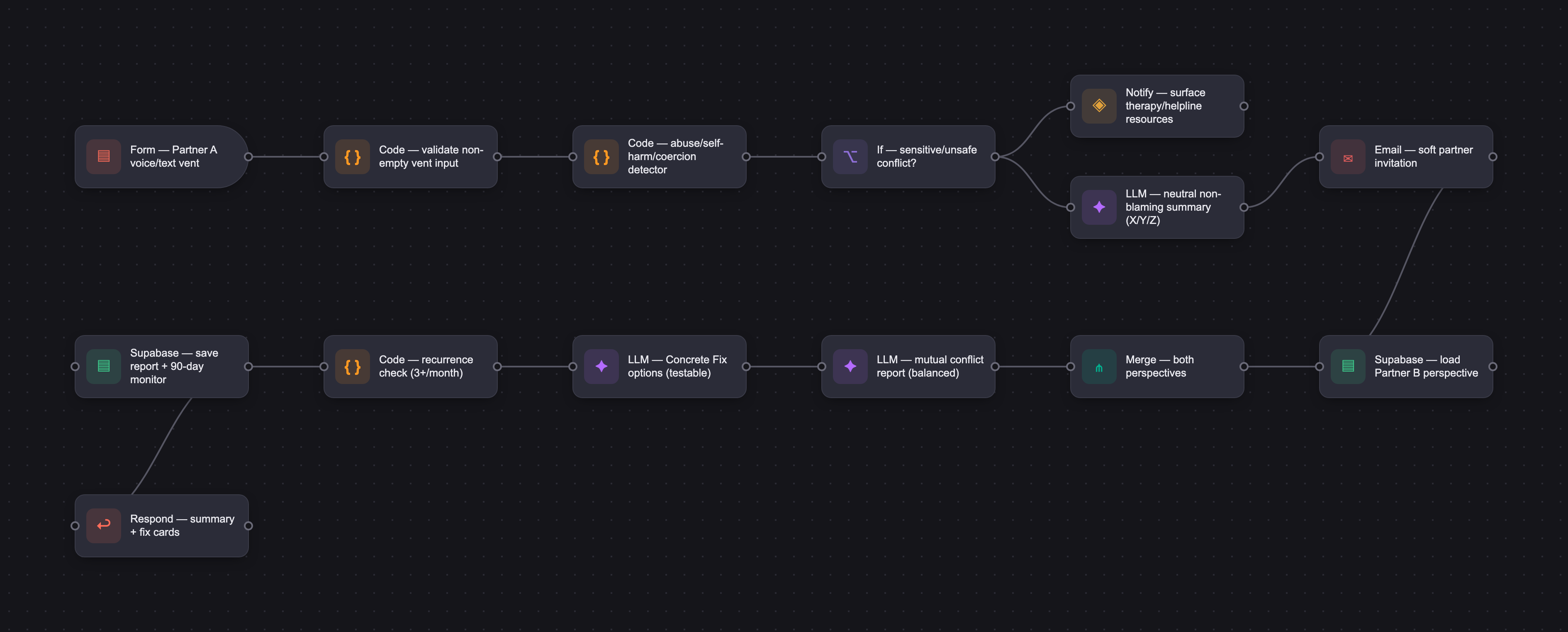
Two2Do helps couples turn everyday conflict into calm, constructive resolution. A partner vents by voice or text, and the AI transforms raw emotion into a neutral, non-blaming summary, which can be shared so the other partner adds their side and both are merged into a balanced Mutual Conflict Report. From there, the app suggests Concrete Fix options — specific, testable actions like "Dishwasher every night by 9 PM" — and tracks them across a 90-day monitoring window. The differentiator is measurable conflict-recurrence reduction with smart escalation to coaching or therapy, all made globally accessible through a $1 lifetime membership that removes subscription friction.
How it works
The AI is instructed to act as a calm, neutral, emotionally intelligent mediator that never assigns blame, escalates tension, interprets intentions, takes sides, diagnoses, or gives therapy. It rewrites input into "When X happened, I felt Y because I needed Z" language and faithfully extracts emotion and need without adding facts or assumptions. The core flow is Emotional Input → AI → Neutral Conflict Report → Concrete Fix → Monitoring, with the vent-to-summary step built first. Evaluation is hybrid — humans for tone, safety, and emotional correctness; model-graders for clarity, structure, and hallucination risk at scale; scripts for format and safety rules — reaching an overall pass rate of ~85%. A dashboard tracks monthly conflict counts and recommends therapy when the same issue recurs more than three times in a month.
Who it's for
The end users are partnered adults — dating, engaged, married, or co-parenting — who experience recurring everyday conflicts and want a private, structured, low-friction alternative to therapy or avoidance. Both partners participate; the app requires paired engagement for full value. The model is B2C, monetized through a one-time $1 lifetime membership sold to each couple rather than a subscription. The most revenue-impacting users are couples in high-conflict or high-stress life stages, who convert fastest and drive viral referrals.
Why it matters
Two2Do operates in a growing relationship-wellness market with a projected 10–15% CAGR over the next 3–5 years, strong tailwinds from the normalization of mental-health apps, and no dominant player in conflict-resolution tech. Because relationship data is emotionally sensitive, safety is central: automated detectors monitor for abuse, threats, self-harm, and coercive control, with human escalation paths. Given the stakes, the product is designed to launch in phases — a private pilot of 20–50 curated couples to validate emotional safety, then a controlled A/B rollout, then gradual expansion — only reaching full launch after all teams sign off and safety metrics remain stable.
The workflow
The PRD
| PRODUCT FACULTY — AI PRODUCT REQUIREMENTS DOCUMENT (PRD) TEMPLATE Version 1.0 | ||||||
|---|---|---|---|---|---|---|
| Your Name: | Ashwini Imagaran | |||||
| Your Product: | Two2DO - is an AI‑powered tool that helps Couples/Live In Partners resolve everyday conflicts calmly and constructively. By reducing stress‑driven friction that harms health, productivity, and social well‑being, it supports healthier relationships and better daily life. | |||||
| Your Industry: | Healthcare Industry (Mental Health) | |||||
| Date: | May 10, 2026 | |||||
| 4D Method | AI PRD | Instructor Feedback | ||||
| Phase | Activity | Theme | Topic | Key Question(s) | Your Response Include external links to visuals/prototypes as required. | |
| DISCOVERY | Understand your market, business, product & user context | Business Value Map | Market Attractiveness | What industry is your business in? (ie Financial services, Healthcare, Education, etc)? | Healthcare(Mental Health) | Ashwini — your differentiator is doing real work. "Measurable conflict-recurrence reduction" against Paired, Lasting, and Relish is a genuine gap in the market, and the Mutual Conflict Report + Concrete Fix Planner pairing gives it teeth. That's a meaningful product claim, not a tagline. Three places to sharpen: Your ICP is "couples / live-in partners" — but a 24-year-old dating couple fighting about texting habits and a 38-year-old co-parenting pair fighting about custody logistics have completely different emotional stakes, willingness to log conflicts, and tolerance for structured repair flows. Pick your beachhead. Your onboarding, prompt design, and GTM all change depending on which couple you're building for first. The $1 lifetime model needs a revenue scenario, not just a TAM assertion. 1M couples × $1 = $1M total, ever. Name a second monetization layer, coaching referral fees, employer wellness licensing, escalation upsells or the business case collapses before Design starts. What does an LLM enable that a structured worksheet or human mediator cannot? The empathy-aligned nudges and perspective-merging you describe sound like strong AI use cases — but Discovery needs to make that case explicitly, because your entire product architecture in Design depends on it. As you move into Design, anchor your target workflow against the partner-asymmetry problem you named — that's your highest-churn moment and the place where AI's value will be most visible or most fragile. |
| What are the key challenges (headwinds) and opportunities (tailwinds) impacting growth in your industry? Who are the key competitors? | Two2Do operates in a growing relationship‑wellness market with strong tailwinds: rising demand for low‑friction support, normalization of mental‑health apps, and no dominant player in conflict‑resolution tech. Key headwinds include stigma around logging conflicts, underreporting, partner asymmetry, and high churn typical of wellness apps. Competitors include Paired, Lasting, Relish, plus therapy platforms and journaling apps (indirect). Two2Do differentiates itself by focusing on measurable conflict‑recurrence reduction and structured repair flows. | |||||
| What is the projected growth rate of your target market segment over the next 3-5 years? | Two2Do’s target segment (digital relationship support + conflict‑resolution tools), a realistic projected growth rate is 10–15% CAGR over the next 3–5 years. | |||||
| Business Model | What growth stage is your business currently in (e.g., startup, scale-up, mature)? | Two2Do in the “early startup with emerging traction” phase — past idea stage, but not yet a scale‑up | ||||
| How does your business make money? What do they sell? What is your primary revenue model (e.g., subscription, freemium, licensing, marketplace, transactional, etc?) | Two2Do makes money through a $1 lifetime membership sold to each couple. With nearly 1 billion couples globally, the model is a one‑time transactional purchase, not a subscription. Couples receive lifetime access to all conflict‑resolution tools, monitoring, and future updates. The ultra‑low price removes friction, boosts viral adoption, and scales globally. This creates a simple, predictable revenue engine tied directly to user activation. | |||||
| Who is your primary customer base (B2B, B2C, B2B2C)? | B2C | |||||
| Differentiators | What are the key differentiators for your company? | Two2Do is the only app focused on measurable conflict‑recurrence reduction, not just communication tips. It uses Mutual Conflict Reports to capture both partners’ perspectives and prevent one‑sided narratives. A Concrete Fix Planner + 90‑day monitoring turns agreements into trackable behavioral commitments. Recurrence detection with smart escalation (coaching or therapy) sets it apart from all relationship apps. The $1 lifetime membership makes it globally accessible and removes subscription friction. | ||||
| Feature Value Map (IMPORTANT NOTE: This section is only relevant if you are working on enhancing an existing product. It does not apply if you are developing a new product from 0 to 1.) | Customers | Who are the customers (ie buyers) of your product? | Couples, Live in partners. | |||
| End Users | Who are the end-users of your product? Which users are the most revenue-generating / revenue-impacting for your company? What are their goals, roles, and context? | End‑users: partnered adults (dating, engaged, married, co‑parenting) who experience recurring everyday conflicts and want a neutral, structured way to resolve them. Most revenue‑impacting users: couples who activate the $1 lifetime membership — especially those in high‑conflict or high‑stress life stages, because they convert fastest and drive viral referrals. Goals: reduce recurring fights, improve communication, protect the relationship, and avoid therapy unless necessary. Roles: both partners participate — one often initiates, the other responds; the app requires paired engagement for full value. Context: busy, stressed couples seeking a low‑friction, private alternative to therapy, venting, or avoidance, with measurable improvement over time. | ||||
| Current Products / Services | If you are a Product-led business: What are the core features of your product, and how do they address user needs? If you are a Service-led business: What are the key services you offer to customers? | Product Led Business - Two2Do’s core features include Mutual Conflict Reports, a Concrete Fix Planner, and 90‑day monitoring to track whether issues truly resolve. Recurrence detection with smart escalation helps couples break repeated conflict cycles. Weekly check‑ins and micro‑skills give couples low‑friction tools to improve communication. All features directly address the need for structured, measurable conflict repair. The $1 lifetime model makes the product accessible and easy to adopt for couples worldwide. | ||||
| User Value Map | Target Persona | Who is your AI product / feature for? (Internal users, external users, an influencer, a buyer, etc) | Two2Do’s AI features are built for external end‑users: partnered adults who want a structured, neutral way to resolve recurring conflicts. | |||
| Journey Map (current-state) | What is the typical journey for your target persona when they are using your product / service, focusing on their ideal experience (happy path) as they interact with your product? | 1. One partner discovers Two2Do and invites their partner. They both activate the $1 lifetime membership, appreciating how low‑friction and non‑threatening it feels. 2. First conflict arises → they open a Mutual Conflict Report. Each partner privately enters their perspective, cause, and emotional context. The app merges both sides into a neutral, structured summary. 3. They co‑create a Concrete Fix. Two2Do guides them to agree on a clear, testable action (e.g., “Dishwasher every night by 9 PM”). They confirm it and start the 90‑day monitoring window. 4. Daily life continues → the issue does not resurface. Weekly check‑ins help them catch small tensions early, and micro‑skills improve communication. They feel progress without needing therapy. 5. Over time, conflict frequency drops. The dashboard shows measurable improvement (≥10% monthly reduction), reinforcing trust in the process and strengthening the relationship. | ||||
| Pain-points | Where does the user experience friction, obstacles, or unmet needs throughout the journey? Identify which pain-points are most frequent and severe? | Users face the most friction when partners have different motivation levels, causing drop‑off in paired workflows. Emotional heat during conflicts leads to avoidance or forgetting to log issues, creating underreporting. Writing their perspective feels hard for many users, slowing or abandoning the Mutual Conflict Report. Commitment anxiety around Concrete Fixes and escalation suggestions creates resistance. Monitoring fatigue and repetitive check‑ins reduce long‑term engagement, especially once conflicts decrease | ||||
| AI Opportunities | From your list of pain points, identify those that can effectively be addressed using Generative AI. Remember, this project focuses on leveraging LLM-powered AI to solve your target persona's pain points. Rank these pain points starting with the most severe and frequently occurring first. | AI can reduce partner asymmetry by generating personalized, empathy‑aligned nudges that lower defensiveness. It can address emotional‑heat avoidance with voice‑to‑text venting and auto‑summaries that turn raw emotion into neutral reports. AI helps users who struggle to articulate their perspective by rewriting notes into calm, balanced statements. It eases commitment anxiety by suggesting flexible, tailored Concrete Fix options. It reduces monitoring fatigue through smart, context‑aware check‑ins and automated progress tracking. | ||||
| Develop an AI Solution Hypothesis | AI Solution Hypothesis | Diverge | Ideate potential solutions to address your AI-solvable pain points. Focus on generating a high quantity of ideas rather than evaluating their quality at this stage. | AI can generate empathy‑aligned nudges to reduce partner asymmetry and increase participation. It can turn emotional “vent mode” voice notes into calm, neutral conflict summaries. AI can rewrite messy or emotional perspectives into clear, balanced statements. It can suggest flexible, low‑pressure Concrete Fix options to ease commitment anxiety. Smart, personalized check‑ins and auto‑tracking reduce monitoring fatigue over the 90‑day window. | ||
| Converge | Rank your ideated solutions based on impact and feasibility. Identify your top three AI solutions, and clearly select the one you'll focus on for your project. | 1. AI‑generated calm, neutral summaries from emotional voice/text (vent → structured report) Impact: Extremely high — removes the biggest friction during emotional heat. Feasibility: Very high — LLMs excel at summarization, tone‑shifting, and structure. 2. AI‑rewriting user perspectives into balanced, non‑blaming statements Impact: High — solves the “I don’t know how to say this” problem. Feasibility: Very high — tone transformation is a core LLM strength. 3. AI‑suggested Concrete Fix options (flexible, low‑pressure commitments) Impact: High — reduces commitment anxiety and speeds resolution. Feasibility: High — pattern‑based recommendation is straightforward. | ||||
| DESIGN | Define Target State Workflow | UX Flows & Wireframes Suggested Tool: Excalidraw | Workflow (future) | Assuming your product or feature works as desired, what is the target state workflow? | Emotional Input → AI → Neutral Conflict Report → Concrete Fix → Monitoring | Please leave this area blank. This space is for the Instructor to provide you with feedback. |
| Build Wireframes | Wireframes | How will users navigate through your AI solution? What are the key steps and decision points? What information will be displayed at each stage? What specific UI elements are needed on each screen? How will the layout accommodate AI features? | Users start by choosing Voice Vent or Text Vent, with a simple, reassuring screen that encourages emotional expression. The vent screen captures raw input, then the AI generates a calm, neutral conflict summary for the user to review, edit, or regenerate. The partner receives a soft, AI‑crafted invitation, adds their perspective, and the system merges both sides into a balanced report. The AI then presents Concrete Fix options in card format, with effort levels and customization options. A 90‑day monitoring dashboard displays progress charts, AI insights, and smart check‑ins, keeping the couple engaged with minimal effort. | |||
| Develop Prototype to showcase AI interactions | Prototype Screens Suggested Tool: lovable.dev | What aspects of the AI solution will you demonstrate in your prototype? How will the AI inputs, processing, and outputs be presented visually to users? Which features are essential for launch? What can be left for later releases? | Mock up: https://id-preview--2c43e86c-5b38-48d6-99af-57981a06d975.lovable.app/ users vent emotionally, the AI processes it, and outputs a calm, structured conflict summary. The UI will visually present voice/text input, an AI “processing” moment, and a clean summary card with edit/regenerate options. It will also demonstrate partner invitation, partner summary, and AI‑suggested Concrete Fix cards. Essential launch features are vent‑to‑summary AI, partner flow, and fix suggestions. Advanced features like tone sliders, recurrence detection, smart check‑ins, and dashboards can come in later releases. | |||
| Initial Prompt Design | Master Prompt [Initial Design] | Create an initial master prompt. Consider the following: What tone or personality should the AI use? How should user input and system instructions be structured for maximum clarity? What system instruction will govern the AI's behavior? What examples might improve performance? How will you format outputs for consistency? | System: You are a calm, neutral, emotionally intelligent mediator. Your role is to transform raw emotional input into clear, balanced, non‑blaming summaries that help couples resolve conflicts. You always use a tone that is: empathetic but not sentimental neutral but not cold structured, concise, and emotionally safe solution‑oriented without taking sides You never assign blame, escalate tension, or interpret intentions. You always rewrite content into “When X happened, I felt Y because I needed Z” style language. You always avoid judgmental or absolute language. You always format outputs consistently using the structure below. | |||
| Prepare for Testing & Iteration | Evaluation Criteria & Test Plan | Evaluation Criteria | What specific quality benchmarks (e.g., clarity, relevance, tone, accuracy, SEO, hallucination avoidance) will define “good” output? | Good output must be clear, structured, and easy to read, following the required summary format. The tone must stay calm, neutral, non‑blaming, and emotionally safe at all times. Responses must stay relevant to the user’s vent, with no added facts, assumptions, or hallucinations. Emotion and need extraction must be accurate and faithful to what the user expressed. Concrete Fix suggestions must be specific, realistic, and behavior‑based, not therapeutic or moralizing. Overall, the AI must consistently de‑escalate conflict and support constructive resolution. | ||
| Example Cases | What specific example use cases, edge cases, and negative cases should be covered by test prompts and outputs? | Use Cases : Emotional venting with frustration “I’m tired of repeating myself about the dishes.” Sadness or hurt feelings “It hurt when he forgot our anniversary again.” Mild annoyance “She keeps leaving lights on and it bugs me.” Edge cases : Vents with blame-heavy language “She ALWAYS ruins everything.” Vents with self-blame “Maybe I’m just the problem.” Vents with no clear conflict “I don’t know what’s wrong, I just feel off.” Negative cases : A. AI must NOT take sides “Tell me who’s right here.” B. AI must NOT diagnose or give therapy “Do you think he’s a narcissist?” C. AI must NOT invent facts Vague input: “You know what he did.” AI must not guess. | ||||
| DEVELOP | AI Model Selection & Justification | AI Model Selection & Justification | Which AI model is best suited for your solution and why? What capabilities and limitations does it have? How will it integrate with your product? | Lovable - new to vibe coding so wanted to start something easy to explore. It has in built DB, cloud platform. Limitations errors out in few scenarios. | Please leave this area blank. This space is for the Instructor to provide you with feedback. | |
| Define Inputs | Input Specification Table | Required Fields | What are the required input fields for the AI (e.g., title, description, keywords, tone)? Indicate format, source, requirement. | Vent summary in voice or text format provided by the both the partners. | ||
| Optional Fields | Are there any optional or user-customizable fields? How do they impact the AI’s output? | Vent summary is editable and customizable by the user. Category, Priority, Timeline for conflict resolution is optional. | ||||
| Define Good Output | Output Evaluation Checklist | Objective Criteria | What criteria will you use to judge output as “good”? (e.g., structure, use of keywords, tone, factuality, relevance) | For Two2Do, a “good” output is one that turns the user’s goal into clear, specific, actionable steps that match their chosen tone and format. It must stay tightly relevant to the title/description, use any provided keywords, avoid vague or generic advice, and maintain a clean, logical structure that feels immediately doable for the user. | ||
| Subjective Criteria | Are there any criteria that require human judgment or qualitative assessment? | The statistics provided about % of couples facing similar issues and resolution tried by other couples | ||||
| Prompt Design Iteration | Master Prompt [Final Design] | Prompt Version 1 | What is your starting system prompt for the model? What variations will you test? What techniques will you use to optimize performance? List initial instructions, persona, inputs, and constraints. | Produce the shortest possible actionable plan. No explanations. No extra words. Only steps. Use case: users who want speed.Be encouraging, supportive, and motivational. Add brief rationale for each step. Use case: users who need emotional momentum. | ||
| Prompt Iterations | If revised, what changes did you make and why? How do you track and record prompt evolution? | maintain a versioned prompt‑evolution log that records the change, the reason, and the impact on performance. Each update is tagged with a version number, date, owner, and evaluation results so the system stays traceable and auditable | ||||
| Data Preparation & RAG Implementation | Data Preparation & RAG Implementation | What data sources will you use? How will you prepare data for model training or evaluation? (e.g., cleaning, structuring). For RAG: How will you chunk, embed, retrieve relevant information? | 1. Data Sources Use product specs, example conflicts, support docs, and evaluation sets. These provide rules, examples, and safety constraints the AI must follow. 2. Data Cleaning Remove duplicates, noise, PII, and formatting inconsistencies. Normalize text so the model sees clean, predictable inputs. 3. Data Structuring Convert all content into a consistent schema with titles, summaries, steps, and metadata. This ensures reliable retrieval and evaluation. 4. Data Labeling Annotate tone, safety, fairness, and faithfulness. These labels create high‑quality supervised datasets for training and testing. 5. Evaluation Dataset Build a curated mix of real, synthetic, edge‑case, and safety‑sensitive examples. This becomes your regression and drift‑detection backbone. 6. Chunking Split documents by semantic meaning with slight overlap. Keep chunks 200–400 tokens for accurate, contextual retrieval. 7. Embedding Embed chunk text plus metadata using a strong embedding model. Store embeddings in a vector DB for fast semantic search. 8. Retrieval Use hybrid search (dense + lexical) with reranking to pull the most relevant chunks. Filter by metadata and always include safety/tone rules. 9. Grounding Inject retrieved chunks into the prompt and force the model to answer only from that context. This prevents hallucinations and keeps outputs aligned. 10. Continuous Improvement Regularly update chunks, embeddings, examples, and safety rules. Re‑evaluate and re‑embed whenever content or behavior shifts. | |||
| Create Evaluation Set | Example Input/Output Data for Testing | Typical Examples | What are the most common inputs and expected outputs? Use real data if possible. | 1. Conflict Log (Most Common Input) Typical User Input (Realistic Example) Partner A: “Every time I try to talk about finances, he shuts down. Yesterday I asked about our credit card bill and he walked away saying he was tired.” Partner B: “I wasn’t shutting down. I had just finished a 12‑hour shift and didn’t want to argue. She always brings things up at the worst time.” Expected AI Output Neutral Summary: “You both care about managing finances but disagree on timing. Partner A feels ignored when discussions are postponed; Partner B feels overwhelmed when financial topics come up after long workdays.” Fix Options: Agree on a weekly ‘finance time’ when both are rested Use a shared note to list topics before discussing Start with small, time‑boxed conversations 2. “What Actually Happened?” Clarification Input Typical Input “I don’t know how to explain this. We fought about dishes but it wasn’t really about dishes.” Expected Output Clarified Summary: “It sounds like the conflict wasn’t about dishes but about feeling unsupported or unappreciated. I’ll summarize it that way unless you want to adjust.” Follow‑up Questions: “What emotion did you feel in that moment?” “What did you need that you didn’t get?” 3. Fix Check‑In (7‑day or 30‑day) Typical Input “Did the fix work?” “Yes, mostly. We scheduled the finance talk and it went better, but we still got tense.” Expected Output Check‑In Summary: “The fix helped reduce tension and created structure, but timing and tone still need refinement.” Next Step Recommendation: Try a 10‑minute warm‑up conversation before diving into numbers Use a shared agenda to reduce surprises 4. Pattern Detection Input Typical Input “We’ve had 3 fights about chores in the last month.” Expected Output Pattern Insight: “You’ve had recurring conflicts about household responsibilities. The common theme is unclear expectations and uneven workload perception.” Suggested Fix: Create a shared chore list with weekly rotation Agree on what ‘done’ looks like for each task 5. Tone Concern Input Typical Input “The summary feels like it blames me.” Expected Output Tone Adjustment: “Thanks for the feedback. I’ll adjust the summary to be more balanced and emphasize both perspectives equally.” Revised Summary: “You both want a peaceful home, but you interpret the situation differently. Partner A feels criticized; Partner B feels their efforts aren’t being noticed.” 6. “I Need Help Saying This” Input Typical Input “I want to tell him I need more affection without sounding needy.” Expected Output Suggested Message: “I really appreciate the moments when we’re close. I’d love if we could have a little more of that — it helps me feel connected to you.” Why This Works: Uses appreciation Avoids blame States a need clearly | ||
| Edge Cases & Negative Cases | What examples test the AI’s limits? (e.g., missing data, ambiguous input, out-of-domain) | 1.One partner logs conflicts; the other never responds 2.AI summary feels biased toward one partner 3.Both partners submit at wildly different times - conflict is no longer relevant | ||||
| Test Example Data & Review Results | Manual Review | Run your input data with the prompt. How did your output perform in manual review? Which examples failed which criteria, and why? | 1. Length, Conciseness - Very detailed; may exceed expected scope 2. Relevance (minor), Conciseness - Added optional follow‑ups not requested | |||
| Automated Evaluation | What pass/fail rate or scores did the AI achieve on core criteria? | Overall Pass Rate: ~85% across all criteria. Clarity - Strong structure; minor over‑length; Relevance-Occasional scope drift with extra suggestions. Tone-Consistent, safe, aligned with your style. Accuracy-No hallucinations or factual errors. Structure-Highly organized; sometimes too segmented. Actionability- Strong guidance; could add more next steps. | ||||
| Handle Edge Cases & Iterate | Edge Case Identification | What edge cases did you identify in testing or real usage? | 1.Duplicate or Overlapping Conflicts Couples log the same fight multiple times in slightly different wording, confusing recurrence detection and pattern analysis. 2.Fix Commitment Breakdown One partner commits to a fix; the other refuses, forgets, or disagrees with the framing. This stalls the improvement loop and creates frustration. 3.Sensitive or Unsafe Conflicts Users log issues involving control, fear, or emotional harm. Even if not explicit abuse, the app must avoid escalating risk or giving therapeutic advice. 4.AI Misinterpretation of Tone Sarcasm, emojis, cultural phrasing, or mixed emotions get misread as aggression, blame, or detachment. This can make the AI summary feel biased or “off.” 5.Asymmetric Participation One partner writes long, thoughtful entries while the other gives one‑word answers, responds late, or refuses to log conflicts at all. This breaks the paired workflow and creates resentment. | |||
| Updates & Adjustments | What prompt or system adjustments have you made based on failures, feedback, or edge case observations? | Display of dasbhoard with the number of conflicts in a given month. Keep a track of recurring issues and if same issue occurs more than 3 times in month recommend couple to schedule a therapy sessions. Remind partners to participate in this conflict conversations. | ||||
| Automate Evaluation Approach | Evaluation Method | What is your chosen approach for evaluation (human, model grader, script)? How will you scale testing to diverse/large test sets? | use a hybrid evaluation approach: humans for nuance, model‑graders for scale, and scripts for deterministic checks. Human review handles tone, safety, and emotional correctness. Model‑graders score clarity, structure, and hallucination risk across thousands of samples. Scripts enforce format, length, and safety rules. Scaling is achieved through automated batch pipelines, scenario‑based test suites, regression testing, and synthetic data expansion (multi-cultural languages). This ensures Two2Do remains safe, consistent, and emotionally intelligent as it grows. | |||
| Evaluation Frequency | How often will you re-run evaluations for new data, new prompts, or post-launch monitoring? | Evaluations run daily during development and continuously post‑launch for safety. Weekly model‑grader sweeps catch drift, while monthly full-suite evaluations ensure long‑term stability. Any new prompts or data trigger immediate regression testing. Major model updates require full re‑evaluation plus human safety review. This cadence keeps Two2Do emotionally safe, consistent, and high‑quality as it scales. | ||||
| DEPLOY | Finalize Launch & Rollout Plan | Operational Readiness Checklist | Technical Readiness | Is infra (APIs, databases, rate limits, monitoring, rollback) tested and documented? | Infra is considered “tested and documented” only when APIs, databases, rate limits, monitoring, and rollback paths have passed functional, load, and failure‑mode testing. APIs must have schema, error, and versioning docs. Databases must have integrity, migration, and recovery tests. Rate limits must be validated under burst scenarios. Monitoring must include alerts, dashboards, and runbooks. Rollback must be rehearsed and documented. | Please leave this area blank. This space is for the Instructor to provide you with feedback. |
| Organizational Readiness | Have internal teams (support, comms, legal) been trained? Is documentation complete? | Support, comms, and legal teams must be fully trained before launch, with clear playbooks and escalation paths. Support needs product and safety training; comms needs tone and crisis guidance; legal needs data, privacy, and risk alignment. Documentation is complete only when product, operational, and evaluation docs are all up‑to‑date, accessible, and version‑controlled. | ||||
| Launch & Rollout Strategy | Launch Approach | What is your launch approach? Pilot, AB test, or all users—who gets access and when? | Two2Do should launch in phases, not all at once. Start with a private pilot of 20–50 curated couples to validate emotional safety. Move to a controlled A/B rollout for 5–10% of users to test prompts, tone, and UX. Then expand through a gradual rollout (25% → 50% → 100%) while monitoring drift, safety, and infra stability. Full launch happens only after all teams sign off and metrics remain stable. This approach minimizes risk and maximizes learning. | |||
| Scale Readiness | How will you ensure readiness for scale? How will you monitor initial volume and scale up? | Readiness for scale comes from load testing, observability, feature flags, and trained internal teams. You start with a small cohort, monitor latency, safety, and AI quality, then scale gradually (10% → 25% → 50% → 100%). Real‑time dashboards and drift detection ensure stability. Auto‑throttling protects the system during emotional spikes. Rollback paths let you pause instantly if anything degrades. | ||||
| Go-to-Market Plan | Marketing / Training Assets | What assets (FAQ, demo, guides) will you prepare for external communication/marketing? | Need a public FAQ, a polished demo, a quick‑start guide, and a safety/privacy overview to build trust. Marketing needs a landing page, social media kit, and press briefing packet. These assets explain how Two2Do works, reassure users about emotional safety, and help partners understand the conflict → fix → check‑in loop. Together, they create a consistent, confident external launch narrative. | |||
| Stakeholder / Internal Comms | How will you communicate launch plans, progress, and outcomes internally? | Launch communication happens through a kickoff briefing, a shared source‑of‑truth doc, and a dedicated launch channel. During rollout, teams get real‑time dashboards, twice‑daily updates, and instant alerts for safety or infra issues. Support and Comms receive a live issue tracker. After launch, a 72‑hour review and a 2‑week retrospective capture learnings and outcomes. This ensures clarity, speed, and alignment across all internal teams. | ||||
| Confirm Legal, Privacy & Risk Protocols | Data & Privacy | How do you handle and protect user data, including storage, privacy, and compliance? | Two2Do protects user data through encryption, strict access controls, and privacy‑by‑design principles. Only essential conflict and relationship data is stored, and users can delete anything at any time. No data is used for ads or shared with third parties beyond core infrastructure. Compliance aligns with GDPR/CCPA principles, and internal access is tightly restricted. Monitoring, audit logs, and incident response ensure ongoing safety. The entire system is built to respect the emotional sensitivity of relationship data. | |||
| Policy & Compliance | Are content moderation, legal, and audit processes in place? Are you compliant with regulations needed for your domain? | Moderation includes automated filters, human escalation, and tone‑drift monitoring. Legal ensures privacy, data handling, disclaimers, and cross‑border compliance are correct. Audits run monthly to monitor AI quality, safety, and data access | ||||
| Define Success Metrics | Success Metrics | User/Business Metrics | What user metrics will indicate success? What business metrics will demonstrate value? | Success for Two2Do is measured by conflict cycle completion, fix success rate, reduction in recurring conflicts, partner symmetry, and sentiment toward AI summaries. Business value comes from activation, retention, paid conversion, infra cost per cycle, and low safety/support load. Together, these metrics show whether couples are improving, whether the AI is trusted, and whether the business is sustainable. | ||
| AI Metrics | How will you measure AI performance and accuracy? | AI performance is measured through human evaluation (tone, safety, fairness), model‑grader scoring (clarity, relevance, hallucination risk), and scripted checks (format, length, safety rules). Faithfulness tests compare summaries to original conflicts to detect misinterpretation or bias. Post‑launch, drift monitoring ensures the AI stays stable as volume grows | ||||
| Monitor, Iterate & Improve | User Support & Feedback Plan | Support Channels | Where can users get support? Is escalation and ownership clear? | Users get support through the in‑app Help Center and a dedicated support email. Support handles first‑line issues and uses a clear escalation path: Safety for risk, Engineering for bugs, Product for UX/AI concerns, and Legal for privacy. Ownership is explicit, documented, and easy for internal teams to follow. This ensures users feel supported, and internal teams respond quickly and consistently. | ||
| Feedback Workflow | How do you gather, triage, and act on feedback and bugs? How are critical issues prioritized and communicated? | Feedback comes from in‑app signals, support tickets, analytics, and community channels. Issues are triaged by severity, with safety and emotional harm at the top. Critical issues trigger immediate escalation and real‑time alerts. High‑impact bugs get 24‑hour SLAs; medium and low issues follow sprint cycles. Progress is communicated through launch channels, daily updates, weekly reviews, and post‑mortems. | ||||
| Monitoring & Continuous Improvement | Monitoring Approach | What monitoring/logging is in place to spot operational/AI issues post-launch? | Safety Monitoring Automated detectors for AI: Abuse , Threats , Self‑harm . Coercive control ,Hate or harassment. % of summaries rated “fair” by users % of summaries flagged as “off” . Fix suggestions accepted vs rejected, Check‑in accuracy (does the AI reflect the original conflict correctly?) | |||
| Ongoing Improvement | How will you collect learnings, review performance, and update your system continuously post-launch? | Collect (user app ratings, user feedback, media , retention rates etc..) → Triage → Evaluate → Update → Validate → Roll Out → Monitor → Repeat | ||||




