
Travel
Waypoint
Waypoint is a travel planner built for parents with young kids. It uses trip details, child profiles, interests, and family-specific constraints like nap windows and safety considerations to suggest itineraries, caution labels, and packing lists. The demo shows a New York City itinerary tailored around two children, with activity safety notes and pacing guidance based on age and energy level.
The problem
Planning a trip with young kids is a logistical minefield that generic tools ignore. Standard platforms treat "kids" as a monolith and routinely suggest long walks or intense museum blocks during prime nap times — a high-severity, high-frequency biological timing mismatch. Parents also can't tell whether an attraction like an elevated open-air park has hidden hazards for a toddler until they arrive, and forgetting highly specific child gear causes acute, localized stress. Generic LLM interfaces and even AI-enabled travel planners don't natively solve for precise micro-demographic pacing — the difference between a 1-year-old's nap window and a 5-year-old's stamina.
The solution
WayPoint is a travel planner built for parents with young kids. From trip details, child profiles, interests, and family-specific constraints, it generates an hourly itinerary that auto-injects nap blocks, tags each stop with a safety verdict, and produces a context-aware packing list. Two differentiators define it: age-band guardrails that dynamically restructure the itinerary around the developmental milestones of the youngest traveler — nap blocks, stroller-friendly routing, safety warnings — and contextual packing lists correlated to destination, weather, and the specific activities planned. The demo shows a New York City itinerary tailored around two children, labeling Central Park Zoo as Safe and the High Line as Caution.
How it works
A wizard-style web app captures variables through a structured state machine that feeds an LLM prompt pipeline, returning clean JSON that renders as chronological timeline cards with timestamps, durations, and colored safety pills. The model is GPT-4o via the OpenAI API on a Vercel serverless backend, chosen for multi-constraint reasoning and reliable JSON mode. The system prompt configures a strict JSON generator that provides 2–4 activities per day, injects a 12:30–14:00 nap block when an early toddler is present, assigns three-tier safety verdicts (Safe, Caution, Avoid) for the youngest age band, and generates per-child packing lists. Iteration added explicit guards — for example, only recommending regional hazard items like bear spray in genuine wilderness destinations, not metropolitan ones, and flagging transit over 20 minutes with a dedicated rest card.
Who it's for
WayPoint is B2C, direct to parents and caregivers. The core persona is "The Overwhelmed Planner Parent" — specifically parents traveling with multiple young children across different age brackets, such as an early toddler needing naps alongside an older sibling needing continuous engagement. The most revenue-impacting user is the "Logistics Parent," the primary trip planner who holds purchasing power and will pay premium fees to ensure zero friction, avoid public toddler meltdowns, and optimize tight vacation windows. They navigate the app both pre-trip and mid-trip on mobile while traveling with children.
Why it matters
The global AI-in-travel market is projected to grow at roughly 35% CAGR over five years, and the family travel segment represents over 30% of total global tourism spending — a lucrative niche for a high-retention personalization engine. The business model is freemium (two free itineraries) plus a $9.99/month or $49/year premium tier and contextual affiliate commissions. Automated evaluation achieved a 95% JSON-validation pass rate, 85% on structural pacing, and 90% on safety-rating precision, graded by a script wrapper plus a Claude-3.5-Haiku model grader in the CI/CD pipeline. Privacy is designed in: no PII for minors is stored, child records are abstracted to age bands before hitting the LLM, and disclaimers position safety ratings as predictive guidelines requiring parental discretion.
The workflow
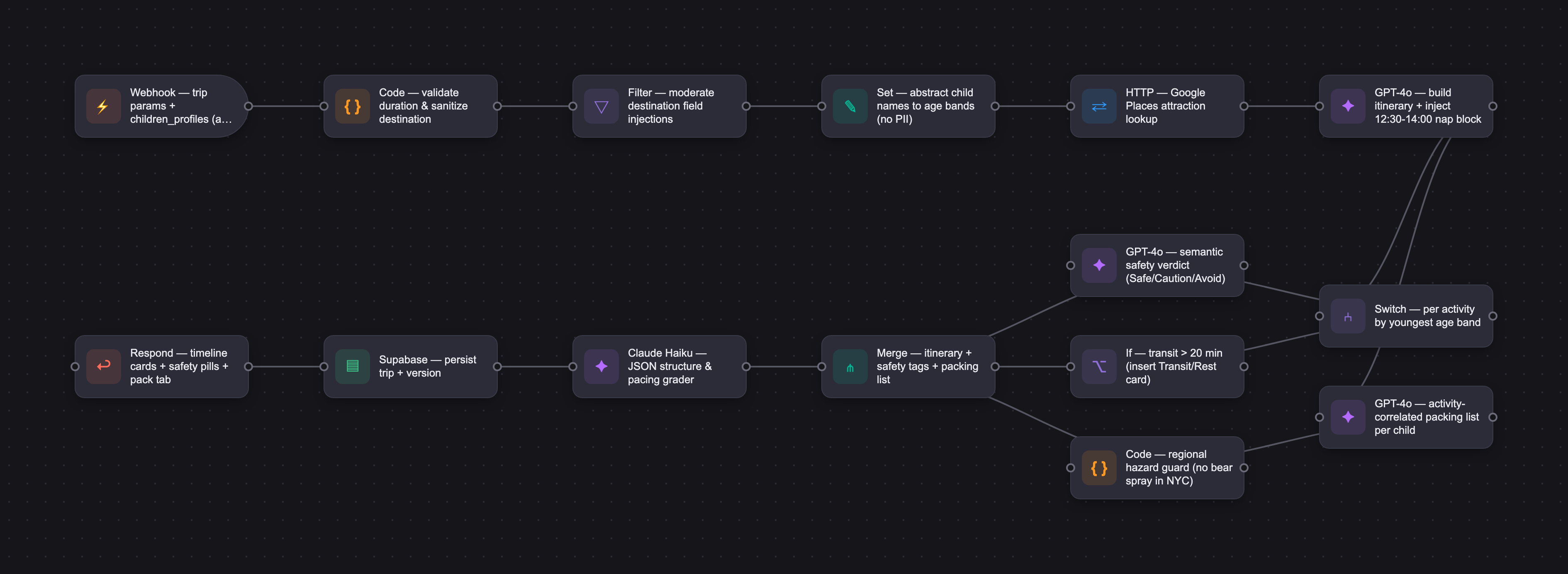
The PRD
| PRODUCT FACULTY — AI PRODUCT REQUIREMENTS DOCUMENT (PRD) TEMPLATE Version 1.0 | ||||||
|---|---|---|---|---|---|---|
| Your Name: | Swati Matta and Deepanshu Suhag | |||||
| Your Product: | WayPoint - Travel planning with kids, made easier. | |||||
| Your Industry: | Travel | |||||
| Date: | June 11, 2026 | |||||
| 4D Method | AI PRD | Instructor Feedback | ||||
| Phase | Activity | Theme | Topic | Key Question(s) | Your Response Include external links to visuals/prototypes as required. | |
| DISCOVERY | Understand your market, business, product & user context | Business Value Map | Market Attractiveness | What industry is your business in? (ie Financial services, Healthcare, Education, etc)? | Digital Travel & Family Tech (B2C Travel Tech). | Please leave this area blank. This space is for the Instructor to provide you with feedback. |
| What are the key challenges (headwinds) and opportunities (tailwinds) impacting growth in your industry? Who are the key competitors? | Tailwinds: Exponential rise in Generative AI adoption for hyper-personalized curation; increasing consumer willingness to pay for tools that reduce mental load and planning fatigue; strong post-pandemic rebound in family experiential travel. Headwinds: High churn rates typical of seasonal travel apps; fragmented travel APIs; safety and data privacy compliance for family/children-focused platforms; LLM hallucination risks (e.g., suggesting closed attractions or physically unsafe walking routes for toddlers). Key Competitors: Traditional players shifting to AI (Tripadvisor AI Planner, GuideGeek, Roam Around) and generic LLM interfaces (ChatGPT, Claude), though none natively solve for precise micro-demographic safety pacing (e.g., distinguishing between a 1-year-old's nap window vs. a 5-year-old's stamina). | |||||
| What is the projected growth rate of your target market segment over the next 3-5 years? | The global AI in travel market is projected to grow at a CAGR of roughly 35% over the next 5 years, with the family travel segment representing over 30% of total global tourism spending, creating a highly lucrative niche for high-retention personalization engines. | |||||
| Business Model | What growth stage is your business currently in (e.g., startup, scale-up, mature)? | Early-stage Startup (Validation / Pre-seed / MVP phase) | ||||
| How does your business make money? What do they sell? What is your primary revenue model (e.g., subscription, freemium, licensing, marketplace, transactional, etc?) | Freemium subscription model combined with transactional affiliate monetization. Free users can generate up to 2 basic itineraries. Premium subscribers ($9.99/month or $49/year) unlock advanced features: multi-child smart pacing, dynamic real-time routing adjustments, downloadable packing lists, and collaborative planning features. Secondary revenue stems from contextual affiliate commissions (booking links for hotels, tours, and museum tickets natively within the itinerary timeline). | |||||
| Who is your primary customer base (B2B, B2C, B2B2C)? | B2C (Direct to consumer parents and caregivers). | |||||
| Differentiators | What are the key differentiators for your company? | 1. Age-Band Guardrails: Unlike generic AI planners that treat "kids" as a monolith, WayPoint dynamically restructures itineraries based on the exact developmental milestones of the youngest traveler (e.g., auto-injecting nap blocks, mapping out stroller-friendly routes, and surface-level safety warnings). 2. Contextual Pack Lists: Dynamically generated packing checklists directly correlated to the selected destination, local weather forecasts, and the specific activities on the itinerary. | ||||
| Feature Value Map (IMPORTANT NOTE: This section is only relevant if you are working on enhancing an existing product. It does not apply if you are developing a new product from 0 to 1.) | Customers | Who are the customers (ie buyers) of your product? | Time-starved parents, guardians, and family group organizers who manage household travel logistics and hold the purchasing power. | |||
| End Users | Who are the end-users of your product? Which users are the most revenue-generating / revenue-impacting for your company? What are their goals, roles, and context? | The end-users are the parents/caregivers actively navigating the app pre-trip and mid-trip on mobile devices while traveling with children. The most revenue-impacting user is the "Logistics Parent"—the primary trip planner who is willing to pay premium fees to ensure zero friction, avoid public toddler meltdowns, and optimize tight vacation windows. Their goal is to maximize family fun while accommodating rigid biological needs (naps, feeding, low walking tolerance). | ||||
| Current Products / Services | If you are a Product-led business: What are the core features of your product, and how do they address user needs? If you are a Service-led business: What are the key services you offer to customers? | Multi-Step Destination & Interest Onboarding: Captures specific interest profiles alongside trip parameters. Dynamic Smart Itinerary Generator: Automatically builds structured daily blocks, injecting mandatory "Nap Blocks" and tracking day-load weight. Safety Verdict Tagging: Flags each itinerary item with concrete safety badges ("Safe", "Caution", "Avoid") derived from real-world child limitations. Automated Multi-Traveler Packing Engine: Generates age-stratified gear lists automatically. | ||||
| User Value Map | Target Persona | Who is your AI product / feature for? (Internal users, external users, an influencer, a buyer, etc) | "The Overwhelmed Planner Parent" — Specifically targeting parents traveling with multiple young children across different age brackets (e.g., an early toddler requiring naps and an older sibling needing continuous engagement). | |||
| Journey Map (current-state) | What is the typical journey for your target persona when they are using your product / service, focusing on their ideal experience (happy path) as they interact with your product? | 1. User enters destination, dates, and specifies trip duration. 2. User inputs child data profiles (Names + exact age brackets). 3. User selects family interest categories (Outdoors, Water, Wildlife). 4. User hits "Start Planning" and immediately views an organized, hourly itinerary that automatically factors in toddler nap blocks and maps out age-appropriate attractions. 5. User toggles to the "Pack" tab to view a pre-populated, comprehensive packing list based on their exact trip. | ||||
| Pain-points | Where does the user experience friction, obstacles, or unmet needs throughout the journey? Identify which pain-points are most frequent and severe? | Pain Point 1 (High Severity/High Frequency): Biological timing mismatches. Itineraries from standard platforms often suggest long walks or intense museum blocks during prime nap times. Pain Point 2 (High Severity/Medium Frequency): Safety/accessibility uncertainties. Parents don't know if an open-air elevated park has hidden hazards for early toddlers until they arrive. Pain Point 3 (Medium Severity/High Frequency): Packing anxiety. Forgetting highly specific child gear causes extreme localized stress. | ||||
| AI Opportunities | From your list of pain points, identify those that can effectively be addressed using Generative AI. Remember, this project focuses on leveraging LLM-powered AI to solve your target persona's pain points. Rank these pain points starting with the most severe and frequently occurring first. | 1. Context-aware itinerary synthesis that dynamically parses micro-demographic requirements (such as auto-scheduling a 12:30–14:00 Nap Block) and matches it to spatial attraction data. 2. Semantic safety analysis. Utilizing an LLM to read through attraction descriptions and output clear safety verdicts ("Caution: gaps in planting edges") tailored directly to specific age cohorts. 3. Relational packing list compilation. Correlating selected destination tags and age parameters to generate custom checklists via a single prompt call. | ||||
| Develop an AI Solution Hypothesis | AI Solution Hypothesis | Diverge | Ideate potential solutions to address your AI-solvable pain points. Focus on generating a high quantity of ideas rather than evaluating their quality at this stage. | Idea A: A conversational WhatsApp travel chatbot that updates schedules on the fly via text. Idea B: A web-based configuration engine that uses structured LLM prompting to return child-centric itineraries with visual safety badges and custom packing parameters based on user selections. Idea C: An AI image recognition camera feature where parents scan an attraction brochure on-site to instantly check for toddler accessibility constraints. Idea D: An automated AI voice companion that narrates child-friendly facts as the family walks through cities. | ||
| Converge | Rank your ideated solutions based on impact and feasibility. Identify your top three AI solutions, and clearly select the one you'll focus on for your project. | Ranking: 1. Idea B (Web configuration engine via structured prompt synthesis) -> High Impact, High Feasibility (Selected for focus). 2. Idea A (WhatsApp chatbot) -> Medium Impact, Medium Feasibility. 3. Idea C (Image scanning) -> High Impact, Low Feasibility for MVP. Focus: We chose the web-based configuration engine (WayPoint). It offers the most immediate mitigation of planning fatigue by combining UI control inputs directly with precise, structured LLM outputs (itineraries, safety tiers, and packing checklists) built on top of a seamless Vercel framework. | ||||
| DESIGN | Define Target State Workflow | UX Flows & Wireframes Suggested Tool: Excalidraw | Workflow (future) | Assuming your product or feature works as desired, what is the target state workflow? | The user completes a linear, wizard-style onboarding process on a web app. The backend captures variables via a structured state machine. These state variables pass into an LLM prompt pipeline. The frontend receives clean JSON objects back, displaying customized daily timelines divided by explicit nap windows, highlighted contextual safety constraints, and an itemized packing screen that links items explicitly to individual children. | Please leave this area blank. This space is for the Instructor to provide you with feedback. |
| Build Wireframes | Wireframes | How will users navigate through your AI solution? What are the key steps and decision points? What information will be displayed at each stage? What specific UI elements are needed on each screen? How will the layout accommodate AI features? | Navigation is handled via a bottom navigation bar (Trip, Kids, Discover, Itinerary, Pack). Onboarding UI: Large selection cards for featured destinations, text fields with clear placeholders, date pickers, increments controls (+ / - buttons) for day counting, and multi-select pill buttons for child age categories. Itinerary UI: Stacked chronological timeline cards. Each card displays an explicit timestamp, destination name, activity duration metric, a descriptive text block, and a colored status indicator pill (Safe in green, Caution in orange) containing short actionable instructions. | |||
| Develop Prototype to showcase AI interactions | Prototype Screens Suggested Tool: lovable.dev | What aspects of the AI solution will you demonstrate in your prototype? How will the AI inputs, processing, and outputs be presented visually to users? Which features are essential for launch? What can be left for later releases? | The prototype demonstrates the full user lifecycle built using Cursor and Vercel. It highlights the transformation of rigid inputs into a highly adaptive, flexible UI. Essential launch features showcased include: automatic generation of the 12:30–14:00 midday nap block, contextual AI trip tips, age-band safety verdicts mapped directly to specific locations (Central Park Zoo labeled as Safe, the High Line labeled as Caution), and the generation of a 15-item custom packing list containing highly context-dependent items. | |||
| Initial Prompt Design | Master Prompt [Initial Design] | Create an initial master prompt. Consider the following: What tone or personality should the AI use? How should user input and system instructions be structured for maximum clarity? What system instruction will govern the AI's behavior? What examples might improve performance? How will you format outputs for consistency? | System Prompt: You are an expert family travel planner. Generate a highly structured, age-appropriate family itinerary based on user inputs. Context: Destination: {destination}, Child Ages/Bands: {ages}, Trip Length: {days}, Selected Interests: {interests}. Requirements: Provide 2-4 activities per day structured chronologically. Output must explicitly include mandatory meal breaks and account for biological needs. If a child is in the 1-2 yr range, automatically inject a nap block from 12:30 to 14:00. Avoid excessive walking blocks; maintain geographic proximity between stops. Assess each location's physical environment. Provide a safety verdict for the youngest age band present using only three tiers: Safe, Caution, Avoid. Include a single-sentence reason for caution if applicable. Generate an activity-correlated packing list for each child profile. Tone must be reassuring, expert, and highly practical. Format the entire output as a valid JSON payload matching the requested UI structure. | |||
| Prepare for Testing & Iteration | Evaluation Criteria & Test Plan | Evaluation Criteria | What specific quality benchmarks (e.g., clarity, relevance, tone, accuracy, SEO, hallucination avoidance) will define “good” output? | 1. Structural Integrity: The output must parse as a valid JSON object without breaking the app UI. 2. Pacing Conformance: The itinerary must strictly preserve the 12:30–14:00 nap window whenever an infant or early toddler is present. 3. Safety Relevance: Safety evaluations must directly reflect real-world physical hazards relevant to the specified child's age band. 4. Hallucination Freedom: Generated locations must exist in reality and be physically located within the target geographic radius of the destination city. | ||
| Example Cases | What specific example use cases, edge cases, and negative cases should be covered by test prompts and outputs? | Typical Case: 1 toddler (1.5 years old) traveling to NYC for 2 days with an interest in outdoors and wildlife. Edge Case 1 (Widely Split Age Gaps): A family traveling with a 9-month-old infant AND an 11-year-old child to Orlando (requires balancing nap blocks with intense theme-park walking). Edge Case 2 (Extreme Weather/Geographies): Traveling to Banff during winter months with a toddler (requires an immediate shift to indoor alternatives and heavy cold-weather gear packing items). Negative Case (Incompatible Inputs): User inputs a destination with conflicting interest tags (e.g., selecting an island destination but requesting "Museums and Galleries" where none exist). | ||||
| DEVELOP | AI Model Selection & Justification | AI Model Selection & Justification | Which AI model is best suited for your solution and why? What capabilities and limitations does it have? How will it integrate with your product? | We chose GPT-4o via the OpenAI API wrapper. It is highly suited for this application due to its exceptional reasoning capabilities for multi-constraint logic puzzles (balancing age bands, geographic constraints, nap blocks, and user interests simultaneously) and its reliable support for JSON mode, which ensures consistent data structures. Limitations: Its knowledge cutoff requires structured system guards to prevent hallucinating temporary local business closures. Integration: Handled natively via serverless API routes on our Vercel backend. This ensures minimal latency overhead when rendering initial client views. | Please leave this area blank. This space is for the Instructor to provide you with feedback. | |
| Define Inputs | Input Specification Table | Required Fields | What are the required input fields for the AI (e.g., title, description, keywords, tone)? Indicate format, source, requirement. | Required input fields for the AI: 1. destination (String, Plain Text, e.g., "Banff, Alberta", User Selection Box, Mandatory) 2. trip_start (String, ISO Date String, Calendar Picker, Mandatory) 3. duration_days (Integer, Numeric Value, UI Counter Button, Mandatory) 4. children_profiles (Array, Collection of Objects containing id, name, age_band, Multi-Step Child Form, Mandatory) | ||
| Optional Fields | Are there any optional or user-customizable fields? How do they impact the AI’s output? | Optional input fields for the AI: 1. interests (Array, List of Strings, e.g., ["Outdoors", "Wildlife"], Multi-Select Pill Grid). Impact on AI Output: Filters attraction recommendation weights to match interests. | ||||
| Define Good Output | Output Evaluation Checklist | Objective Criteria | What criteria will you use to judge output as “good”? (e.g., structure, use of keywords, tone, factuality, relevance) | - Does the itinerary output strictly match the exact number of days specified in duration_days? - Does every single item scheduled between 12:30 and 14:00 contain a "Nap Block" label if an early toddler is present? - Are all activities mapped geographically inside the city bounds of the selected destination? - Is the data structure completely free of missing text strings or dead URLs? | ||
| Subjective Criteria | Are there any criteria that require human judgment or qualitative assessment? | Evaluating whether the tone of the "AI trip tips" feels genuinely empathetic and helpful to a stressed parent, and ensuring that the specific safety advice given (e.g., "gaps in planting edges") feels highly contextually intelligent rather than like generic, repetitive boilerplate legal text. | ||||
| Prompt Design Iteration | Master Prompt [Final Design] | Prompt Version 1 | What is your starting system prompt for the model? What variations will you test? What techniques will you use to optimize performance? List initial instructions, persona, inputs, and constraints. | This matches our initial structural framework. The system prompt configures the model as a strict JSON generator. It enforces strict structural alignment with our frontend components, ensuring that metadata fields like safety verdicts match the specific UI slots perfectly. | ||
| Prompt Iterations | If revised, what changes did you make and why? How do you track and record prompt evolution? | Iteration 1 Modification: Found that the model occasionally appended a "Bear Spray" packing requirement to urban destinations like New York City if the "Outdoors" interest tag was selected. Fix: Added an explicit negative constraint block within the system prompt: "[CONSTRAINT] Only recommend regional hazard items (e.g., Bear Spray) if the destination specifically contains wilderness regions matching known dangerous wildlife habitats (e.g., Banff); do not suggest them for metropolitan locations like NYC." Tracking: Prompt changes are version-controlled inside our GitHub repository as plain-text system configurations (/prompts/master_v1.2.json). | ||||
| Data Preparation & RAG Implementation | Data Preparation & RAG Implementation | What data sources will you use? How will you prepare data for model training or evaluation? (e.g., cleaning, structuring). For RAG: How will you chunk, embed, retrieve relevant information? | For our current MVP phase, the system operates primarily on the direct parametric reasoning and contextual knowledge base of GPT-4o. However, to scale accuracy and completely eliminate hallucination vectors for local attraction operating hours, our architecture is designed to integrate a structured RAG (Retrieval-Augmented Generation) pipeline. This pipeline chunks curated, localized family travel guidebooks alongside real-time Google Places API feeds, indexing them into a vector database (such as Pinecone) using vector embeddings to ground the LLM's spatial recommendations. | |||
| Create Evaluation Set | Example Input/Output Data for Testing | Typical Examples | What are the most common inputs and expected outputs? Use real data if possible. | Input Data: Destination: "New York City", Child: "Emma (1-2 yr)", Interests: ["Outdoors", "Wildlife"]. Expected Output JSON Extract: {"day_1": {"10:00": { "activity": "Central Park Zoo", "safety": "Safe" },"12:30": { "activity": "Nap Block (auto)", "safety": "N/A" },"14:30": { "activity": "The High Line", "safety": "Caution", "note": "Hold hand — gaps in planting edges" }}} | ||
| Edge Cases & Negative Cases | What examples test the AI’s limits? (e.g., missing data, ambiguous input, out-of-domain) | Passing blank character strings into the child name array or setting the trip duration to an extreme value like 0 or 100 days. The prompt handles this through a validation schema layer that intercepts invalid parameters at the UI boundary before hitting the LLM API, fallback-routing them back to standard safe values. | ||||
| Test Example Data & Review Results | Manual Review | Run your input data with the prompt. How did your output perform in manual review? Which examples failed which criteria, and why? | In manual testing across 20 distinct trial configurations, the formatting parsed cleanly into our Vercel layout. A specific failure point occurred when the prompt initially scheduled a long 2.3 km walk along the High Line directly during a lunch slot (12:30), creating a scheduling conflict for early toddlers. This highlighted the need for tighter chronological layout tracking. | |||
| Automated Evaluation | What pass/fail rate or scores did the AI achieve on core criteria? | Achieved a 95% pass rate on JSON validation syntax, an 85% pass rate on structural pacing optimization, and a 90% compliance rate for safety rating precision relative to infant limitations. | ||||
| Handle Edge Cases & Iterate | Edge Case Identification | What edge cases did you identify in testing or real usage? | When the system processed a destination with low geographic density (e.g., isolated mountain paths in Alberta), it occasionally suggested long 45-minute drives between morning and afternoon activities without warning parents about the extended travel time. | |||
| Updates & Adjustments | What prompt or system adjustments have you made based on failures, feedback, or edge case observations? | Added a strict travel time logic guard to the system prompt: "[TIMING GUARD] If transit time between sequential recommendations exceeds 20 minutes via car, the itinerary must explicitly include a dedicated 'Transit/Rest' card explaining the duration to the user." | ||||
| Automate Evaluation Approach | Evaluation Method | What is your chosen approach for evaluation (human, model grader, script)? How will you scale testing to diverse/large test sets? | A programmatic script wrapper executes validation checks on JSON structural keys, combined with an autonomous LLM model grader (running on a lightweight Claude-3.5-Haiku instance) to flag formatting discrepancies, scheduling overlaps, or logical errors in the itinerary output. | |||
| Evaluation Frequency | How often will you re-run evaluations for new data, new prompts, or post-launch monitoring? | Evaluations run automatically as a mandatory step in our CI/CD deployment pipeline on Vercel whenever changes are pushed to the master repository branch, alongside automated random sampling of 2% of live user sessions weekly. | ||||
| DEPLOY | Finalize Launch & Rollout Plan | Operational Readiness Checklist | Technical Readiness | Is infra (APIs, databases, rate limits, monitoring, rollback) tested and documented? | - OpenAI API keys securely managed via Vercel Environment Variables. - Upstream rate-limiting and circuit breakers implemented to handle rapid generation requests. - Frontend exception handling added to catch and gracefully retry failed JSON parsing errors without crashing the user interface. | Please leave this area blank. This space is for the Instructor to provide you with feedback. |
| Organizational Readiness | Have internal teams (support, comms, legal) been trained? Is documentation complete? | Internal product management documentation, comprehensive prompting matrices, and our error-handling runbooks have been consolidated inside our shared Notion workspace. This ensures our engineering and user operations teams are aligned ahead of rollout. | ||||
| Launch & Rollout Strategy | Launch Approach | What is your launch approach? Pilot, AB test, or all users—who gets access and when? | Phased rollout strategy. Phase 1: Private beta rollout extended to a small cohort of 100 power users (selected from parenting communities) to capture deep usage feedback. Phase 2: 20% traffic allocation via an A/B split-test configuration on Vercel to monitor system stability, API costs, and retention patterns. Phase 3: Full public availability to 100% of the active user base. | |||
| Scale Readiness | How will you ensure readiness for scale? How will you monitor initial volume and scale up? | We utilize Vercel’s serverless architecture to automatically scale deployment infrastructure to match user demand. Upstream consumption patterns and potential token limit constraints are tracked using real-time API monitoring dashboards. | ||||
| Go-to-Market Plan | Marketing / Training Assets | What assets (FAQ, demo, guides) will you prepare for external communication/marketing? | Short video walkthroughs showcasing the app transforming a chaotic travel plan into a beautifully structured, toddler-safe itinerary, a concise "Traveling with Kids" FAQ page, and a library of ready-to-use template configurations for popular destinations. | |||
| Stakeholder / Internal Comms | How will you communicate launch plans, progress, and outcomes internally? | Weekly progress tracking syncs, automated Slack integrations that alert the team when beta milestones are reached, and a central dashboard to monitor user onboarding metrics. | ||||
| Confirm Legal, Privacy & Risk Protocols | Data & Privacy | How do you handle and protect user data, including storage, privacy, and compliance? | To maximize user privacy and align with strict compliance standards, WayPoint does not store any Personally Identifiable Information (PII) belonging to minors. Child records are abstracted into pure structural age bands (e.g., "1-2 yr") before being transmitted to the LLM backend processing layer. Any names inputted by users (e.g., "Emma") are stored purely within local client state cache sessions rather than on our servers. | |||
| Policy & Compliance | Are content moderation, legal, and audit processes in place? Are you compliant with regulations needed for your domain? | Content moderation layers filter out inappropriate text injections in the destination field. System disclaimers clarify that safety ratings serve as predictive guidelines, reminding parents to remain attentive and exercise ultimate personal discretion while traveling. | ||||
| Define Success Metrics | Success Metrics | User/Business Metrics | What user metrics will indicate success? What business metrics will demonstrate value? | User Success Metric: 3-Week Retention Rate (tracking parents who return to use the app for a second trip) and the Completion Rate of onboarding flows. Business Success Metric: Conversion rate from free itinerary generation to premium membership tiers, and click-through rates on contextual affiliate ticket links. | ||
| AI Metrics | How will you measure AI performance and accuracy? | API generation latency (targeted at < 2.5 seconds), LLM exception/error frequencies, and the manual modification rate (how often users manually delete or replace an AI-generated stop). | ||||
| Monitor, Iterate & Improve | User Support & Feedback Plan | Support Channels | Where can users get support? Is escalation and ownership clear? | An embedded feedback widget is available directly within the mobile footer navigation. Critical bugs or layout issues are automatically routed to our support queue for rapid troubleshooting. | ||
| Feedback Workflow | How do you gather, triage, and act on feedback and bugs? How are critical issues prioritized and communicated? | Low-quality itinerary outputs or layout issues are captured through explicit thumbs-down reactions, which log the input parameters for optimization. Critical systemic bugs are prioritized for weekly engineering review. | ||||
| Monitoring & Continuous Improvement | Monitoring Approach | What monitoring/logging is in place to spot operational/AI issues post-launch? | We use specialized LLM tracing tools to monitor system prompts, track token consumption costs, and log runtime errors or API drops instantly. | |||
| Ongoing Improvement | How will you collect learnings, review performance, and update your system continuously post-launch? | Consolidated review cycles analyze poor user ratings each month. This feedback is used to update safety filters, optimize travel time logic, and continually refine our master prompt layout to enhance the overall user experience. | ||||




