
Enterprise Consulting
Workflow Advisory AI pipeline
This project helps Autodesk capture consulting knowledge and turn it into structured workflow assets inside Workflow Advisory. Consultants upload source material, and the AI extracts it into the platform format, compares it against the existing catalog, and recommends whether to adopt, customize, or add a new workflow. The goal is to reduce manual entry, shorten review cycles, and create a reusable institutional knowledge base that can later power agentic AI.
The problem
Inside Autodesk's Workflow Advisory platform, capturing consulting knowledge is a manual wall. Internal consultants enter workflows into an Airtable taxonomy field by field, then wait through a 3–4 month governance review before publication. Enterprise admins rebuild catalog workflows by hand in the Customize UI. The second severe pain is that catalog fit assessment is entirely off-platform — the system surfaces workflows but cannot tell a user how relevant they are to their specific organization. This manual content creation is the primary bottleneck slowing platform adoption, and roughly 30% of workflows change about twice a year, so documentation constantly lags actual practice.
The solution
The AI Import feature turns unstructured source material into structured Workflow Advisory assets. A contributor uploads documents, images, or pasted text, and the AI extracts them into the platform's taxonomy, compares them against the published catalog, and recommends whether to adopt, customize, or add a new workflow. The deliberate design choice is a single integrated pipeline — extract and compare run together in one pass — because ingestion without comparison leaves contributors unable to make disposition decisions. A Portfolio Summary surfaces every submitted workflow with fit scores and ranked catalog candidates, and no content enters the platform without explicit human approval.
How it works
The current build uses OpenAI gpt-4.1 via a Supabase Edge Function at temperature 0.4, chosen for structured JSON output, native vision for image-based sources, and a context window large enough to hold the full 471-workflow catalog. PDF text is extracted client-side; images are sent as base64 vision inputs. An expert-analyst system prompt runs EXTRACT then COMPARE as one JSON response per workflow, with anti-fabrication rules requiring every field to be grounded in source material and per-field confidence scores flagging uncertainty. A V6 redesign is in progress, introducing function tools and a pgvector RAG store that retrieves top-K catalog candidates instead of injecting the whole corpus, keeping token cost flat as the catalog grows.
Who it's for
This is a strictly B2B enterprise feature. The buyer is a Digital Transformation Leader at a large enterprise account who signs the platform license and consulting contracts and is accountable for organization-wide digital outcomes. The capstone primarily serves Bob, the internal Autodesk consultant who captures engagement IP into the published catalog and is the main contributor to catalog depth. A second persona, Sarah — a BIM Manager or Digital Lead configuring workflows for her organization — has her org-library path designed but deferred to a future phase. Engineers and contractors downstream consume the standardized processes.
Why it matters
Global digital transformation consulting was roughly $590B in 2024, growing about 20% CAGR. For Workflow Advisory specifically, the addressable market is 1,000–2,000 enterprise accounts representing $40M–$80M ARR, and each customer carries about $416K/year in internal manual workflow-management cost — putting the platform subscription at roughly 10x cost-displacement. The differentiator is a flywheel generic AI tools cannot replicate: every consulting engagement contributes IP that makes the next one faster. The primary target is a 75% or greater reduction in time from raw engagement material to governance-ready submission, with the core message held constant — AI drafts, you approve — and the governance board's authority unchanged.
The workflow
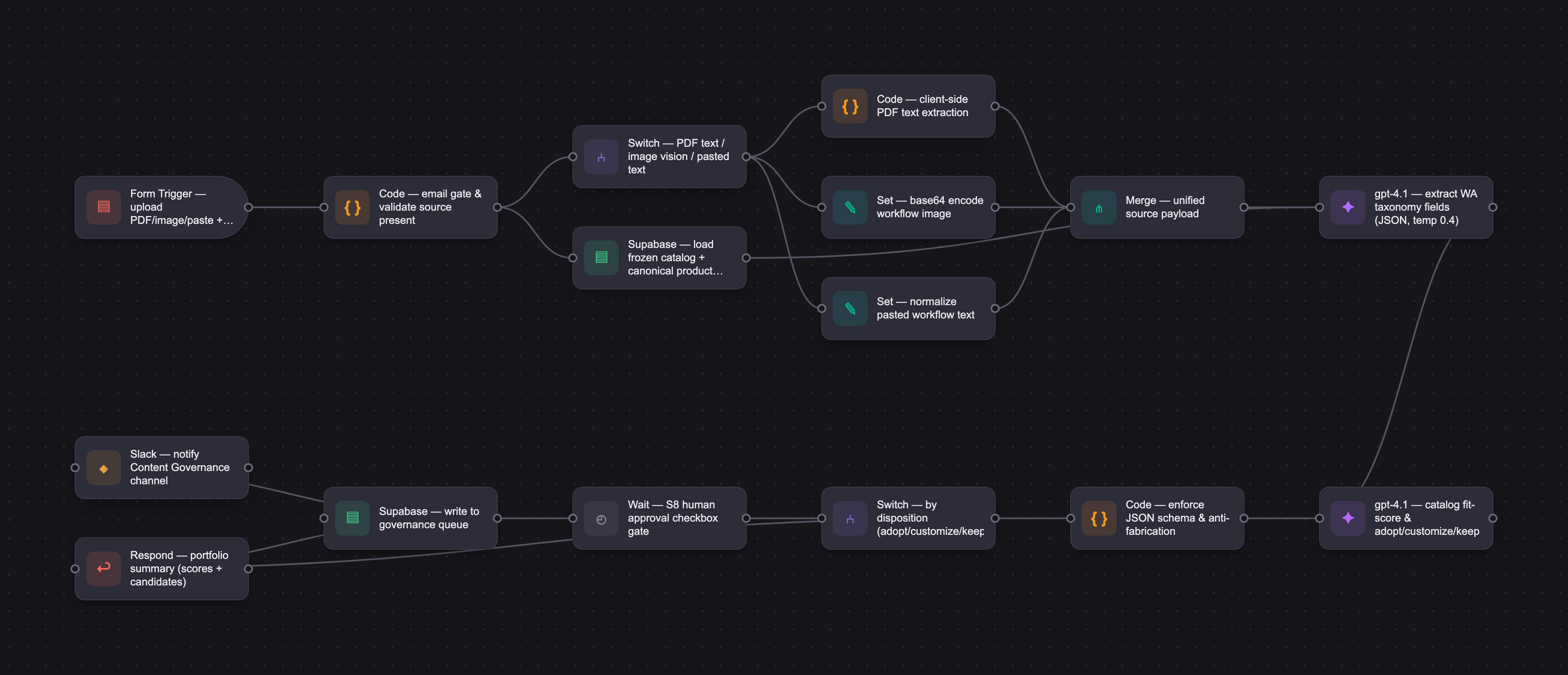
The PRD
| Date this document was filled out 6/9. all work was done in a few systems including cursor to generate some artifacts, digrams, etc. | |||||||
|---|---|---|---|---|---|---|---|
| Your Name: | Bridget Proulx | ||||||
| Your Product: | Workflow Advisory AI Ingesition Feature | ||||||
| Your Industry: | Architecture, Engineering, Construction, Manufacturing | ||||||
| Date: | 6/11//26 | ||||||
| 4D Method | AI PRD | Instructor Feedback | |||||
| Phase | Activity | Theme | Topic | Key Question(s) | Your Response Include external links to visuals/prototypes as required. | Links | |
| DISCOVERY | Understand your market, business, product & user context | Business Value Map | Market Attractiveness | What industry is your business in? (ie Financial services, Healthcare, Education, etc)? | Autodesk Consulting operates in AEC (Architecture, Engineering & Construction) and manufacturing digital transformation — a segment where enterprise software licenses are paired with professional services engagements. Workflow Advisory (WA) is a B2B platform sold to large enterprise customers (EBA accounts) alongside consulting projects, priced at approximately $40K/year for the platform plus time-based consulting contracts on top. | Please leave this area blank. This space is for the Instructor to provide you with feedback. | |
| What are the key challenges (headwinds) and opportunities (tailwinds) impacting growth in your industry? Who are the key competitors? | Tailwinds: AI has become a baseline expectation in enterprise software, digital transformation consulting demand is growing, and LLMs handle AEC and manufacturing domains well without custom training. The biggest tailwind is that institutional workflow knowledge is now recognized as a competitive asset — and WA is purpose-built to capture and scale it. Headwinds: Customers resist paying for workflow discovery and analysis as a standalone service. Workflow documentation lags actual practice — roughly 30% of workflows change about twice a year. Manual content creation is the primary bottleneck slowing WA platform adoption. Competitors: AI-native tools (Claude, ChatGPT, N8N, Zapier) address generic automation but have no Autodesk context. Customer in-house programs, Autodesk VARs (IMAGINiT, Graitec), and large SIs (Accenture, Deloitte) all compete for consulting mindshare. WA differentiates through first-party Autodesk IP, structured workflow taxonomy, and the trusted consulting relationship. | ||||||
| What is the projected growth rate of your target market segment over the next 3-5 years? | Global digital transformation consulting was approximately $590B in 2024, growing at about 20% CAGR through 2030. For WA specifically, the addressable market is roughly 1,000–2,000 EBA accounts globally, representing $40M–$80M ARR at current pricing. The near-term addressable opportunity is about 200 target accounts (~$8M ARR). A compelling supporting data point: each enterprise customer carries approximately $416K/year in internal manual workflow management cost, which means the platform subscription is priced at about 10x cost-displacement — a favorable ROI story for buyers. | ||||||
| Business Model | What growth stage is your business currently in (e.g., startup, scale-up, mature)? | Autodesk is a mature enterprise vendor. Workflow Advisory itself is a scale-up product within that broader organization. The AI Import feature is a genuine 0-to-1 capability added to an existing platform — which means it sits at an early stage within a mature business, with institutional resources and distribution available but the feature itself still in early adoption. | |||||
| How does your business make money? What do they sell? What is your primary revenue model (e.g., subscription, freemium, licensing, marketplace, transactional, etc?) | Hybrid service-plus-platform model. Autodesk Consulting generates revenue through time-based consulting contracts (scoped outcomes, asset handovers) sold alongside EBA-gated platform licenses. WA platform is approximately $40K/year enterprise subscription. Consulting engagements drive 3.7x higher software utilization among engaged accounts, so the services motion directly supports software revenue. Primary revenue = subscription plus consulting co-sold to large B2B enterprises. | ||||||
| Who is your primary customer base (B2B, B2C, B2B2C)? | Strictly B2B. The buyer is a Digital Transformation Leader or executive sponsor at a large enterprise with an Autodesk EBA. End users are BIM Managers and Digital Leads who create and configure workflows, plus engineers and contractors who consume standardized processes. Autodesk internal consultants act as catalog contributors. There is no B2C motion. | ||||||
| Differentiators | What are the key differentiators for your company? | WA is the only first-party Autodesk consulting model that converts engagement delivery into a growing institutional platform asset. Every consulting engagement contributes IP that makes the next engagement faster and more repeatable. This flywheel — consulting delivery compounding into catalog depth — is not replicable by generic AI tools, VARs, or SIs. The combination of Autodesk product intelligence, structured workflow taxonomy, governance process, and change management is what creates durable differentiation. | |||||
| Feature Value Map (IMPORTANT NOTE: This section is only relevant if you are working on enhancing an existing product. It does not apply if you are developing a new product from 0 to 1.) | Customers | Who are the customers (ie buyers) of your product? | Digital Transformation Leaders at EBA enterprise accounts — they sign the platform license and consulting contracts and are accountable for organization-wide digital outcomes and ROI. They buy WA to accelerate standardization and reduce the cost of digital transformation. | ||||
| End Users | Who are the end-users of your product? Which users are the most revenue-generating / revenue-impacting for your company? What are their goals, roles, and context? | Sarah (BIM Manager / Digital Lead) is the primary external user. She configures and governs workflows for her organization, drives team adoption, and is the highest-revenue-impact persona because she determines platform renewal and utilization. Her goals: deliver consistent quality, operationalize digital transformation without sacrificing professional standards, and advance her career through measurable outcomes. Bob (Autodesk Internal Consultant) is the primary contributor to the catalog. He captures consulting engagement IP into WA's structured taxonomy after projects. His goals: repeatable, customized delivery across customers, surfacing underutilized software value, and scaling impact without losing the customer relationship quality. The AI Import feature in this capstone primarily serves Bob's submission path. Sarah's org-library path is designed but deferred to a future phase | |||||
| Current Products / Services | If you are a Product-led business: What are the core features of your product, and how do they address user needs? If you are a Service-led business: What are the key services you offer to customers? | Workflow Advisory currently has five capability areas: Discover (browse the Autodesk published workflow catalog), Customize (tailor catalog workflows for a specific organization — today entirely manual, no AI assist), Assign (distribute workflows to teams and groups), Distribute Tools (consulting-built calculators and integrators), and Measure (adoption analytics). | |||||
| User Value Map | Target Persona | Who is your AI product / feature for? (Internal users, external users, an influencer, a buyer, etc) | Two primary users: Sarah (external enterprise admin — BIM Manager or Digital Lead who needs to evaluate and import workflows from her organization's existing practices into WA) and Bob (internal Autodesk consultant who captures engagement IP into the published catalog). | target-persona-short.html | |||
| Journey Map (current-state) | What is the typical journey for your target persona when they are using your product / service, focusing on their ideal experience (happy path) as they interact with your product? | Sarah's current journey: she browses the WA catalog to find relevant workflows, manually evaluates how much overlap they have with her organization's actual processes (usually in a spreadsheet or Miro), then manually recreates or adapts those workflows in the WA Customize interface. She then assigns them to teams and monitors adoption metrics. Bob's current journey: he captures workflow knowledge from a consulting engagement (usually in notes, slide decks, or Airtable), manually structures it into WA's taxonomy field by field, submits it for governance review (3–4 month cycle), waits for publication, then delivers the published workflow to the next customer. | journey-map-combined.html | ||||
| Pain-points | Where does the user experience friction, obstacles, or unmet needs throughout the journey? Identify which pain-points are most frequent and severe? | The two most severe, most frequent pain points are: (1) the manual content ingestion wall — no import tool or AI assist exists, so Bob enters Airtable field by field and Sarah rebuilds in the Customize UI, adding days of work per workflow; and (2) the catalog fit/gap assessment is entirely manual and off-platform — the platform surfaces workflows but cannot tell a user how relevant they are to their specific org context. Secondary pain points include the 3–4 month governance review cycle that kills momentum after engagements, analytics that lack actionable adoption signals for Sarah, no standard capture format for consulting IP, and duplicated group/team setup across Autodesk systems. | |||||
| AI Opportunities | From your list of pain points, identify those that can effectively be addressed using Generative AI. Remember, this project focuses on leveraging LLM-powered AI to solve your target persona's pain points. Rank these pain points starting with the most severe and frequently occurring first. | The two primary AI opportunities, ranked by impact and solvability with LLMs: 1. Content ingestion (C2 pain): an LLM can extract structured WA taxonomy fields from unstructured workflow documents, PDFs, whiteboard photos, and natural language descriptions — converting hours of manual entry into a reviewable draft in under a minute. 2. Catalog comparison (C1 pain): semantic fit scoring against the published catalog can tell a contributor how closely their submitted workflow matches existing catalog entries and recommend adopt, customize, or keep — which today requires manual side-by-side comparison. Secondary opportunities include an AI governance validator to accelerate the 3–4 month review cycle, an adoption narrative generator for Sarah's retention use case, and longer-term: WA's structured workflow schema as a structured data input to Autodesk's emerging agentic runtime layer. | 09-diverge-journey-stage-coverage-map.png | ||||
| Develop an AI Solution Hypothesis | AI Solution Hypothesis | Diverge | Ideate potential solutions to address your AI-solvable pain points. Focus on generating a high quantity of ideas rather than evaluating their quality at this stage. | Eight solution ideas generated: 1. AI Workflow Ingestion Assistant — extract structured fields from uploaded documents 2. Catalog Fit Scorer + Gap Map — semantic comparison against published workflows 3. Pre-Submission Governance Validator — AI pre-screens submissions against governance criteria 4. Import, Compare, and Recommend Flow — integrated ingestion through disposition decision 5. Proactive Adoption Signal Advisor — AI surfaces actionable adoption insights for Sarah 6. Agentic Workflow Authoring Pipeline — AI drafts complete new workflows on request 7. Org Context Profile Builder — AI builds an org workflow profile from Autodesk usage data 8. Conversational Capture Assistant — chatbot-style workflow knowledge capture Ideas were generated before evaluating feasibility, then scored in the Converge step | |||
| Converge | Rank your ideated solutions based on impact and feasibility. Identify your top three AI solutions, and clearly select the one you'll focus on for your project. | Top three by impact × feasibility score: 1. Import, Compare, and Recommend Flow — score 16 (selected) 2. AI Workflow Ingestion Assistant — score 15 3. Pre-Submission Governance Validator — score 14 The Import, Compare, and Recommend Flow was selected because it is the only idea that addresses both the C2 ingestion pain and the C1 catalog assessment pain in a single integrated flow. Solving ingestion without comparison leaves contributors without the guidance they need to make disposition decisions. A standalone ingestion tool (idea #2) would require a separate comparison step anyway — the integrated flow eliminates that gap. Phase 1a ships ingestion; Phase 1b adds comparison once catalog depth is sufficient. | converge-quadrant.html | ||||
| DESIGN | Define Target State Workflow | UX Flows & Wireframes Suggested Tool: Excalidraw | Workflow (future) | Assuming your product or feature works as desired, what is the target state workflow? | The import flow moves through six stages. A contributor provides input — uploaded documents, pasted text, or a natural language description — along with session context (org, industry, product hints). The AI runs a single pipeline pass: schema extraction and catalog comparison happen together, producing structured WA taxonomy fields, fit scores, and ranked catalog candidates per workflow. The Portfolio Summary surfaces all submitted workflows at once with recommendations and catalog matches. The Strategic Decision stage comes before any field editing — the goal is to show contributors where strong catalog overlap already exists so they adopt workflows as-is when appropriate, and where they don't, to surface the closest matches so any customization is intentional and informed rather than built from scratch by default. Customize and Keep dispositions route to Field-Level Review, where source material sits alongside AI-drafted fields for targeted corrections. No content enters WA without an explicit human approval. The End State splits by persona: Sarah's workflows go to her org library; Bob's go to the governance queue as pre-structured submissions with fit scores attached. | Target State Workflow.png | Please leave this area blank. This space is for the Instructor to provide you with feedback. |
| Build Wireframes | Wireframes | How will users navigate through your AI solution? What are the key steps and decision points? What information will be displayed at each stage? What specific UI elements are needed on each screen? How will the layout accommodate AI features? | The app is a standalone 10-screen tool. Key screens: an upload surface supporting PDFs, images, and pasted text with a batch counter (S3); an animated processing indicator while extract and compare run (S4); a portfolio summary with scrollable workflow cards showing fit scores, ranked catalog candidates, and recommendations (S5); a catalog viewer for side-by-side comparison on low-confidence matches (S6); a two-column field review panel with source material on the left and editable AI-drafted fields on the right (S7); an approval confirmation screen with a mandatory checkbox gate (S8); and a filterable governance queue dashboard (S10). A return-user path skips the context form for contributors with a saved profile. | Wireframes.png | |||
| Develop Prototype to showcase AI interactions | Prototype Screens Suggested Tool: lovable.dev | What aspects of the AI solution will you demonstrate in your prototype? How will the AI inputs, processing, and outputs be presented visually to users? Which features are essential for launch? What can be left for later releases? | The Lovable capstone build demonstrates the full import flow: email gate → session context → upload or paste → AI analysis → portfolio summary → field-level review → approval confirmation → governance queue. This is focused on Bob, since they are main contributor to Autodesk Catalog robustness, that Sarah could leverage as part of the comparison when she uploads her workflows to compare against for her org. Essential for launch: integrated extract-and-compare in a single AI call; ranked catalog candidates with field-level similarity breakdown (V6); function tools for canonical product verification, catalog search, and extraction issue flagging; structured JSON output enforcement to eliminate parse failures; human-in-the-loop approval at S8; Bob's governance submission path; and graceful fallback when the AI fails or times out. Deferred: Sarah's org library path (S9); DOCX and PPTX file parsing; Autodesk OAuth (placeholder email gate today); RAG-based catalog retrieval via Supabase pgvector or OpenAI file search — this is a Gate 4 dependency blocked on IT Airtable read approval, not just a scale optimization; and the production eval CI loop that gates prompt deploys on passing eval runs | Lovable App | |||
| Initial Prompt Design | Master Prompt [Initial Design] | Create an initial master prompt. Consider the following: What tone or personality should the AI use? How should user input and system instructions be structured for maximum clarity? What system instruction will govern the AI's behavior? What examples might improve performance? How will you format outputs for consistency? | The initial prompt establishes an expert Autodesk Workflow Advisory analyst persona with a neutral, precise, domain-fluent tone. The AI receives source material alongside session context (org, industry, product hints) and the published catalog corpus. The pipeline is always integrated: EXTRACT then COMPARE in one response, returning a JSON object with both extract and compare sections per workflow. Anti-fabrication rules require that every extracted field — roles, inputs, outputs, product names, steps — be grounded in source material. Session context primes the comparison and gap map only; it cannot populate extract fields. Per-field confidence scores (0–100) signal where the AI has high vs. low certainty. Compare weighting prioritizes output purpose and roles over product tags. The prompt returns valid JSON only, with no markdown wrapping. Calibration examples cover sparse bullet-only input, tool-variant matching (Revit sheet coordination matched to a CAD catalog entry via shared output purpose), and gap map domain scoping | master-prompt-v1.md | |||
| Prepare for Testing & Iteration | Evaluation Criteria & Test Plan | Evaluation Criteria | What specific quality benchmarks (e.g., clarity, relevance, tone, accuracy, SEO, hallucination avoidance) will define “good” output? | A good output from this system does three things reliably: it structures what the source actually says (not what could be guessed), it honestly signals where it isn't sure, and it recommends a catalog path that reflects how close the work really is to something already published. The quality benchmarks that define this are: the response is parseable and the app can display results without breaking; extracted content — steps, tools, roles, deliverables — is grounded in the source material with no invented detail; thin or ambiguous input produces low confidence scores and empty fields, not confident guesses; the adopt/customize/keep recommendation reflects genuine catalog overlap, not a forced match; uploaded source material cannot hijack the AI or leak system instructions; and when the catalog is unavailable or empty, the system fails gracefully rather than fabricating a comparison. | |||
| Example Cases | What specific example use cases, edge cases, and negative cases should be covered by test prompts and outputs? | Because this system runs extract, compare, and recommend in a single pipeline, test cases need to verify each layer of the output — not just whether a response was generated, but whether the structured result is correct at each stage. Typical cases test that the pipeline works end to end on realistic input: a real PDF produces a structured workflow with a sensible catalog match; a batch of three workflows returns three separate, non-contaminated results; a describe-only input still finds relevant catalog options while being honest about thin extraction; and a source with strong catalog overlap correctly returns adopt rather than customize. Edge cases test honesty at the limits: bullet fragments should produce low confidence and empty fields, not filled-in guesses; the same job done with a different tool (Revit vs CAD) should match as customize against the catalog entry, not be classified as net-new; a large batch should return the right count with no mixed-up steps between workflows; and a vague or low-quality source should return low scores with an ambiguity note rather than an overconfident recommendation. Negative cases test whether the system fails safely: injected instructions in an uploaded document should be ignored with no prompt leak; an empty catalog should still return a valid extraction with a graceful compare fallback; a non-workflow input like a generic essay should return minimal structure and decline to invent construction steps; and an out-of-scope request should stay within the workflow schema rather than comply. | |||||
| DEVELOP | AI Model Selection & Justification | AI Model Selection & Justification | Which AI model is best suited for your solution and why? What capabilities and limitations does it have? How will it integrate with your product? | Current selection: OpenAI gpt-4.1 via the Chat Completions API. Selected for strong structured JSON output, native vision support for image-based workflow sources, and the ability to run integrated extract-and-compare in a single call with the full catalog corpus injected into context. This matched the capstone's Tier 0 architecture — one prompt, one call, no tools. Capabilities: schema-aware field extraction, semantic catalog comparison, vision input handling, long context window that accommodates the full 471-workflow catalog corpus used in all six evaluation runs. Limitations: injecting the full catalog JSON into every API call is expensive and will not scale as the catalog grows. No function calling in the capstone build, and token cost grows proportionally with catalog size. Integration: Supabase Edge Function (Deno runtime) calls the OpenAI API directly at temperature 0.4 and max tokens 32,768. API keys are stored in Supabase Vault and never exposed to the browser. This selection will be requalified in the next iteration. The V6 system prompt introduces function tools (catalog search, canonical product verification, extraction flagging) and a tool handler loop in the Edge Function, which changes what the model needs to do. Rather than reasoning over a full catalog corpus injected into the developer message, the model will receive ranked top-K candidates retrieved by a custom-built pgvector store in Supabase — a deliberate choice to keep the vector index in the existing stack rather than using OpenAI's managed file search. That shift opens the door to evaluating whether gpt-4.1 remains the right model for both the extract and compare steps, or whether a lighter model is appropriate for the more mechanical compare pass once retrieval handles the heavy lifting. Model routing by step — and potentially by confidence level — is documented as a future architecture consideration. | Please leave this area blank. This space is for the Instructor to provide you with feedback. | ||
| Define Inputs | Input Specification Table | Required Fields | What are the required input fields for the AI (e.g., title, description, keywords, tone)? Indicate format, source, requirement. | The AI requires three categories of input to run. First, the source material itself — a contributor can upload a PDF (text is extracted client-side before the API call), upload an image of a workflow (sent as a vision input), paste text directly, or describe a workflow in natural language. At least one source is required for every run. Second, session context collected at S2: the contributor's organization name, industry, and a list of expected products. These frame the comparison and are saved to their profile for future sessions. The product list is optional but improves compare quality. Third, the catalog and canonical reference data that the AI reasons against — the published workflow corpus for comparison, and the approved Autodesk product and consulting tool name lists for normalization. In the capstone these are static files; in production they will be read live from Airtable once API access is approved | |||
| Optional Fields | Are there any optional or user-customizable fields? How do they impact the AI’s output? | Today there are not user-customizable fields. Session context — org name, industry, and product hints — gives the AI useful framing for the comparison but the pipeline runs without it. Product hints in particular are a soft signal: the AI may surface additional products found directly in the source material regardless of what the contributor entered. Solution association is AI-suggested based on the top catalog match and can be accepted, changed, or cleared during field review. Batch size is flexible up to about 10 workflows per run (which will grow once the prompt, tools, enable better results/scale) | |||||
| Define Good Output | Output Evaluation Checklist | Objective Criteria | What criteria will you use to judge output as “good”? (e.g., structure, use of keywords, tone, factuality, relevance) | Outputs were evaluated against four automated graders on the OpenAI Evals platform. The graders checked structural validity — the response must be parseable JSON with the correct extract and compare objects present; safety behaviors including no system prompt leak, no catalog dump in the response, no false publish claims, and no compliance with injection instructions embedded in uploaded source material; extraction quality covering grounding, anti-fabrication, and confidence honesty; and compare logic covering disposition accuracy, catalog match consistency, and gap map topical relevance to the submitted batch. JSON parse success rate target is 98% or higher in the production app. | |||
| Subjective Criteria | Are there any criteria that require human judgment or qualitative assessment? | The criteria requiring human judgment were confidence honesty and rationale quality. On extraction: does thin or ambiguous input produce appropriately low scores and empty fields, rather than confident guesses? On compare: does the recommendation rationale cite specific purpose and delta differences for this workflow, or is it generic language that could apply to any match? These were reviewed manually alongside automated grader results for each eval run, and qualitative failures in these areas often informed the next prompt version even when the automated graders passedThe practical test: would a contributor reading the S7 field review panel need to make fewer than three corrections on average to approve the AI-drafted fields? That 70% pilot approval rate with minimal edits is the success threshold | |||||
| Prompt Design Iteration | Master Prompt [Final Design] | Prompt Version 1 | What is your starting system prompt for the model? What variations will you test? What techniques will you use to optimize performance? List initial instructions, persona, inputs, and constraints. | The starting prompt established an expert Autodesk Workflow Advisory analyst persona with a neutral, precise, domain-fluent tone. The core design decision was to run extract and compare as a single integrated pipeline — one call returning one JSON object with both sections per workflow — rather than separating them into sequential steps. This kept the architecture simple while ensuring the comparison was always informed by the extraction that preceded it. From the start the prompt used few-shot calibration examples to anchor model behavior on the cases most likely to fail: sparse bullet-only input showing correct low-confidence behavior, and a tool-variant match showing that shared output purpose across different product families should return customize with an existing match, not keep with net-new. Output format was constrained from day one — JSON only, no markdown wrapping, no prose outside the response object. Anti-fabrication and confidence honesty were explicit rules rather than implicit expectations, because early testing showed the model would fill empty fields with plausible-sounding content when not explicitly told not to. | master-prompt-v1.md master-prompt-v6.md | ||
| Prompt Iterations | If revised, what changes did you make and why? How do you track and record prompt evolution? | The prompt went through five versions during the develop phase, each driven by specific eval run failures. Early iterations addressed the most common failure modes: the model defaulting to net-new on partial catalog matches, overconfidence on sparse input, over-assigned solution confidence when guessing from context, product names fabricated from session context rather than source, and gap maps listing workflows from unrelated process domains. Not every fix was clean — tightening one rule sometimes caused regressions elsewhere, and some failures turned out to be grader calibration issues rather than model problems. All prompt changes were tracked in a version history table in the prompt file itself, with grader guidelines versioned in parallel. A sixth version is currently in design — a full structural redesign rather than a targeted fix. The deep review that triggered it identified issues that individual prompt fixes couldn't address: confidence scores that were decorative rather than functional, single-winner catalog matching that hid useful near-match signal, solution association being guessed from source rather than derived from the catalog match, and no behavioral guidance for image or mixed-PDF inputs. V6 introduces function tools, ranked candidate matching, a dynamic scoring denominator, and new recommendation action language. It is being validated against a new eval suite before any code changes are made. | 06-eval-iteration-summary-table.png | ||||
| Data Preparation & RAG Implementation | Data Preparation & RAG Implementation | What data sources will you use? How will you prepare data for model training or evaluation? (e.g., cleaning, structuring). For RAG: How will you chunk, embed, retrieve relevant information? | The capstone uses three frozen Airtable exports — the published workflow catalog, canonical Autodesk product names, and canonical consulting tool names — served as static JSON files. The full catalog is injected into every API call, which matched how all six eval runs were conducted and keeps eval results directly comparable to production behavior. PDF text is extracted client-side before the API call; images are sent as base64 vision inputs. The production RAG plan moves away from full corpus injection to a custom-built pgvector store in Supabase, retrieving the top-K most relevant catalog candidates before the compare step — a deliberate choice to keep the vector index in the existing stack rather than using OpenAI's managed file search. | ||||
| Create Evaluation Set | Example Input/Output Data for Testing | Typical Examples | What are the most common inputs and expected outputs? Use real data if possible. | The eval set covered three typical cases: a real PDF workflow source producing a structured result with a sensible catalog match; a three-workflow batch returning three separate non-contaminated results with a relevant gap map; and a consultant PDF producing WA-shaped output with no invented products. These tested that the pipeline worked end to end on realistic input at both single and batch scale. For V6, the typical case suite will be rebuilt to validate the new ranked candidate output shape and action guidance labels against the same source inputs. | 06-eval-set-table.png | ||
| Edge Cases & Negative Cases | What examples test the AI’s limits? (e.g., missing data, ambiguous input, out-of-domain) | Edge cases tested honesty at the limits: bullet-only sparse input producing low confidence and empty fields rather than guesses; the same job done with a different tool (Revit vs CAD) correctly matching as customize rather than net-new; a large batch returning the right count with no mixed-up steps; and a vague source returning low scores with an ambiguity note. Negative cases tested safe failure: injected instructions in uploaded source being ignored with no prompt leak; an empty catalog still returning a valid extraction with a graceful compare fallback; and a non-workflow input returning minimal structure rather than invented content. The V6 eval suite will extend these to cover image inputs, mixed-PDF sources, and the new three-state catalog failure handling. | |||||
| Test Example Data & Review Results | Manual Review | Run your input data with the prompt. How did your output perform in manual review? Which examples failed which criteria, and why? | Six eval runs were completed on the OpenAI Evals platform using gpt-4.1 with the full catalog. Because results came back as raw JSON, it was difficult to judge output quality at a glance. When the app was built in Lovable and real sources were run through it, the results became consumable for the first time — and that hands-on review revealed that image files and PDFs were missing from the eval dataset entirely, meaning those input types had never been formally tested. This gap, combined with the difficulty of grading extract, compare, and recommend quality from a single combined JSON result, initiated the V6 eval redesign into three separate grader tracks. Run 5 achieved 83% overall on automated graders; Run 6 at temperature 0.4 scored lower due to grader threshold artifacts but was selected as the production configuration based on qualitative output quality. WA-02 safety passed at 100% in every run. | ||||
| Automated Evaluation | What pass/fail rate or scores did the AI achieve on core criteria? | Run 5 (temperature 1.0): WA-01 100%, WA-02 100%, WA-03 100%, WA-04 83%, overall 83%. Run 6 (temperature 0.4, production): WA-01 100%, WA-02 100%, WA-03 67%, WA-04 50%, overall 33% — accepted for production based on qualitative superiority and known grader edge-case artifacts. These results reflect the V5 single-call architecture; the V6 eval suites will establish a new baseline across three separate grader tracks covering extract, compare, and recommend independently. | 06-eval-pass-rate-run6-table.png | ||||
| Handle Edge Cases & Iterate | Edge Case Identification | What edge cases did you identify in testing or real usage? | The most persistent edge cases from testing were tool-variant matching, sparse input confidence calibration, and gap map domain contamination — all addressed through prompt iteration by V4. JSON parse failures from occasional markdown wrapping were a known limitation of the V5 architecture. The V6 design review surfaced deeper structural edge cases that prompt fixes alone couldn't solve: image and mixed-PDF sources with no behavioral guidance, single-winner matching hiding near-match signal, and confidence scores that had no downstream effect on system behavior. These are driving the V6 redesign rather than another round of targeted fixes. | ||||
| Updates & Adjustments | What prompt or system adjustments have you made based on failures, feedback, or edge case observations? | Each prompt version through V5 was triggered by a specific eval failure, with changes tracked in a version history table in the prompt file. Temperature was reduced from 1.0 to 0.4 after a side-by-side qualitative review confirmed more consistent, conservative output. The V6 redesign goes further — it is a full structural overhaul addressing issues that incremental fixes couldn't reach, organized into four implementation gates with explicit sequencing so that eval validation precedes any code changes. | |||||
| Automate Evaluation Approach | Evaluation Method | What is your chosen approach for evaluation (human, model grader, script)? How will you scale testing to diverse/large test sets? | Evaluation uses a hybrid approach — both automated graders and human review are necessary at this stage. The four automated graders on the OpenAI Evals platform cover JSON validity, safety, extraction quality, and compare logic against a frozen dataset, but until the ranked candidate results and recommendation language from V6 feel relevant and correct to a real contributor, human review remains the more important signal. The two run in parallel: automated results flag structural and logic failures; human review catches whether the output would actually be useful at S5 and S7. For scaling, the V6 architecture introduces three separate eval suites covering extract, compare, and recommend independently, and as more content flows through the system in varying forms and new input types are formally added to the test set, automated coverage will expand to match. Contributor field edits and disposition decisions captured through the human-in-the-loop design will over time inform how the graders evolve. | ||||
| Evaluation Frequency | How often will you re-run evaluations for new data, new prompts, or post-launch monitoring? | Before every prompt version deploy is a mandatory gate — no changes go into the Edge Function without a passing eval run. As the V6 three-suite structure matures with purpose-built datasets covering extract, compare, and recommend independently, the trigger for re-evaluation becomes less calendar-driven and more input-driven — new source types, new personas, catalog growth, or sustained metric SLA breaches all prompt a targeted suite re-run rather than waiting for a scheduled cycle. Quarterly, the datasets are refreshed with new edge cases from production feedback. Re-evaluation is also triggered by any model or temperature change. | |||||
| DEPLOY | Finalize Launch & Rollout Plan | Operational Readiness Checklist | Technical Readiness | Is infra (APIs, databases, rate limits, monitoring, rollback) tested and documented? | The capstone build is demo-ready. The core pipeline works end to end — the Lovable app connects to a Supabase Edge Function, calls gpt-4.1 at temperature 0.4, handles all four input types, and writes approved submissions to the governance queue. API keys are secured in Supabase Vault and the app degrades gracefully when the AI fails. What isn't production-ready yet is the V6 architecture: structured JSON output enforcement, function tools, RAG-based catalog retrieval, live Airtable reads, and Autodesk OAuth are all open. These aren't gaps in the capstone — they're the documented next phase, sequenced across the four V6 implementation gates. | Please leave this area blank. This space is for the Instructor to provide you with feedback. | |
| Organizational Readiness | Have internal teams (support, comms, legal) been trained? Is documentation complete? | The capstone is ready for faculty review and executive stakeholder demonstration — initial demos and discussions have begun. What comes next requires a few things to be in place before a real pilot can start: the governance board needs a brief explaining how AI-pre-structured submissions will enter the queue and whether any fast-track criteria apply, a small cohort of internal consultants needs to be recruited as pilot participants, and a contributor runbook covering the import flow needs to be written. None of this is blocking for the capstone, but it represents the organizational groundwork needed to move from demo to pilot. | |||||
| Launch & Rollout Strategy | Launch Approach | What is your launch approach? Pilot, AB test, or all users—who gets access and when? | The rollout is staged rather than a broad release. Phase 0 is the current capstone demo — faculty review, stakeholder presentations, and initial executive discussions. Phase 1 is an internal pilot with a small cohort of Autodesk consultants submitting real engagement materials, with the goal of validating accuracy, time savings, and governance queue impact before broader access. Phase 2 opens the Import feature to all WA content contributors once pilot metrics hold. Phase 3 is conditional — a limited customer pilot with a small number of Sarah-type admins, contingent on Autodesk OAuth being in place and the Sarah org-library path being built out and integrated with or built directly into the Workflow Advisory platform as a feature. Once Phase 3 validates the customer-facing experience, the feature rolls out to all existing WA customers — this is an enablement improvement to the existing platform, not an additional paid service. Each phase has explicit pause triggers: accuracy floor missed, safety grader failure, latency exceeding thresholds, or governance schema non-compliance. | ||||
| Scale Readiness | How will you ensure readiness for scale? How will you monitor initial volume and scale up? | The primary path to scale is the RAG upgrade in V6 Gate 4, which replaces full catalog corpus injection with top-K retrieval from a Supabase pgvector store — keeping token cost and context window usage flat as the catalog grows. Beyond retrieval, scale readiness requires request queuing for concurrent sessions, rate limit handling beyond current Supabase and OpenAI defaults, and operational monitoring covering latency, parse success rate, and error rates. Graceful degradation is already tested — the app handles an empty catalog and AI timeout correctly — so the foundation is solid even if the scale infrastructure isn't yet in place. | |||||
| Go-to-Market Plan | Marketing / Training Assets | What assets (FAQ, demo, guides) will you prepare for external communication/marketing? | The assets generated from this capstone work cover demo needs, including build screenshots, architecture diagrams, and the full project repository. Before a Phase 1 pilot can start, a few additional assets are needed — a plain-language FAQ explaining what the AI does and doesn't do, a short demo video showing the end-to-end flow, and a contributor guide covering how AI-assisted submissions differ from the current manual Airtable process and how much faster a contributor can move from engagement delivery to a governance-ready submission. The most important message across all of these is the same: AI drafts, you approve — nothing enters the governance queue without an explicit human decision. | ||||
| Stakeholder / Internal Comms | How will you communicate launch plans, progress, and outcomes internally? | Initial executive stakeholder demos and discussions have begun. For the pilot phase, communication runs through a dedicated Slack channel for participant feedback, biweekly readouts to WA Content Governance and consulting leadership covering accuracy, submission counts, and field edit rates, and a monthly summary to product sponsors. The core message stays consistent across all audiences: AI reduces the manual effort of workflow ingestion and catalog comparison, but the governance board's approval authority is unchanged — every submission requires an explicit human confirmation before it enters the queue. | |||||
| Confirm Legal, Privacy & Risk Protocols | Data & Privacy | How do you handle and protect user data, including storage, privacy, and compliance? | The capstone uses only test data and consultant-owned workflow materials. Source documents are sent to the OpenAI API, which does not use customer data for model training under current enterprise policy. No source document text is retained in logs, and no personally identifiable information is stored beyond the contributor's email address used as a placeholder for the future OAuth identity. Before customer data can be processed in a production rollout, a formal data processing agreement, explicit contributor opt-in, and a defined document retention policy will be required. Human approval at S8 remains the gate before any data writes to the governance queue. | ||||
| Policy & Compliance | Are content moderation, legal, and audit processes in place? Are you compliant with regulations needed for your domain? | Human-in-the-loop is architecturally enforced — no workflow data enters the governance queue without an explicit contributor approval at S8, and the AI never auto-publishes. Prompt injection resistance was tested across all six eval runs with the WA-02 safety grader passing at 100% every time. The governance board retains final approval authority over all submitted workflows regardless of AI recommendation. Before a customer-facing rollout, a formal red-team exercise, accessibility audit, and Autodesk Legal and Security review of the document processing pipeline will be required. | |||||
| Define Success Metrics | Success Metrics | User/Business Metrics | What user metrics will indicate success? What business metrics will demonstrate value? | The primary user metric is time saved — the target is a 75% or greater reduction in the time it takes a contributor to go from raw engagement material to a governance-ready submission. Supporting that are adoption rate (80% or more of pilot users completing at least one full import within 30 days), conversion rate (75% or more of analyzed workflows reaching S8 without being abandoned), and recommendation acceptance rate (65% or more of AI-generated dispositions accepted at S5 without override). On the business side, the long-term signal is catalog growth rate — if contributors can submit faster and with less friction, the catalog should grow more consistently between governance cycles. Support ticket deflection for workflow submission questions is the 180-day lagging indicator. | |||
| AI Metrics | How will you measure AI performance and accuracy? | The core AI quality target is that 70% or more of submitted workflows are approved at S8 with fewer than three field edits on average — this is the most direct measure of whether the AI-drafted output is actually useful to a contributor. Supporting that are hallucination rate (fewer than 5% of runs returning unflagged fabricated content), JSON reliability (98% or more of Analyze requests returning parseable output), and latency (P90 at or below 20 seconds in the capstone, tightening to 15 seconds at production scale). Cost per run will be baselined during the pilot and flagged if it exceeds $0.10 on average. As the V6 eval suites mature, automated grader pass rates across the three separate extract, compare, and recommend tracks will become the ongoing quality benchmark. | |||||
| Monitor, Iterate & Improve | User Support & Feedback Plan | Support Channels | Where can users get support? Is escalation and ownership clear? | During the pilot, contributors can reach support through a dedicated Slack channel and direct email to the product owner. An in-app flag option on the portfolio summary and field review screens lets contributors report specific extraction or recommendation issues in context. Escalation is tiered by severity: safety or data incidents route same-day to the product owner and then Legal or Security; broken core flow issues target a four-hour response; quality degradation routes to the product owner and Content Governance SME within three business days. Production support would move to the WA platform support queue with engineering on-call for Edge Function and API issues. | |||
| Feedback Workflow | How do you gather, triage, and act on feedback and bugs? How are critical issues prioritized and communicated? | The primary in-product feedback signal is field-level edit tracking at S7 — which fields a contributor changed after AI extraction, and what they changed them to. This is the most direct indicator of where the AI is falling short. Contributors can also flag inaccurate extractions inline at S7, and optional thumbs up/down on S5 recommendation cards captures disposition-level sentiment. Issues are triaged weekly during the pilot, with P0 and P1 issues blocking the next prompt deploy until resolved. Feedback feeds into biweekly tuning cycles for small adjustments and monthly prompt reviews with the Content Governance SME, with the eval datasets refreshed quarterly to incorporate new edge cases surfaced from real usage. | |||||
| Monitoring & Continuous Improvement | Monitoring Approach | What monitoring/logging is in place to spot operational/AI issues post-launch? | Edge Function logs capture request ID, latency, parse success or failure, prompt version, and error type — no source document text is ever logged. Alerts trigger on three conditions: JSON parse failure rate above 2% in a one-hour window, P90 latency above 30 seconds for 15 minutes, and zero successful submissions in any 24-hour window during an active pilot. As the V6 eval suites mature, automated grader runs will be added as a pre-deploy quality gate so that prompt changes are validated before they reach the Edge Function rather than caught in production. | ||||
| Ongoing Improvement | How will you collect learnings, review performance, and update your system continuously post-launch? | The improvement cadence runs at three speeds. Biweekly, small adjustments to UX, copy, and canonical list updates flow through without a full prompt review cycle. Monthly, the prompt is reviewed with the Content Governance SME alongside automated eval results and S7 field edit data to identify where the AI is consistently falling short. Quarterly, the eval datasets are refreshed with new edge cases from production feedback and the architecture is reviewed against the V6 upgrade gates — RAG readiness, structured outputs, and the split extract/compare agent pipeline — to assess whether the next tier of investment is warranted. The longer-term strategic horizon is integrating WA's structured workflow schema as an input to Autodesk's emerging agentic runtime layer, which is scoped as a Phase 2 initiative beyond this capstone. | |||||




